ENGLISH
7OPERATIONS
Warning:
To prevent acci ents an amage
• o not install any battery other than CR2025 or
its equivalent.
• o not leave the remote controller in a place
(such as dashboards) exposed to direct sunlight
for a long time.
• Store the battery in a place where children
cannot reach.
• o not recharge, short, disassemble, heat the
battery, or dispose of it in a fire.
• o not leave the battery with other metallic
materials.
• o not poke the battery with tweezers or similar
tools.
• Wrap the battery with tape and insulate when
throwing away or saving it.
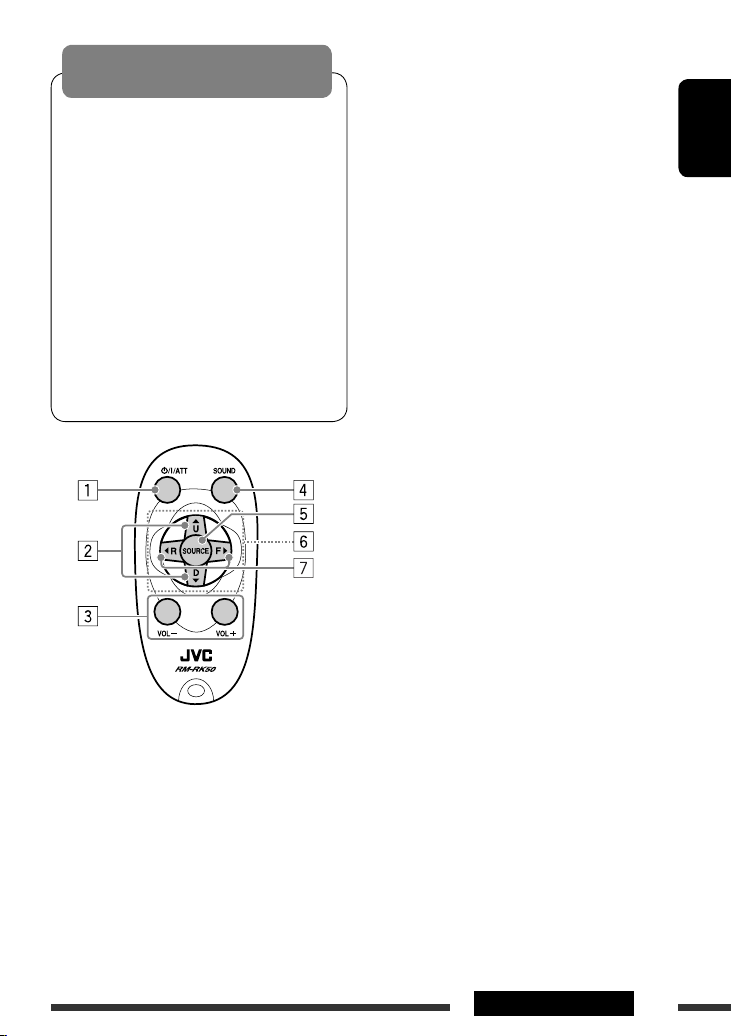
1 • Turns the power on if pressed briefly or
attenuates the sound when the power is on.
• Turns the power off if pressed and held.
2 • Changes the FM/AM bands with 5 U.
• Changes the preset stations with ∞.
• Changes the folder of the MP3/WMA/WAV.
• While playing an MP3 disc on an
MP3-compatible C changer:
– Changes the disc if pressed briefly.
– Changes the folder if pressed and held.
• While listening to an Apple iPod:
– Pauses/stops or resumes playback with ∞.
– Enters the main menu with 5 U.
(Now 5 U/ ∞/2 R/F 3 work as the menu
selecting buttons.)*
*
5 U : Returns to the previous menu.
∞ : Con irms the selection.
3 Adjusts the volume level.
4 Selects the sound mode (iEQ: intelligent equalizer).
5 Selects the source.
6 For Bluetooth cellular phone:
– Answers calls if pressed briefly.
– Rejects calls if pressed and held.
7 • Searches for stations if pressed briefly.
• Fast-forwards or reverses the track if pressed and
held.
• Changes the tracks if pressed briefly.
• While listening to an iPod (in menu selecting
mode):
– Selects an item if pressed briefly. (Then, press
∞ to confirm the selection.)
– Skips 10 items at a time if pressed and held.
• Reverse skip/forward skip for Bluetooth audio.
EN02-07_KW-XG706_001A_f.indd 7EN02-07_KW-XG706_001A_f.indd 7 16/4/08 10:49:51 AM16/4/08 10:49:51 AM