manuals.online logo
Brands
  1. Home
  2. •
  3. Brands
  4. •
  5. Karassn
  6. •
  7. Security System
  8. •
  9. Karassn KS-258B User manual

Karassn KS-258B User manual

Other Karassn Security System manuals

Karassn KS-200B Series User manual

Karassn

Karassn KS-200B Series User manual

Karassn KS-858G User manual

Karassn

Karassn KS-858G User manual

Karassn KS-200B Series User manual

Karassn

Karassn KS-200B Series User manual

Popular Security System manuals by other brands

Polon-Alfa 4000 Installation and maintenance manual

Polon-Alfa

Polon-Alfa 4000 Installation and maintenance manual

Nexcom NViS 14162 Series user manual

Nexcom

Nexcom NViS 14162 Series user manual

Eminent EM8670 Quick install

Eminent

Eminent EM8670 Quick install

urmet domus alpha 1060 INSTALLATION AND USE BOOKLET

urmet domus

urmet domus alpha 1060 INSTALLATION AND USE BOOKLET

SmartPool YardGuard YG03 manual

SmartPool

SmartPool YardGuard YG03 manual

DSC PC5964 Mounting instructions

DSC

DSC PC5964 Mounting instructions

Secure USAB-1 operating instructions

Secure

Secure USAB-1 operating instructions

B&B 480 SERIES Operation & maintenance manual

B&B

B&B 480 SERIES Operation & maintenance manual

ADEMCO VISTA-20P Series Installation and setup guide

ADEMCO

ADEMCO VISTA-20P Series Installation and setup guide

Inner Range Concept 2000 user manual

Inner Range

Inner Range Concept 2000 user manual

Johnson Controls PENN Connected PC10 Install and Commissioning Guide

Johnson Controls

Johnson Controls PENN Connected PC10 Install and Commissioning Guide

Aeotec Siren Gen5 quick start guide

Aeotec

Aeotec Siren Gen5 quick start guide

Swann SW-P-MC2 Specifications

Swann

Swann SW-P-MC2 Specifications

Ecolink Siren+Chime user manual

Ecolink

Ecolink Siren+Chime user manual

EDM Solution 6+6 Wireless-AE installation manual

EDM

EDM Solution 6+6 Wireless-AE installation manual

Siren LED GSM operating manual

Siren

Siren LED GSM operating manual

Detection Systems 7090i Installation and programming manual

Detection Systems

Detection Systems 7090i Installation and programming manual

FRIEDLAND MA10 Installation and operating instructions

FRIEDLAND

FRIEDLAND MA10 Installation and operating instructions

manuals.online logo
manuals.online logoBrands
  • About & Mission
  • Contact us
  • Privacy Policy
  • Terms and Conditions

Copyright 2025 Manuals.Online. All Rights Reserved.

User’ s Manual
8-zone Telephone Alarm System
Table Of Contents
1.Main Functions And Characteristics ---------------------------------------------1
2.Operate Precautions ----------------------------------------------------------------1
3.Name And Usage Of Main Parts ---------------------------------------------------2
4.Diagram Of Connection ------------------------------------------------------------3
5.Program Of Main Unit--------------------------------------------------------------4
5.1 Program Precautions -----------------------------------------------------------4
5.2 Specific Operations-------------------------------------------------------------5
5.3 User's Setting--------------------------------------------------------------------5
<1> How To Set Zone List Of At Home Mode ------------------------------------5
<2> How To Set Zone List Of Away Home Mode --------------------------------5
<3> How To Define Zone Type ----------------------------------------------------5
<4> How To Modify User' Code ---------------------------------------------------6
<5> How To Set Alarm Volume ----------------------------------------------------6
<6> How To Set Inner Siren Duration ---------------------------------------------6
<7> How To Set Delay Arm Time --------------------------------------------------7
<8> How To Set Delay Alarm Time ------------------------------------------------7
<9> How To Set Wireless External Siren ------------------------------------------7
5.4Telephone Setting ---------------------------------------------------------------8
<1> How To Set Telephone Numbers ----------------------------------------------8
<2> How To Delete Telephone Numbers ------------------------------------------8
<3> How To Set Telephone Attribute ----------------------------------------------9
<4> How To Set Cycle Times Of Dialing ------------------------------------------9
<5> How To Open/Close Telephone Line Cut Detect Function------------------9
<6> How To Set Ringing Times Of Operation Remotely ------------------------9
5.5 Alarm Monitor Center Setting -------------------------------------------------9
<1> How To Enter Networking Accounts -----------------------------------------10
<2> How To Set Report To Monitor Center When Armed/Disarmed -----------10
<3> How To Set Report To Monitor Center When Power Lower ----------------10
6.Manager's Setting -------------------------------------------------------------------10
<1> How To Recover User's Code -------------------------------------------------10
<2> How To Register Detector -----------------------------------------------------10
<3> How To Delete Detector -------------------------------------------------------11
<4> How To Display Registered Zones -------------------------------------------11
<5> How To Register Remote Controller -----------------------------------------12
<6> How To Delete Remote Controller -------------------------------------------12
<7> How To Display Registered Remote Controller -----------------------------12
7.System Installation ------------------------------------------------------------------13
7.1Testing Before Installation ------------------------------------------------------13
7.2Installation Requirements -------------------------------------------------------13
7.3Installation And Debugging Of Main Unit And Accessories ------------------13
8-zone Telephone Alarm System
<1> Main Unit --------------------------------------------------------------13
<2> Wireless Remote Controller -----------------------------------------13
<3> Wireless Door Sensor ------------------------------------------------14
<4> PIR Detector ----------------------------------------------------------14
<5> Smoke Detector, Gas Detector ---------------------------------------14
7.4Testing After Installation --------------------------------------------------14
8.User's Operation -----------------------------------------------------------------14
8.1All Indicate Sound Of Main Unit -----------------------------------------14
8.2Indications When Power On Main Unit ----------------------------------15
8.3How To Alarm --------------------------------------------------------------15
8.4How To Operate When Receipt Of Alarm Telephone -------------------15
8.5How To Control Remotely ------------------------------------------------16
9.Technical Parameter ------------------------------------------------------------17
10.Standard Packing List ---------------------------------------------------------18
11.Optional Packing List ----------------------------------------------------------18
12.Frequently Ask Questions -----------------------------------------------------18
13.Program Directives ------------------------------------------------------------19
Common User's Program Directives -------------------------------------------19
Manager's Program Directives --------------------------------------------------21
Operate Directives When Receipt Of Alarm Telephone ----------------------22
Directives Of Remote Operation -----------------------------------------------22
Recover To Ex-factory Default State -------------------------------------------22
8-zone Telephone Alarm System
-1-
Summary
This system adopts microprocessor as control core, and it can work with
wireless remote controllers and all kinds of wireless PIR detectors. It
characteristics of many functions, such as anti-theft, anti-rob, anti-fire,
emergency ask for help and so on. It reports alarm message to users and
network manage center by dialing telephone number preset when alarming.
It also can be armed/disarmed remotely. And wireless siren can be linkaged
to make alarm sound when alarming. We believe that humanly design and
reasonable price will satisfied with you, therefore, it is very suitable to be
widely used in family, shop and so on.
1.Main Function And Characteristics
* Compatible with ADEMCO CONTACT ID networking form (Only B
model have this function).
* 24 wireless detectors and 8 remote controllers can be learned, and it
learns code automatically and wirelessly.
* At home mode and away home mode are optional, and the zone type is
modifiable.
* It stands for wireless siren (Only B model have this function)
* Remotely Operation: It can be armed/disarmed remotely by entering
code through fix telephone or mobile phone. (Only B model have this
function)
* It indicates by sound and light when power lower of main unit or
detector, and dials telephone number preset at the same time.
* It rushes to inform you the alarm message by cutting your speaking on
the telephone, and then recovers automatically.
* 8 groups of telephone numbers can be set, and the type of each group is
modifiable
* 4 levels of alarm volume are adjustable, and it also can be set to be mute.
* When networking, the message of main unit (such as arm/disarm, power
lower and so on) can be reported to manage center, (Only B model have
this function).
* Usually, the backup battery charges automatically, and it automatically
switches between AC and battery power.
* The alarm information can be recorded and can't be deleted until
confirmed.
* Delay arm time, delay alarm time are modifiable.
* It will indicate when telephone line cut-off or open circuit.
* All the settings are stored and won't lose even if power off.
2.Operate Precautions
Please carefully read this user's manual before operating, and note all
labels on main unit.
The main unit is not explosion-proof, so it cannot be directly installed in
8-zone Telephone Alarm System
-2-
hazard class I, II or III locations (i.e. Where there have flammable and
explosive steam gas, dusts of some certain concentration, otherwise, it will
be very dangerous)
The backup battery should be AA 1.2V Ni-MH rechargeable battery, and
one off dry battery is banned, otherwise, it will be very dangerous.
The user should not dismantle main unit by oneself.
Please check routinely so as to clear troubles in time to avoid missing
alarms.
3.Name And Usage Of Main Parts
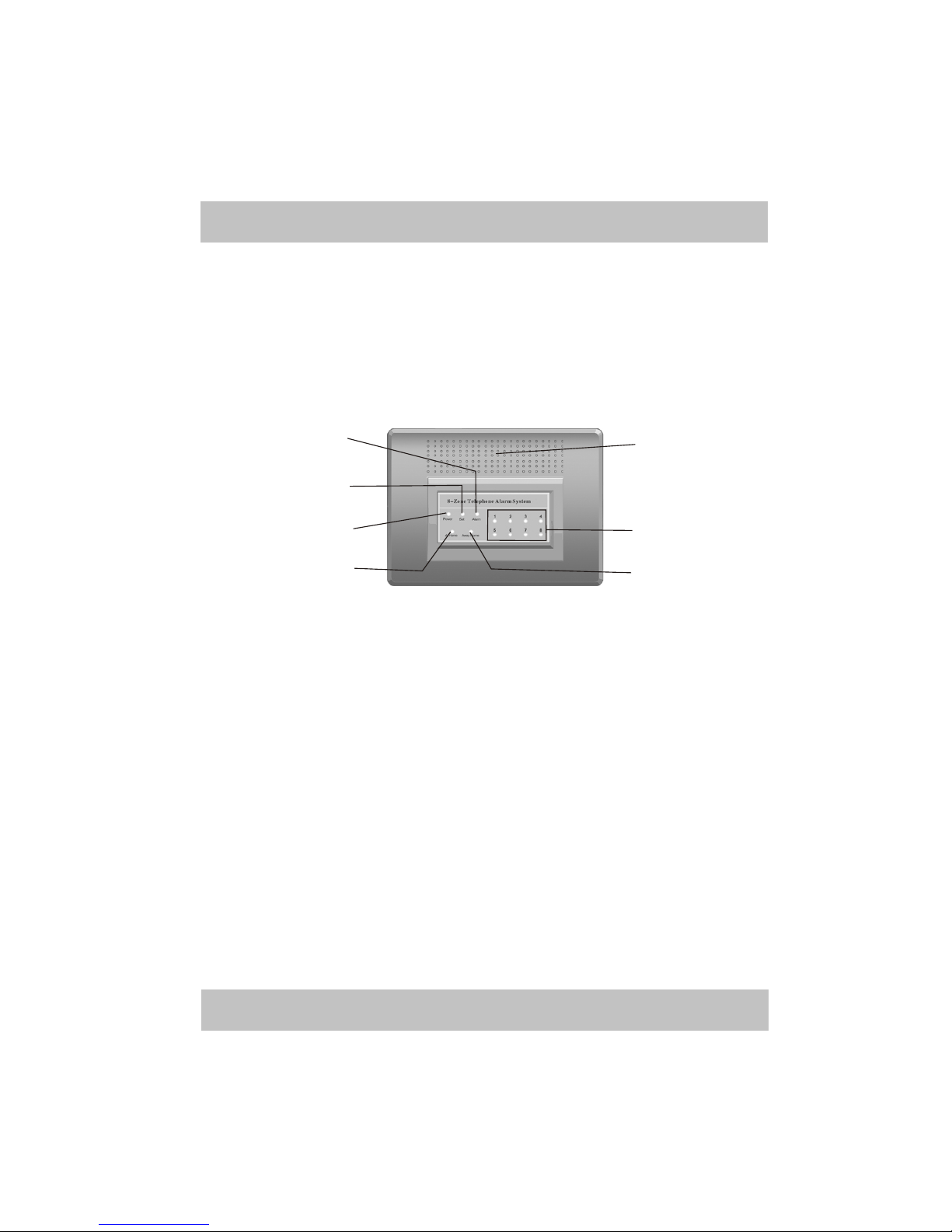
3.1 Front Panel Of Main Unit
Picture 1
① “POWER” Indicator (Green):This light will be on if power supply is
normal, and it will be flashing if the backup power of main unit is lower.
② “SET” Indicator (Orange):This light will be on when main unit enter
setting state, and it will be off when main unit exit from setting state.
③ “ALARM” Indicator (Red): This light will be on when main unit occurs
alarm.
④ At Home Mode Indicator (Red): If this light is on, which means it is in
arm state of at home mode.
⑤ Away Home Mode Indicator (Red): If this light is on, which means it is
in arm state of away home mode.
⑥ Zone Indicators (Red): Those eight indicators separately stand for 8
zones (from 1-8).
* If the indicator is on, which means this zone is in arm state.
*If the indicator is off, which means this zone is in disarm state.
*If the indicator is flashing slowly (1 time every second), which means
there is alarm occurs in this zone.
*If the indicator is flashing quickly (3 times every second),which
means power lower of some detector occurs in this zone.
⑦ Trumpet: Build-in trumpet.
①
②
③
④⑤
⑥
⑦
8-zone Telephone Alarm System
-3-
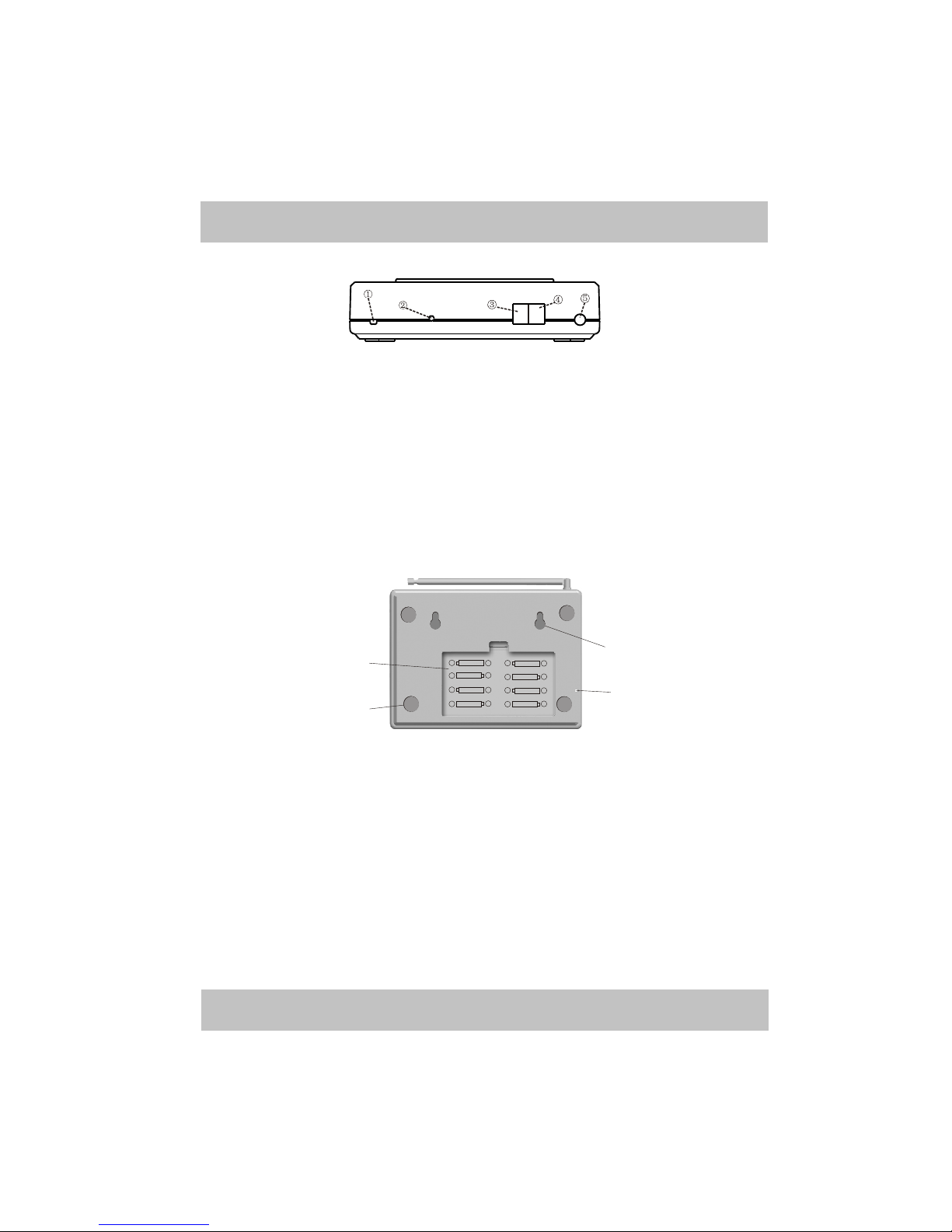
3.2Back Components Of Main Unit
Picture 2
① City Inputting: AC 220V±15%50Hz Inputting Power
② “SET” Button: Enter setting state by pressing and holding this button
for 3 seconds, and exit from setting state by pressing and holding this
button for 3 seconds.
③ Telephone Socket: It is used to connect with telephone set.
④ Outside Line Socket: It is used to connect with outside line of
telephone.
⑤ Antenna: It is used to send/receive wireless signals, pulling it out is
recommended to assure to get the best effect.
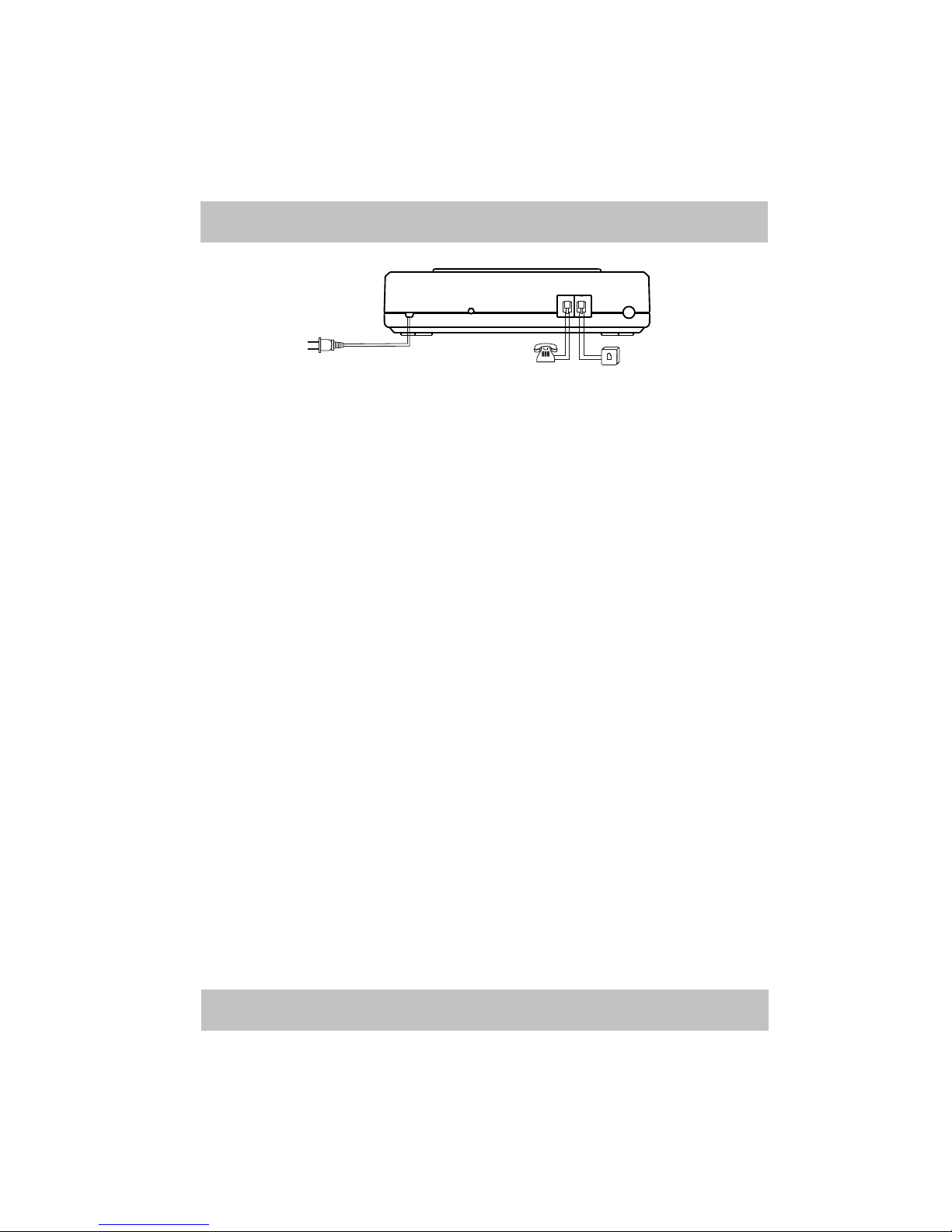
3.3 Bottom Components Of Main Unit
Picture 3
① Microphone: It is used to monitor.
② Anti-slip footpad: It prevents main unit from slipping on glaze surface.
③ Backup Battery Case: Open the case, and put 8 PCS AA Ni-MH
rechargeable batteries in the battery case according to the labels, and then
close the case.
Note: *Please note the polarity.
*It is not allowed to open battery case when main unit is in working
state, otherwise, it will alarm immediately.
④ Pothook: Hang this main unit with those two pothooks.
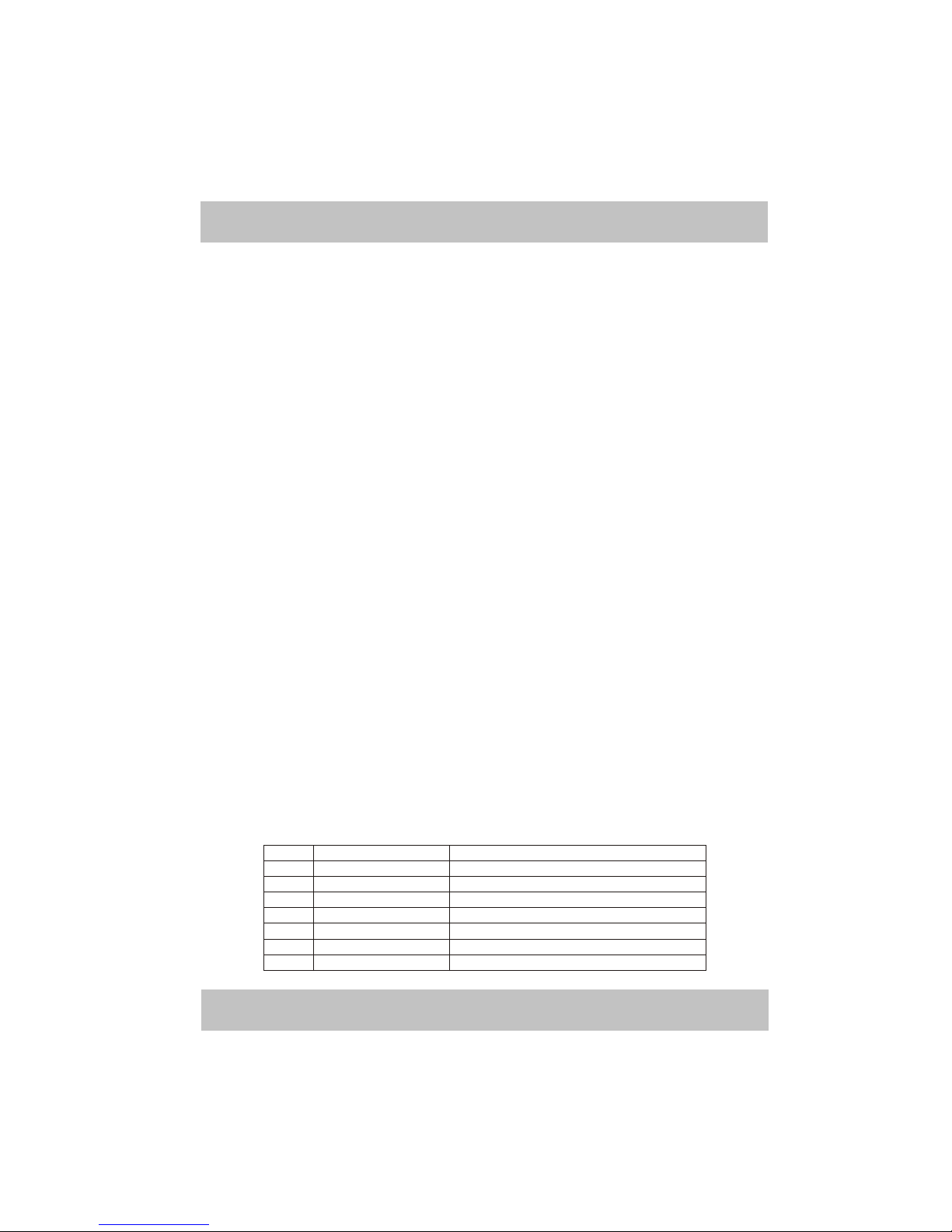
4.Diagram Of Connection
Phone Line
Set
①
②
③④
++--
++--
++--
++--
++--
++--
++--
++--
8-zone Telephone Alarm System
-4-
Picture 4
5.Program Of Main Unit
5.1Program Precautions
① The phone should be standard DTMF (double tone multi frequency).
and the power of telephone is provided by AC power, so please pick
receiver up instead of free hand when programming.
② Main unit only can be programmed in disarm state, and it will delete
all alarm information and power lower information after entering into
setup state, therefore, before entering setup state, please check
whether to keep records firstly or not. After entering setup state,
please arm the main unit in time to avoid missing alarm message.
③ After entering into setup state, the telephone will cut with outside line,
and there should be no any dialing tone.
④ If there are no indicate sound when pressing telephone keyboard,
please check to see weather the lines are correctly connected, if the
connection is correct, please try another telephone set.
⑤ Main unit will make a short “Du” sound every time pressing keyboard
on telephone, therefore, during setting, you can adjust wheather the
operation is valid or not according to the sound made by main unit.
Four short “Di” sound ------The operation is effective.
Two long “Di” sound ------- The operation is ineffective.
⑥ Press “*” key to delete if you press wrong information (except when
entering telephone numbers).
⑦ Delete Directive: If you delete anything, there should be an indication
if the operation is successful, that is all zone lights are on at the same
time, and then be off one by one, then the main unit will make four
short “Di” sound.
⑧ If there are no any operations for 60 seconds after entering setting
state, the system will exit from setting state automatically.
⑨ You can exit setting state by pressing “SET” button at the back of main
unit, and the “SET” indicator light will be off, which means it has
exited from setting state.
SET
PHONE LINE
220V AC
Telephone Line
8-zone Telephone Alarm System
-5-
5.2Specific Operation
Entering into setup state
Well connect main unit with telephone line, power on main unit, and
press “SET” button at the back of main unit for 3 seconds, “SET” indicator
will be on, and wait for 2 seconds before picking telephone receiver up, and
then enter XXXXXX# (XXXXXX is 6-bit user's code, and it is “000000” by
default).
*If the code is incorrect, main unit will make two long “Di” sounds, and
then exit from setting state automatically.
*If the code is correct, main unit will make four short “Di” sounds, and
then you can program as following directives.
5.3 User’s Setting
<1> How To Set Zone List Of At Home Mode 12345678 by default
01#XXXX# (X is any number ranges from 1 to 8, and they separately
stands for 1-8 zones)
Instruction: Main unit will make a “Di” sound after entering 01#, then
the indicator light of the zones (at home mode) will be on, then you can enter
the zone number which you want it to be at home mode. And the state of
indicator you set is the same as that of at home mode. After that, press “#” to
confirm, and it will make four short “Di” sound, which means the setting is
successful.

<2> How To Set Zone List Of Away Home Mode 12345678 by default
02#XXXXX# (X is any number ranges from 1 to 8, and they separately
stands for 1-8 zones)
Instruction: Main unit will make a short “Di” sound after entering 02#,
then the indicator light of the zones (away home mode) will be on, then you
can enter the zone number which you want it to be away home mode. And the
state of indicator you set is the same as that of away home mode. After that,
press “#” to confirm, and it will make four short “Di” sound, which means the
setting is successful.
<3> How To Define Zone Type 1111 1111by default
03#XXXXXXXX#
Instruction: “XXXXXXXX” should be 8-bits, and X is any number
ranges from 0 to 6, and 0-6 are separately stand for as following:
Code Type Instruction
0 Bypass Zone This zone is unused at the moment
1 Anti-theft Zone It is controlled by arm/disarm
2 Medical Zone It is uncontrolled by arm/disarm
3 Fire Zone It is uncontrolled by arm/disarm
4 Gas Zone It is uncontrolled by arm/disarm
5 Emergency Zone It is uncontrolled by arm/disarm
6 Doorbell Zone It will make doorbell sound when triggered
8-zone Telephone Alarm System
-6-
Instruction: After entering 03#, main unit will make a short “Di” sound,
and then you can enter 8 bit numbers ranges from 0 to 6, and press “#” to
confirm, then it will make four short “Di” sound, which means the setting is
successful.
Application:
1.When connecting with monitor center, if the type of some zone has been
set, monitor center can see the alarm type when alarm occurs in this zone
(such as anti-theft, fire alarm, gas alarm and so on).
2.When there is some malfunction occurs in some zone, set to be bypass
zone is recommended because the main unit will not receive any
information from this zone. And then you can set it to be other types after
precluding malfunctions.
Suggestion: Set the unused zones to be “Bypass Zone”
<4> How To Modify User' code 000000 by default
09#BBBBBB#BBBBBB#
“BBBBBB” is 6 bits new code, and it should be any number ranges from 0 to 9.
Instruction: After entering 09#, you will hear a short “Di” sound, then
you can enter 6 bits new code and press a “#” to confirm, after hearing a short
“Di” sound, enter 6 bits new code and a “#” again, it will make four short “Di”
sound, which means the setting is successful.
After modifying the code, the old code is invalid automatically, and you
should enter setting state by entering new code next time.
Note: you should keep the code in mind, if you forget it, please recover
user's code according to 6.1 chapters.
<5> How To Set Alarm Volume Loudest volume by default
Instruction: After entering directive, main unit will make alarm sound
with the volume as you set, then press A“#” to confirm, and it will make four
short “Di” sound, which means the setting is successful.

<6> How To Set Inner Siren Duration 30 Minutes by default
25#DD#
Instruction: “DD” is the inner siren duration, which ranges from 00 to
99 minutes, and it should be 2 bits.
Directive Instruction
21# Lowest
22# Middle
23# Louder
24# Loudest
8-zone Telephone Alarm System
-7-
When main unit occurring alarm, it will make alarm sound till the alarm
duration arrives, then main unit will close alarm sound automatically (if there
are wireless siren, then it will close alarm sound of wireless external siren at
the same time).
Note: If the alarm duration is set to be 00, which means the main unit is
in mute alarm mode, if you don't want it to be mute, then you only need to
enter alarm duration, and then it will cancel mute function.
<7> How To Set Delay Arm Time (Leaving Time) 00 second by default
26#DD#
Instruction: “DD” is delay arm time, and it ranges from 00 to 99 seconds,
and it should be 2 bits. (Delay arm time is only valid to away home mode).
When you press “Away Home” button on remote controller, main unit
will enter delay arm time immediately, and then the main unit will make a
short “Di” sound every one second, and you should leave the defense area
during the time. When delay arm time you set arrives, main unit will enter
into away home mode immediately. (If you set to be 00 second, then once you
press “Away Home” button on remote controller, main unit will enter
away home mode automatically.
<8> How To Set Delay Alarm Time (Entering Time) 00 second by default
27#DD#
Instruction: “DD” is delay alarm time, which ranges from 00 to 99, and
it should be 2 bits. (Delay alarm time is only valid to anti-theft zones).
If you enter the defense area which has been armed, then you can disarm
the main unit by remote controller during the delay alarm time, if you don't
disarm main unit during the time, it will make alarm sound when the time
arrives. (If the time set to be 00 second, main unit will make alarm sound
immediately when receiving alarm signal).
<9> How To Set Wireless External Siren Closed by default (Only B
model have this function)
A. Enter The Code Of Wireless Siren (This function open automatically
after entering the code of siren).
40#AAAAAAAA# (AAAAAAAA is the code of siren)
Instruction: After entering 40#, main unit will make a short “Di” sound,
and then enter 8 bits code of siren labeled at the back of siren, and press a “#”
to confirm, then it will make four short “Di” sound, which means the setting
is successful.

B. Delete The Code Of Wireless Siren (This function close automatically
after deleting the code of siren)
40##
Instruction: After entering 40#, main unit will make a “Di” sound, and
then enter a “#”, and the indicator Light will be off one by one, then it will
make four short “Di” sound, which means the setting is successful.