manuals.online logo
Brands
  1. Home
  2. •
  3. Brands
  4. •
  5. Leigh
  6. •
  7. Tools
  8. •
  9. Leigh SUPERJIG-12-18-24 User manual

Leigh SUPERJIG-12-18-24 User manual

This manual suits for next models

3

Other Leigh Tools manuals

Leigh FMT PRO User manual

Leigh

Leigh FMT PRO User manual

Leigh D4R Pro User manual

Leigh

Leigh D4R Pro User manual

Leigh rtj400 User manual

Leigh

Leigh rtj400 User manual

Leigh F1 User manual

Leigh

Leigh F1 User manual

Leigh FMT PRO Guide

Leigh

Leigh FMT PRO Guide

Leigh B975 User manual

Leigh

Leigh B975 User manual

Leigh R9PLUS User manual

Leigh

Leigh R9PLUS User manual

Leigh TD330 User manual

Leigh

Leigh TD330 User manual

Leigh Multiple Mortise and Tenon User manual

Leigh

Leigh Multiple Mortise and Tenon User manual

Leigh rtj400 User manual

Leigh

Leigh rtj400 User manual

Leigh B975 User manual

Leigh

Leigh B975 User manual

Leigh D4R Pro User manual

Leigh

Leigh D4R Pro User manual

Leigh D4R Pro User manual

Leigh

Leigh D4R Pro User manual

Leigh D4R User manual

Leigh

Leigh D4R User manual

Popular Tools manuals by other brands

AGI Westfield MKX16 Assembly manual

AGI

AGI Westfield MKX16 Assembly manual

GYS HAND-DUCTION 056923 Translation of the original instructions

GYS

GYS HAND-DUCTION 056923 Translation of the original instructions

Grizzly H7583 instruction manual

Grizzly

Grizzly H7583 instruction manual

Sealey VS0462.V2 instructions

Sealey

Sealey VS0462.V2 instructions

Makita HR2650 instruction manual

Makita

Makita HR2650 instruction manual

Forza 1100H Series manual

Forza

Forza 1100H Series manual

Aventics EBS-PI operating instructions

Aventics

Aventics EBS-PI operating instructions

Martor SECUNORM 175 quick start guide

Martor

Martor SECUNORM 175 quick start guide

jbc N4473 instruction manual

jbc

jbc N4473 instruction manual

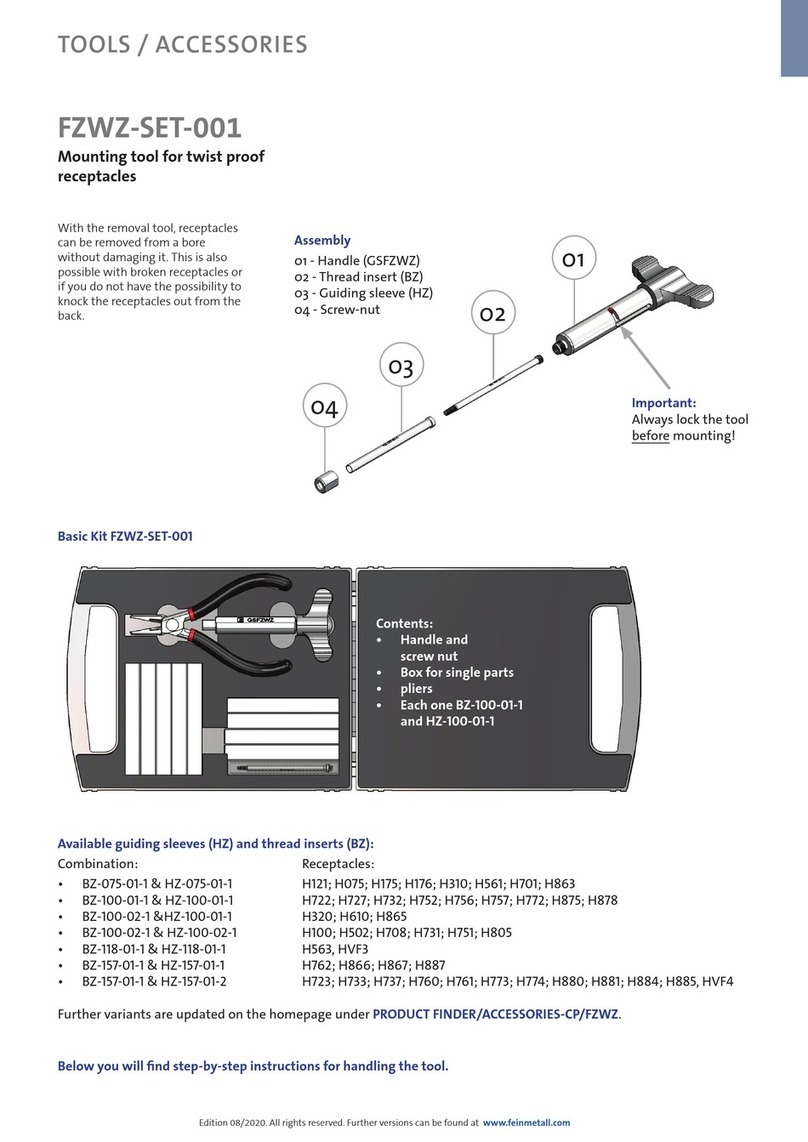
FEINMETALL FZWZ-SET-001 quick start guide

FEINMETALL

FEINMETALL FZWZ-SET-001 quick start guide

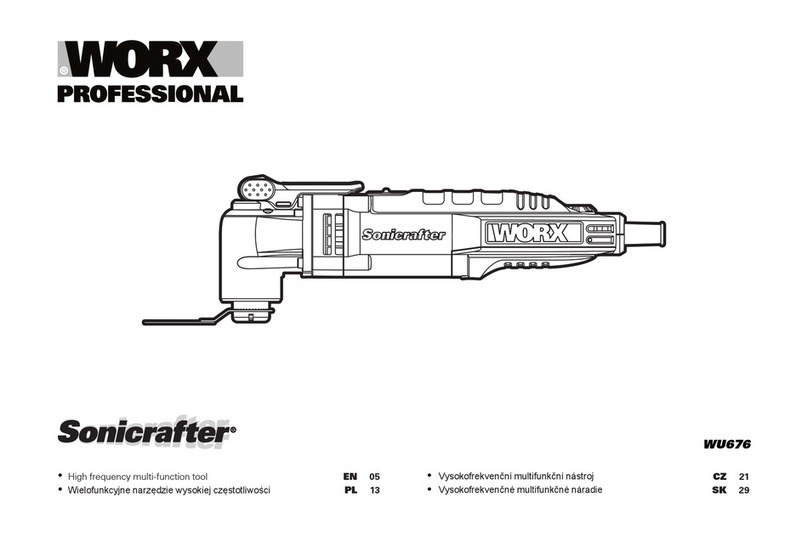
Worx Professional Sonicrafter WU676 Original instructions

Worx Professional

Worx Professional Sonicrafter WU676 Original instructions

Gage Bilt GB713SH Original instructions

Gage Bilt

Gage Bilt GB713SH Original instructions

Hilti DX 9-ENP Original operating instructions

Hilti

Hilti DX 9-ENP Original operating instructions

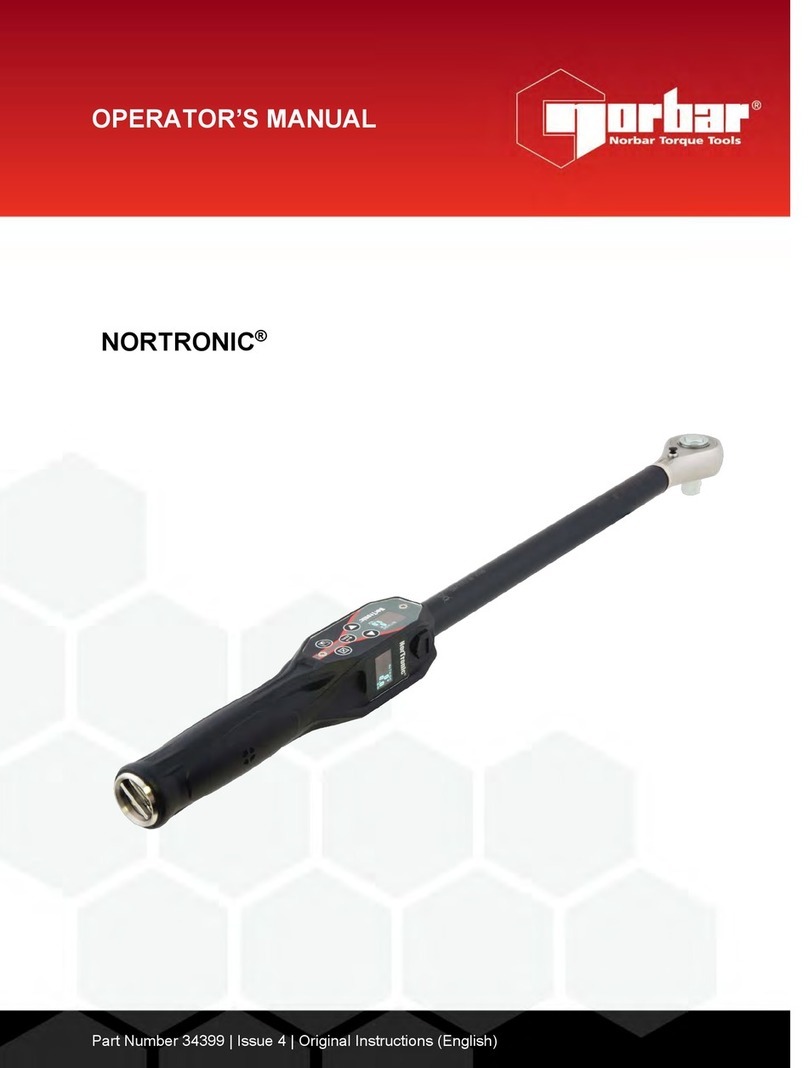
norbar NORTRONIC 34399 Operator's manual

norbar

norbar NORTRONIC 34399 Operator's manual

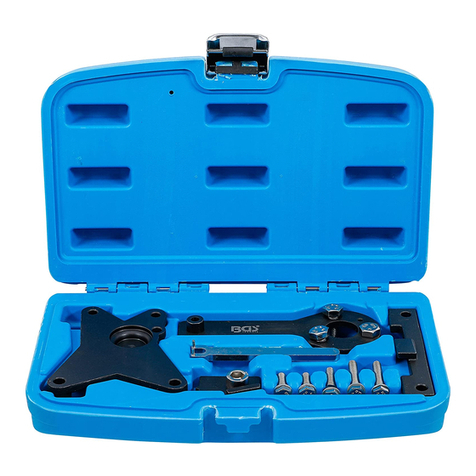
BGS technic 8578 manual

BGS technic

BGS technic 8578 manual

axing BWZ 5-02 Operation instructions

axing

axing BWZ 5-02 Operation instructions

Makita DHR241 instruction manual

Makita

Makita DHR241 instruction manual

Motor Guard JMB-1250 instructions

Motor Guard

Motor Guard JMB-1250 instructions

manuals.online logo
manuals.online logoBrands
  • About & Mission
  • Contact us
  • Privacy Policy
  • Terms and Conditions

Copyright 2025 Manuals.Online. All Rights Reserved.

CONTENTS and STANDARDS
ii
SUPERJIG-12-18-24 User Guide
Your New Leigh Dovetail Jig
Congratulations! You now own a most useful and versatile
dovetailing tool.The Leigh Superjig Dovetail Jig will help you
cut an infinite variety of joints, and all of its major functions
are described in detail in this manual, plus there's a slide-out
Quick Reference Guide underneath the jig. A very helpful
DVD is also included, but the manual is essential reading.
We recommend that you first assemble and mount the jig,
carefully following the instructions in the first section of the
manual. Then read the rest of the manual, following along
with the basic functions and principles of operation, before
you try to do any actual joinery routing. By all means, cut a
few practice joints in scrap boards before you use the jig to
rout a precious hardwood work piece!
If you have any questions that are not answered in the manual,
please call the Leigh customer support line*.
But remember: “If at first you don’t succeed, read the instruc-
tions!”
*See Appendix IV – Customer Support
Important! Inches and Millimetres
The Superjig can be ordered in inch or metric versions.They're
identical except for the calibration scales. This Leigh English-
language user guide show measurements in both inches and
millimetres, with “inches” first, followed by “millimetres” in
square brackets.
Example:
3⁄4"x 51⁄2"x8" [20x140x200mm]
Do not be concerned if the inch/millimetre equivalents are not
exact. Just use the dimensions which apply to your jig.
Where finger assembly scales overlay an illustration, the “inches”
scale will be at the top, the “millimetres” scale will be at the
bottom. Only the front “active” half of the scales are illustrated.
For clarity, setting positions are indicated with a red line in the
manual only. On the jig, the lines are black.

1
2
© 2007 Leigh Industries Ltd. All rights reserved.
iii
CONTENTS and STANDARDS SUPERJIG-12-18-24 User Guide
CONTENTS and Standards ........................................................................................ iii
Chapter 1 – Jig Assembly, Mounting, and Using The Clamps .................................. 1
Chapter 2 – Adjusting the Finger Assembly ............................................................. 7
Chapter 3 – Guidebushes and the unique Leigh e-Bush .......................................... 9
Chapter 4 – Basic Jig Functions and Scale Modes ................................................... 11
Chapter 5 – Using Your Jig Safely............................................................................ 13
Chapter 6 – Wood Preparation ................................................................................ 15
Chapter 7 – Router Preparation............................................................................... 17
Chapter 8 – Through Dovetail Procedures .............................................................. 19
Chapter 9 – Variably Spaced Half-Blind Dovetail Procedures ................................ 29
Chapter 10 – One-Pass Half-Blind Dovetails ........................................................... 37
Chapter 11 – Rabbeted Half-Blind Dovetails .......................................................... 43
Chapter 12 – Asymmetric Dovetails ....................................................................... 45
Chapter 13 – Sliding Dovetails................................................................................. 49
Chapter 14 – Box Joints............................................................................................ 55
Chapter 15 – Hints and Tips ..................................................................................... 61
Appendix I – Attaching the Leigh e-Bush to the Router ........................................ 65
Appendix II – Bit Selection....................................................................................... 67
Appendix III – Jig Parts List ...................................................................................... 73
Appendix IV – Customer Support............................................................................ 78
© 2007 Leigh Industries Ltd. All rights reserved.
CONTENTS and STANDARDS
iv
SUPERJIG-12-18-24 User Guide
1
2
1
Glossary of Symbols
To help you understand the instructions and illustrations in this
manual, we have used a number of international symbols, plus
a few special ones of our own.They are all explained below. You
needn’t worry about memorizing these symbols now, because
they are repeated quite frequently in the manual, and you will
soon get used to them.
The Leigh jig’s guidefinger assembly can be in any one of four
joint modes, depending on what type of joint and which part of
the joint you are cutting. Each finger assembly scale has it’s own
mode icon, identifying that joint part. You will also find the
joint mode icon in the top left corner of most illustrations,
indicating which finger assembly mode to use.
Sometimes a joint mode icon will be used to identify a
board.
These are the four joint mode icons:
TD Tails
(tails for through dovetail joints)
TD Pins
(pins for through dovetail joints)
HB Tails
(tails for half-blind dovetail joints)
HB Pins
(pins for half-blind dovetail joints)
3
© 2007 Leigh Industries Ltd. All rights reserved.
v
CONTENTS and STANDARDS SUPERJIG-12-18-24 User Guide
Which Way Round Should the Board Go?
As virtually all dovetail joinery is used to make boxes,
drawers and chests etc., we devised these simple (and
hopefully intuitive) icons to indicate which side of a
board faces inwards or outwards on the finished “box”,
and which side of the board faces outward (toward
you, the operator), when it is clamped in the jig.
The following symbols indicate:
This edge against sidestop
This edge against sidestop
Sawcut allowance

฀Caution: use special care for this
operation
Numbered References in text
฀This icon indicates the “outside”
of a board. All through dovetail
pin boards are mounted in the
jig with this “outside” face away
from the jig (toward you, the
operator).
฀This icon indicates the “inside”
of a board. All half-blind pin and
half-blind tail boards, and through
dovetail tail boards, are mounted
in the jig with the “inside” face
away from the jig toward you,
the operator.
฀This icon indicates boards that
are mounted both ways e.g. sliding
dovetails and box joints.
Dotted line icons
indicate the
“other” side of the board in the
illustrations.
Centreline of board or layout
Equals
Does not equal
Approximately
© 2007 Leigh Industries Ltd. All rights reserved.
CONTENTS and STANDARDS
vi
SUPERJIG-12-18-24 User Guide
© 2007 Leigh Industries Ltd. All rights reserved.
10
1 2 3 4
5 6 7 8
9
Jig Assembly, Mounting,
and Using the Clamps
SUPERJIG - CHAPTER 1
Make Sure You Have All the Parts.
Before you start to assemble your Leigh SUPERJIG, check to make sure you have received all the required parts.
The small carton you removed from the end of the main
carton contains:
1. DVD instructional video (English only)
2. 2 Dovetail bits, 1 straight bit, 1 Collet Reducer, 1
e7-Bush & Nut
3. 2 scale thumbscrews c/w nylon washers
2 each, front and rear Side Stops
1 Spacer
4. 2 support brackets
5. 2 support knobs
6. Square-head guidefinger screwdriver
7. 4 clamp springs
4 clamp T-bolts
4 flat washers
4 T-bolt nuts
4 Jig Hold-down Wood Screws No.10 x1"
1 Pin Wrench
8. 4 cam-action speed clamps
4 cam clamp pivot nuts
…and any other small optional items you may have
ordered with your new jig. Check the packing slip
for this information.
The main carton contains:
9. 1 main jig body
1 Leigh jig User Guide
The large inner box contains:
10.1 finger assembly on a bar, complete with scales
Super12, with 13 guidefingers
Super18, with 16 guidefingers
Super24, with 19 guidefingers
2 lengths bridge material
1 cross cut fence (identical to bridge)
2 clamp bars c/w end plugs
1 Nylon Stop Rod
1 Quick Reference pull-out card
If any items are missing from your jig, contact your supplier
or Leigh Industries immediately.
Important Note
Mount your jig securely and assemble it com-
pletely before you try to use it.
Make sure you have read and understood all
the material in the Safety section of this user
guide before using the jig.
1
© 2007 Leigh Industries Ltd. All rights reserved.
JIG ASSEMBLY, MOUNTING, AND USING THE CLAMPS
2
Chapter 1 SUPERJIG-12-18-24 User Guide
1-1 Install Side Stops InserttwoclampT-boltsthrough
the rear jig body holes and place a “stepped” rear side stop over
each bolt , using the rear part of the double-hole . Make
sure the bolt's “T” is between the extrusion ribs . Don’t forget
the steel washer and use a ½"[13mm] wrench to tighten the
nuts.
3
1
4
4
1
2
5
1-2 Insert the two front clamp T-bolts through the jig body
holes. Make sure the bolt's “T” is between the extrusion ribs.
Place a front side stop and steel washer over each bolt but only
finger-tighten the front nuts; you will need to index these to the
rear stops later.
1-3 Preparea flat ¾"[20mm]mountingboard (plywoodorMDF),
atleast 5"[125mm] wide. Length :26"for Super12, 32"forSuper18,
40" for Super24 [660, 830 or 1000mm respectively]. Clamp it to the
front of your bench. Centre the jig on the board, front face slightly
overhanging the board edge . Mark the four hold down screw posi-
tions. Drill small pilot holes at a slight angle .
2
3
5"
[125mm]+ 1
1-4 Quick Reference Pull-Out Decide which end
of the jig you wish to access the “Quick Reference” instruction
pull-out and place the jig over the pull-out . Using the screws
provided; screw the jig to the board. Make sure that the pull-out
slides freely.
1
1-5 Place four springs and two clamp bars on the T-bolts.
Make sure the clamp bars move freely on the T-bolts.
1
1
1-6 Screw a clamp lever assembly onto each T-bolt.
© 2007 Leigh Industries Ltd. All rights reserved.
3
JIG ASSEMBLY, MOUNTING, & USING THE CLAMPS Chapter 1SUPERJIG-12-18-24 User Guide
1-7 Now you need two boards about ¾" x 6" x 8" long
[20 x 150 x 200mm]. Both must have perfectly square ends to accu-
rately index the front and rear side stops.
DCheck for squareness: stand both pieces vertically on a flat
surface. Make sure side edges are flush at bottom and top .
Turn one piece around on its end . If side edges are flush top to bot-
tom , the boards are square. If not, ; cut two that are.
90˚
90˚
90˚
90˚
1
4
2
3
1-8 Align Front Side Stops Clamp one square ended board
inthe front,not touchingtheleft sidestopandwiththe topedgeabove
thetop surfaceofthejig body.Placethe other squareboardintherear
clamp,tight against the leftrearside stop,withits frontedgetouching
flush across the rear of the vertical board .Tighten the rear clamp.
3
90˚
90˚ 1
2
1-9 Now loosen the front clamp and position the front board so
its top end edge is perfectly flush and level with the top face of the
horizontal board and, both boards left edges are also perfectly
flush . Tighten the clamp.
1
2
1-10 Now push the front left side stop inwards and flush against
the vertical board and firmly tighten the clamp bolt nut.
Repeat operations 1-8 thru 1-10 at the right side of the jig. The
front and rear side stops are now indexed to provide accurate
board alignment in all routing procedures. You may now remove
the boards.
1
2
1-11 Insert the right and left support brackets. Attach the knobs,
raise them to full height and tighten the knobs.
Note: For clarity, the set lines on support brackets are shown in
red in this user guide. The actual bracket lines are black.
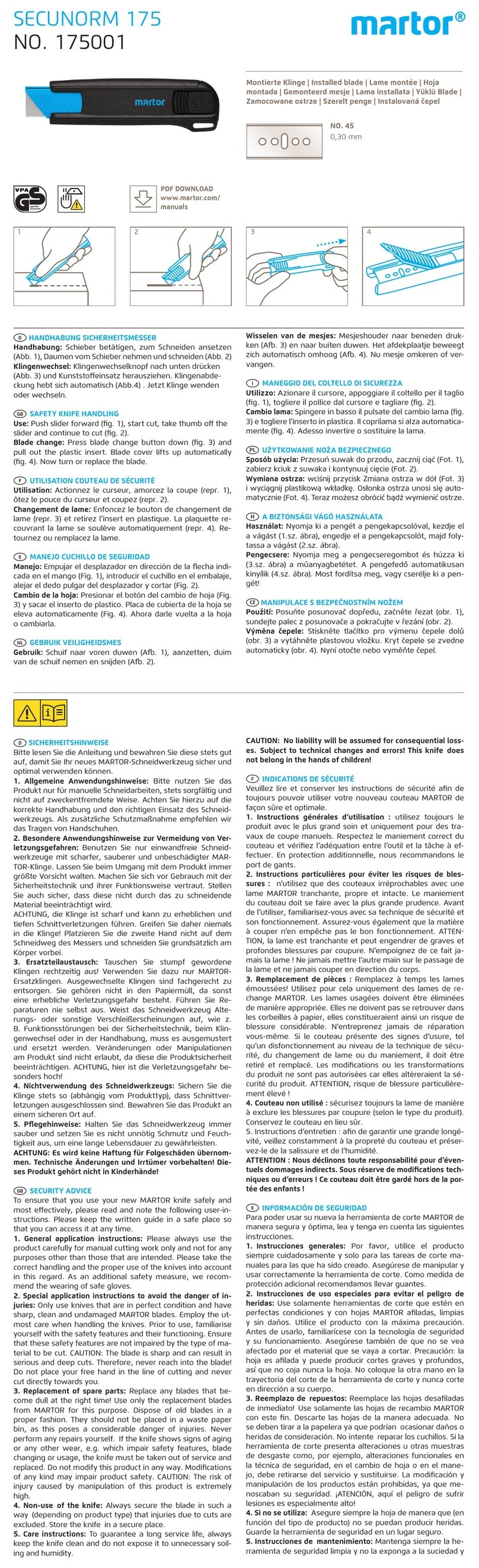
1
1-12 Make up a 3⁄4"x 6"[20 x 150mm] finger support board as
shown. Lengths: 11"[280mm] for Super12, 17"[430mm] for
Super18, and 23"[600mm] for Super24. This board will support
the guidefinger assembly in all front-clamping vertical board
modes. Clamp it in the rear of the jig.
© 2007 Leigh Industries Ltd. All rights reserved.
JIG ASSEMBLY, MOUNTING, AND USING THE CLAMPS
4
Chapter 1 SUPERJIG-12-18-24 User Guide
1-13 Before using the jig, the scales must be set into position on
the finger assembly. Install the two thumbscrews a few turns into
the scales . Loosen the scale lock screw at each end by one
turn only.
1
2
1
1
1-15 Pull up on the finger bar while pushing down on the
scale to ensure the bar is touching the two registration pads 
inside the scale. Maintain pressure and tighten the scale lock-
screw . Repeat at the other end. To maintain correct finger
assembly alignment, follow this procedure whenever you remove
the scales from the finger assembly.
3
4
2
1
1-16 With the finger assembly in +TD Pins mode , move the
outer end guidefingers to touch the scale block and lock in posi-
tion . Note: the outer end guidefingers are used for router support
only. When guidefingers are loosened, the finger assembly should
easily slide on the support brackets. If not, apply a little candle
wax to the mating surfaces.
1
2
1-17 Finally, slip the Spacer on the outside of the left rear side
stop , the nylon stop rod through its storage hole in the left end 
and the pin wrench in its slot in the right hand end housing .
1
2
3
1-18 With Superjig assembled and mounted, you have some
items left over:
1-14 Slide the finger assembly onto the support brackets, in
the +TD Pin mode and set on the 1⁄2"[12,7mm] setting. First,
tighten both thumbscrews .
Do not lower the assembly onto the finger support board.
1 Leigh jig user guide
1 DVD instruction video (English only)
1 Leigh e7-Bush and nut
2 Dovetail bits
1 Straight bit
1 Collet Reducer
1 square-head screwdriver
3 bridge-piece/crosscut extrusions
© 2007 Leigh Industries Ltd. All rights reserved.