●
●●
●
aria
–24IP DIGITAL KEY TELEPHONE SYSTEM USER’S GUIDE
6
Fixed Feature Buttons
Speed key provides you with access to speed dialing, save
number redial and last number redial.
Trans/Pgm ( ransfer) button is used to ransfer an outside
call from a station to another.
DndFwd (Do Not Disturb/Forward) button allows you to
forward your calls to another destination, or make DND mode.
Call Back button allows you to leave a callback indication at a
station that is busy, unattended, or in DND.
Quick Reference Guide for
aria-24IP
24IP
Digital Key Telephone
Speaker button enables you to make a phone call with-out
lifting handset. It turns the telephone on and off when using
the speakerphone.
Hold/Save button enables you to place an outside caller on
hold.
-Volume +bar allows you to adjust speakerphone and
handset volume.
Call Forward
Dial
4 9
- 0 : Follow me
- 1 : Unconditional
- 2 : Busy calls
- 3 : No answer calls
- 4 : Busy/no answer calls
- 5 : Station off-net, unconditional
- 6 : Station off-net, no answer
- 7 : Incoming outside line to off-net (Sys. A D only))
- # : Cancel previous call forward
Dial the station number or press DSS button or
intercom group where calls are forwarded.
o make Call forward to VMIB, press #key after
dialing call forward type (1~4).
Call Wait (Camp-on)
If you dial a busy station, you may alert it to your call.
After receiving intercom busy tone, dial
or the last
digit of called station number or press DSS button.
When the called party answers, consult with them
or hang up to ransfer the call, if any.
Conference
Call the desired party (internal or outside). When
called party answers, press CONF soft key.
Add next conference party by selecting another
outside line or intercom station.
When the party answers, press CONF soft key twice.
All parties are connected.
o terminate a conference,
he conference initiator should be actively in the
conference.
Hang up, or press CONF soft key to finish the
conference (only for conference initiator).
Lea ing a Message Waiting Indication
If you dial a station that is unattended or in Do
Not Disturb, you can leave a message waiting
indication.
Dial the desired intercom station. Busy tone or
DND tone is heard.
Press Call Back key. he called party’s Call Back
key LED will flash.
o answer a Message Waiting Indication,
Press flashing Call Back key and the station that
left message will be signaled with tone ringing.
If called station does not answer, press the Call Back key
once to leave a message.
Placing an Outside Call on Hold
While connected to an outside line,
Press Hold/Sa e button.
- Once for system hold
- wice for exclusive hold
Reverse if hold preference is programmed to system hold.
Press Hold/Sa e button.
Last Number Redial
he last dialed number on an outside line is saved.
Press REDIAL Soft key. Or,
Dial 5 2
Each station with LCD has 10 last dialed number directory.
You may find a dialed number by pressing Volume key. And
press Hold/Save button to dial the number.
Sa e Number Redial
If you wish to save a number you dialed,
After dialing the number of an outside party, don’t hang up
Press Speed key twice (saves number in SNR Buffer)
o dial a saved number (in SNR Buffer),
Press Speed key and dial #.
Call Transfer
While connected to an outside call,
Press Trans/Pgm button.
Dial station number or DSS button.
(You can select a screened or unscreened ransfer.)
Screened ransfer
When that extension answers, announce the ransfer and hang
up to complete call ransfer.
Unscreened ransfer
When the called extension begins to signal, hang up to complete
call ransfer.
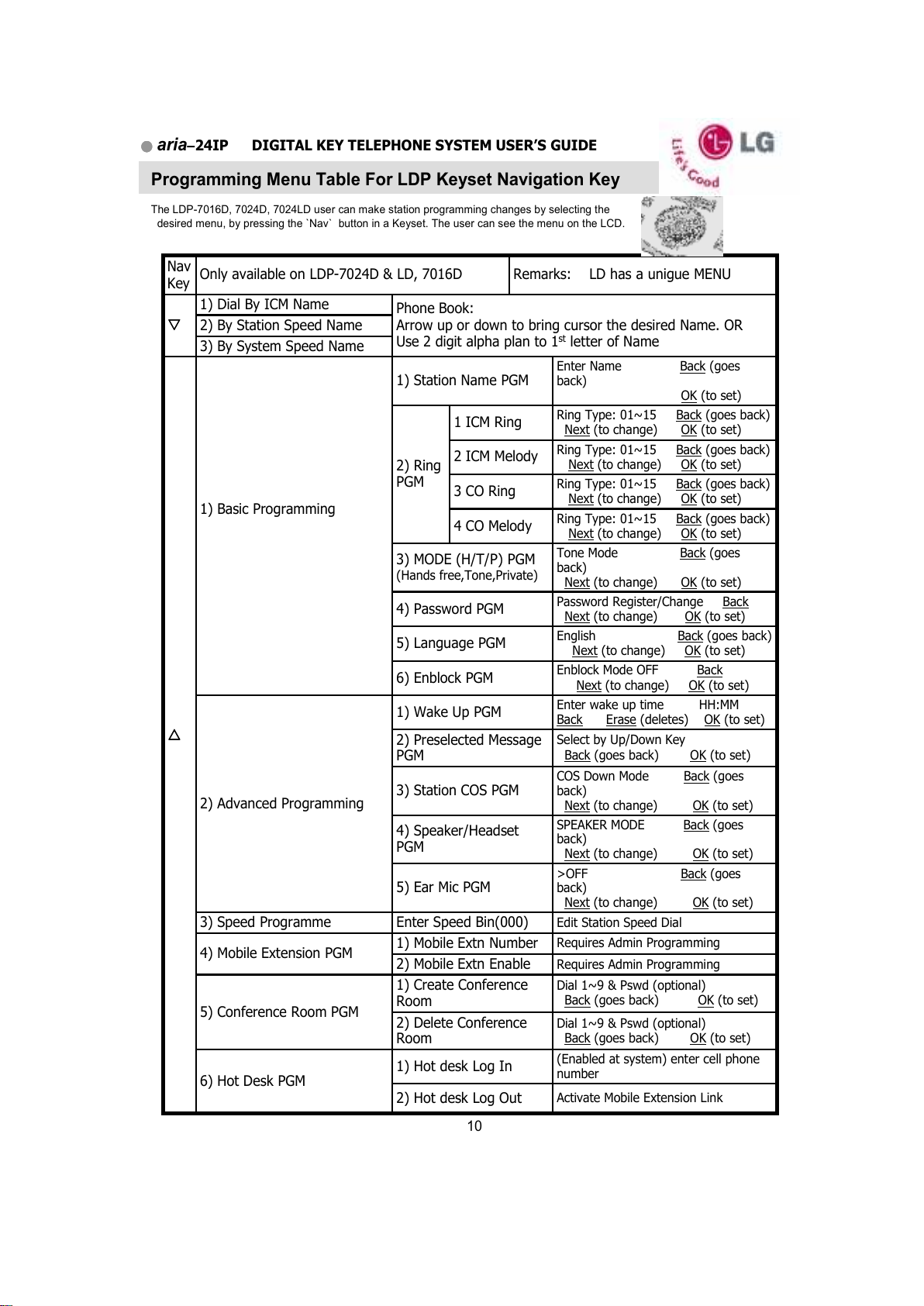
Na igation Key (LDP-7016,7024 series Keysets)
Navigation button provides you with access to Keyset programming and features.
In many cases the OK button provides the same function as the Hold/ Save key.
Soft Key (LDP-7016,7024 series Keysets)
Soft eys provides LCD prompted menu access when a specific feature is available.
Such as Flash/ Mute/ Redial/ Conference/ VMIB rewind etc.