LOYTEC L-VIS Series User manual

Installation instructions
LVIS-ME212 Touch Panel 12.1”
LVIS-ME215 Touch Panel 15”
Instructions de montage
Montageanweisung
Montagevoorschrift
Instruzioni di montaggio
Instrucciones de montaje
Monteringsanvisning
H
G
F
E
DC
B
A
27
30
I30 30
25
max 40º C
min 10º C
10 - 90 %
RH
kg
12.1” 2.500 kg
15” 3.500 kg
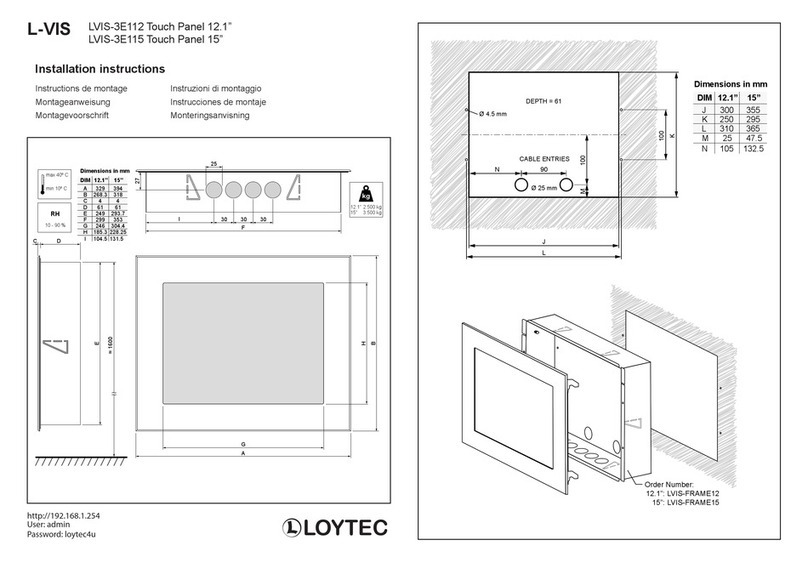
DIM 12.1” 15”
A 329 394
B
C
D
E
F
G
H
268.3 318
4 4
61 61
249
299
246
185.3
293.7
353
304.4
228.25
I 104.5 131.5
Dimensions in mm
≈ 1600
LOYTEC
100
DEPTH = 61
K
J
L
CABLE ENTRIES
100M
Ø 25 mm
90N
DIM 12.1” 15”
J 300 355
K
L
250 295
310 365
M 25 47.5
N 105 132.5
Dimensions in mm
Order Number:
12.1”: LVIS-FRAME12
15”: LVIS-FRAME15
Ø 4.5 mm
L-VIS

PROTECTIVE EARTH MUST BE CONNECTED!
1 2 3 4 5
POWER1 POWER2 USB1
USB2
Ethernet1
Ethernet2 6 7 8 9 1011
RS-485 Extension
85 - 264 VAC
-
24 VDC
EIA-485
L-TERM
Termination
+2 x USB
2 x 10/100Base-T
(RJ45)
Extension
cable
61006001
AUDIO OUT
-
+
GND
EARTH
Stereo Plug
TRS connector
Stereo 3.5 mm
0,2 - 2,5 mm2
Weidmüller BLZP 5.08/03/180
7
GND
TEMP
+3 V
DIGIN1
GND
DIGIN0
Extension cable
Nr. 61006001
Modular
connector
6p6c (RJ12)
black GND
green TEMP
red +3 V
white DIGIN1
blue GND
yellow DIGIN0
PE
DC only!
Connectors
POWER1 1 Power supply AC input
85-264 VAC 2 Power supply AC input
POWER2 3 Power supply DC input earth ground
24 VDC 4 Power supply DC input MINUS
5 Power supply DC input PLUS
do not connect PLUS to GND
BACnet 6 Input GND
MS/TP 7 Input +
8 Input
-
EIA-485 9 Input GND
10 Input +
11 Input
-
-
+
GND
MS/TP
BACnet
Document 88076901
2010-01
Printed in Austria
Data is subject to change http://www.loytec.com
LOYTEC
LOYTEC electronics GmbH
MADE IN
AUSTRIA
W51/2009
SER#
MAC address
Serial number of the device
Date Code
000AB001285B
MAC1 LVIS-ME212
009304-8000000350EF
RS-485
LINK
ACT
ONLINE
Ethernet2
Ethernet1
MICROSD
PC USB
RESET
STATUS
POWER
STAT
Buttons
RESET Reset
STATUS Send “I AM” message
Status LEDs
MS/TP GREEN flashing Traffic on BACnet MS/TP port
CNIP GREEN flashing Traffic on BACnet IP port
LINK GREEN Ethernet link
ACT GREEN flashing Ethernet traffic
ONLINE GREEN Node is online
PWR GREEN Power
STAT OFF Normal operation
CN/IP
MS/TP
This manual suits for next models
2
Other LOYTEC Touch Panel manuals