MANUAL CRMX Galileo LUMENRADIO
Copyright © LumenRadio AB 2023, All Rights Reserved www.lumenradio.com
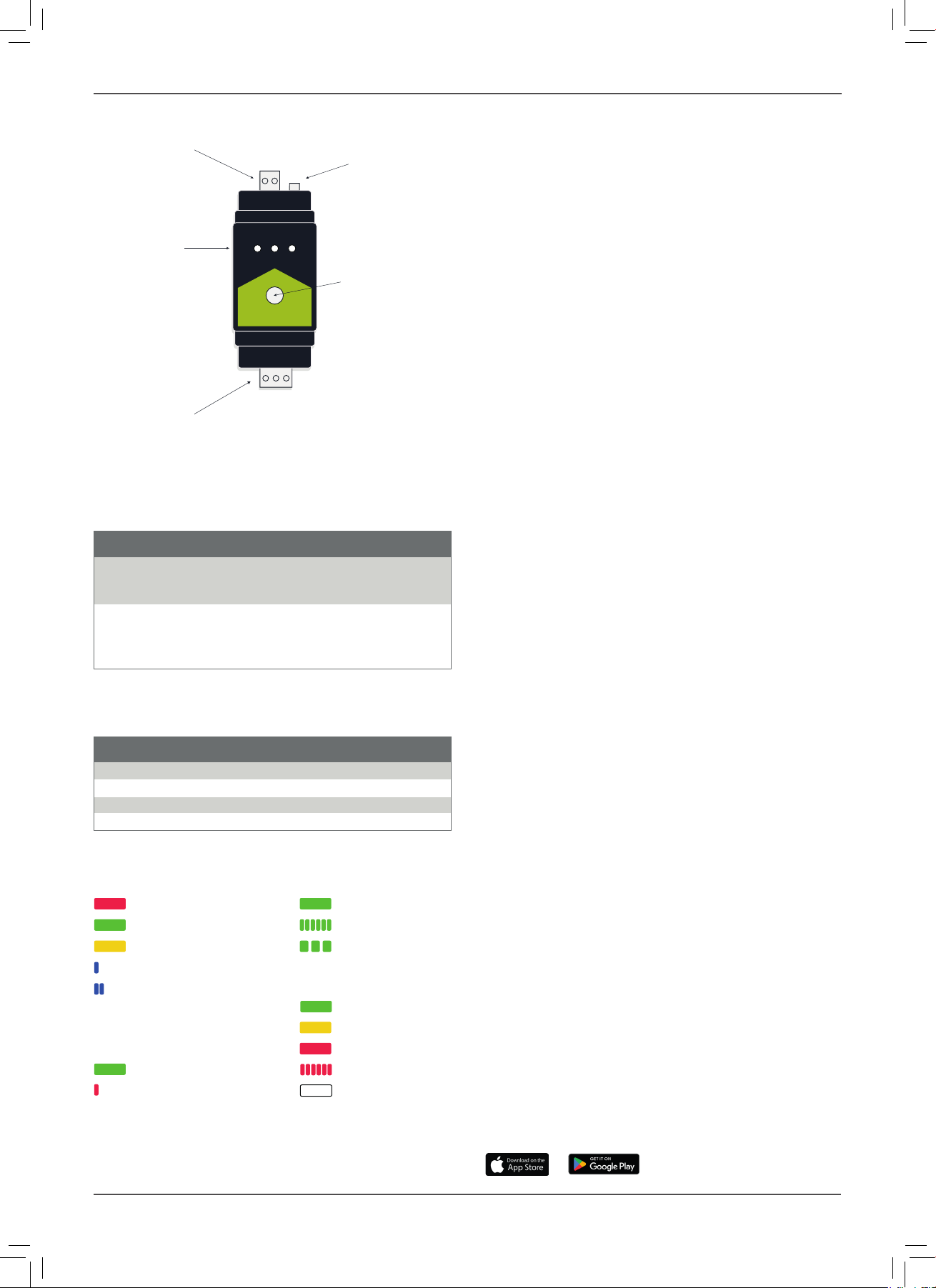
Power in
Status LEDs
DMX port
Antenna connector
Link switch
- +
Gnd D- D+
YOUR GALILEO UNIT
LINK SWITCH FUNCTIONS
The link switch performs the basic link and unlink functions, but combinations of
presses can perform some special functions. All functions are listed in the tables
below. In the tables below short press is <0.5 s, long press is >3 s.
BASIC FUNCTIONS
Push Function
Short On transmitter: Link available receivers
On receiver: No function
On repeater: Link available receivers
Long On transmitter: Unlink all receivers
On receiver: Unlink this receiver
On repeater: Unlink all receivers, or unlink this repeater
if pressed again within 5 seconds after unlink process.
SPECIAL FUNCTIONS
The special functions are accessed by pressing the button momentarily a number
of times, followed by a long press (> 3 s).
Push Function
2 x short + long Enable/disable BLE.
3 x short + long Galileo TX: Select RF protocol.
5 x short + long Galileo RX: Enable/disable repeater (if option is installed)
7 x short + long Reset BLE PIN code.
STATUS LEDS
MODE SINGAL (TX)
Transmitter Transmitting
Receiver Linking receivers
Repeater Unlinking receivers
BLE enabled
BLE connected SINGAL (RX)
> 70%
30 – 70%
DATA < 30%
DMX data No link
RDM activity Not linked
IDENTIFY
When connecting via BLE using the CRMX Tooolbox app, or when using RDM, it
is possible to identify a device to know what device is accessed. When doing this,
all LEDs will ash rapidly.
LINKING
To be able to transmit data through the system, receivers needs to be linked to
the appropriate transmitter, or repeater.
1. Make sure the receivers are unlinked and that they are withing communica-
tion range.
2. If receiver is already linked, follow the steps in the unlink section.
3. Press the link switch momentarily on the transmitter.
4. Wait for the linking process to nish.
UNLINKING
Unlinking can be done directly from the transmitter, which wil lunlink all currently
powered receivers that are within range that is linked to this transmitter. This is
done by holding the link switch for >3 s.
Unlinking can also be done on one specic receiver by holding its link switch
pressed for >3 s.
USING REPEATERS
When the range needs to be expanded, a receiver can be upgraded to
repeaters (software license required). Before a repeater can be linked to receivers
it rst need to be linked to a transmitter.
To unlink a repeater from a transmitter, its receivers rst needs to be unlinked. Re-
peating the unlink step within 5 seconds after the unlinking process has nished
will unlink the repeater from its transmitter.
RDM (REMOTE DEVICE MANAGEMENT)
Galileo supports RDM both as transmitter and receiver (including repeater mode).
llows conguration of RDM capable xtures, allowing DMX start address and
DMX personality to be set among other things. It also allows for monitoring the
system, such as detecting if devices goes ofine, monitor receivers’ signal levels,
and much more.
Available RDM functions varies depending on the controller and the xtures.
A Galileo TX incorporates an RDM Proxy that needs to be enabled before any
downstream devices can be discovered. This can be done either by changing the
DMX personality of the transmitter, via the link switch button, or from the CRMX
Toolbox app.
BLUETOOTH
Bluetooth, or BLE, is enabled by default. It is recommended to disable the BLE
interface after installation has been completed, or to protect the BLE interface
by setting a PIN code.
It is possible to send DMX data to the Galileo device via BLE. There are several
apps that supports this that can be downloaded from App Store. When sending
DMX data to a receiver or a repeater, the DMX data is only forwarded to the local
DMX interface. But when DMX data is sent via BLE to a transmitter device, the
DMX data will be sent to the entire network.
DMX via BLE is limited in performance due to the limitations of BLE, and is not
suitable for fast effects.
FIRMWARE UPDATES
The software in your Galileo device, called rmware, is continuously improved
and new functions may be added. It is therefore recommended to make sure you
keep the devices up to date. In all cases, make sure you have the latest rmware
installed before commissioning a new system.
Firmware can be updated via Bluetooth using the CRMX Toolbox app. The latest
rmware is automatically downloaded from LumenRadio’s cloud and pushed to
your device when you initiate an update.
INSTALLING REPEATER OPTION
Galileo RX units can have an optional repeater option installed. It is installed
using the CRMX Toolbox app and requires you to have an account registered
through the app. To purchase this option, reach out to your local reseller.
CRMX TOOLBOX
CRMX Toolbox is an app available from LumenRadio to congure CRMX devices.
It is available for iOS and Android and can be downloaded directly from Apple
App Store or Google Play Store.