Luminar 64398 Assembly instructions

Visit our website at: http://www.harborfreight.com
Email our technical support at: [email protected]
Owner’s Manual & Safety Instructions
Save This Manual Keep this manual for the safety warnings and precautions, assembly,
operating, inspection, maintenance and cleaning procedures. Write the product’s serial number in the
back of the manual near the assembly diagram (or month and year of purchase if product has no number).
Keep this manual and the receipt in a safe and dry place for future reference. 19d
When unpacking, make sure that the product is intact
and undamaged. If any parts are missing or broken,
please call 1-888-866-5797 as soon as possible.
Copyright© 2019 by Harbor Freight Tools®. All rights reserved.
No portion of this manual or any artwork contained herein may be reproduced in
any shape or form without the express written consent of Harbor Freight Tools.
Diagrams within this manual may not be drawn proportionally. Due to continuing
improvements, actual product may differ slightly from the product described herein.
Tools required for assembly an d se rv ic e may n ot b e in cl uded.
Read this material before using this product.
Failure to do so can result in serious injury.
SAVE THIS MANUAL.

Page 2 For technical questions, please call 1-888-866-5797. Item 64398
WARNING SYMBOLS AND DEFINITIONS
This is the safety alert symbol. It is used to alert you to potential personal injury hazards.
Obey all safety messages that follow this symbol to avoid possible injury or death.
Indicates a hazardous situation which, if not avoided,
will result in death or serious injury.
Indicates a hazardous situation which, if not avoided,
could result in death or serious injury.
Indicates a hazardous situation which, if not avoided,
could result in minor or moderate injury.
Addresses practices not related to personal injury.
INSTRUCTIONS PERTAINING TO A RISK OF FIRE, ELECTRIC SHOCK,
EXPOSURE TO EXCESSIVE UV RADIATION, OR INJURY TO PERSONS.
IMPORTANT SAFETY INSTRUCTIONS
Lighted Lamp is HOT:
WARNING – To reduce the risk of FIRE, ELECTRIC SHOCK,
EXPOSURE TO EXCESSIVE UV RADIATION, OR INJURY TO PERSONS:
1. Turn off/unplug and allow to cool
before replacing bulb.
2. Bulb gets HOT quickly!
Only contact On/Off Button/Plug when turning on.
3. Do not touch hot lens, guard, or enclosure.
4. Do not remain in light if skin feels warm.
5. Do not look directly at lighted lamp.
6. Keep lamp away from materials that may burn.
7. Use only with 500 watt or smaller bulbs.
8. Do not touch the bulb at any time. Use a soft cloth
instead. Oil from your skin may damage the bulb.
9. Do not operate the portable luminaire
with a missing or damaged guard,
lamp containment barrier, or UV filter.
10. Avoid electric shock. Do not use with an extension
cord near water or where water may accumulate.
Keep lamp at least 16 feet (5m) from pools
and spas. Keep plugs and receptacles dry.
Use only on GFCI-protected circuits.
Do not submerge the Light in water.
11. The Light is not waterproof. Use extreme
caution in any wet location.
12. Be careful when placing tripod.
Make certain that the area is clear of debris
and obstructions that may bump the Light.
13. Do not obstruct walkways or
common areas with the cord.
14. Maintain labels and nameplates on the Light.
These carry important safety information.
If unreadable or missing, contact
Harbor Freight Tools for a replacement.

Page 3For technical questions, please call 1-888-866-5797.Item 64398
15. This product is not intended for use in a residence
or to be mounted in a cabinet. This product is
not suitable for recessed installation in ceilings
or on buildings. This product can cause a fire.
16. Do not leave the Light unattended when it is plugged
into an electrical outlet. Turn off the Light, and
unplug it from its electrical outlet before leaving.
17. This product is not a toy.
Keep it out of reach of children.
18. People with pacemakers should consult their
physician(s) before use. Electromagnetic fields in
close proximity to heart pacemaker could cause
pacemaker interference or pacemaker failure.
In addition, people with pacemakers should:
• Avoid operating alone.
• Properly maintain and inspect
to avoid electrical shock.
• Properly ground power cord. Ground
Fault Circuit Interrupter (GFCI) should
also be implemented – it prevents
sustained electrical shock
19. The warnings, precautions, and instructions
discussed in this instruction manual cannot
cover all possible conditions and situations
that may occur. It must be understood by the
operator that common sense and caution are
factors which cannot be built into this product,
but must be supplied by the operator.
20. Do not operate a Light in explosive atmospheres,
such as in the presence of flammable liquids,
gases, or dust. A Light creates sparks
which may ignite the dust or fumes.
21. Do not abuse the cord. Never use the cord
for carrying, pulling, or unplugging the Light.
Keep the cord away from heat, oil, sharp edges,
and moving parts. Damaged or entangled
cords increase the risk of electric shock.
22. Stay alert, watch what you are doing, and
use common sense when operating a Light.
Do not use a Light while you are tired or under
the influence of drugs, alcohol, or medication.
A moment of inattention while operating a
Light may result in serious personal injury.
23. Do not use the Light if the On/Off Button does not
turn it on and off. Any Light that cannot be controlled
with the Button is dangerous and must be repaired.
24. Have your Light serviced by a qualified repair person.
Use only identical replacement parts. This will
ensure that the safety of the Light is maintained.
25. Always point the Light away from a wall, whether
the unit is in use or not. If the Light is accidentally
pointed at a wall while it is on or while it is
still hot when turned off, a fire may result.
26. Wear ANSI-approved goggles during assembly.
SAVE THESE INSTRUCTIONS.

Page 4 For technical questions, please call 1-888-866-5797. Item 64398
Grounding
TO PREVENT ELECTRIC SHOCK AND DEATH FROM INCORRECT GROUNDING
WIRE CONNECTION:
Check with a qualified electrician if you are in doubt as to whether the outlet is properly grounded.
Do not modify the power cord plug provided with the Light. Never remove the grounding prong
from the plug. Do not use the Light if the power cord or plug is damaged. If damaged, have it repaired by a
service facility before use. If the plug will not fit the outlet, have a proper outlet installed by a
qualified electrician.
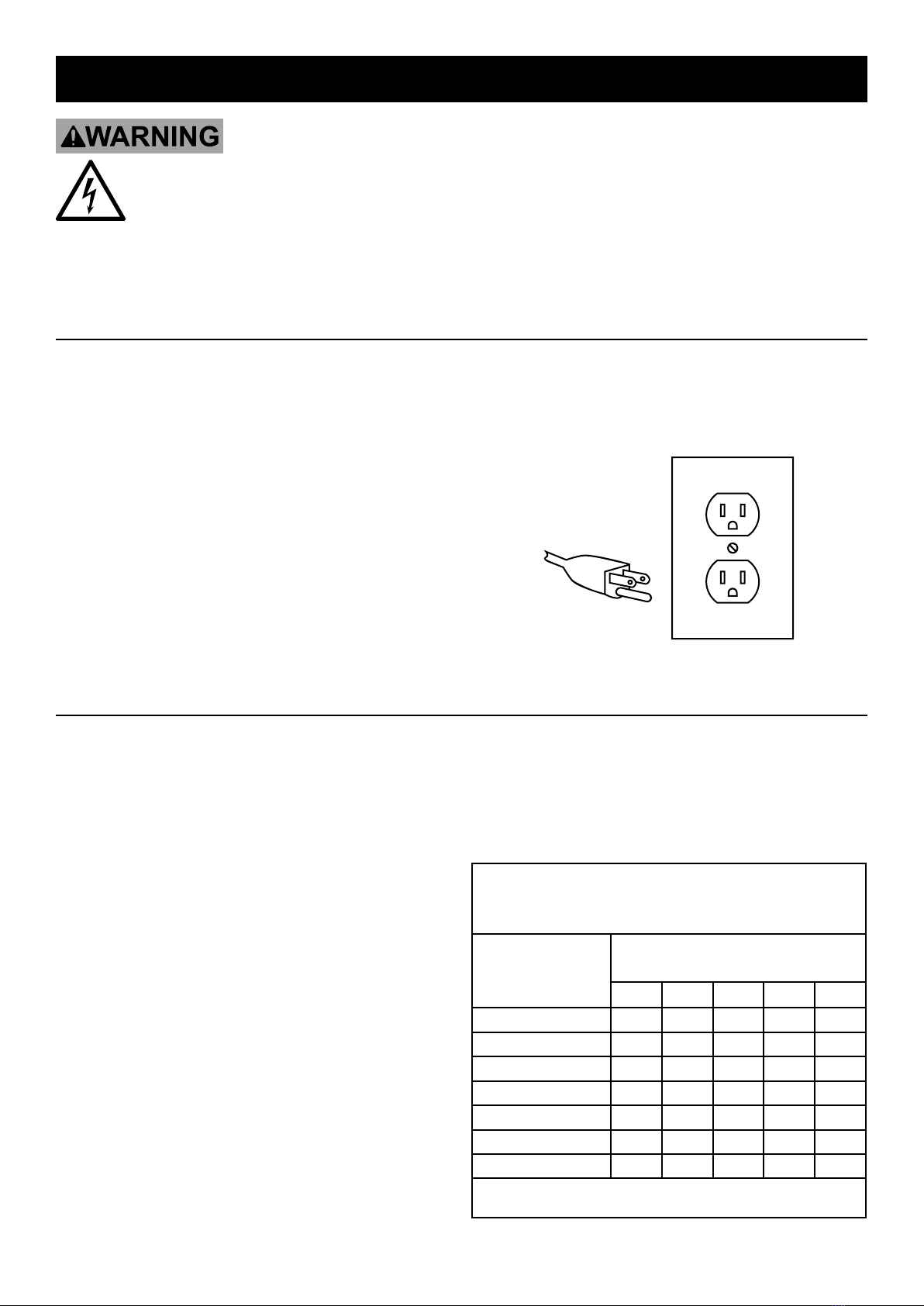
Grounded Lights: Lights with Three-Prong Plugs
1. Lights marked with “Grounding Required” have
a three wire cord and a three prong grounding
plug. The plug must be connected to a properly
grounded outlet. If the Light should electrically
malfunction or break down, grounding provides
a low resistance path to carry electricity away
from the user, reducing the risk of electric
shock. (See 3-Prong Plug and Outlet.)
2. The grounding prong in the plug is connected through
the green wire inside the cord to the grounding
system in the Light. The green wire in the cord must
be the only wire connected to the Light’s grounding
system and must never be attached to an electrically
“live” terminal. (See 3-Prong Plug and Outlet.)
3. The Light must be plugged into an appropriate outlet,
properly installed and grounded in accordance
with all codes and ordinances. The plug and outlet
should look like those in the preceding illustration.
(See 3-Prong Plug and Outlet.)
3-Prong Plug and Outlet
Extension Cords
1. Grounded Lights require a three-wire extension cord.
Double Insulated Lights can use either
a two or three wire extension cord.
2. As the distance from the supply outlet increases,
you must use a heavier gauge extension cord.
Using extension cords with inadequately sized wire
causes a serious drop in voltage, resulting in loss of
power and possible tool damage. (See Table A.)
3. The smaller the gauge number of the wire,
the greater the capacity of the cord. For
example, a 14 gauge cord can carry a
higher current than a 16 gauge cord.
4. When using more than one extension cord to
make up the total length, make sure each cord
contains at least the minimum wire size required.
5. If you are using one extension cord for more than
one tool, add the nameplate amperes and use the
sum to determine the required minimum cord size.
6. If you are using an extension cord outdoors, make
sure it is marked with the suffix “W-A” (“W” in
Canada) to indicate it is acceptable for outdoor use.
7. Make sure the extension cord is properly wired
and in good electrical condition. Always replace
a damaged extension cord or have it repaired
by a qualified electrician before using it.
8. Protect the extension cords from sharp objects,
excessive heat, and damp or wet areas.
TABLE A: RECOMMENDED
MINIMUM WIRE GAUGE FOR
EXTENSION CORDS* (120 VOLT)
NAMEPLATE
AMPERES
(at full load)
EXTENSION CORD
LENGTH
25´ 50´ 75´ 100´ 150´
0 – 2.0 18 18 18 18 16
2.1 – 3.4 18 18 18 16 14
3.5 – 5.0 18 18 16 14 12
5.1 – 7.0 18 16 14 12 12
7.1 – 12.0 16 14 12 10 -
12.1 – 16.0 14 12 10 - -
16.1 – 20.0 12 10 - - -
* Based on limiting the line voltage drop to five volts at
150% of the rated amperes.

Page 5For technical questions, please call 1-888-866-5797.Item 64398
Symbology
Double Insulated
VAC Volts Alternating Current
AAmperes
n0 xxxx/
min. No Load Revolutions per Minute (RPM)
WARNING marking concerning Risk
of Eye Injury. Wear ANSI-approved
safety goggles with side shields.
Read the manual before
set-up and/or use.
WARNING marking
concerning Risk of Fire.
Do not cover ventilation ducts.
Keep flammable objects away.
WARNING marking concerning
Risk of Electric Shock.
Properly connect power cord
to appropriate outlet.
Specifications
Electrical Rating 120VAC / 60Hz / 8A
Bulbs 500W /120VAC Halogen (included)

Page 6 For technical questions, please call 1-888-866-5797. Item 64398
Set Up Instructions
Read the ENTIRE IMPORTANT SAFETY INSTRUCTIONS section at the beginning of this
manual, including all text under subheadings therein before setup or use of this product.
Risk of accidental starting, resulting in serious personal injury. Turn the Power Switch of the Light
OFF and unplug it from the electrical outlet before assembling or making any adjustments.
Deviation from the assembly instructions may result in a risk of fire or electric shock.
Note: For additional information regarding the parts listed in the following pages,
refer to the Assembly Diagram near the end of this manual.
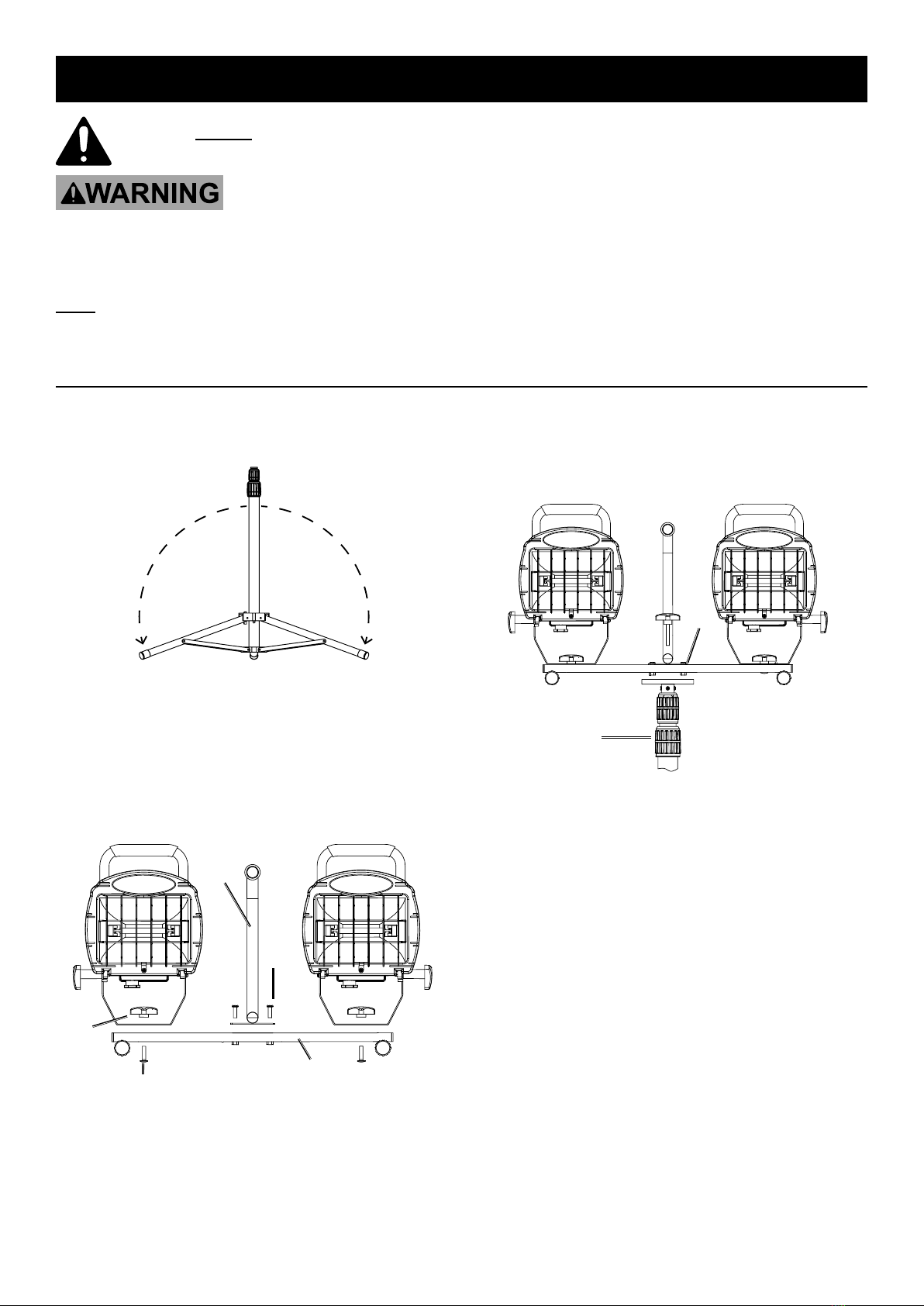
Tripod Setup
1. Loosen the Leg Knob and swing the three Legs out
and down. Then tighten the Leg Knob.
(See Figure A.)
Figure A
2. Attach the lamp assemblies to the Portable Stand
(1A), using the Screw (8A) and Knob Nut (7A).
(See Figure B.)
3. Place Center Handle (2A) atop Portable Stand
so that the holes line up. Secure Center Handle
to Stand using Screws (9A). (See Figure B.)
1
7
8
2
9
Figure B
4. Place Portable Stand on top of Stand Bracket
(13A) and secure Stand Bracket to Portable
Stand using Screws (9A). (See Figure C.)
13
9
Figure C

Page 7For technical questions, please call 1-888-866-5797.Item 64398
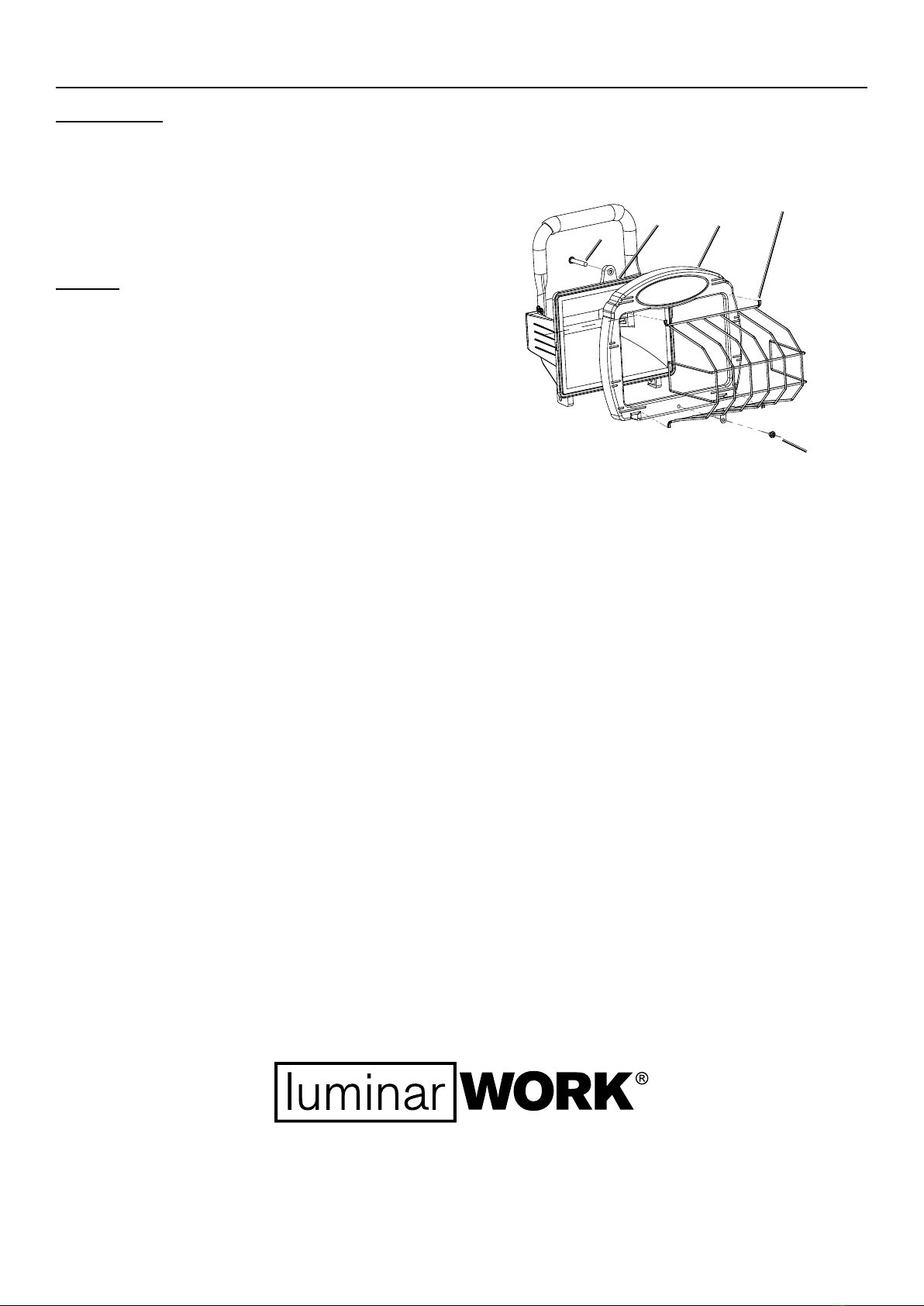
Light Assembly
For each light:
1. Remove the Screw (3) at the top of the
housing and open the Lamp Cover (2).
2. The bulb is shipped in a protective
box inside the light.
3. Insert the Bulb (22) into the Bulb Socket (21).
NOTICE: Do not touch the Bulb with your bare
hands; oil from skin will drastically shorten the life
span of the bulb if not cleaned with rubbing alcohol
and allowed to dry before use. Handle the bulb with
a soft, clean cloth or clean work gloves instead.
4. Close the Lamp Cover (2) and secure to Shell
(1) with the Screw (37). (See Figure D.)
5. Gently squeeze the Wire Cover (6) while placing
its four tabs into the Lamp Cover (2). Secure
the tab on the Wire Cover to the Lamp Cover
using the Screw (28). (See Figure D.)
6
28
2
1
37
Figure D

Page 8 For technical questions, please call 1-888-866-5797. Item 64398
Operating Instructions
Read the ENTIRE IMPORTANT SAFETY INSTRUCTIONS section at the beginning of this
manual, including all text under subheadings therein before setup or use of this product.
1. Plug the Light into a standard 120V
grounded, electric outlet.
2. Push the On/Off switch on the back of the light.
3. WARNING! Keep the Light away from
combustible objects. The light and housing
will get hot enough to start a fire.
4. To turn off, push the On/Off switch.
5. To prevent accidents; turn off lights
and disconnect power supply after use.
Allow the Lights to cool. Clean, then store
the Light indoors out of children’s reach.

Page 9For technical questions, please call 1-888-866-5797.Item 64398
Maintenance And Servicing
Procedures not specifically explained in this manual must
be performed only by a qualified technician.
TO PREVENT SERIOUS INJURY FROM ACCIDENTAL OPERATION:
Make sure that the On/Off Button is in the OFF position and unplug the tool from
its electrical outlet before performing any procedure in this section.
TO PREVENT SERIOUS INJURY FROM LIGHT FAILURE:
Do not use damaged equipment. If damage is noted, have the problem corrected before further use.
1. BEFORE EACH USE, inspect the general
condition of the light. Check for:
• loose hardware,
• damaged cord/electrical wiring,
• cracked or broken parts, and
• any other condition that may
affect its safe operation.
2. AFTER USE, allow Light to cool and then wipe
external surfaces of the Light with a clean cloth.
WARNING! If the supply cord of this
light is damaged, it must be replaced only
by a qualified service technician.

Page 10 For technical questions, please call 1-888-866-5797. Item 64398
Parts Lists and Diagram
Lamp Parts List
PLEASE READ THE FOLLOWING CAREFULLY
THE MANUFACTURER AND/OR DISTRIBUTOR HAS PROVIDED THE PARTS LIST AND ASSEMBLY DIAGRAM
IN THIS MANUAL AS A REFERENCE TOOL ONLY. NEITHER THE MANUFACTURER OR DISTRIBUTOR
MAKES ANY REPRESENTATION OR WARRANTY OF ANY KIND TO THE BUYER THAT HE OR SHE IS
QUALIFIED TO MAKE ANY REPAIRS TO THE PRODUCT, OR THAT HE OR SHE IS QUALIFIED TO REPLACE
ANY PARTS OF THE PRODUCT. IN FACT, THE MANUFACTURER AND/OR DISTRIBUTOR EXPRESSLY
STATES THAT ALL REPAIRS AND PARTS REPLACEMENTS SHOULD BE UNDERTAKEN BY CERTIFIED AND
LICENSED TECHNICIANS, AND NOT BY THE BUYER. THE BUYER ASSUMES ALL RISK AND LIABILITY
ARISING OUT OF HIS OR HER REPAIRS TO THE ORIGINAL PRODUCT OR REPLACEMENT PARTS
THERETO, OR ARISING OUT OF HIS OR HER INSTALLATION OF REPLACEMENT PARTS THERETO.
Part Description Qty
1 Shell 2
2 Lamp Cover 2
3 Ellipse Logo Plate 2
4 Reflector 2
5 Jump Ring 4
6 Bracket 2
7 Wire Cover 2
8 Lamp Handle 2
9 Junction Box Base 2
10 Junction Box Cover 2
11 Switch Nut 2
12 Φ7.5 Ring 2
13 Wire Press Board 2
14 Junction Box Hex Sleeve 2
15 Seal Ring 2
16 O-Ring 2
17 3-prong 2
18 Hand Guard 2
19 Bulb Socket 2
20 Bulb 2
21 Switch 2
Part Description Qty
22 Wire Nut 6
23 Power Cord 1
24 Bolt M4*6 2
25 Bolt M4*6 4
26 Bolt M4*5 6
27 Bolt M4*8 8
28 Bolt M4*5 4
29 Φ4 Spring Washer 4
30 Φ4 Washer 2
31 Φ4 Washer 8
32 Screw M4*14 2
33 Φ4 Washer 2
34 M4*8 2
35 BT M4*14 4
36 BT M4*14 8
37 Screw 2
38 Nut M6 4
39 Φ4 Washer 4
40 Bolt M6*14 2
41 Bolt M6*14 2
42 Glass 2
Table of contents
Other Luminar Lighting Equipment manuals