5
illuminator or Video/Wi-Fi functions are activated, and more powerful output is
not necessary and may make power supply area hot to the touch. To connect the
Power Bank, open the Connection Area rubber cover by gently pulling it outward
and then swing it counter-clockwise to the right and locate the Micro-USB-C
connector. Connect the small end of the USB
cable (included) to the connector and then
connect the large end of the cable into Power
Bank output. You may need to activate the
power bank first, prior to turning the viewer on.
We strongly recommend operating this
binocular from a power bank when long time observation is required and when
binocular is utilized on a tripod in a fixed position.
DAYLIGHT COLOR ENHANCING FILTER:
Your binocular is equipped with a unique daytime color enhancing filter, which
provides vibrant and accurate colors rendition (digital image sensors are known to
distort colors and provide an unnatural color image during daytime). The filter is
embedded into the objective lens cover (11-a) and we strongly recommend
keeping it on during daytime use in order to enjoy vibrant daytime color images.
During nighttime you will need to remove the lens cover, because the color filter
will block most of the built-in IR illuminator’s light.
TURNING THE UNIT ON / FOCUSING THE UNIT / TURNING IT OFF:
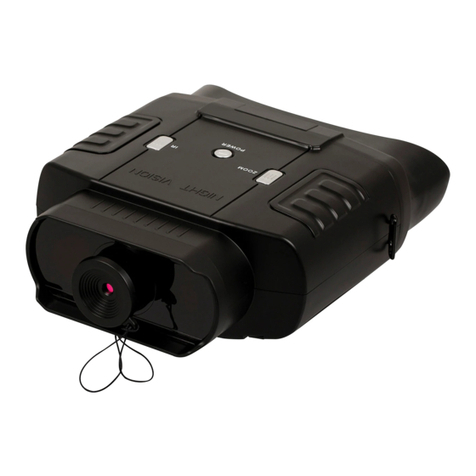
To turn the unit ON, press the POWER Button
(5) momentarily. The LED Power Indicator
(10) located on the back of the unit should
light up in green color. Look through the
eyecups (6) –you should see the Welcome
screen for a few seconds, followed by the
initial image showing alphabet and numbers.
Once you see this image you can begin the eyepiece focusing process. With right
eye closed, focus the left eyepiece until you can clearly see letters and numbers.
Then close the left eye and focus the right eyepiece. Open both eyes and the
image should be mostly clear. If the image is still not 100% clear, fine-tune each
eyepiece until you can uniformly see all letters and numbers with both eyes open.
You may also need to adjust the physical distance between the eyepieces (inter-
pupillary distance) by grasping both eyepiece assemblies and either pulling them
apart or pushing them closer to each other. Once the uniformed and sharp image
is obtained, you no longer need to adjust the two eyepieces. Now press the power
button momentarily and the letters/numbers will disappear from the screen.
(NOTE: the initial screen will automatically disappear after some time. If you are
not done focusing the eyepieces, you may continue doing so by focusing on the on-
screen display icons.)