manuals.online logo
Brands
  1. Home
  2. •
  3. Brands
  4. •
  5. Makita
  6. •
  7. Laser Level
  8. •
  9. Makita SK104Z User manual

Makita SK104Z User manual

Other Makita Laser Level manuals

Makita SK40GD User manual

Makita

Makita SK40GD User manual

Makita SK20 User manual

Makita

Makita SK20 User manual

Makita SK105GD User manual

Makita

Makita SK105GD User manual

Makita SKR60 User manual

Makita

Makita SKR60 User manual

Makita SK102 User manual

Makita

Makita SK102 User manual

Makita SK20SP User manual

Makita

Makita SK20SP User manual

Makita SK10 User manual

Makita

Makita SK10 User manual

Makita SK20GD User manual

Makita

Makita SK20GD User manual

Makita SKR200 User manual

Makita

Makita SKR200 User manual

Makita SKR300 User manual

Makita

Makita SKR300 User manual

Makita SK105D Operating instructions

Makita

Makita SK105D Operating instructions

Makita SK104 User manual

Makita

Makita SK104 User manual

Makita SK103P Operating and maintenance instructions

Makita

Makita SK103P Operating and maintenance instructions

Popular Laser Level manuals by other brands

Sokkia DT7C Operator's manual

Sokkia

Sokkia DT7C Operator's manual

Nedo ET-5 operating instructions

Nedo

Nedo ET-5 operating instructions

geo-FENNEL Maxi-Liner FL 65 HP user manual

geo-FENNEL

geo-FENNEL Maxi-Liner FL 65 HP user manual

LaserLiner X2-Laser manual

LaserLiner

LaserLiner X2-Laser manual

Spectra LL300N manual

Spectra

Spectra LL300N manual

geo-FENNEL Selection PRO FLG 40-PowerCross GREEN SP user manual

geo-FENNEL

geo-FENNEL Selection PRO FLG 40-PowerCross GREEN SP user manual

Nedo Crossliner 4 operating instructions

Nedo

Nedo Crossliner 4 operating instructions

Lasertec FX360G instruction manual

Lasertec

Lasertec FX360G instruction manual

Flex ALC 8 Original operating instructions

Flex

Flex ALC 8 Original operating instructions

Cocraft HL 20-SG Original instructions

Cocraft

Cocraft HL 20-SG Original instructions

Johnson 40-6692 instruction manual

Johnson

Johnson 40-6692 instruction manual

LaserLiner SuperCross-Laser SCL 2 operating instructions

LaserLiner

LaserLiner SuperCross-Laser SCL 2 operating instructions

Leica iCON robot 60 user manual

Leica

Leica iCON robot 60 user manual

DeWalt DW082 Original instructions

DeWalt

DeWalt DW082 Original instructions

LaserLiner ActiveFinder XP user manual

LaserLiner

LaserLiner ActiveFinder XP user manual

imex EL20 manual

imex

imex EL20 manual

Fixturlaser NXA D I-0912 user manual

Fixturlaser

Fixturlaser NXA D I-0912 user manual

Skil 560 Original instructions

Skil

Skil 560 Original instructions

manuals.online logo
manuals.online logoBrands
  • About & Mission
  • Contact us
  • Privacy Policy
  • Terms and Conditions

Copyright 2025 Manuals.Online. All Rights Reserved.

1Start up
Makita SK104
en
GB
F
I
E
P
NL
DK
S
N
FIN
J
CN
ROK
PL
HR
H
RUS
CZ
GR
LT
LV
EST
SLO
SK
M
TR
User Manual
English
Before using the product for the first
time, please read carefully through
the Safety Instructions and the User
Manual. The person responsible for
the instrument must ensure that all users understand
these directions and adhere to them.
Contents
Start up ..................................................................... 1
Operation ................................................................. 2
Care and advice on operation............................ 8
Transport.................................................................. 8
Technical data SK104........................................... 9
Safety instructions .............................................. 10
Start up
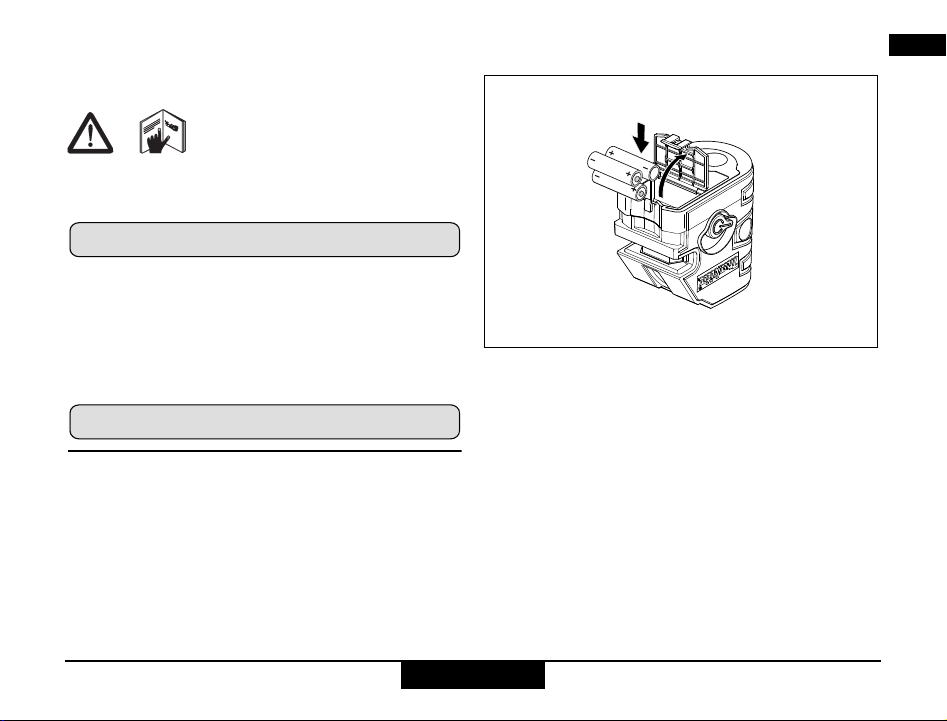
Inserting / replacing batteries
Pull the battery cover outwards to unlock the battery
compartment. Open the battery compartment cover and
insert the batteries, observing the correct polarity. Then
press the battery compartment cover back down until it
engages.
• Insert the batteries observing the correct polarity
• Use alkaline batteries or rechargeable batteries only
• Remove the batteries if the instrument is not to be
used for a long period of time (to prevent corrosion)
2
Operation Makita SK104
en
GB
F
I
E
P
NL
DK
S
N
FIN
J
CN
ROK
PL
HR
H
RUS
CZ
GR
LT
LV
EST
SLO
SK
M
TR
Operation
Keypad and control elements
1On/Set key
2Pulse key
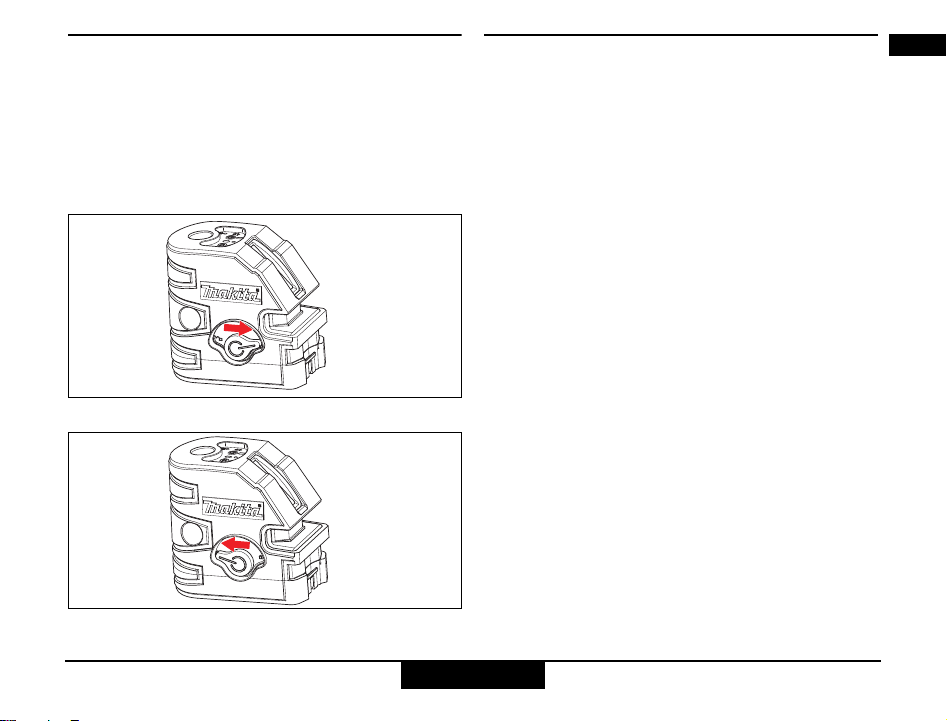
3Lock switch
Display
4Locked
5Laser active
6Pulse/Power save mode ON
Switching on/off
• ON: Briefly press the On/Set key 1.
• OFF: Press and hold down the On/Set key 1.
Laser functions
Pressing the On/Set key 1activates the following laser
functions:
3
Action SK104
not in Lock mode in Lock mode
1x only
horizontal line
only
horizontal line
2x only vertical line only vertical line
3x horizontal and
vertical line again as 1x
1
5
46
2
3Operation
Makita SK104
en
GB
F
I
E
P
NL
DK
S
N
FIN
J
CN
ROK
PL
HR
H
RUS
CZ
GR
LT
LV
EST
SLO
SK
M
TR
Self-levelling and Lock functions
The instrument automatically levels itself within the
specified grade range (Refer to "Technical data") .
Turn the Lock switch 3in order to transport or tilt the
instrument beyond the self-levelling range. When
locked, the pendulum is fixed and the self-levelling
function is deactivated.
Transportation and lock
Self levelling
Pulse
To be able to detect the laser lines over long distances
(> 15 m) or in unfavourable lighting conditions, a laser
detector can be used. The detector is able to locate the
laser beam in Pulse mode, even over long distances.
(Laser detector refer to accessories)
4
Operation Makita SK104
en
GB
F
I
E
P
NL
DK
S
N
FIN
J
CN
ROK
PL
HR
H
RUS
CZ
GR
LT
LV
EST
SLO
SK
M
TR
Applications SK104
Receiver
available
as
accessory.
5Operation
Makita SK104
en
GB
F
I
E
P
NL
DK
S
N
FIN
J
CN
ROK
PL
HR
H
RUS
CZ
GR
LT
LV
EST
SLO
SK
M
TR
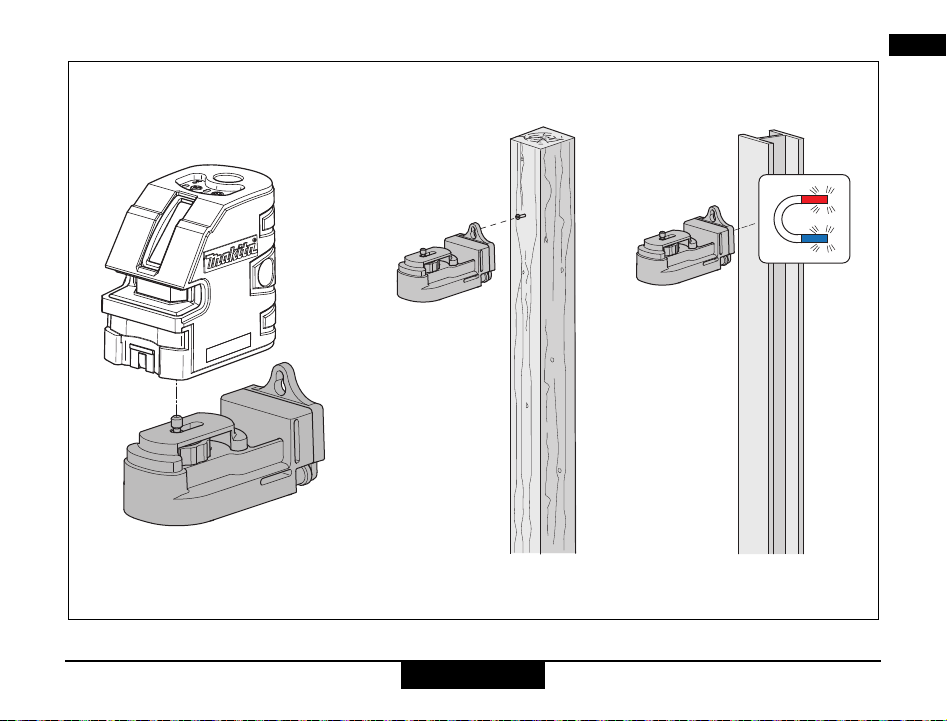
How to use the wall mount bracket:
6
Operation Makita SK104
en
GB
F
I
E
P
NL
DK
S
N
FIN
J
CN
ROK
PL
HR
H
RUS
CZ
GR
LT
LV
EST
SLO
SK
M
TR
Checking the accuracy
Check the accuracy of your SK104 regularly and
particularly before important measuring tasks.
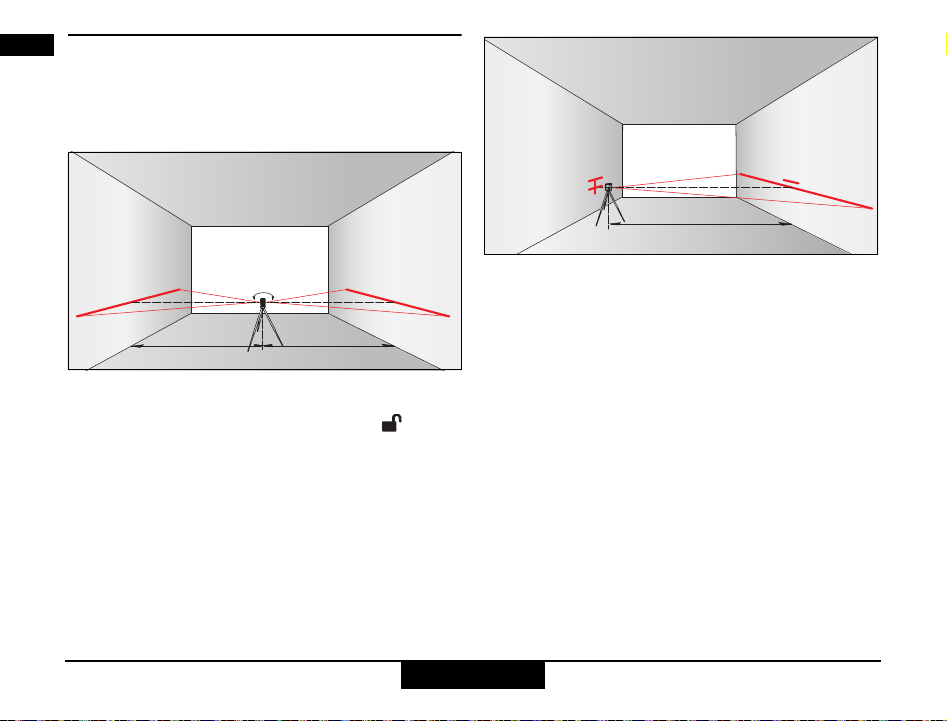
Checking the accuracy of the levelling
Set the instrument on a tripod half-way between two
walls (A+B) that are approx. 5 m apart.
Place the Lock switch 3in the "Unlocked" ( )
position.
Direct the instrument at wall A and switch on the instru-
ment. Activate the horizontal laser line or laser dot and
mark the position of the line or the dot on wall A (-> A1).
Rotate the instrument by 180° and mark the horizontal
laser line or the laser dot in exactly the same way on wall
B (-> B1).
Then place the instrument at the same elevation as
close as possible to wall A and again mark the horizontal
laser line or the laser dot on wall A (-> A2) . Rotate the
instrument by 180° again and mark the laser on wall B (-
> B2). Measure the distances of the marked points A1-
A2 and B1-B2. Calculate the difference of the two
measurements. If the difference does not exceed 2 mm,
then the SK104 is within tolerance.
| (A1 - A2) - (B1 - B2) | 2 mm
A1 B1
2.5 m 2.5 m
A1
A2
B1
B2
5 m
7Operation
Makita SK104
en
GB
F
I
E
P
NL
DK
S
N
FIN
J
CN
ROK
PL
HR
H
RUS
CZ
GR
LT
LV
EST
SLO
SK
M
TR
Checking the accuracy of the horizontal line:
Place the Lock switch 3in the "Unlocked" ( )
position.
Position the instrument approx. 5 m away from the wall.
Direct the instrument at the wall and switch on with the
On/Set key 1. Activate the laser line with the On/Set key
1and mark the intersection point of laser crosshairs on
the wall.
Swivel the instrument to the right and then to the left.
Observe the vertical deviation of the horizontal line from
the marking. If the difference does not exceed 3 mm,
then the SK104 is within tolerance.
Checking the accuracy of the vertical line:
Place the Lock switch 3in the "Unlocked" ( )
position.
As reference, use a plumb-bob and attach it as close as
possible to an approx. 3 m high wall.
Position the instrument at a distance of approx. 1.5 m from
the wall at an elevation of approx. 1.5 m. Direct the instru-
ment at the wall and switch on with the On/Set key 1. Acti-
vate the laser line with the On/Set key 1. Rotate the instru-
ment and align it with the bottom of the plumb line. Now read
off the maximum deviation of the laser line from the top of the
plumb line. If the difference does not exceed 2 mm, then the
SK104 is within tolerance.
max.
3 mm
5 m
1.5 m
max.
2 mm
8
Care and advice on operation Makita SK104
en
GB
F
I
E
P
NL
DK
S
N
FIN
J
CN
ROK
PL
HR
H
RUS
CZ
GR
LT
LV
EST
SLO
SK
M
TR
Checking the accuracy of the vertical
plumbing of the SK104:
Place the Lock switch 3in the "Unlocked" ( )
position.
Checking the upper plumbing point:
Checking the lower plumbing point:
Set up the laser on its tripod or wall mount bracket near point
A1 at a minimum distance of 1.5 m from point B1. The hori-
zontal laser is aligned in direction 1. Mark the laser dots A1
and B1 with a pin.
Rotate the instrument by 180° so that it points in the opposite
direction 2 to direction 1. Adjust the instrument so that the
laser beam hits point A1 exactly. If point B2 is no further than
2 mm away from point B1, then the SK104 is within toler-
ance.
Should your SK104 be outside of the specified toler-
ance, please contact an authorised dealership of Makita.
Display notices
Falling below or exceeding the permissible temperature
range:
The laser switches off and all symbols flash.
Outside of the self-levelling range:
The laser beam is flashing.
Pendulum locked:
The laser beam is not levelled and the Lock symbol 4lights
up.
Care and advice on operation
Do not immerse the instrument in water. Wipe off dirt with a
damp soft cloth. Do not use aggressive cleaning agents or
solvents. Treat the instrument with the same care that you
would apply to binoculars or a camera.
Dropping or violent shaking of the instrument may damage
it. Check the instrument for any damage before using it.
Check the levelling accuracy of the instrument regularly.
Transport
To safely transport the instrument, set the Lock switch 3to
"Locked" ( ).
1
B1
A1
B2
1.5 m
max. 2 mm
2
1
B1
A1
B2
1.5 m
max. 2 mm
2
9Technical data SK104
Makita SK104
en
GB
F
I
E
P
NL
DK
S
N
FIN
J
CN
ROK
PL
HR
H
RUS
CZ
GR
LT
LV
EST
SLO
SK
M
TR
Technical data SK104
* depending on lighting conditions * depending on lighting conditions
Metric unit system
Range up to 15 m*
Range with detector up to 60 m
Levelling accuracy @ 10 m ± 3,0 mm
Self-levelling range 4° ± 1°
Accuracy of horizontal line @ 10 m ± 3,0 mm
Vertical accuracy @ 3 m
line length ± 0,75 mm
Number of laser lines 2
Beam direction vertical,
horizontal
Laser type 635 nm, laser class II
Batteries Type Typ AA
3 x 1,5 V
Protection class spray water / dust IP 54
Operating temperature -10°C to 40°C
Storage temperature -25°C to 70°C
Dimensions (H x D x W) 111 x 117 x 72 mm
Weight without batteries 470 g
Tripod thread 1/4"
Non-metric unit system
Range up to 50 ft*
Range with detector up to 197 ft
Levelling accuracy @ 32 ft ± 1/8 “
Self-levelling range 4° ± 1°
Accuracy of horizontal line @ 32 ft ± 1/8 “
Vertical accuracy @ 10 ft
line length ± 0.03 “
Number of laser lines 2
Beam direction vertical,
horizontal
Laser type 635 nm, laser class II
Batteries Type Typ AA
3 x 1,5 V
Protection class spray water / dust IP 54
Operating temperature 14°F to +104°F
Storage temperature -13°F to +158°F
Dimensions (H x D x W) 4.25 x 4.6 x 2.83 in
Weight without batteries 16.6 oz
Tripod thread 1/4"
10
Safety instructions Makita SK104
en
GB
F
I
E
P
NL
DK
S
N
FIN
J
CN
ROK
PL
HR
H
RUS
CZ
GR
LT
LV
EST
SLO
SK
M
TR
Safety instructions
The person responsible for the instrument must ensure
that all users understand these directions and adhere to
them.
Symbols used
The symbols used have the following meanings
WARNING:
Indicates a potentially hazardous situation or an
unintended use which, if not avoided, will result in death
or serious injury.
CAUTION:
Indicates a potentially hazardous situation or an
unintended use which,if not avoided, may result in minor
injury and/or appreciable material, financial and environ-
mental damage.
Important paragraphs which must be adhered
to in practice as they enable the product to be used
in a technically correct and efficient manner.
Permitted use
• Projection of horizontal and vertical laser lines and
laser dots
Prohibited use
• Using the product without instruction
• Using outside the stated limits
• Deactivation of safety systems and removal of
explanatory and hazard labels
• Opening of the equipment by using tools (screw-
drivers, etc.), as far as not specifically permitted for
certain cases
• Carrying out modification or conversion of the
product
• Deliberate dazzling of third parties; also in the dark
• Inadequate safeguards at the surveying site.
Limits of use
Refer to section "Technical data".
The SK104 is designed for use in areas permanently
habitable by humans. Do not use the product in explo-
sion hazardous areas or in aggressive environments.
Areas of responsibility
Responsibilities of the manufacturer of the original
equipment:
Makita Corporation Anjo, 3-11-8, Sumiyoshi-cho, Aichi
446-8502, Japan /
Makita, Jan-Baptist Vinkstraat 2, 3070, Belgium
Internet: www.makita.com (for short Makita):
• Makita is responsible for supplying the device, including
the User Manual, in a completely safe condition.
• Makita is not responsible for third party accessories.