user application.
For more information regarding fuel gauge battery
packs, please send e-mail to Mokeneye Customer
Service: support@mokeneye.com.
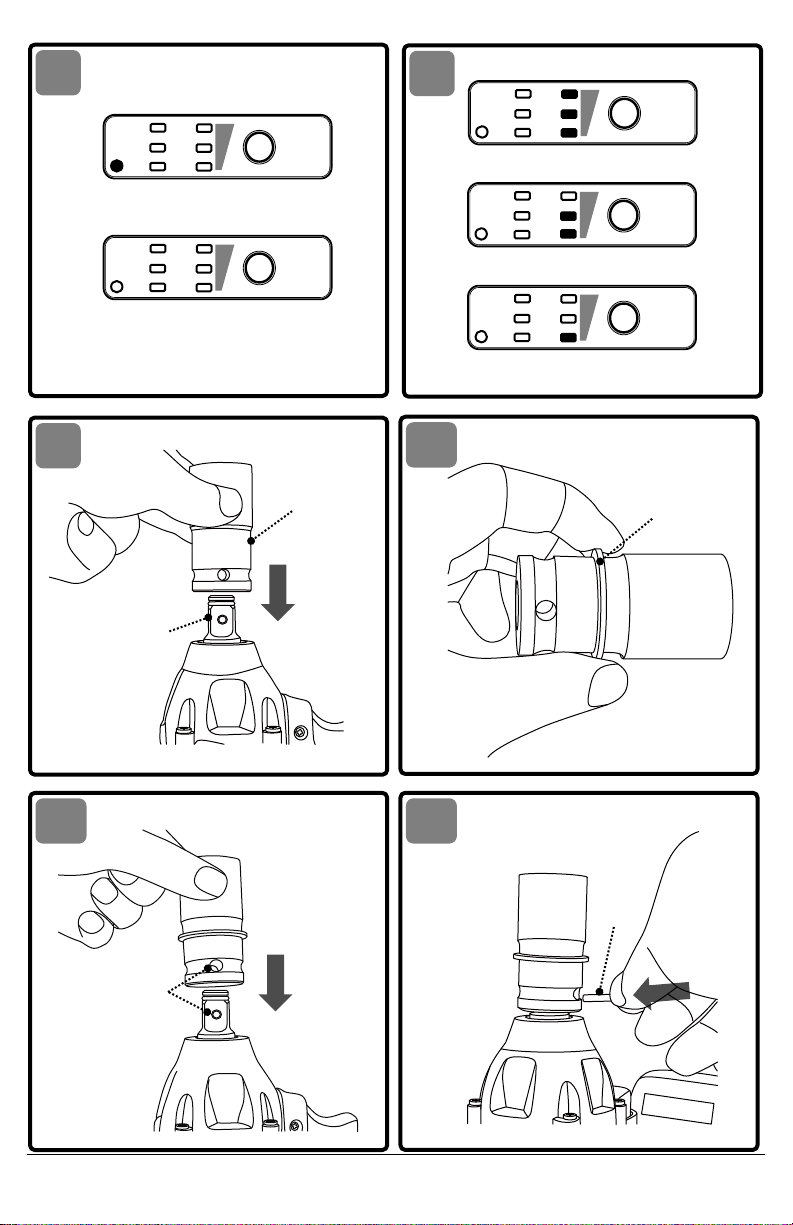
LED FUNCTIONS OF CHARGER
LED WILL BE ON TO INDICATE STATUS OF CHARGER
AND BATTERY PACK:
•LED lights up red = Fast charging mode.
•LED lights up green = Fully charged and in
maintenance charge mode.
•LED lights up green = When an under-charged
battery pack is inserted into charger, indicates
hot battery pack or that battery pack is out of
normal temperature range or deeply discharged
or defective battery pack.
•No LED on = Defective charger.
CHARGING THE BATTERY PACK
See Fig. 2
Battery packs for this tool are shipped in a low
charge condition to prevent possible problems.
Therefore, you should charge it until the green LED
on the front of the charger comes on.
CHARGING A COOL BATTERY PACK
If battery pack is within normal temperature range,
the red LED on charger will come on.
NOTICE: If the charger does not charge the battery
pack under normal circumstances, return both the
battery pack and charger to your nearest Mokeneye
Authorized Service Center for electrical check.
•Charge the battery pack only with the charger
provided.
•Make sure the power supply is normal household
voltage, 110~240 volts, 50/60 Hz, AC only.
•Connect the charger to the power supply.
•For C10M1US charger, insert the plug of the
charger into the charging hole of the battery pack.
•For C20M1US/C20MK1US charger, place the
battery pack in the charger aligning raised rib on
the battery pack with the groove in the charger.
•Press down on the battery pack to be sure
contacts on the battery pack engage properly
with contacts in the charger.
•Normally the red LED on charger will come on.
This indicates the charger is in fast charging mode.
•Red LED should remain on for approximately 1 to
2 hours then the green LED will come on. Green
LED on indicates battery pack is fully charged and
charger is in maintenance charge mode.
NOTICE:The green LED will remain on until the
charger is disconnected from the power supply.
•After normal usage, a minimum of 1 hour of
charging time is required to fully recharge battery
pack.
•The battery pack and the charger will become
slightly warm to the touch while charging. This is
normal and does not indicate a problem.
•Do not place the charger and battery pack in an
area of extreme heat or cold. They will work best
at normal room temperature.
NOTICE: The charger and battery pack should be
placed in a location where the temperature is
more than 32°F but less than 100°F.
•When batteries become fully charged, unplug the
charger from power supply and remove the
battery pack.
CHARGING A HOT BATTERY PACK
When using the tool continuously, the batteries in
the battery pack will become hot. You should let a
hot battery pack cool down for approximately 30
minutes before attempting to recharge. When the
battery pack becomes discharged and is hot, this will
cause the green LED to come on instead of the red
LED. After 30 minutes, reinsert the battery pack in
the charger. If the green LED continues to remain on,
return battery pack to your nearest Mokeneye
Authorized Service Center for checking or replacing.
NOTICE: This situation only occurs when continuous
use of the tool causes the batteries to become hot. It
does not occur under normal circumstances. Refer to
"CHARGING A COOL BATTERY PACK" for normal
recharging of batteries. If the charger does not
charge your battery pack under normal
circumstances, return both the battery pack and
charger to your nearest Mokeneye Authorized
Service Center for electrical check.
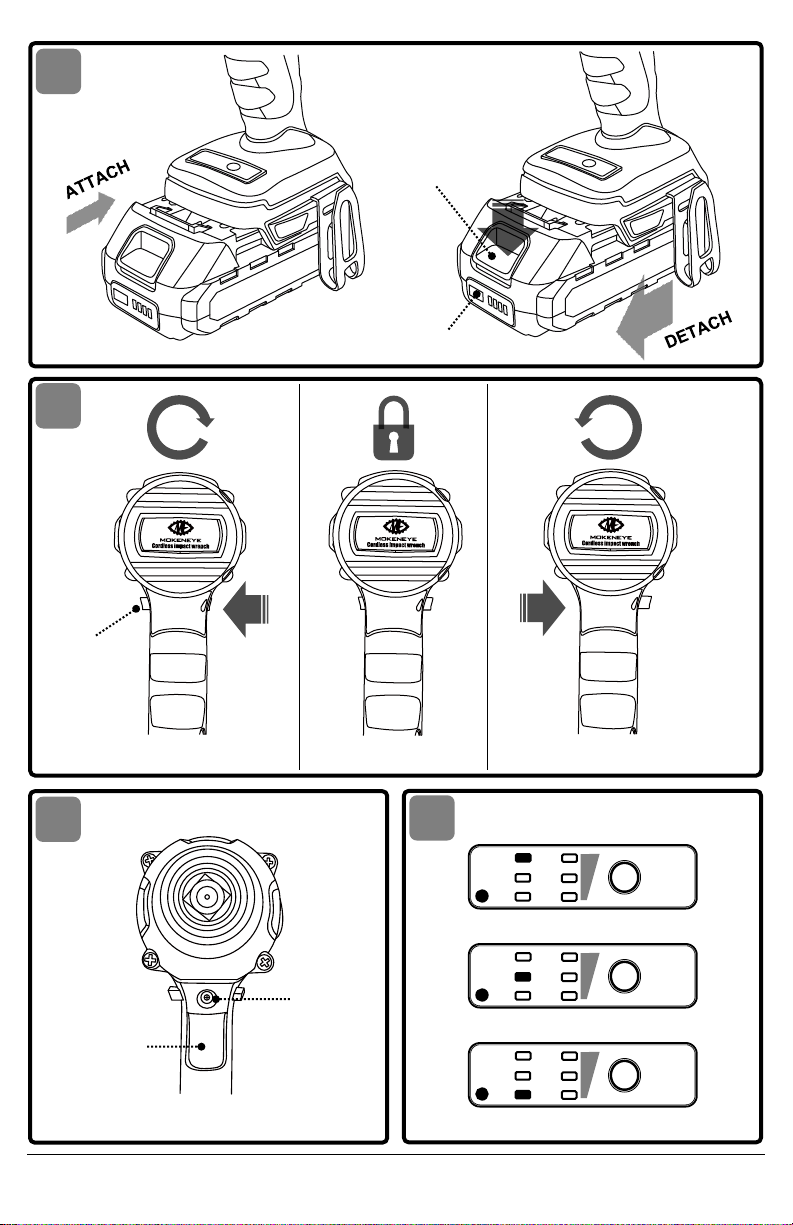
TO ATTACH/DETACH BATTERY PACK
See Fig. 3
Lock the variable-speed trigger switch "OFF" on the
tool by placing the direction-of-rotation
(forward/center-lock/reverse) selector in the center
position before attaching or detaching the battery
pack.
To Attach The Battery Pack:
Align the raised rib on the battery pack with the
grooves in the tool, and then slide the battery pack
onto the tool.
To Detach The Battery Pack:
Depress the battery-release button, located on the
front of the battery pack, to release the battery pack.
Pull the battery pack out and remove it from the tool.
NOTICE: When placing the battery pack onto the tool,
be sure that the raised rib on the battery pack aligns
with the groove inside the tool and that the latches
snap into place properly. Improper attachment of
the battery pack can cause damage to internal
components.
Battery tools are always in
operating condition. Therefore, the
direction-of-rotation (forward/center-lock/reverse)
selector should always be locked in the center
position when the tool is not in use or carrying it at
your side.