manuals.online logo
Brands
  1. Home
  2. •
  3. Brands
  4. •
  5. NaviLite
  6. •
  7. Lighting Equipment
  8. •
  9. NaviLite N1 Series User manual

NaviLite N1 Series User manual

This manual suits for next models

2

Other NaviLite Lighting Equipment manuals

NaviLite N1 Series User manual

NaviLite

NaviLite N1 Series User manual

NaviLite N3 Series User manual

NaviLite

NaviLite N3 Series User manual

Popular Lighting Equipment manuals by other brands

Life 39.9F70020C quick start guide

Life

Life 39.9F70020C quick start guide

EuroLite LED ML-20 user manual

EuroLite

EuroLite LED ML-20 user manual

LIGMAN OD-50141 installation manual

LIGMAN

LIGMAN OD-50141 installation manual

Home Accents Holiday 1002461144 instructions

Home Accents Holiday

Home Accents Holiday 1002461144 instructions

Experia IRiS Ripple Light instruction manual

Experia

Experia IRiS Ripple Light instruction manual

Erco Gecko Mounting instructions

Erco

Erco Gecko Mounting instructions

Inter-lux ZTA.100.Surface Installation and maintenance instructions

Inter-lux

Inter-lux ZTA.100.Surface Installation and maintenance instructions

Whelen Engineering Company TN Series installation guide

Whelen Engineering Company

Whelen Engineering Company TN Series installation guide

IKEA BJÖRKSPIREA manual

IKEA

IKEA BJÖRKSPIREA manual

Toolland PM 6640 instruction manual

Toolland

Toolland PM 6640 instruction manual

GTD GTD-LP200 user manual

GTD

GTD GTD-LP200 user manual

LIVARNO home 1105-W-UK manual

LIVARNO home

LIVARNO home 1105-W-UK manual

ProLights EclPar IPMFC user manual

ProLights

ProLights EclPar IPMFC user manual

Velvet EVO Series user manual

Velvet

Velvet EVO Series user manual

IDTOLIGHT GENT installation instructions

IDTOLIGHT

IDTOLIGHT GENT installation instructions

MAYTONI S35 installation manual

MAYTONI

MAYTONI S35 installation manual

MaxLite MLFP14DP4535 user manual

MaxLite

MaxLite MLFP14DP4535 user manual

SLV Elektronik 550621 instruction manual

SLV Elektronik

SLV Elektronik 550621 instruction manual

manuals.online logo
manuals.online logoBrands
  • About & Mission
  • Contact us
  • Privacy Policy
  • Terms and Conditions

Copyright 2025 Manuals.Online. All Rights Reserved.

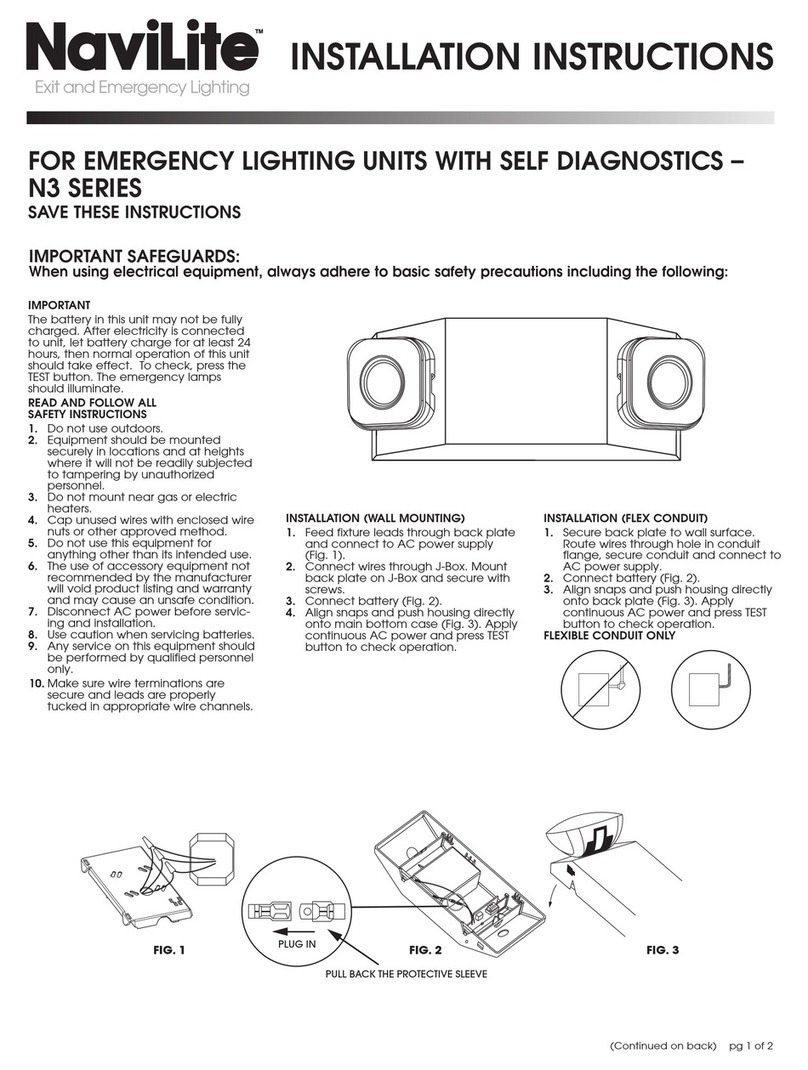
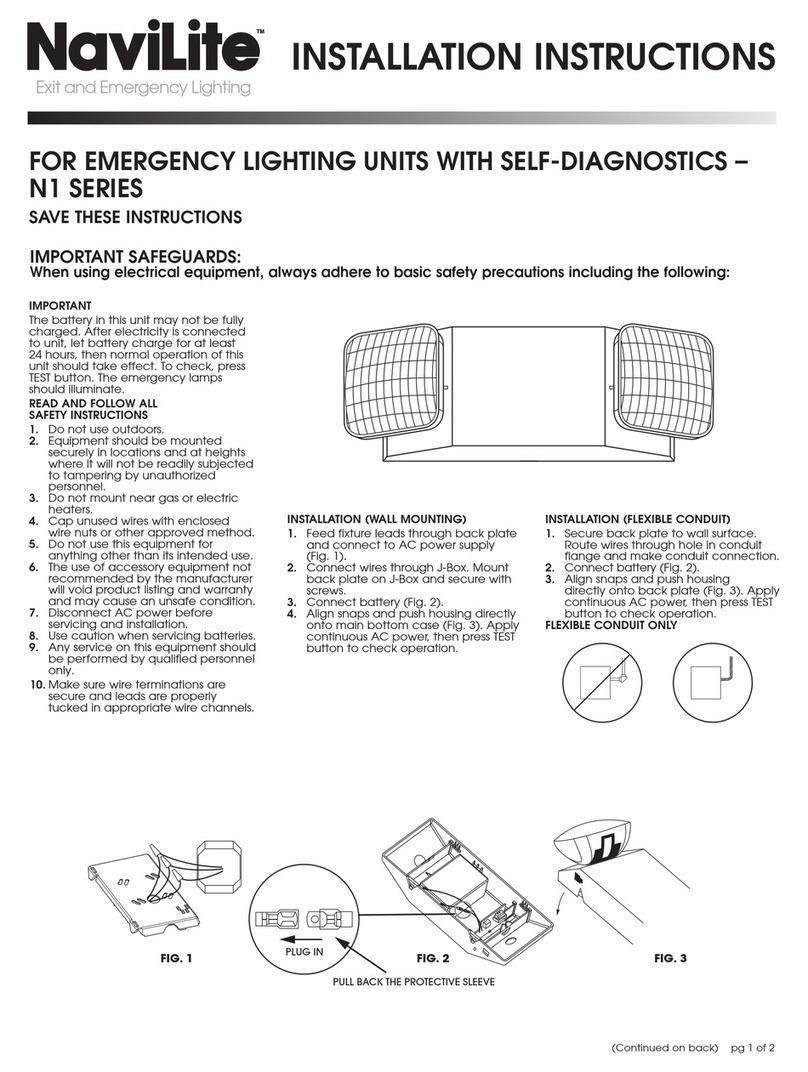
IMPORTANT
The battery in this unit may not be fully
charged. After electricity is connected
to unit, let battery charge for at least 24
hours, then normal operation of this unit
should take effect. To check, press the
TEST button. The emergency lamps
should illuminate.
READ AND FOLLOW ALL
SAFETY INSTRUCTIONS
1. Do not use outdoors.
2. Equipment should be mounted securely
in locations and at heights where it will
not be readily subjected to tampering by
unauthorized personnel.
3. Do not mount near gas or electric
heaters.
4. Cap unused wires with enclosed wire
nuts or other approved method.
5. Do not use this equipment for
anything other than its intended use.
6. The use of accessory equipment not
recommended by the manufacturer will
void product listing and warranty and
may cause an unsafe condition.
7. Disconnect AC power before servicing
and installation.
8. Use caution when servicing batteries.
9. Any service on this equipment should be
performed by qualified personnel only.
10. Make sure wire terminations are secure
and leads are properly tucked in appro-
priate wire channels.
INSTALLATION (WALL MOUNTING)
1. Feed fixture leads through back plate and
connect to AC power supply
(Fig. 1).
2. Connect wires through J-Box. Mount back
plate on J-Box and secure with screws.
3. Connect battery.
4. Align snaps and push housing directly
onto main bottom case (Fig. 3). Apply
continuous AC power and press TEST
button to check operation.
INSTALLATION (FLEXIBLE CONDUIT)
1. Secure back plate to wall surface. Route
wires through hole in conduit flange,
secure conduit and connect to AC power
supply.
2. Connect battery.
3. Align snaps and push housing directly onto
back plate (Fig. 3). Apply continuous
AC power and press TEST
button to check operation.
FLEXIBLE CONDUIT ONLY
IMPORTANT SAFEGUARDS:
When using electrical equipment, always adhere to basic safety precautions including the following:
(Continued on back) pg 1 of 2
INSTALLATION INSTRUCTIONS
FOR EMERGENCY LIGHTING UNITS – N1 SERIES
SAVE THESE INSTRUCTIONS

WARRANTY
Juno Lighting Group warrants that its products are free from defects in material and workmanship. Juno Lighting Group’s obligation
is expressly limited to repair or replacement, without charge, at Juno Lighting Group’s factory after prior written return authorization
has been granted. This warranty shall not apply to products which have been altered or repaired outside of Juno Lighting Group’s
factory. This warranty is in lieu of all other warranties, expressed or implied, and without limiting the generality of the foregoing phrase,
excludes any implied warranty of merchantability. Also, there are no warranties which extend beyond the description of the product
on the company’s literature setting forth terms of sale.
Product Services Phone (888) 387-2212
1300 S. Wolf Rd • P.O. Box 5065 • Des Plaines, IL 60017-5065 • Phone: 800-323-5068 • www.junolightinggroup.com
©2016 Acuity Brands Lighting, Inc. Rev 08/05 P0077 pg 2 of 2
INSTALLATION INSTRUCTIONS
FOR EMERGENCY LIGHTING FIXTURE – N1 SERIES
OPERATION
1. During an electrical power failure, the
lamps will automatically illuminate for a
minimum of 90 minutes.
2. To test, depress the TEST switch. The
emergency lamps will illuminate. When
the switch is released, lamps will shut
off.
IMPORTANT SAFEGUARDS:
When using electrical equipment, always adhere to basic safety precautions including the following:
WIRING DIAGRAM