6
Quick-Start Instructions
Note: This section is intended for use only after you have read and familiarized yourself with the entire
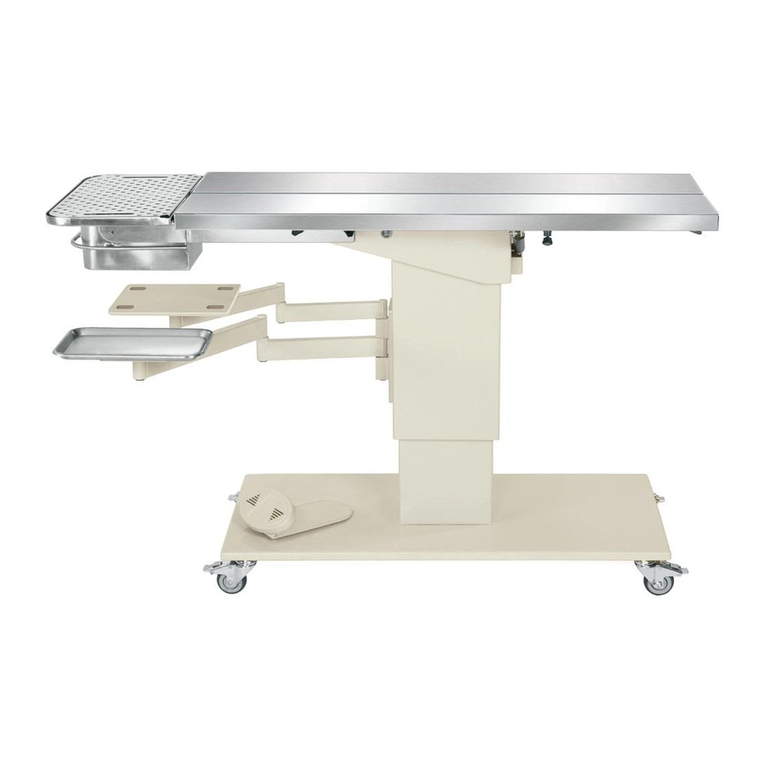
contents of this manual. Refer to Figure 1 for component identification.
1. Lock all 4 casters A.
2. Plug the Power Cord Einto a suitable 120V/60Hz grounded wall outlet.
3. With the table top attened and horizontal, and the table set to a comfortable height, place the patient
on the center of the table top with its head over the Head Support S.
4. Turn the Swivelling Foot switch Bto the desired location and adjust height.
5. Adjust a V-Table panel to desired angle for dorsal positioning by depressing and holding the V-Positioner
Lock Lever Jwhile raising the panel to the desired angle. Releasing the lever will lock the panel in place.
To atten a V-Positioner panel, depress and hold the lever while rmly gripping the panel, slowly lowering
the panel until level.
6. Tie patient down using the provided Tie-down Cleats.
7. The tilt of the Olympic Dental Table may be adjusted to any angle up to 10 degrees by pressing
on the Tilt Lever Iwhile simultaneously lifting or lowering the end of the table closest to the lever.
Releasing the lever will lock the table at the desired tilt angle.
Caution: To avoid damage to the Instrument Tray Uwhile tilting the table top down, make sure it is not
directly beneath the Removable Drain Pan P.
Caution: To prevent the table from tilting suddenly, always maintain a firm grip on the table top while
depressing the Tilt Lever.
8. Move the Instrument Tray to the desired location and place a clean instrument tray (size ‘B’) onto the
permanently installed base tray.
9. When done, empty any collected uids from the Removable Drain Pan P. To remove the pan, pull on the
Retention Knob Rwhile sliding the pan out on its track. You may also wish to remove the Drain Trough L
from under the table top for cleaning.
Operation
Loading/Unloading Patients
Caution: Be sure the Dental Table is located on a level surface and that all 4 casters are locked before
loading or unloading patients.
Caution: Do not use the Dental Table for patients weighing more than 250 pounds.
1. Press the V-Positioner Lock Levers Jand while rmly gripping the panels, slowly lower until attened.
2. Raise or lower the table top to the desired height for loading a patient by pressing and holding the indicator
on the Foot Switch B.
3. Place the patient on the center of the table with its head over the Head Support S .
4. Proceed with additional table adjustments. When a procedure is completed, the table should be returned
to a horizontal position with its 2 table V-panels attened before removing the patient.
Height Adjustment
The height of the Olympic Dental Table is innitely adjustable from 29" to 41" and may be adjusted at any time
during a procedure to provide maximum comfort to the operator or to provide better visualization or access.
The Foot Switch Bis mounted on a swivel for easy access from either side, or from the back of the table. Simply
move the swivel with your foot until the Foot Switch is directly in front of you, then step on the foot control to raise
or lower the table.