manuals.online logo
Brands
  1. Home
  2. •
  3. Brands
  4. •
  5. Passotel
  6. •
  7. Intercom System
  8. •
  9. Passotel Telpass EVO User manual

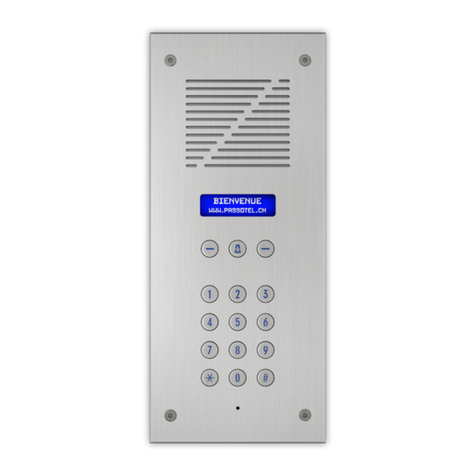
Passotel Telpass EVO User manual

Other Passotel Intercom System manuals

Passotel 120LCD User manual

Passotel

Passotel 120LCD User manual

Passotel EVO2 User manual

Passotel

Passotel EVO2 User manual

Passotel 9 User manual

Passotel

Passotel 9 User manual

Passotel Telpass STD User manual

Passotel

Passotel Telpass STD User manual

Passotel EVO 3 User manual

Passotel

Passotel EVO 3 User manual

Passotel 1 mini User manual

Passotel

Passotel 1 mini User manual

Popular Intercom System manuals by other brands

Videx VRDK1 (25H) Technical manual

Videx

Videx VRDK1 (25H) Technical manual

Auta COMPACT VISUALTECH manual

Auta

Auta COMPACT VISUALTECH manual

Aiphone LC-10S instructions

Aiphone

Aiphone LC-10S instructions

Aiphone PD-1 instructions

Aiphone

Aiphone PD-1 instructions

Aiphone JF-DVF-HID-I instructions

Aiphone

Aiphone JF-DVF-HID-I instructions

Comelit 4893M Technical manual

Comelit

Comelit 4893M Technical manual

MGL Avionics V16 manual

MGL Avionics

MGL Avionics V16 manual

SSS Siedle BVI 750-0 Installation & programming

SSS Siedle

SSS Siedle BVI 750-0 Installation & programming

urmet domus AIKO 1716/1 quick start guide

urmet domus

urmet domus AIKO 1716/1 quick start guide

urmet domus IPerVoice 1039 Installation

urmet domus

urmet domus IPerVoice 1039 Installation

Alpha Communications STR QwikBus TT33-2 Installation, programming, and  user's manual

Alpha Communications

Alpha Communications STR QwikBus TT33-2 Installation, programming, and user's manual

Monacor ICM-20H instruction manual

Monacor

Monacor ICM-20H instruction manual

Logenex A202CR Installation & programming

Logenex

Logenex A202CR Installation & programming

Quantum QR5 Installation and programming manual

Quantum

Quantum QR5 Installation and programming manual

EVGA XR1 quick guide

EVGA

EVGA XR1 quick guide

CyberData 011211 series Installation quick reference

CyberData

CyberData 011211 series Installation quick reference

Vidos duo M1021 user manual

Vidos

Vidos duo M1021 user manual

Savant DOR-SMS-00 Deployment guide

Savant

Savant DOR-SMS-00 Deployment guide

manuals.online logo
manuals.online logoBrands
  • About & Mission
  • Contact us
  • Privacy Policy
  • Terms and Conditions

Copyright 2025 Manuals.Online. All Rights Reserved.

passotel.ch/inscription
Vous venez d’emménager, ou vous souhaitez modifier
la configuration de votre portier téléphonique?
Rendez-vous sur notre site Internet et remplissez
simplement le formulaire d’inscription.
You just moved in, or wish to amend your
building’s door entry phone configuration?
Visit our web site, and fill in the inscription form.
Sie sind umgezogen oder möchten
die Einstellungen an Ihrem Türtelefon ändern?
Besuchen Sie unsere Internetseite und füllen Sie
das Anmeldeformular für Anwohner aus.
Vi siete appena trasferiti, o desiderate far
modificare la configurazione del vostro citotelefono?
Visitate il nostro sito Internet e compilate
il modulo di iscrizione per residenti.
Acaba de mudarse de casa, o pretende cambiar
la configuración de su portero telefonico?
Visite nuestra página web y rellene simplemente
el formulario de inscripción de residente.
Acabou de mudarde casa o pretende alterar a
configuraçao do seu porteiro telefonico?
Visite o nosso site Web e preencha simplesmente
o formulário de inscrição.
?
passotel.ch
Istruzioni per l’uso
Guía de uso
Guia de utilização
Guide d’utilisation
User Guide
Hinweise zur Nutzung
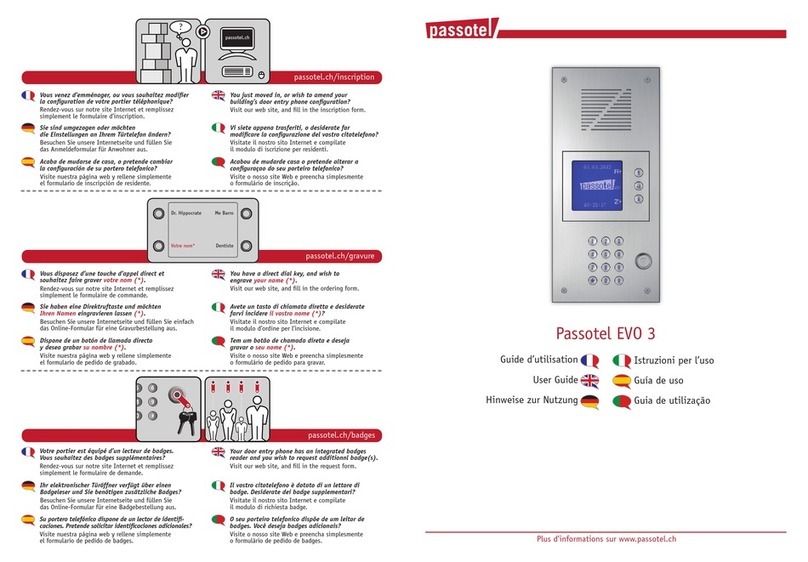
Passotel Telpass EVO
Plus d’informations sur www.passotel.ch
Sollte sich die Tür nicht öffnen:
Stellen Sie Ihr Telefon in den Multifrequenz- oder
DTMF-Modus.
Se la porta non si apre:
Programmate il vostro telefono in modalità
"multifrequenza" o "DTMF".
Si la puerta no se abre:
Programe su teléfono en el modo "multifrecuencia" o "DTMF".
Caso a porta não abra:
Programe o seu telefone em modo
"multifrequência" ou "DTMF ".
Si la porte ne s’ouvre pas:
Programmez votre téléphone en mode
"multifréquence" ou "DTMF".
If the door does not open:
Get your telephone configured to "multitone" DTMF.
Comment le visiteur appelle-t-il un résidant?
Il sélectionne votre nom à l’aide de la touche (#)
“flèches”. Puis il presse la touche d’appel pour
vous appeller.
How does a visitor call a residant?
By selecting your name in the list with hash key (#),
and by pressing "bell" key to initiate the call.
Wie kann ein Besucher einen Anwohner anrufen ?
Mit der Raute-Taste (#) den gewünschten Namen auswählen
und dann auf die Ruf-Taste drücken um Sie anzurufen.
In che modo un visitatore può chiamare
un residente?
Selezionando il vostro nome
mediante i tasti cancelletto (#), quindi premendo il
tasto "squillo" per avviare la chiamata.
Cómo llama un visitante a un residente?
Selecciona el nombre a través de las almohadilla (#).
Después presiona el botõn "timbre" para
efectuar la llamada.
Como é que um visitante chama um residente?
Seleciona o nome na lista através das cardinal (#).
Depois, selecione o botão "campainha" para
fazer a chamada.
?
Ramuz
12 3
45 6
78 9
*0 #
0
987
#0
*
654
3
1
2
Vous libérez la porte d’entrée en appuyant sur
la touche zéro de votre téléphone.
Votre visiteur peut entrer.
Release the door by pressing shortly your
telephone zero key.
Your visitor can access.
Durch kurzes drücken der Zahlentaste “0“ auf
Ihrem Telefon öffnen Sie die Eingangstür.
Ihr Besucher kann eintreten.
Sbloccate la porta d’ingresso premendo
il tasto zero del vostro telefono.
Il vostro visitatore può entrare.
Para abrir la puerta de entrada, presione
el botón cero de su teléfono.
Su visitante puede entrar.
Para abrir a porta da entrada, pressione
o botão zero do seu telefone.
O visitante pode entrar.
987
#0
*
654
321
passotel
calling!
Un visiteur vous contacte depuis le Passotel.
Votre téléphone fixe ou votre mobile sonne. Vous
pouvez entrer en conversation avec votre visiteur.
A visitor call from the Passotel.
Your landline or mobile ring. You can answer and talk
with your visitor.
Ein Besucher ruft Sie über das Passotel an.
Ihr Festnetz- oder Mobiltelefon klingelt. Sie können
antworten und mit Ihrem Besucher sprechen.
Un visitatore vi contatta da Passotel.
Il vostro telefono fisso o il vostro cellulare suona.
Potete rispondere e parlare con il vostro visitatore.
Un visitante le contacta a través de Passotel.
Su teléfono fijo o su teléfono movil suena. Usted puede
responder e iniciar la conversación con el visitante.
Um visitante liga-lhe através do Passotel.
O seu telefone fixo ou telemóvel toca. Pode
responder e falar com o o seu visitante.
Activez la fonction
"Double appel"
passotel.ch/swisscom
Déjà en ligne?
Activate the
"Call waiting" signal
Busy online?
Attivate la funzione di
"Avviso di chiamata"
Già al telefono?
Active la función de señal
"llamada en espera"
Ocupado?
Ative a função
"Chamada em espera"
Ocupado?
987
#0
*
654
321
passotel
calling!
Aktivieren Sie
die Funktion "Anklopfen"
Bereits in einem Gespräch?