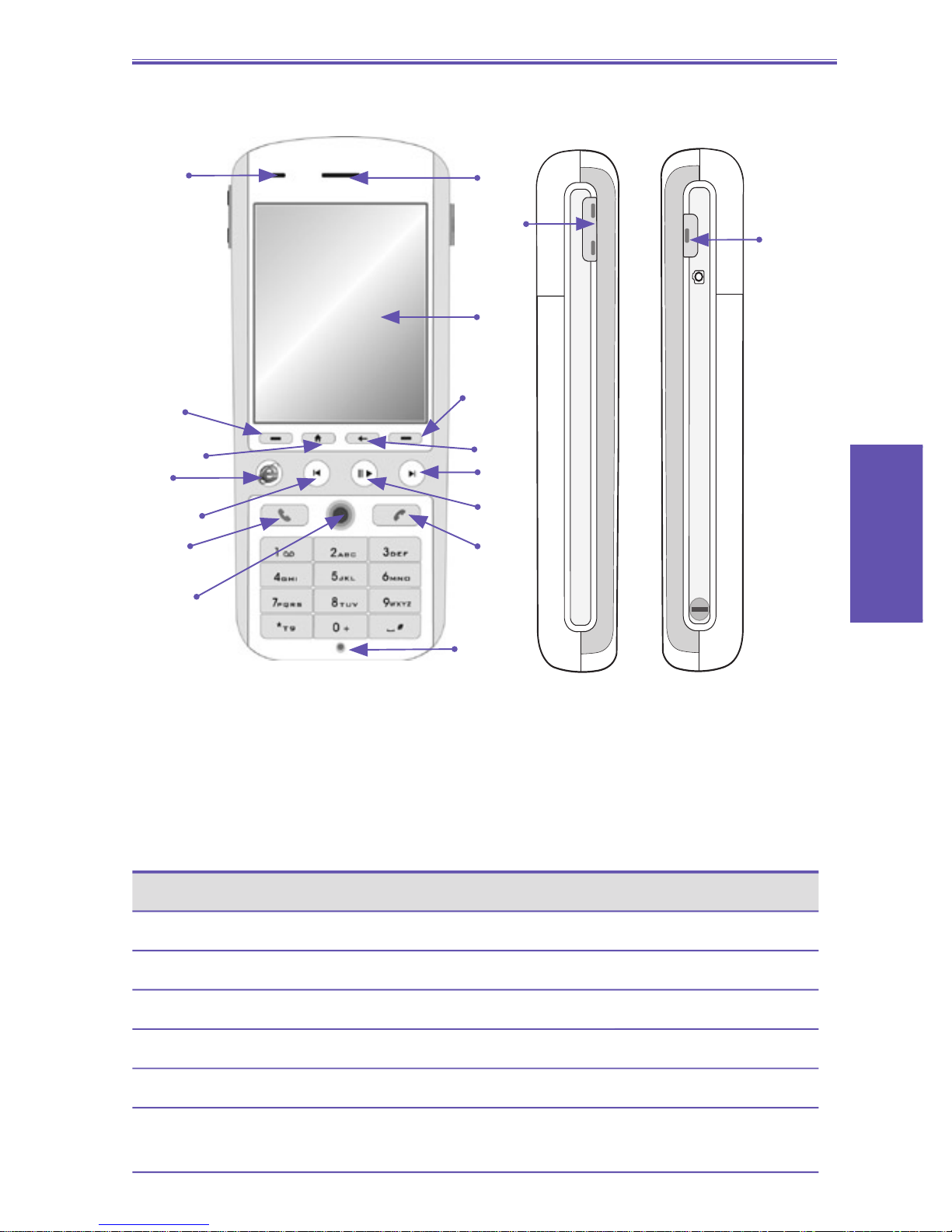
2. Speaker
3. Display screen
The status indicators concerning the current mode,
battery strength, the current activity, or active program
are displayed in the Title Bar at the top of the display. In
the center of the screen is the active menu or program
(or incoming live video stream if Camera mode is active).
At the bottom of the screen are the menus or commands
related to the active program.
4. Left softkey
Performs the function shown in the “softkey label”
immediately above the button. (When in the Home screen,
pressing the Left Softkey opens the Start Menu.)
5. Right softkey
Performs the function shown in the “softkey label”
immediately above the button. (In many cases, pressing
the Right softkey opens a menu dedicated to a particular
application.)
6. Home button
Press to return to the Home screen at any time.
7. Back button
Press to go back to the previous screen, or to backspace
over one character in a text eld. Press and hold to delete
the contents of an editable eld.
8. Internet Explorer button
Press to launch Internet Explorer.
LED Indicator Status
Flashing amber Battery temperature is hotter or colder than
the functional limits of 0 to 48 degrees Cel-
sius, and has stopped charging
Amber / green LED off Battery fault. The “Battery Fault” icon is
displayed ( ) In this case, the ashing
green LED can be recovered by unplugging
the AC adaptor.
Dim Network is disconnected.
Smartphone User Manual
1. Getting
Started