manuals.online logo
Brands
  1. Home
  2. •
  3. Brands
  4. •
  5. RATTAN
  6. •
  7. Scooter
  8. •
  9. RATTAN LM-500 User manual

RATTAN LM-500 User manual

This manual suits for next models

3

Other RATTAN Scooter manuals

RATTAN Pathfinder User manual

RATTAN

RATTAN Pathfinder User manual

RATTAN LF PRO Series User manual

RATTAN

RATTAN LF PRO Series User manual

Popular Scooter manuals by other brands

Segway Robotics Loomo Product information guide

Segway Robotics

Segway Robotics Loomo Product information guide

HL Corp ESX3 instruction manual

HL Corp

HL Corp ESX3 instruction manual

F-Wheel DYU S1 instructions

F-Wheel

F-Wheel DYU S1 instructions

Handicare Fortress 2000 SERIES owner's manual

Handicare

Handicare Fortress 2000 SERIES owner's manual

HYOSUNG SF 50 B manual

HYOSUNG

HYOSUNG SF 50 B manual

HOMCOM 371-004 Assembly instruction

HOMCOM

HOMCOM 371-004 Assembly instruction

Kinroad XT125T-10 instruction manual

Kinroad

Kinroad XT125T-10 instruction manual

PLAYTIVE AS-2448 Instructions for use

PLAYTIVE

PLAYTIVE AS-2448 Instructions for use

Ebinger DONKEY XL User instructions

Ebinger

Ebinger DONKEY XL User instructions

Flyer Mountain Original instruction manual

Flyer

Flyer Mountain Original instruction manual

BackCountry eBikes Storm owner's manual

BackCountry eBikes

BackCountry eBikes Storm owner's manual

Pride Boxter owner's manual

Pride

Pride Boxter owner's manual

equipmed FreeRoam II user manual

equipmed

equipmed FreeRoam II user manual

WESTHILL BIKES LINK user manual

WESTHILL BIKES

WESTHILL BIKES LINK user manual

BAnff eProdigy series Assembly manual

BAnff

BAnff eProdigy series Assembly manual

Winther 475 Assembly instruction

Winther

Winther 475 Assembly instruction

Jetson JBZL17 user manual

Jetson

Jetson JBZL17 user manual

Carrera impel manual

Carrera

Carrera impel manual

manuals.online logo
manuals.online logoBrands
  • About & Mission
  • Contact us
  • Privacy Policy
  • Terms and Conditions

Copyright 2025 Manuals.Online. All Rights Reserved.

Model:LM-500/750
LF-500/750
User’s Manual
2020
www.rattanebike.com
CONTENTS
Part 1 Assembly Instructions (page1-3)
Part 2 Display Instruction (page4-9)
Part 3 Use and Maintenance (page10-13)
Part 4 After sales and Warranty (page14-17)
1
Part 1 Assembly Instructions
1.
Unboxing
2.
Unfold the bike and lock
2
3.
Install the peddles and rear peddles
4.
Power on the battery before turning on the display
3
▲The gasket is an addition repair part. Please don’t use for peddle
assembly.
▲Please fully plug the DC head into the end of charging connector.
▲To make sure you can install by yourself, please click our website
(www.rattanebike.com)for the assembly video or find the video on YouTube.
4
Part 2 Display Instruction
MODEL: LCD-M5
1.
LCD Display Size and Material
Display Frontal View Display Lateral View
Control Button Frontal View Control Button Lateral View
5
2.
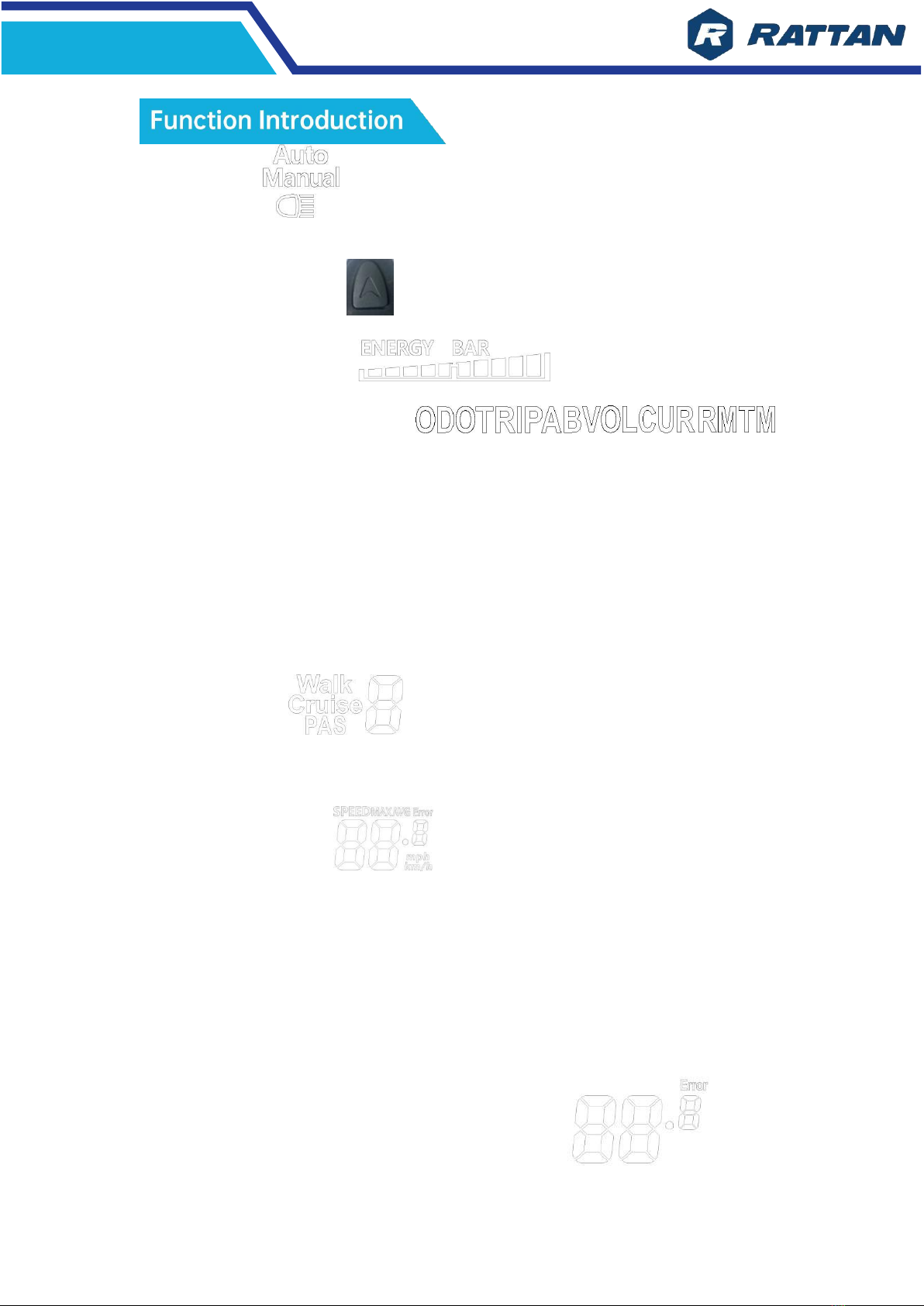
Introduction of Display
⚫
Speed display ⚫Power leveldisplay
⚫
Power indicator ⚫Failure warning
⚫
Total mileage ⚫Individualmileage
⚫
Headlight display ⚫Singledrivingtimedisplay
3.
Introduction of Control & Setting
⚫
Power switch control
⚫
Maximum speedsetting
⚫
Headlight switchcontrol
⚫
Auto idle time setting
⚫
6Km/h point control
⚫
Backlight brightness setting
⚫
Wheel diametersetting
⚫
Voltage level setting
4.
Introduction of Display Screen and Operation
Display Screen
6
⚫
Headlight
Please press the button for few seconds to open.
⚫
Battery power display
⚫
Multi-functional display area
ODO—Total mileage.
TRIP A—Singlemileage.
TRIP B—Single mileage.
VOL—Battery current voltage.
CUR—Current operating current.
RM—Remaining mileage.
TM—Instrument boot time.
⚫
Vehicle mode
Walk—Walk boost mode. PAS—
PAS Level 1~ 3 adjustable.
⚫
Speed display area
MAX—Maximum speed.
AVG—Average speed
MPH—Unit of speed
KM/H.
[The display will calculate the true speed based on the wheel diameter and
signal data]
⚫
Vehicle Status Display Area
Detail attached on PART -3 EBIKE STATS CODE
7
⚫
Switch into setting menu
Long press + & short press switch to next parameter;
Exit settings and save parameters.
(If not been operated, the modified parameters will automatically save and exit
after 8 seconds.)
⚫
Setting Parameter Interpretation
P01: Backlight brightness. The darkest is level 1 & the brightest is level 3.
P02: Mileage unit, 0:KM; 1:MILE.
P03: Voltage level:24V, 36V, 48V.
P04: Turn off time. 0 means the display will not turn off automatically; Other
numbers are the time turn off automatically. Range:1-60; unit: minute.
P05: Switch PAS level: 0/1. 0: level 0-3; 1: level 0-5.
P06: Wheel diameter:16-28. Unit: inch. 20 for 500W; 24 for 750W.
P07: Speed gauge magnetic steel. Range 1-100.
P08: Speed limit. Range 0-51km / h.
P09: Zero start setting, 0:zero start; 1:Non-zero start.
P10: Drive mode: 0/1/2.
0: Power Drive : Power output is determined by the power file bit. (It is
invalid to change the data)

8
1: Electric drive: Using by turning the handle drive. (It is invalid to
change the data)
2: Power Driven and Electric Driven Coexistence. (Valid parameter)
P11: Assistance sensitivity setting. Range:1-24.
P12: Assistance intensity setting. Range:1-5.
P13: Boost magnetic steel. Setting 5/8/12.
P14: Controller limit value setting. Range:1-20A.
P15: Controller under voltage.
P16: Reset ODO.
P17: The display does not support cruise. Default: 0.
P18: Display speed ratio. Adjustment range:50% ~ 150%,
P19: The switch of PAS level 0. 0:PAS level 0-3; 1: PAS level 1-3. (When P05
set “0”)
P20: System communication protocol. Default: 2.
Note: Due to product upgrade, some product content will differ from
specifications, but will not affect your normal use.
If you have any questions, please contact us.