PRODUCT MANUAL 16GB Pathnder IR Watch : SB-WR9800
Page 3
www.SafetyBasement.com Phone: 877-345-2336 Fax: 888-236-2524
BEFORE YOU START
You will rst need to connect your watch to your PC or Mac. You do not need additional
drivers to do this - your PC may install standard drivers when it rst connects. is is
normal.
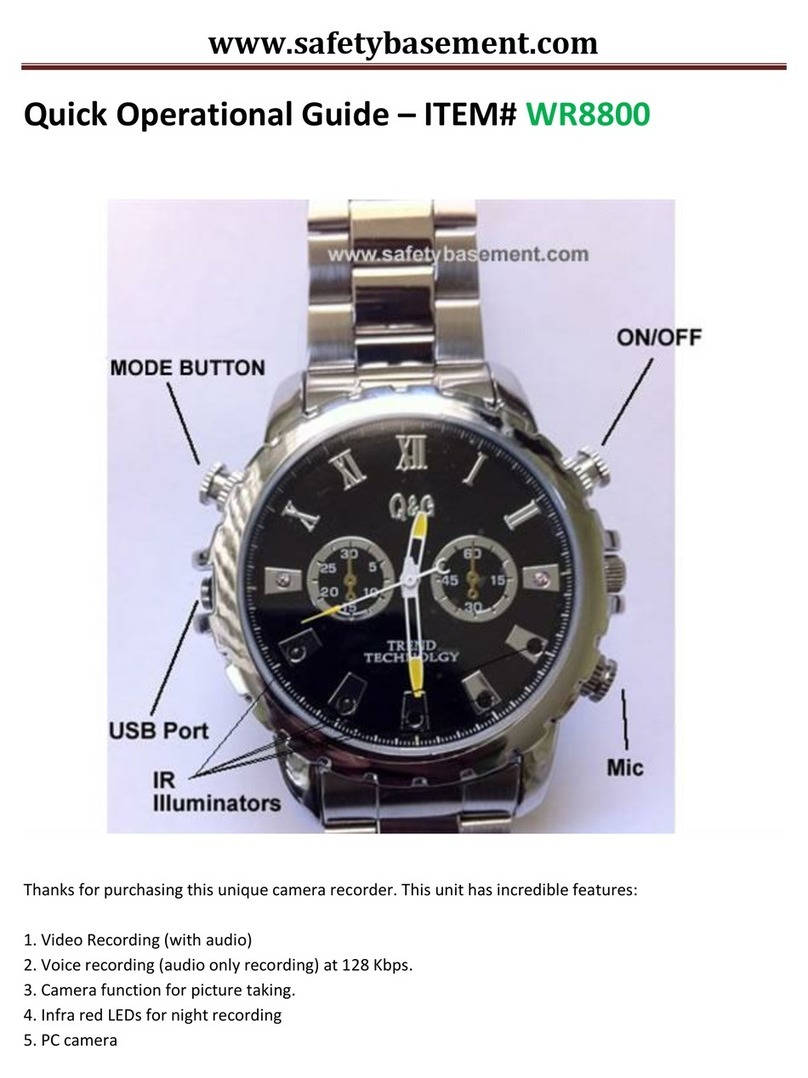
On the le side of your watch, unscrew the center knob to reveal USB port. Plug one end
of the included USB cable into the port on your watch. is should go all the way into the
watch. en, connect the other end to a USB port on your PC. IMPORTANT: Please do not
use a hub. Connect directly to USB port on computer!
In a few moments, your PC will automatically nd and install your watch. Your watch will
appear as an External Device or Removable Disk.
is is how you will access your video, photo and audio les to save them to your PC. is
is also how you charge your watch.
Charging the rst time may take several hours. Charge this unit for atleast 4hrs. You may
access your les during charging.
USB Port
Now, download the les you will need to setup your product.
All les are located in the same TECH SUPPORT area you downloaded this user manual.