7
◊
◊
B. INPUT This input accepts either an XLR or /" plug:
The XLR connection is a balanced input:
(Pin 1=ground, Pin 2=positive, Pin 3=negative)
The /" connection is an unbalanced "TS" input:
(Tip=positive, Sleeve=ground)
Use "Phantom Power" as required for microphones connected
to the XLR input (this button does not affect the /" input).
Off—Phantom Power off.
On—Phantom Power on.
C. PAD/CLIPPAD reduces input sensitivity by –dB to provide
cleaner response with high output sources on each channel.
Select PAD if a CLIP LED illuminates, indicating signal
distortion.
NOTE: CLIP LEDs flashing simultaneously indicates that the Bass
Intensifier {M} or Master Volume {P} levels are clipping and
should be reduced. Channel and Channel CLIP LEDs flashing
independently indicates that the Gain {D}, EQ {G–K}, or EFFECTS
BLEND {L} levels for that channel are clipping and should be
reduced.
D. GAINAdjusts the preamp signal level for each channel.
GAIN is also the primary level control for the EFX SEND {X}
and LINE OUT {Y} jacks on the rear panel and can be used to
accommodate the input sensitivity of external equipment, if
necessary.
E. MUTEDisables audio output from each channel except
TUNER OUT {W}, useful for instrument changes and tune-ups.
The LED indicates when MUTE is active.
F. PHASEPress to reverse the phase of the INPUT circuit of each
channel, useful for reducing "regenerative" feedback when you
are standing at a particular distance from the amplifier. You can
also reduce feedback by changing your position or distance
from the amplifier.
G. AURAL ENHANCERA trademark SWR® feature for over
years, the Aural Enhancer brings out the fundamental low
notes of the bass, brightens high-end transients and reduces
certain frequencies that “mask” the fundamentals. The ultimate
effect is a more transparent sound that opens up the sibilance
characteristics of all instruments without being harsh.
How the Aural Enhancer works: Think of it as a variable tone
control that changes frequency range AND level according to
where you set the Aural Enhancer control:
As you rotate the control clockwise from the “MIN” position,
you are elevating low, mid, and high frequency levels in ranges
that are different, yet complementary to the Bass and Treble
tone controls. The “ o’clock” position—a favorite for many
players—brings out both low end fundamentals and crisp
highs, while at the same time, adds a little lower midrange
helping you to cut through the band. Then, as you rotate
further clockwise, selected mids will drop off—specifically, a
group of frequencies centered around Hz. While apparent,
the Aural Enhancer is gentle compared to the extreme response
curves you can create with the EQ tone controls.
H. BASSAdjusts low-frequency signal response ±dB centered
around Hz. This range provides punch and fullness to your
sound.
I. EQ IN/OUTEngages/bypasses the tone controls and the
Aural Enhancer for each channel, as indicated by the LEDs
and "brackets" on the front panel.
J. MID RANGESemi-parametric tone control for each channel.
These split knobs allow you to adjust mid-frequency range and
level. With the outer ring, select the frequency range that you
want to control from Hz to .kHz, then use the inner knob
to adjust the amount of cut or boost at the selected frequency.
Mid range adjustment is critical for most instruments and
depends on your situation. What may sound harsh while
playing alone may sound just right in a crowded room, or on a
recording.
K. TREBLEAdjusts high-frequency response ±dB above the
kHz range. This range adds bright sparkle to your sound.
Because high frequencies are inherently directional (narrowly
focused), it is important to listen from different angles to find
the best treble setting and the optimum placement for your
amplifier.
L. EFFECTS BLENDFunctional only when a plug is inserted into
one of the EFX RETURN {X} jacks, this knob sets your effects
level by controlling the amount of "wet" effects loop signal
blended into the "dry" preamp signal.
M. BASS INTENSIFIERPress "Engage" to activate the Bass
Intensifier circuit for both channels, as indicated by the LED.
The Bass Intensifier boosts a chosen set of low frequencies
combined with a smooth, fast-acting compressor, providing
radical boosts without overdriving the amplifier, useful for
heavier sections of a tune. Bass Intensifier can also be engaged
from the footswitch.
N. POWER SWITCHSwitches the unit ON-OFF as indicated by
the LED.
O. COMPRESSIONAdjusts the level of signal compression
for both channels. Rotate fully counterclockwise for
no compression. Rotate clockwise to increase the ratio of
compression. The brightness of the yellow LED indicates the
active amount of compression moderating your peak signal
levels.
P. MASTER VOLUMEUse to set the loudness output from your
speakers after all other levels are set, including any external
effects.
Q. MASTER MUTEDisables audio output from both channels
except TUNER OUT {W}, useful for instrument changes and
tune-ups. The LED indicates when MASTER MUTE {Q} is
active. Master Mute can also be engaged from the footswitch.
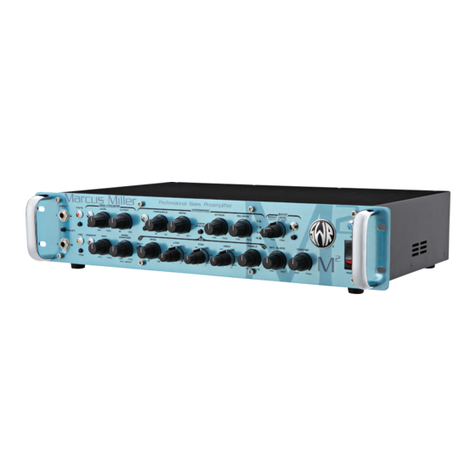
Front Panel