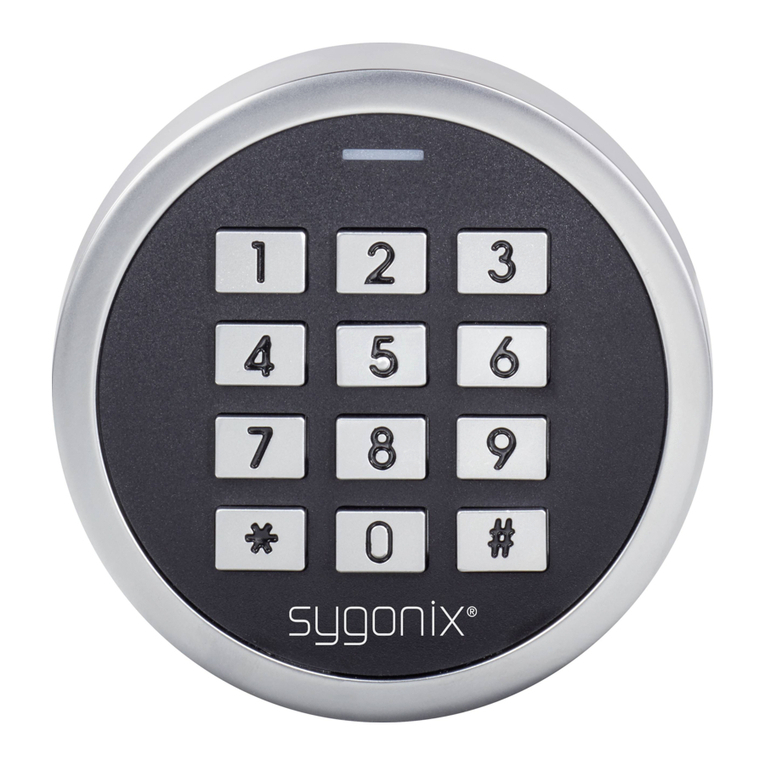
Sygonix 2299888 User manual

Operating Instructions
Mini weatherproof ngerprint &
RFID access control IP66
Item No. 2299888 Page 2 - 55
Notice d’emploi
Module miniature de contrôle d‘accès
RFID et empreinte digitale, protégé
contre les intempéries (IP66)
N° de commande 2299888 Page 56 - 116
Gebruiksaanwijzing
Mini weerbestendige vingerafdruk-
& RFID-toegangscontrole IP66
Bestelnr. 2299888 Pagina 117 - 174
Istruzioni
Lettore di schede RFID IP66 con
impronte digitali
N°.: 2299888 Pagina 175 - 236
Instrukcja użytkowania
Czytnik linii papilarnych, czytnik
kart RFID IP66
Nr zamówienia: 2299888 Strona 237 - 300

Table of contents
Page
1. Introduction...........................................................................5
2. Description of symbols .........................................................6
3. Intended use.........................................................................6
4. Features and functions.........................................................8
5. Safety information ................................................................9
a) General information.........................................................9
b) Connected devices........................................................10
c) Persons and product.....................................................11
d) Battery...........................................................................11
6. Product overview................................................................13
7. Installation and connection.................................................13
a) Installation.....................................................................13
8. Connection cable................................................................16
a) Connection....................................................................17
b) Circuit diagrams............................................................18
c) Door opener design.......................................................19
9. Setup..................................................................................20
a) Remote control..............................................................20
b) Code lock......................................................................21
2

10. Remote control...................................................................21
11. Programming......................................................................22
a) General information.......................................................22
b) Entering/exiting programming mode.............................23
c) Changing the master code............................................24
d) AddingthemasterngerprintwiththemasterID..........25
e) Addinguserngerprints(withautomatic
assignment of the user ID)............................................27
f) Adding user transponders with automatic
assignment of the user ID.............................................31
g) Deletingauserngerprint.............................................34
h) Deleting a user transponder..........................................35
i) DeletingngerprintsortranspondersusinguserIDs....36
j) Deleting all user data ....................................................37
k) Usingthemasterngerprint..........................................38
l) Addingguestusercodes(transpondersonly)...............40
m) Selecting the access mode
(transponderorngerprint) ...........................................43
n) Scheduling the timer for the relay output or
switching to toggle mode...............................................45
o) Setting the alarm duration.............................................47
p) Security function for invalid access attempts ................48
q) Restoring factory settings..............................................50
3

12. Operation............................................................................50
a) Activating the changeover contact
(openingandclosingthedoor)......................................50
b) Stopping the alarm / switching off the alarm.................51
13. Audible and visual signals..................................................52
14. Care and cleaning ..............................................................53
15. DeclarationofConformity(DOC)........................................53
16. Disposal..............................................................................54
17. Technical data ....................................................................54
4

1. Introduction
Dear customer,
Thank you for purchasing this product.
This product complies with statutory, national and European
regulations.
To ensure that the product remains in this state and to guarantee
safe operation, always follow the instructions in this manual.
These operating instructions are part of this product.
They contain important information on setting up
and using the product. Do not give this product to a
third party without the operating instructions. Keep
these operating instructions in a safe place for future
reference.
If there are any technical questions, please contact:
www.conrad.com/contact
5

2. Description of symbols
The symbol with the lightning in a triangle indicates that
there is a risk to your health, e.g. due to an electric
shock.
The symbol with an exclamation mark in a triangle
is used to highlight important information in these
operating instructions. Always read this information
carefully.
The arrow symbol indicates special information and tips
on how to use the product.
3. Intended use
This product is designed to prevent unauthorised access to
doors(e.g.inanofce)andtoactivate/disablealarmsystems.A
maximum of 890 users can be set up with different transponder
cards(EMusercards),100userngerprintsand10temporary
guestcodes(transponderswithalimitonthenumberofusers).
The device can be controlled either via suitable transponders
or the integrated ngerprint sensor. When you hold an added
transponderinfrontofthecodelockorplaceasavedngerprint
on the ngerprint sensor, a potential-free changeover contact
willbeactivated(see"Technicaldata"forthespeciedcontact
rating). This can be used, for example, to trigger a door opener or
an alarm system. The product is designed for indoor and outdoor
6

use(IP66).Italsofeaturesarelayoutput(1xswitchcontact,max.
18 V/DC, 3 A), which can be used to control a door opener or
other devices (e.g. an alarm system). The code lock must be
powered with a 9–18 V/DC power supply.
For safety and approval purposes, do not rebuild and/or modify
this product. Using the product for purposes other than those
described above may damage the product. In addition, improper
usecan causehazards suchas ashort circuit,re or electric
shock. Read the operating instructions carefully and store them
in a safe place. Only make this product available to third parties
together with its operating instructions.
All company and product names contained herein are trademarks
of their respective owners. All rights reserved.
Package contents
• Fingerprint/transponder code lock (reads RFIDs and
ngerprintsforauthorization)
• Remote control with 1x CR2025 battery
• 1x diode
• 2x screws
• 2x dowels
• 1x hex key
• User manual
• Programming overview
7

Up-to-date operating instructions
Download the latest operating instructions at
www.conrad.com/downloads or scan the QR
code shown. Follow the instructions on the
website.
4. Features and functions
• Vandal-proofmetalhousing
• IP66protectionrating(weatherproof)
• Fingerprint and transponder card access
• 1000 users (890 regular card users, 100 users with
ngerprints&10guest/visitortransponders)
• One relay output
• Tamper alarm
• Timer or toggle mode
• Choose between timer or toggle mode
• Multi-colouredLEDstatusindicator
8

5. Safety information
Read the operating instructions carefully and
especially observe the safety information. If
you do not follow the safety information and
information on proper handling in these operating
instructions, we will assume no liability for any
resulting personal injury or damage to property.
Such cases will invalidate the warranty/guarantee.
a) General information
• This product is not a toy. Keep it out of the reach of
children and pets.
• Do not leave packaging material lying around
carelessly. It may become a dangerous toy for
children.
• Protect the product from extreme temperatures,
direct sunlight, strong jolts, high humidity, moisture,
ammablegases,vapoursandsolvents.
• Do not place the product under any mechanical
stress.
• If it is no longer possible to operate the product
safely, stop using it and prevent unauthorised use.
Safe operation can no longer be guaranteed if the
product:
9

-is visibly damaged,
-is no longer working properly,
-has been stored for extended periods in poor
ambient conditions or
- has been subjected to any serious transport-
related stress.
• Handle the product carefully. Jolts, impacts or a fall
even from a low height may damage the product.
• Consult a technician if you are not sure how to use
or connect the product, or if you have concerns
about safety.
• Maintenance,modications and repairsmay only
be carried out by a technician or a specialist repair
centre.
• If you have questions which remain unanswered by
these operating instructions, contact our technical
support service or other technical personnel.
b) Connected devices
• Always observe the safety information and
operating instructions of any other devices which
are connected to the product.
10
Table of contents
Languages:
Other Sygonix IP Access Controllers manuals