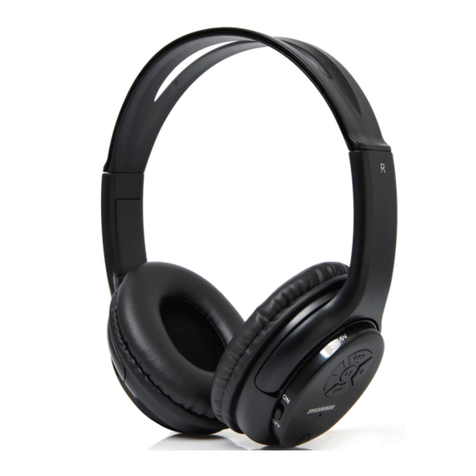
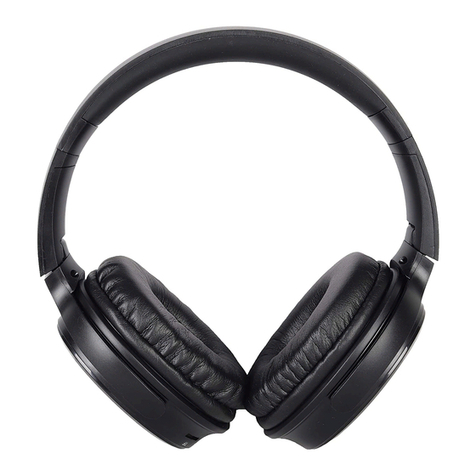
Sylvania SBT-455-BLACK-PDQ User manual

Please read this user manual carefully to ensure proper use of this product
and keep this manual for future reference
SYLVANIA is a registered trademark of OSRAM SYLVANIA INC. Used under license.
MODEL:SBT-455-BLACK-PDQ
BLUETOOTH HEADPHONE

2
To prevent possible hearing damage, do not listen at high volume level
for long periods.
This device complies with Industry Canada licence-exempt RSS standard(s).
Operation is subject to the following two conditions: (1) This device may not
cause interference, and (2) This device must accept any interference, including
interference that may cause undesired operation of the device.
CAN ICES-3 (B)/NMB-3(B)
CONFORMITÉ À L'INDUSTRIE DU CANADA
CAN ICES-3 (B)/NMB-3(B)
IMPORTANT SAFETY INSTRUCTIONS
Le présent appareil est conforme aux CNR d'Industrie
licence. L'exploitation est autorisée aux deux
susceptible d'en compromettre le fonctionnement.
doit accepter tout brouillage
conditions suivantes :
(1) l'appareil ne doit pas produire de brouillage, et
(2) l'utilisateur de l'appareil
Canada applicables aux
appareils radio exempts de
radioélectrique subi,
même si le brouillage est

The headphone can be adjusted properly following the direction of the arrowhead
as illustrated below.
1
23
1
2
3
1: Extending up and down.
2: Only for swiveling inwardly.
3: Folding the headphone inwardly.
HEADPHONES ADJUSTMENT
3

VOL+
VOL-
TF-CARD
USB
1234
5678 9
FUNCTION PANEL
1. Power on/off, Voice control Button
2. Volume Down Button
3. Play/Pause, Hands-free Button
4. Volume Up Button
5. Micro-USB Charging Port
6. Indicator
7. Line in Jack
8. Built-in Microphone
9. TF-Card Slot
LINE IN MIC
4

3. While charging, the Indicator on the unit will turn Red, it will turn Blue when
completely charged.
1. Connect the Micro USB Plug from the supplied USB Charging Cable to the DC
The unit has a built-in Li-ion rechargeable battery, charge it before use or when it is
drained as below:
D. Battery life naturally shortens slowly over time.
E. The rechargeable battery incorporated in this product is not user replaceable.
A. Before first time use, charge approximately 2 hours until the unit is completely
charged.
B. Recharge and store the unit within the temperature range of 5°C~35°C
(40°F~95°F).
C. Do not charge longer than 24 hours. Excessive charging or running the unit
until the battery fully drains will damage battery. Battery life will be extended
if you keep the battery fully charged.
IN Jack (Micro USB Port).
2. Plug the Macro USB Plug to the USB Port on Laptop (or USB Adapter) as below.
RECHARGING THE UNIT
NOTES:
USB
5

BLUETOOTH OPERATION
4. Play a track on your paired device as normal.
device list, select it and make connection.
3. After successful connection, the indicator will be solid Blue.
the pairing name
search the unit, "SYLVANIA SBT455" will appear on Bluetooth
2. Activate the bluetooth menu on the device you wish to connect to the unit, try to
During playing:
Press the Button to pause, press it again to resume playing.
1. Press and hold the button to power on the unit, the indicator will turn Blue
and blinks.
Press the VOL- or VOL+ button to adjust volume level.
Hands-free Function:
Press the Button to answer the incoming call, press it agian to end the call.
Press and hold the Button to refuse the incoming call.
Press the Button twice to redial the last dialed phone number.
NOTES:
The latter one inserted will be selected as playing source.
If the LINE IN cable inserted into the LINE IN jack, or the TF-Card inserted into
the card slot, the unit will be switched to LINE IN or TF-Card mode.
6
VOICE ASSISTANT
1. Connect the unit with your phone with Siri or Google Assistant through Bluetooth.
2. Press the button on the unit, then speake your requests to the Microphone
on the unit.
3. You can visit any function on your phone, navigate the desired location, asking
weather or traffic, giving a call to somebody on your contact list, checking the
NBA schedule, checking the emails, playing music, sending message, checking
the airline information, browsing the photos, etc.
4. When the phone searching the answer from network, you may need to activate
your Wifi or phone data streaming.

Mobile Phone
Connect to the mobile phone/external
audio device's AUX Out / Line Out jack
(Like an MP3 player, mobile phone, or
iPod/iPad, etc.)
MP3
LINE IN
2. Insert the other end of the LIEN IN cable to the LIEN IN jack of the unit.
4. Play music on external player.
1. Insert one end of the LIEN IN cable to the LINE OUT or AUX OUT jack on the
external player.
During playing:
Press the VOL- or VOL+ button to adjust volume level.
Do not insert the TF-Card into card slot, or it will switch to TF-Card playing mode.
NOTE:
LINE IN
3. Power on the unit.
TF-CARD PLAYING
TF-CARD
Ï
1. Insert the TF-CARD into the TF-CARD slot with the
copper plate facing upside as the figure on right.
2. Power on the unit.
3. The unit will play automatically. TF-CARD
4. When finishing playing, push the TF-CARD again to spring out from the slot.
Do not insert the LINE IN cable, or it will switch to LINE IN playing mode.
NOTE:
7

Check the following before requesting service:
SYMPTOM POSSIBLE CAUSE POSSIBLE SOLUTION
Can’t power on Built in battery drained Recharge the battery
Volume level of paired/connected device
is in low level
Rise the volume level of the
paired/connected device
Volume level of the connected/paired
device too high
Reduce the volume level of the
connected/paired device
BT not
unctioning
The external BT device had NOT paired to
the unit
Pair the external BT device to the
unit
The external BT device too far from the
unit
Place the external BT device
close to the unit
SPECIFICATIONS AND ACCESSORIES ARE SUBJECT TO CHANGE
WITHOUT NOTICE
f
No sound or
sound weak
Sound
distortion
ACCESSORIES:
SPECIFICATIONS
TROUBLESHOOTING GUIDE
Bluetooth working range: up to 32 feet in open area
For service assistance and product information, please call: 1-800-968-9853.
Curtis International Ltd.
7045 BECKETT DRIVE, UNIT 15, MISSISSAUGA, ON, L5S 2A3 www.curtisint.com
1 x User Manual
1 x USB Charging Cable
8
Power source: Built-in DC 3.7V, 250mAh rechargeable battery
Charging time: approx.2 hours
Running time: approx.3.5 hours@70% volume
Recharge by DC 5V through Micro USB port

FCC Statement
This device complies with part 15 of the FCC rules. Operation is subject to the following
two conditions: (1) this device may not cause harmful interference, and (2) this device
must accept any interference received, including interference that may cause undesired
operation.
Changes or modifications not expressly approved by the party responsible for compliance
could void the user's authority to operate the equipment.
NOTE: This equipment has been tested and found to comply with the limits for a Class B
digital device, pursuant to part 15 of the FCC Rules. These limits are designed to provide
reasonable protection against harmful interference in a residential installation.
This equipment generates uses and can radiate radio frequency energy and, if not installed
and used in accordance with the instructions, may cause harmful interference to radio
communications. However, there is no guarantee that interference will not occur in a
particular installation. If this equipment does cause harmful interference to radio or
television reception, which can be determined by turning the equipment off and on, the
user is encouraged to try to correct the interference by one or more of the following
measures:
-- Reorient or relocate the receiving antenna.
-- Increase the separation between the equipment and receiver.
-- Connect the equipment into an outlet on a circuit different
from that to which the receiver is connected.
-- Consult the dealer or an experienced radio/TV technician for help.
FCC ID: OKUBRC35051
The device has been evaluated to meet general RF exposure requirement. The device can
be used in portable exposure condition without restriction.
Table of contents
Other Sylvania Headphones manuals