manuals.online logo
Brands
  1. Home
  2. •
  3. Brands
  4. •
  5. Taewoo
  6. •
  7. Cutter
  8. •
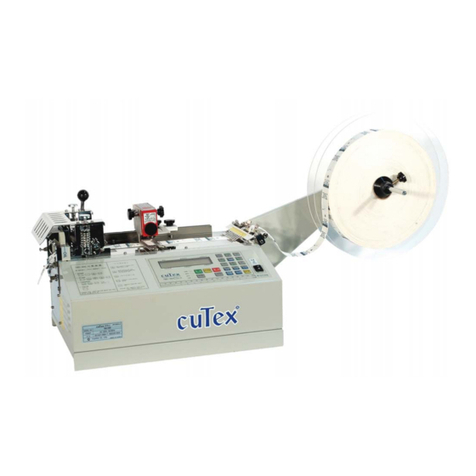
  9. Taewoo cuTex TBC-50SH User manual

Taewoo cuTex TBC-50SH User manual

Other Taewoo Cutter manuals

Taewoo cuTex TBC-553L User manual

Taewoo

Taewoo cuTex TBC-553L User manual

Taewoo cuTex TBC-50S User manual

Taewoo

Taewoo cuTex TBC-50S User manual

Taewoo cuTex TBC-50 User manual

Taewoo

Taewoo cuTex TBC-50 User manual

Popular Cutter manuals by other brands

Eraser WC600 operating instructions

Eraser

Eraser WC600 operating instructions

Husqvarna K 760 OilGuard Operator's manual

Husqvarna

Husqvarna K 760 OilGuard Operator's manual

Binding Products GuilloMax user manual

Binding Products

Binding Products GuilloMax user manual

Bms Bulut Makina BULUCUT-6 Operational manual

Bms Bulut Makina

Bms Bulut Makina BULUCUT-6 Operational manual

Westfalia 80 02 22 instruction manual

Westfalia

Westfalia 80 02 22 instruction manual

Perfecta 76 UC Service instructions

Perfecta

Perfecta 76 UC Service instructions

Bosch POF 1400 ACE Original instructions

Bosch

Bosch POF 1400 ACE Original instructions

SignWarehouse.com Bobcat BA-60 user manual
SignWarehouse.com

SignWarehouse.com Bobcat BA-60 user manual

Makita 4112HS instruction manual

Makita

Makita 4112HS instruction manual

GEISMAR STUMEC MTZ 350S manual

GEISMAR STUMEC

GEISMAR STUMEC MTZ 350S manual
Hitachi CM 4SB2 Safety instructions and instruction manual
Hitachi

Hitachi CM 4SB2 Safety instructions and instruction manual

Dexter Laundry 800ETC1-20030.1 instruction manual
Dexter Laundry

Dexter Laundry 800ETC1-20030.1 instruction manual
GCC Technologies AFJ-24S user manual

GCC Technologies

GCC Technologies AFJ-24S user manual

ARCBRO Stinger-PRO 5100 Series Install manual

ARCBRO

ARCBRO Stinger-PRO 5100 Series Install manual

DeWalt XR LI-ION DCS350N manual

DeWalt

DeWalt XR LI-ION DCS350N manual

Baudat ES1 instruction manual

Baudat

Baudat ES1 instruction manual
Makita 4100NH instruction manual

Makita

Makita 4100NH instruction manual

CAB PCU400 instructions

CAB

CAB PCU400 instructions

manuals.online logo
manuals.online logoBrands
  • About & Mission
  • Contact us
  • Privacy Policy
  • Terms and Conditions

Copyright 2025 Manuals.Online. All Rights Reserved.

E-mail : taewoo@cutex.kr http://www.cutex.kr
- 1 -
How to operate TBC-50SH
1. An example (Cutting length : 70mm, Cutting quantity : 120 pcs)
▷
Turn on the
POWER SW
.
▷
Set the temperature.(It is normally used at 250°
~
350°C. About 5 minutes after turn-on
& set it, it will be reached to set-temperature. (For more detail, refer to the appended
"How to use temperature Controller KX4")
※
Caution : When a work is over, set the temperature at zero and turn the cooling
fan 10 minutes or so and power off.
▷
Set cutting length 70mm. (Press the following buttons in order.)
☞
LENGTH
⇒
7
⇒
0
LENGTH
CLEAR
⇒
SET
※
Button "0" has a double functions of "0" and
eraising current length.
▷
Set cutting quantity 120 PCs.
☞
Q ‘TY
⇒
1
EXTRA
⇒
SPEED
2
⇒
0
LENGTH
CLEAR
⇒
SET
E-mail : taewoo@cutex.kr http://www.cutex.kr
- 2 -
▷
Set function.(Sensor cutting : "1", Normal cutting : "0")
☞
Sensor cutting :
FILE
⇒
1
EXTRA
⇒
SET
☞
Normal cutting :
FILE
⇒
0
LENGTH
CLEAR
⇒
SET
▷
Running of knife-front roller
Turn on
MOTOR SW
to prevent cut materials from clinging to the knife blade.
▷
Locate the cutting line of label on the lower knife blade.
(This step must go ahead of sensor adjustment.)
▷
Sensor Adjustment
Lig
ht sensor-beam on sensing point of label.
(Refer to "How to use sensor" of next page.)
▷
Press START button.
☞
START
※
Troubles in cutting,
- Check if you adjust sensor after locating cutting line of label on the knife blade.
- Move the sensor forwards or backwards.
- Check sensitivity & height of the sensor.
E-mail : taewoo@cutex.kr http://www.cutex.kr
- 3 -
How to use sensor TL46-W
①
Mount the sensor on the guide-rail
and connect the jack of sensor into
the connector of machine downside.
★②
Locate the cutting line of label
on the lower knife blade precisely
& move the sensor close to the knife.
(This step is essential just before fix
the location of sensor.)
③
Adjust the sensor with guide-control bolt
for lightening the beam on the center
of marking point.
E-mail : taewoo@cutex.kr http://www.cutex.kr
- 4 -
★④
Move the light spot over the mark (cutting line or figure, letters)
and then press SET button.
⑤
Move the light spot on the background (blank, not printed area) and then
press "SET" button again.
E-mail : taewoo@cutex.kr http://www.cutex.kr
- 5 -
⑥
By moving sensor, make sensor light indicate cutting mark again.
If you did it correctly, when you make sensor light indicate cutting line, the "out" lamp is on.
(Caution)
※
In the case of objects with reflective or shiny surface, tilt sensor by 10° to 15° relative
to surface.
E-mail : taewoo@cutex.kr http://www.cutex.kr
- 6 -
2. Key functions
FILE
: Function for label cutting
0
LENGTH
CLEAR
: Current length on display will be back to “0” at a stop.
RESET
: All of current length and current q‘ty on display will be back to "0".
5
M/CUT
: Moving knife only.
①
to cut the material for test.
②
to take out the material jammed between knife blades.
③
for balancing of knife blades in exchange.
1
EXTRA
: Cutting additional one.
SHIFT
ESC
: Restoring to normal condition in
ERROR
(red
LED
)
and inputting parameter or program.
4
FEED
6
FEED
: to move the roller manually for mounting the material on the machine
or for feeding it forwards or backwards.
SPEED
2
―
Speed up (The current speed appears on the left-upside of
LCD
display with
"%". Normal speed : 50%, Maximum speed : 100%)
* Speed up & down is possible in any time(operation or stop) and set-speed will
not be changed even though you press
RESET
button or power off & on.
8
SPEED
―
Speed up (The current speed appears on the left-upside of
LCD
display with
"%". Normal speed : 50%, Maximum speed : 0%)
* Speed up & down is possible in any time(operation or stop) and set-speed will
not be changed even though you press
RESET
button or power off & on.

INS
: to insert new program between programs inputted already in time of program-
input.
E-mail : taewoo@cutex.kr http://www.cutex.kr
- 7 -
←
DEL
: to delete the wrong program in time of program-input. (All things of the STEP
will be deleted.)
: to prevent the cutted material from clinging to the knife blade.
(This switch is installed to Model TBC-50H, TBC-50SH, TBC-50HX only.)
3. Specification
Model
Name
Main Cutting
Materials
Cutting
Knife
Power
Supply
Max.
Cutting
Width
Range of
Cutting
Length
Cutting Q'ty/min.
(Length: 50mm)
Machine Size
(Net Weight)
Packing Size
(Gross
weight)
TBC-50SH
(Label
cutter)
Woven label
Hot
AC110/220V
50/60Hz
90mm
15mm~
300M
120
~
140 cuts
820×370×380
(21.3kgs)
530×470×420
(25.6kgs)
4. Caution for use
- Before use, please confirm the voltage and make ground(earth) connection.
- Do not access hands or any object close to the working knife. (for safety)
- When the knife blade becomes dull, please use it after grinding with the grinding machine.
(Please do not let the unskilled person grind manually or install the knife blade.)
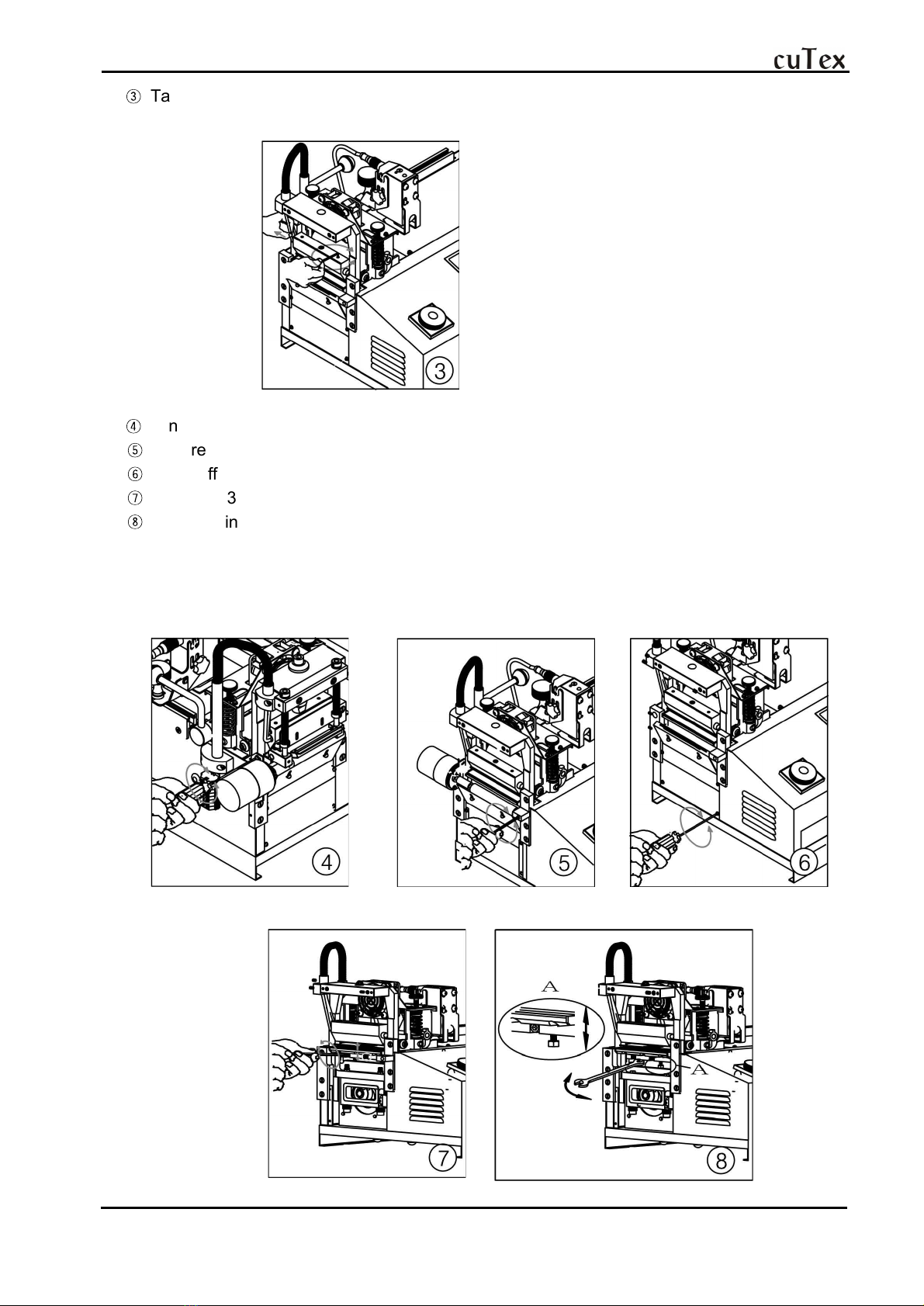
EXCHANGE OF KNIFE
①
First of all, move up the upper knife to top level and power off and take off the presser
of upper knife after unscrewing 2 bolts by 4mm-wrench.
②
Take off the upper knife frame by 6mm-wrench.
E-mail : taewoo@cutex.kr http://www.cutex.kr
- 8 -
③
Take off the heater after unscrewing the fixing bolt by 4~5mm-wrench.
(Install new upper knife and assemble it again vice versa.)
④
If necessary to exchange the lower knife plate, unscrew bolts of the front feeding motor.
⑤
Unscrew bolts of the front feeding roller and take off the motor & the roller.
⑥
Take off the cap by unscrewing bolts.
⑦
Unscrew 3 fixing bolts by 7mm-spanner and take off the lower knife plate.
⑧
If no cutting or one sided cutting, make the upper knife contacted to the lower knife plate
and check the level between upper knife & lower knife plate and power off & adjust gap
or pressure by 7mm-spanner. (Clockwise turn of spanner makes the lower knife plate up,
anti-clockwise turn makes it down.)
E-mail : taewoo@cutex.kr http://www.cutex.kr
- 9 -
Mount of roll Exchange of fuse
Fix the roll triangle by 4mm-wrench. Take off the power plug and exchange as picture.
Cleaning of anti-static brush
If anti-static device does not work, clean the anti-static brush by other brush.