manuals.online logo
Brands
  1. Home
  2. •
  3. Brands
  4. •
  5. TC Electronic
  6. •
  7. Recording Equipment
  8. •
  9. TC Electronic NOVA System User manual

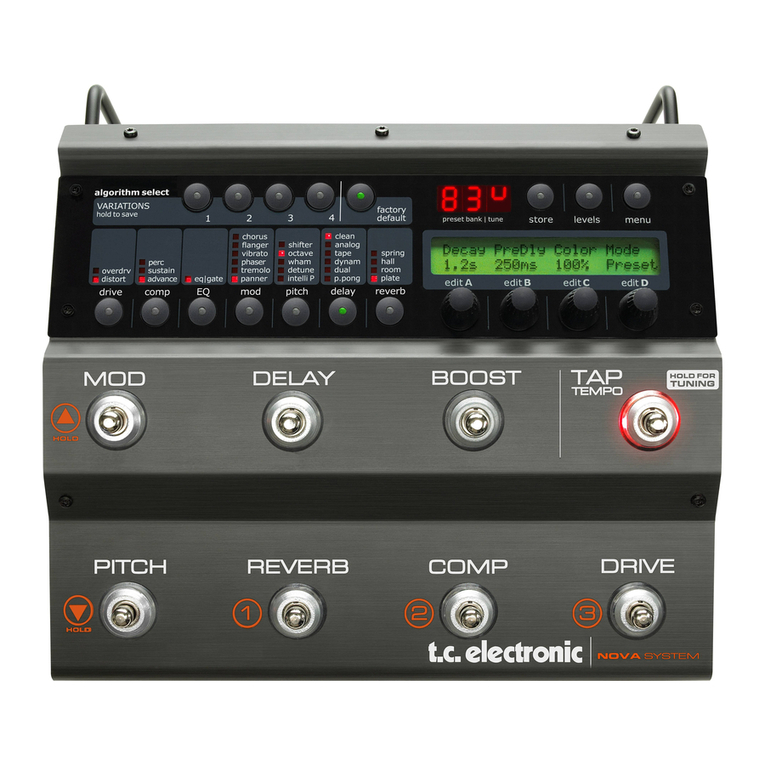
TC Electronic NOVA System User manual

Other manuals for NOVA System

1

Other TC Electronic Recording Equipment manuals

TC Electronic HALL OF FAME 2 MINI User manual

TC Electronic

TC Electronic HALL OF FAME 2 MINI User manual

TC Electronic M-ONE User manual

TC Electronic

TC Electronic M-ONE User manual

TC Electronic Konnekt 24D User manual

TC Electronic

TC Electronic Konnekt 24D User manual

TC Electronic DVR250-DT User manual

TC Electronic

TC Electronic DVR250-DT User manual

TC Electronic FireworX User manual

TC Electronic

TC Electronic FireworX User manual

TC Electronic Nova Dynamics NDY-1 User manual

TC Electronic

TC Electronic Nova Dynamics NDY-1 User manual

TC Electronic DVR250 NATIVE User manual

TC Electronic

TC Electronic DVR250 NATIVE User manual

TC Electronic DBMAX - V 2 User manual

TC Electronic

TC Electronic DBMAX - V 2 User manual

TC Electronic Studio Konnekt 48 User manual

TC Electronic

TC Electronic Studio Konnekt 48 User manual

TC Electronic Flashback X4 Delay User manual

TC Electronic

TC Electronic Flashback X4 Delay User manual

TC Electronic Konnekt Live User manual

TC Electronic

TC Electronic Konnekt Live User manual

TC Electronic TC 1280 User manual

TC Electronic

TC Electronic TC 1280 User manual

TC Electronic DB6 User manual

TC Electronic

TC Electronic DB6 User manual

TC Electronic Desktop Konnekt 6 User manual

TC Electronic

TC Electronic Desktop Konnekt 6 User manual

TC Electronic HALL OF FAME User manual

TC Electronic

TC Electronic HALL OF FAME User manual

TC Electronic DRIP SPRING REVERB User manual

TC Electronic

TC Electronic DRIP SPRING REVERB User manual

TC Electronic Impact Twin User manual

TC Electronic

TC Electronic Impact Twin User manual

TC Electronic D-TWO User manual

TC Electronic

TC Electronic D-TWO User manual

TC Electronic Konnekt 24D User manual

TC Electronic

TC Electronic Konnekt 24D User manual

TC Electronic M3000 User manual

TC Electronic

TC Electronic M3000 User manual

TC Electronic G-MAJOR 2 User manual

TC Electronic

TC Electronic G-MAJOR 2 User manual

TC Electronic REVERB 4000 User manual

TC Electronic

TC Electronic REVERB 4000 User manual

TC Electronic G-MAJOR 2 User manual

TC Electronic

TC Electronic G-MAJOR 2 User manual

TC Electronic INTONATOR User manual

TC Electronic

TC Electronic INTONATOR User manual

Popular Recording Equipment manuals by other brands

ThermoFisher Scientific Dionex DRS 600 Installation checklist

ThermoFisher Scientific

ThermoFisher Scientific Dionex DRS 600 Installation checklist

Shure ANIUSB-Matrix user guide

Shure

Shure ANIUSB-Matrix user guide

Nady Audio HE-1 user guide

Nady Audio

Nady Audio HE-1 user guide

AUDAC APM 01 User manual & installation guide

AUDAC

AUDAC APM 01 User manual & installation guide

Teac GF-350 owner's manual

Teac

Teac GF-350 owner's manual

Fractal Audio MFC-101 MARK III owner's manual

Fractal Audio

Fractal Audio MFC-101 MARK III owner's manual

bmcm USB-OI16 manual

bmcm

bmcm USB-OI16 manual

HHB BurnIT CDR-830 Service manual

HHB

HHB BurnIT CDR-830 Service manual

GE VersaMax IC200CPUE05 manual

GE

GE VersaMax IC200CPUE05 manual

IntesisBox MH-RC-MBS-1 user manual

IntesisBox

IntesisBox MH-RC-MBS-1 user manual

Attero Tech unD4l user manual

Attero Tech

Attero Tech unD4l user manual

Sennheiser UI 765 instruction manual

Sennheiser

Sennheiser UI 765 instruction manual

Sony RCD-W1 Operating Instructions  (primary... Service manual

Sony

Sony RCD-W1 Operating Instructions (primary... Service manual

Roland Planet-P  MKS-10 owner's manual

Roland

Roland Planet-P MKS-10 owner's manual

Roland BOSS GT-PRO Turbostart

Roland

Roland BOSS GT-PRO Turbostart

8x8 Inc Valcom V-2001A manual

8x8 Inc

8x8 Inc Valcom V-2001A manual

Waves SUB Align user guide

Waves

Waves SUB Align user guide

Mitsubishi Electric MAC-334IF-E installation manual

Mitsubishi Electric

Mitsubishi Electric MAC-334IF-E installation manual

manuals.online logo
manuals.online logoBrands
  • About & Mission
  • Contact us
  • Privacy Policy
  • Terms and Conditions

Copyright 2025 Manuals.Online. All Rights Reserved.

User’s Manual
NOVA System
1 Read these instructions.
2 Keep these instructions.
3 Heed all warnings.
4 Follow all instructions.
5 Do not use this apparatus near water.
6 Clean only with dry cloth.
7 Do not block any ventilation openings. Install in accordance
with the manufacturer's instructions.
8 Do not install near any heat sources such as radiators, heat
registers, stoves, or other apparatus (including amplifiers)
that produce heat.
9 Do not defeat the safety purpose of the polarized or
grounding-type plug. A polarized plug has two blades with
one wider than the other. A grounding type plug has two
blades and a third grounding prong. The wide blade or the
third prong are provided for your safety. If the provided plug
does not fit into your outlet, consult an electrician for
replacement of the obsolete outlet.
10 Protect the power cord from being walked on or pinched
particularly at plugs, convenience receptacles, and the point
where they exit from the apparatus.
11 Only use attachments/accessories specified by the
manufacturer.
12 Use only with the cart, stand, tripod, bracket, or
table specified by the manufacturer, or sold with the
apparatus. When a cart is used, use caution when
moving the cart/apparatus combination to avoid
injury from tip-over.
13 Unplug this apparatus during lightning storms or when
unused for long periods of time.
14 Refer all servicing to qualified service personnel. Servicing
is required when the apparatus has been damaged in any
way, such as power-supply cord or plug is damaged, liquid
has been spilled or objects have fallen into the apparatus,
the apparatus has been exposed to rain or moisture, does
not operate normally, or has been dropped.
• This equipment should be installed near the socket
outlet and disconnection of the device should be easily
accessible.
• To completely disconnect from AC mains, disconnect the
power supply cord from the AC receptacle.
• The mains plug of the power supply shall remain readily
operable.
• Do not install in a confined space.
• Do not open the unit – risk of electric shock inside.
Caution:
You are cautioned that any change or modifications not
expressly approved in this manual could void your authority to
operate this equipment.
Service
• There are no user-serviceable parts inside.
• All service must be performed by qualified personnel.
Warning!
• To reduce the risk of fire or electric shock, do not expose
this apparatus to rain or moisture and objects filled with
liquids, such as vases, should not be placed on this
apparatus.
• This apparatus must be earthed.
• Use a three wire grounding type line cord like the one
supplied with the product.
• Be advised that different operating voltages require the use
of different types of line cord and attachment plugs.
• Check the voltage in your area and use the correct type.
See table below:
Voltage Line plug according to standard
110-125V UL817 and CSA C22.2 no 42.
220-230V CEE 7 page VII, SR section
107-2-D1/IEC 83 page C4.
240V BS 1363 of 1984.
Specification for 13A fused
plugs and switched and
unswitched socket outlets.
The lightning flash with an arrowhead symbol within
an equilateral triangle is intended to alert the user to
the presence of uninsulated “dangerous voltage”
within the product's enclosure that may be of sufficient
magnitude to constitute a risk of electric shock to persons.
The exclamation point within an equilateral triangle is
intended to alert the user to the presence of important
operating and maintenance (servicing) instructions in
the literature accompanying the product.
IMPOR AN SAFE Y INS RUC IONS
a

EMC/EMI
This equipment has been tested and found to comply
with the limits for a Class B Digital device, pursuant to

part 15 of the FCC rules.
These limits are designed to provide reasonable
protection against harmful interference in residential
installations. This equipment generates, uses and can
radiate radio frequency energy and, if not installed and
used in accordance with the instructions, may cause
harmful interference to radio communications. However,
there is no guarantee that interference will not occur in a

particular installation. If this equipment does cause
harmful interference to radio or television reception,
which can be determined by turning the equipment off
and on. The user is encouraged to try to correct the
interference by one or more of the following measures:
• Reorient or relocate the receiving antenna.
• Increase the separation between the equipment and
receiver.
• Connect the equipment into an outlet on a circuit
different from that to which the receiver is connected.
• Consult the dealer or an experienced radio/TV
technician for help.
For Customers in Canada:
This Class B digital apparatus complies with Canadian
ICES-003.
Cet appareil numérique de la classe B est conforme à la
norme NMB-003 du Canada.
Certificate of Conformity
TC Electronic A/S, Sindalsvej 34, 8240
Risskov, Denmark, hereby declares on own
responsibility that the following product:
OVA System
- Effects rocessor for electric guitars
that is covered by this certificate and
marked with CE-label conforms with
following standards:
EN 60065 Safety requirements for mains
(IEC 60065) operated electronic and
related apparatus for household
and similar general use
EN 55103-1 Product family standard for
audio,video, audio-visual and
entertainment lighting control
apparatus for professional
use. Part 1: Emission.
EN 55103-2 Product family standard for
audio, video, audio-visual and
entertainment lighting control
apparatus for professional
use. Part 2: Immunity.
With reference to regulations in following
directives:
73/23/EEC, 89/336/EEC
Issued in Risskov, January 2008
Mads Peter Lübeck
Chief Executive Officer
EMC / EMI & CER IFICA E OF CONFORMI Y
b
TC Electronic, Sindalsvej 34, DK-8240 Risskov – [email protected] Manual revision 1.2 – SW – V 1.10
rod. No: E60508712
English Version
IN RODUC ION
Safety Instructions . . . . . . . . . . . . . . . . . . . . . .a
EMC/EMI & Certificate of Conformity . . . . . . . .b
Table of contents . . . . . . . . . . . . . . . . . . . . . . .3
Introduction . . . . . . . . . . . . . . . . . . . . . . . . . . . .5
OPERA ION
NOVA System – Front panel . . . . . . . . . . . . . .6
Operation . . . . . . . . . . . . . . . . . . . . . . . . . . . . .7
NOVA System – Rear panel . . . . . . . . . . . . . . .9
SE UPS
Basic Setup . . . . . . . . . . . . . . . . . . . . . . . . . .10
NOVA System in a an effects loop . . . . . . . . .11
MENUS
Routing . . . . . . . . . . . . . . . . . . . . . . . . . . . . . .12
Levels . . . . . . . . . . . . . . . . . . . . . . . . . . . . . . .14
Boost Function . . . . . . . . . . . . . . . . . . . . . . . .15
edals . . . . . . . . . . . . . . . . . . . . . . . . . . . . . . .16
Utility . . . . . . . . . . . . . . . . . . . . . . . . . . . . . . . .18
The Tuner . . . . . . . . . . . . . . . . . . . . . . . . . . . .20
MIDI . . . . . . . . . . . . . . . . . . . . . . . . . . . . . . . .21
Recall . . . . . . . . . . . . . . . . . . . . . . . . . . . . . . .24
Edit . . . . . . . . . . . . . . . . . . . . . . . . . . . . . . . . .24
Store . . . . . . . . . . . . . . . . . . . . . . . . . . . . . . . .25
Delete . . . . . . . . . . . . . . . . . . . . . . . . . . . . . . .25
EFFEC S
Drive
Overdrive . . . . . . . . . . . . . . . . . . . . . . . . . . . .26
Distortion . . . . . . . . . . . . . . . . . . . . . . . . . . . .26
Compression
Sustaining . . . . . . . . . . . . . . . . . . . . . . . . . . . .27
ercussive . . . . . . . . . . . . . . . . . . . . . . . . . . .28
Advanced . . . . . . . . . . . . . . . . . . . . . . . . . . . .28
EQ and Noise Gate
EQ . . . . . . . . . . . . . . . . . . . . . . . . . . . . . . . . .29
Noise Gate . . . . . . . . . . . . . . . . . . . . . . . . . . .29
Modulation - Mod
haser . . . . . . . . . . . . . . . . . . . . . . . . . . . . . .31
Tremolo . . . . . . . . . . . . . . . . . . . . . . . . . . . . . .32
anner . . . . . . . . . . . . . . . . . . . . . . . . . . . . . .33
Chorus . . . . . . . . . . . . . . . . . . . . . . . . . . . . . .34
Flanger . . . . . . . . . . . . . . . . . . . . . . . . . . . . . .35
Vibrato . . . . . . . . . . . . . . . . . . . . . . . . . . . . . .36
Modulation - Pitch
Detune . . . . . . . . . . . . . . . . . . . . . . . . . . . . . .37
Whammy . . . . . . . . . . . . . . . . . . . . . . . . . . . .37
Octaver . . . . . . . . . . . . . . . . . . . . . . . . . . . . . .38
itch Shifter . . . . . . . . . . . . . . . . . . . . . . . . . .39
Intelligent itch Shifter . . . . . . . . . . . . . . . . . .40
Delay Types
Common Delay arameters . . . . . . . . . . . . . .41
Clean . . . . . . . . . . . . . . . . . . . . . . . . . . . . . . .42
Analog . . . . . . . . . . . . . . . . . . . . . . . . . . . . . .42
Tape . . . . . . . . . . . . . . . . . . . . . . . . . . . . . . . .42
Dynamic . . . . . . . . . . . . . . . . . . . . . . . . . . . . .42
ing ong . . . . . . . . . . . . . . . . . . . . . . . . . . . .42
Dual . . . . . . . . . . . . . . . . . . . . . . . . . . . . . . . .43
Spillover . . . . . . . . . . . . . . . . . . . . . . . . . . . . .43
Reverb Types
Common Reverb arameters . . . . . . . . . . . . .44
Spring . . . . . . . . . . . . . . . . . . . . . . . . . . . . . . .44
Hall . . . . . . . . . . . . . . . . . . . . . . . . . . . . . . . . .44
Room . . . . . . . . . . . . . . . . . . . . . . . . . . . . . . .44
late . . . . . . . . . . . . . . . . . . . . . . . . . . . . . . . .44
APPENDIX
Technical Specifications . . . . . . . . . . . . . . . . .46
ABLE OF CON EN S
3
IN RODUC ION
OVA System - All-in-One Extravaganza
The Audible Choice
NOVA System is the complete, floor-based effects solution for the dedicated guitar player who knows quality when he
sees it. Its unique inclusion of an all-analog distortion/overdrive section under preset and expression control makes it the
perfect choice whether you want to trim down your rack setup, step up from your pedal patchwork or simply just want the
ultimate combination of operational simplicity and audio superiority.
Add to this an array of effects taken straight from the king of floor-based processors; G-System and you have top-notch
compression, EQ, noise gate, modulation, pitch, delay and reverb right at your feet. All you need is a guitar and an amp
and you’re good to go – first class.
Genuine, Analog Drive Circuit
What makes NOVA System so remarkably different is the NDT™ - NOVA Drive Technology - a unique, new drive and
distortion circuit that gets you the best of both worlds: World-class analog distortion and overdrive with digital control. This
is the real deal – no modeling. While the NDT™ is 100% analog and physically separated from the digital effects, its
control potmeters are digital. This way you can tweak, store and recall as many drive settings as you want - you can even
hook up an expression pedal and control the amount of distortion in real-time. Its wide gain range covers your every need
from light breakup to heavy distortion.
Features
• All-analog overdrive and distortion under preset and
expression control.
• 6 effect blocks taken straight from G-System:
- Compression
- EQ + Noise Gate
- Modulation
- Pitch
- Delay
- Reverb
• 30 factory and 60 user presets
• Two footswitch layouts: preset and pedal
• Hi-Z and balanced input + balanced stereo outputs
• Optional G-Switch for added control
The current manual revision number is found at the bottom of page 3.
Latest manual revision can always be downloaded via www.tcelectronic.com.
To seek additional information and support please visit TC Support interactive
that also can be accessed via www.tcelectronic.com
5
Top-notch Effects
Equipped with TC branded quality effects from delays
and reverbs to compressor, EQ and modulation, NOVA
System is the obvious all-in-one solution for any guitarist
who wants setup simplicity without sacrificing tonal
fidelity. All neatly programmable and storable in 60 user
presets. Its 30 factory presets give you a demonstration
of just what this unit provides; great sound quality and an
immense versatility of effects combinations – all
designed to get you started right out of the box.
OVERVIEW
6
1 - Effects edit / Select buttons
Press once to enter edit mode for the current effect.
Press again to toggle between the different effect types.
Press and hold to exit the effects edit mode without
saving.
2 - Variations
For each selected effect type, 4 instant variations can be
stored. When creating new presets this function makes is
very easy to combine your favorite reverbs with your
favorite compression settings etc.
Example:
- Press COMP edit to enter the compression block.
- Edit the compression settings using encoders A-D.
- Now press and hold VARIATION key #1 to save this
compression setting as one of your favorites. Note
that the preset is not stored at this point, you have
simply set up a favorite compression setting.
- Recall a different preset using the preset keys where
you would like to apply this compression.
- Press COMP followed by VARIATION key #1.
- Your favorite compression setting #1 is now recalled
into the current preset.
The VARIATION key LEDs:
When a VARIATION key LED is lit you have previously
stored a variation with that key.
To delete a variation:
Press and hold “FACTORY DEFAULT” while pressing
one of the VARIATION keys 1-4. This will delete the
variation stored with that key.
3 - Factory Default
TC Electronic has predefined factory default settings for
each algorithm. Press FACTORY DEFAULT to recall the
default settings for the currently selected algorithm.
Example:
Assume that you have a very nice preset with a nice
7
OPERA ION
combination of compression, EQ, mod and maybe delay
settings. However, you feel that you have edited the
reverb parameters to a point where you find yourself a bit
lost. - What would TC Electronic suggest?
- We assume that you are in reverb edit, thus the
REVERB EDIT LED is lit.
- Press FACTORY DEFAULT.
Note that there is a factory default setting for each
effect sub-type.
4 - Edit A to D
EDIT encoders A to D is used to adjust parameters.
5 - Tuner Indications
In Tuner mode this section of the display indicates
whether the input note is above or below correct pitch.
6 - Store
Storing a preset can be done in two ways. We call them
“Quick store” and “Normal store”. “Quick store” is
typically used when you have made changes to a preset
and want to store the preset with the same name at the
same location. “Normal store” is used if you want to
change preset location and maybe the name as well.
Quick store - press and hold STORE for 2 seconds. The
preset is now stored at the current location.
If you are trying to store a factory preset using
“Quick store”, you will automatically be directed to
“Normal store” mode.
Normal Store - press STORE once:
Now the following controls are available:
- Encoder A selects preset location
- Encoder B selects preset name characters
- Encoder C changes characters
- Encoder D selects recall, delete or store mode
When selections are made press STORE to confirm.
7 - Levels
Output levels can be set for each preset. All other
parameters in the levels menu are “global” parameters
and do not change with presets.
All preset parameters are marked with a “P” in the
right side of the display.
8 - ME U button
Press to enter the following menus:
- Routing
- Pedal
- Modifiers
- MIDI
- Utility
The menus are described in later chapters of this
manual.
9 - Effect status LEDs
The LEDs indicate which effect is selected in each block.
10 - MOD
On/off switch for the modulation block.
Secondary function:
Press and hold to increase preset bank.
11 - DELAY
On/off switch for the Delay block.
12 - BOOST
On/off switch for the Boost function. different boost levels
can be set for individual presets from 0 to 10 dB.
13 - TAP (Tempo) & Hold for TU I G
This switch has two functions.
Tap Tempo:
By tapping the switch you enter the global tempo for
NOVA System. This tempo can be used for delay and
modulation effects.
Tuning:
Press and hold to enter Tuner mode. Per default the
outputs are muted when in Tuner mode, but via the
Tuner menu chose between setting the “Tuner Out” to
mute or on. The Tuner parameters are automatically
accessible when Tuner mode is accessed.
14 - PITCH
On/off switch for the Pitch block.
Secondary function:
Press and hold to decrease preset.
15 - REVERB or PRESET 1
In Pedal mode this switch acts as an on/off switch for the
Reverb.
In Preset mode you may press this switch to recall preset
#1 in the current bank.
16 - COMP or PRESET 2
In Pedal mode this switch acts as an on/off switch for the
Compressor.
In Preset mode you may press this switch to recall preset
#2 in the current bank.
17 - DRIVE or PRESET 3
In Pedal mode this switch act as an on/off switch for the
Drive section. In Preset mode you may press this switch
to recall preset #3 in the current bank.
OPERA ION
8
9
1 - Drive Input
Input for guitar. Use this input to utilize the programmable
analog drive section of NOVA System.
Connection type: 1/4” jack.
2 - Line Input
In case you want to use the NOVA System in an effects
loop of an amp, the “Effects Loop Send” should be
connected to the NOVA System Line In. Then the NOVA
System pre-amp section is bypassed and you use the
preamp section of your amp for drive.
3/4 - Balanced Outputs
Balanced outputs on 1/4” TRS jack. Use the left output if
you do not play in stereo and connect to a single amp.
5 / 6 / 7 - MIDI In / Thru / Out
Standard MIDI interface.
REAR PANEL VIEW
8 - Pedal In
Several types of external pedals can be connected and
used to control parameters.
- Connect a G-Switch for preset change and thereby
utilize all 8 switches on NOVA System as effects
bypass switches.
- Connect an expression control e.g. volume.
For perfect response when using an expression
pedal, the pedal must be calibrated. This is done via
the pedal menu.
- Via the pedal menu you can set up which parameter
the expression pedal should control.
9 - Power In
The switchmode power-supply accepts from 100 to 240
VAC.
10
YPICAL SE UPS
Basic setup
This is a typical basic setup combining NOVA System
with one combo amp (or two for stereo) running a clean
channel. All effects and overdrive/distortion are
generated by NOVA System. A G-Switch (optional) is
connected and the NOVA System is then automatically in
stomp mode. Presets are then recalled using the G-
Switch.
Connections
• Connect your guitar to the NOVA System’s Drive
input
• Connect Left output to a guitar amp running a clean
channel
• Connect the right output to a second guitar amp for
stereo (optional)
• Connect G-Switch (optional) to the pedal input
pedal input
Basic settings
• Set input sensitivity via the Levels menu
With a G-Switch connected:
• Activate/deactivate effect blocks pressing the effects
switches
• Change presets using G-Switch
With no G-Switch connected:
• Select the Footswitch parameter in the Utility menu
and select Pedal (stomp) or Preset mode
• Select preset - if in preset mode
• Activate/deactivate effect blocks pressing the effects
switches