
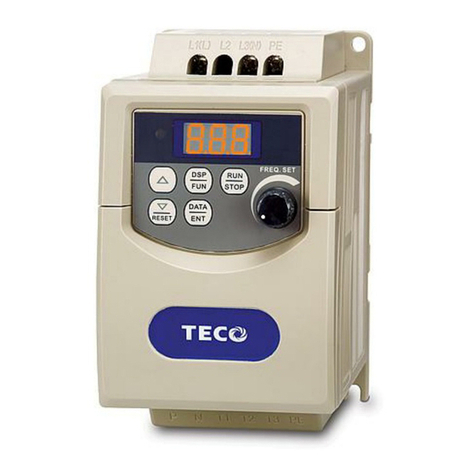
TECO FM501P2-X Planning guide

www.tecowestinghouse.com
Instruction Manual & User Manual

TABLE OF CONTENTS
Foreword .......................................................................................................................................................................................................................................... 3
1. Safety Precaution ............................................................................................................................................................................................................ 3
2. Examination before Installation ................................................................................................................................................................................ 4
1. Safety Precautions
1.1 Precautions for Operation............................................................................................................................................................................................ 5
1.2 Environmental Precautions ........................................................................................................................................................................................ 8
2Hardware Instruction and Installation
2.1 Operational Environment ............................................................................................................................................................................................ 9
2.2 Sample Model No.Identification .............................................................................................................................................................................. 10
2.3 Specifications .................................................................................................................................................................................................................... 11
2.4 Wiring Diagram ................................................................................................................................................................................................................ 17
2.5 Dimensions & Location of Terminal Block ............................................................................................................................................................ 20
2.6 Mounting Instructions .................................................................................................................................................................................................. 33
3. Software Index
3.1 Keypad Operating Instructions.................................................................................................................................................................................. 35
3.2 Parameters List.................................................................................................................................................................................................................. 36
3.3 Parameter Function Description .............................................................................................................................................................................. 37
3.4 Malfunction Indication and Countermeasure .................................................................................................................................................... 49
3.5 General Malfunction Examination Method .......................................................................................................................................................... 52
4. Troubleshooting Procedure
4.1 Flow chart............................................................................................................................................................................................................................ 53
4.2 Routine Examination and Periodical Examination............................................................................................................................................ 60
4.3 Maintenance Examination .......................................................................................................................................................................................... 61
4.4 Voltage Current Measurement ................................................................................................................................................................................ 62
4.5 EMI Filter (Class B) Specification ................................................................................................................................................................................ 63
4.6 DIN Rail Specification .................................................................................................................................................................................................... 63
4.7 Specification of Braking Resistor and Input Reactor........................................................................................................................................ 63
4.8 Specification of Braking Resistor .............................................................................................................................................................................. 64
4.9 Parameters Table .............................................................................................................................................................................................................. 65
Contents
2
FLUXMASTER 50 INSTRUCTION MANUAL
Forward
3
FLUXMASTER 50 INSTRUCTION MANUAL
To fully employ all functions of this AC drive, and to ensure the safety for its users, please read through this operations manual in
detail. Should you have any further questions,please feel free to contact your local distributor or regional sales representative.
1. SAFETY PRECAUTION
The AC Drive is a power electronic device.For safety reasons,please read carefully those paragraphs with "WARNING" or
"CAUTION" symbols.They are important safety precautions to be aware of while transporting,installing,operating,or examining
the AC drive. Please follow these precautions to ensure your safety.
WARNING Personal injury may result from improper operation.
CAUTION The AC Drive or mechanical system may be damaged by improper operation.
WARNING
❙Do not touch the PCB or components on the PCB right after turning off power and before the charging indicator goes off.
❙Do not attempt to wire circuits while power is on. Do not attempt to examine the components and signals on the PCB
while the AC drive is operating.
❙Do not attempt to disassemble or modify internal circuitry, wiring, or components of the AC drive.
❙The grounding terminal of the AC drive must be grounded properly with 200V class type III standard.
❙This is a product of the restricted sales distribution class according to EN61800-3.
❙This product may cause radio interference.The user may be required to take adequate measures for RFI protection.
CAUTION
❙Do not attempt to perform dielectric strength tests on internal components of the AC Drive.There are sensitive
semiconductor-devices vulnerable to high voltages.
❙Do not connect the output terminals:T1 (U),T2 (V), and T3 (W) to AC power input.
❙The CMOS IC on the primary PCB of the AC drive is vulnerable to static electrical charges.Do not touch the primary PCB
of the AC drive.

2. Examination Before Installation
4
FLUXMASTER 50 INSTRUCTION MANUAL
Every AC Drive has been fully tested and examined before shipment. Please carry out the following examination procedures after
unpacking your FM50 AC Drive.
❙Check to see if the model number of the AC Drive matches the model number that you ordered.
❙Check to see whether any damage occurred to the AC Drive during shipment. Do not connect the AC Drive to the
power supply if there is any sign of damage.
Contact your local distributor or regional sales representative if you find any abnormal conditions as mentioned above.
1. Safety Precautions
5
FLUXMASTER 50 INSTRUCTION MANUAL
1.1 Precautions For Operation Before Turning On Power
CAUTION
Choose the appropriate power source with correct voltage settings for the input voltage specification of the AC drive.
WARNING
Special care must be taken while wiring the primary circuitry panel.The L1 and L2 terminal must be connected to the input
power source and must not be mistakenly connected to T1,T2 or T3 output terminals.This may damage the AC drive when
the power is turned on.
CAUTION
❙Do not attempt to transport the FM50 by the front of the cover. Securely hold AC Drives by the heat-sink mounting
chassis to prevent it from falling.This may cause personal injury or damage to the AC drive.
❙Install the drive onto a firm metal base plate or another non-flammable type material.Do not install the drive on or
near any flammable material.
❙An additional cooling fan may need to be installed if several drives are installed on one control panel.The temperature
inside an enclosed panel should be below 40 ˚C (104 ˚F) to avoid overheating.
❙Turn off the power supply before proceeding to remove or perform any work on any panel.Carry out installation
procedures according to instructions given.This will help avoid a situation resulting in an operational malfunction.
❙The AC Drive is suitable for use on a circuit capable of delivering not more than 5000 RMS symmetrical amperes.
❙This product is not provided with overspeed protection.
❙This product is only intended for use in a clean, dust and moisture free environment.
WARNING
❙Do not attempt to install or remove input or output connectors of the AC drive when the power supply is turned on.
Otherwise, it may be damaged due to the surge peak caused by the insertion or removal of power.
❙When momentary power loss is longer than 2 seconds (the larger the horsepower, the the longer the time), the AC drive
does not have enough storage power to control the circuit; therefore, when power is restored, the operation of the
AC drive is based on the setup of F_10 and the condition of external switch.This is considered to be a restart as pertaining
to the following paragraphs.
❙When the momentary power loss is short,the AC drive still has enough storage power to control the circuit; therefore,
when power is restored, the drive will automatically start operation again depending on the setup of F_23.
When restarting the drive, the operation is based on the setup of F_10 and the condition of external switch (FWD/REV
button). Attention: the restart operation is determined by F_23 and F_24.
(1) When F_10=0, the AC drive will not start in restart mode.
(2) When F_10=1 and the external switch (FWD/REV button) is OFF, the inverter will not start in restart mode.
(3) When F_10=1 and the external switch (FWD/REV button) is ON, the inverter will start automatically in restart mode.
Attention: Based on safety, please turn off the external switch (FWD/REV button) after power loss to avoid possible
damage to the machine and personnel after sudden restoration of power.
Under Operation
WARNING
Do not use a separate device to switch motor ON or OFF during operation.Otherwise, the AC drive may experience an
overcurrent breakdown.
WARNING
❙To avoid personal injury caused by electrical shock, do not remove the front cover of the AC drive while the power is ON.
❙When the automatic restart function is enabled, the motor and machinery will be restarted automatically.
When Power is Applied
6
FLUXMASTER 50 INSTRUCTION MANUAL
7
FLUXMASTER 50 INSTRUCTION MANUAL
CAUTION
❙Do not touch the heatsink base during operation.
❙The FM50 can be easily operated from a low-speed to high-speed range.Please reconfirm the operating range of the motor
and machinery you are controlling.
❙Do not examine the signals on the PCB of the AC drive during operation.
❙All AC drives are properly adjusted and factory set before delivery.
CAUTION
Do not proceed with disassembly or examination procedure before ensuring that the power is off and the Power LED
is extinguished.
CAUTION
AC drive ambient temperature should be within temp: +14˚F ~ +104˚F (-10˚C ~ +40˚C),humidity under 95% RH
without condensing.
CAUTION
After the removal of shield sticker, the AC drive ambient temperature should be within +14˚F ~ +122˚F (-10˚C ~ +50˚C) and
humidity under 95% RH without condensing.In addition, the FM50 should be free from dripping water and or metal dust.
CAUTION

1.2 Environmental Precautions
8
FLUXMASTER 50 INSTRUCTION MANUAL
Avoid direct sunlight Keep away from corrosive gases
or liquids
Keep away from oil grease and gas
Keep away from salty
environments
Keep away from rain or where
dripping water may get into
the AC Drive
Avoid dusty environments
Avoid high temperature
environments
Avoid exessive direct heatAvoid excessive vibration
Keep away from high
electromagnetic waves
Keep away from radioactive matter Keep away from flammable
material

2. Hardware Instructions and Installation
9
FLUXMASTER 50 INSTRUCTION MANUAL
2.1 Operational Environment
The installation site of the FM50 is very important. It relates directly to the functionality and the life span of your AC drive.
Please carefully choose an installation site that meets the following requirements:
❙Mount the unit vertically
❙Environment temperature: +14˚F ~ +104˚F (-10˚C ~ +40˚C) (without shield sticker: +14˚F ~ +122˚F (-10˚C ~ +50˚C)
❙Avoid placing FM50 close to any heating equipment
❙Avoid dripping water or humid environment
❙Avoid direct sunlight
❙Avoid oil, grease,and gas
❙Avoid contact with corrosive gases and liquids
❙Prevent foreign dust,flecks, or metal scraps from contacting the AC drive
❙Avoid electric-magnetic interference (soldering or power machinery)
❙Avoid excessive vibration; if vibration cannot be avoided,an anti-rattle mounting device should be installed to
reduce vibration.
❙If the FM50 is installed in an enclosed control panel, please remove the shield sticker located at the top of the AC drive.
This will allow additional airflow and cooling.
❙For proper Installation of the FM50, you must place the front side of the AC Drive facing front and the top of the AC drive in
the up direction for better heat dissipation.
❙Installation must be compliant to the following requirements.
Cooling Fan Cooling Fan Cooling Fan Cooling Fan

Note: Maximum temperature in the enclosure is 122˚F (50˚C) with Shield Sticker removed
2.2 Sample Model No. Identification
10
FLUXMASTER 50 INSTRUCTION MANUAL
P2 = HP
1/4
03 = 3HP
C = Chassis
N4 = NEMA 4
OC = Chassis with Filter
N4FS = NEMA 4 with Operator Devices
This manual suits for next models
10
Table of contents
Other TECO Controllers manuals




Popular Controllers manuals by other brands

Digiplex
Digiplex DGP-848 Programming guide

YASKAWA
YASKAWA SGM series user manual

Sinope
Sinope Calypso RM3500ZB installation guide

Isimet
Isimet DLA Series Style 2 Installation, Operations, Start-up and Maintenance Instructions

LSIS
LSIS sv-ip5a user manual

Rockwell Automation
Rockwell Automation 1769-L31 installation instructions










