logo
Brands
  1. Home
  2. •
  3. Brands
  4. •
  5. TemperZone
  6. •
  7. Air Conditioner
  8. •
  9. TemperZone OPA 161RKTY Maintenance and service guide

TemperZone OPA 161RKTY Maintenance and service guide

Other TemperZone Air Conditioner manuals

TemperZone 116RKTY Maintenance and service guide

TemperZone

TemperZone 116RKTY Maintenance and service guide

TemperZone ISU KD Series Maintenance and service guide

TemperZone

TemperZone ISU KD Series Maintenance and service guide

TemperZone CWP Series Maintenance and service guide

TemperZone

TemperZone CWP Series Maintenance and service guide

TemperZone OSA 160RKTGH Maintenance and service guide

TemperZone

TemperZone OSA 160RKTGH Maintenance and service guide

TemperZone OPA 550RKTB Maintenance and service guide

TemperZone

TemperZone OPA 550RKTB Maintenance and service guide

TemperZone OPA 205RKT Maintenance and service guide

TemperZone

TemperZone OPA 205RKT Maintenance and service guide

TemperZone OPA 970RLTB1FPQ Maintenance and service guide

TemperZone

TemperZone OPA 970RLTB1FPQ Maintenance and service guide

TemperZone OSA 220 Maintenance and service guide

TemperZone

TemperZone OSA 220 Maintenance and service guide

TemperZone OPA 2000RKTM01 Maintenance and service guide

TemperZone

TemperZone OPA 2000RKTM01 Maintenance and service guide

TemperZone ISD 220Q Maintenance and service guide

TemperZone

TemperZone ISD 220Q Maintenance and service guide

TemperZone ISD 500Q Maintenance and service guide

TemperZone

TemperZone ISD 500Q Maintenance and service guide

TemperZone ISF 300K Maintenance and service guide

TemperZone

TemperZone ISF 300K Maintenance and service guide

TemperZone HWP Series Maintenance and service guide

TemperZone

TemperZone HWP Series Maintenance and service guide

TemperZone ISD 840K Maintenance and service guide

TemperZone

TemperZone ISD 840K Maintenance and service guide

TemperZone OSA 840RKTB User manual

TemperZone

TemperZone OSA 840RKTB User manual

TemperZone OPA 116RKTYH Maintenance and service guide

TemperZone

TemperZone OPA 116RKTYH Maintenance and service guide

TemperZone ISD 80K Maintenance and service guide

TemperZone

TemperZone ISD 80K Maintenance and service guide

TemperZone HWP 35 Maintenance and service guide

TemperZone

TemperZone HWP 35 Maintenance and service guide

TemperZone OPA 650RKTB Maintenance and service guide

TemperZone

TemperZone OPA 650RKTB Maintenance and service guide

TemperZone OPA 390R Maintenance and service guide

TemperZone

TemperZone OPA 390R Maintenance and service guide

TemperZone OPA 250R Maintenance and service guide

TemperZone

TemperZone OPA 250R Maintenance and service guide

TemperZone OPA 186RKTY Maintenance and service guide

TemperZone

TemperZone OPA 186RKTY Maintenance and service guide

TemperZone ISD 380-950 Series Instruction manual

TemperZone

TemperZone ISD 380-950 Series Instruction manual

TemperZone ISD 840KB-P Maintenance and service guide

TemperZone

TemperZone ISD 840KB-P Maintenance and service guide

Popular Air Conditioner manuals by other brands

Panasonic CS-E12HKEW operating instructions

Panasonic

Panasonic CS-E12HKEW operating instructions

Mitsubishi Electric MSZ-GE60VA null

Mitsubishi Electric

Mitsubishi Electric MSZ-GE60VA null

Samsung AVMFC052EA0(4) null

Samsung

Samsung AVMFC052EA0(4) null

Haier HSU-09H03/R null

Haier

Haier HSU-09H03/R null

Haier HSU-24C03 null

Haier

Haier HSU-24C03 null

Mitsubishi Electric MSZ-GE22VA null

Mitsubishi Electric

Mitsubishi Electric MSZ-GE22VA null

Samsung AVMCH052CA1 null

Samsung

Samsung AVMCH052CA1 null

nedis ACMB1WT7 quick start guide

nedis

nedis ACMB1WT7 quick start guide

Daikin FCFV50A Operation manual

Daikin

Daikin FCFV50A Operation manual

Fujitsu Inverter ASBA30JFC operating manual

Fujitsu

Fujitsu Inverter ASBA30JFC operating manual

Toshiba RAS-M10SMUV-E installation manual

Toshiba

Toshiba RAS-M10SMUV-E installation manual

Daikin FXLQ20MAVE Operation manual

Daikin

Daikin FXLQ20MAVE Operation manual

CIAT Magister 2 Series Installation, Operation, Commissioning, Maintenance

CIAT

CIAT Magister 2 Series Installation, Operation, Commissioning, Maintenance

Bestron AAC6000 instruction manual

Bestron

Bestron AAC6000 instruction manual

Frigidaire FFRE0533S1E0 Use & care guide

Frigidaire

Frigidaire FFRE0533S1E0 Use & care guide

Samsung AS09HM3N user manual

Samsung

Samsung AS09HM3N user manual

Frigidaire CRA073PU11 use & care

Frigidaire

Frigidaire CRA073PU11 use & care

Soleus Air GB-PAC-08E4 operating instructions

Soleus Air

Soleus Air GB-PAC-08E4 operating instructions

https://manuals.online logo
https://manuals.online logoBrands
  • About & Mission
  • Contact us
  • Privacy Policy
  • Terms and Conditions

Copyright 2025 Manuals.Online. All Rights Reserved.

OPA 161RKTY (c/w EC motor & UC7 Controller)
Packaged Reverse Cycle R410A
Air Cooled Air Conditioner Installation &
Maintenance
shown returns the fan control voltage
down to the minimum value for 'High'
fan speed (3.0V).
v. When the desired setting for high
fan speed is selected then wait for
30 seconds. The controller will save
the selected value in its memory and
return to normal operation.
vi. To adjust the indoor fan 'Low' speed
repeat the above procedure but wait
until the display shows the letter 'L'
before releasing the push button. The
factory default value for low speed is
5.5V.
If the air returning to the indoor unit is
regularly expected to be above 50%RH,
then the coil face velocity should be limited
to be 2.5 m/s or less (refer Air Handling
graph in Technical Data pamphlet).
High humidity levels can occur in tropical or
subtropical conditions, and/or when heavily
moisture laden fresh air is introduced. Select
a fan speed that avoids water carry-over
problems.
CHECK TESTS
1. Leave the remote switch in the off
position and close the mains isolating
switch.
A four hour delay period is required to
allow the crankcase heater to drive any
liquid refrigerant out of the compressor
oil.
2. Check that all fan motors are free
running.
3. Check that the thermostat is correctly
wired to the unit and is set at the desired
temperature.
4. Checkthattheairlters,ifany,have
been correctly installed.
5. Check any supply air diffuser dampers
are open.
START UP PROCEDURE
Use the supplied Commissioning Sheet to
help you complete the following procedure:
1. Switch on the unit after the four hour
delay period for the crankcase heater
has expired.
2. Check for correct rotation of the
compressor. If rotation is incorrect the
compressor will not pump, be noisy, and
will draw minimal current. To correct
motor rotation, change the phasing at
the main power terminal.
3. Check the supply voltage.
4. Measure the current draw on the
compressor motor and on each fan
motor. Check all readings against the
speciedvalues-particularlytheindoor
fan amps if the unit is installed in a free
blow application.
Compressor
The compressor is directional scroll
type. The compressor lubricant is polyol
ester oil (POE). Note, this oil absorbs
moisture quickly if exposed to open air. On
commissioning, the compressor must be
checked for correct rotation (refer Start Up
Procedure).
ELECTRICAL REQUIREMENTS
Electricalworkmustbedonebyaqualied
electrician. The outdoor unit must be wired
directly from a distribution board by means
of a circuit breaker and a mains isolator
provided - preferably close to the unit.
Standard units are suitable for use with
thermostats with either manual Heat/Cool
selection or automatic changeover subject
to the contact ratings of the thermostats.
To connect alternative thermostats (non-
communicating contact switching types),
refergure2forwiringdiagram.
A 24 hour power supply to the crankcase
heaters is required, otherwise the warranty
is void.
INDOOR FAN SPEED
The Indoor fan can be switched ON through
the thermostat by selecting High, Medium
or Low fan speed, or via BMS. This can be
done without starting the compressor.
1. Check the operation of the indoor fan for
noise and vibration.
2. CheckiftheHighspeedairowisto
specication.
3. CheckiftheLowspeedissufciently
low yet without risk of frost on the indoor
coil.
4. Refer wiring diagram for the factory
default setting of the maximum fan
speed and the fan speed range High –
Low.
5. If either High speed or Low speed need
adjusting, use the UC7 Controller board
to adjust the indoor fan speed:-
i. Ensure the compressor is off and the
thermostat or BMS does not request
for the compressor to start.
ii. Press and hold down the SW3 push
button on the UC7 circuit board until
the display shows the letter 'H', then
release the push button.
iii. The indoor fan will start and run at the
'High' speed setting (factory default
setting is 7.5V). The display will show
the value ('7.5') and the indoor fan will
run at the selected speed.
iv. Each following press on the SW3
push button increases the indoor fan
control voltage in steps of 0.5V, up
to a maximum of 10.0V. Pressing the
push button again when value 10.0 is
GENERAL
This OPA 161 unit must be installed in
accordance with all national and local safety
codes.
OPTION (Field Fitted)
TZT-100 Room Temperature Controller
INSTALLATION
Positioning
Refer to dimension diagram for minimum
clearances. If multiple units are to be placed
side-by-side then allow at least 2 m between
coil faces.
Mounting
Fastentheunitdowntoarmathorizontal
base using the four holes provided in the
mounting rails.
When the unit is being installed on a roof
it is recommended that the unit is installed
on a substantial structure with with anti-
vibration mounts or pads beneath the unit.
Flexible duct connections are recommended
between the supply and return ducts and
the unit.
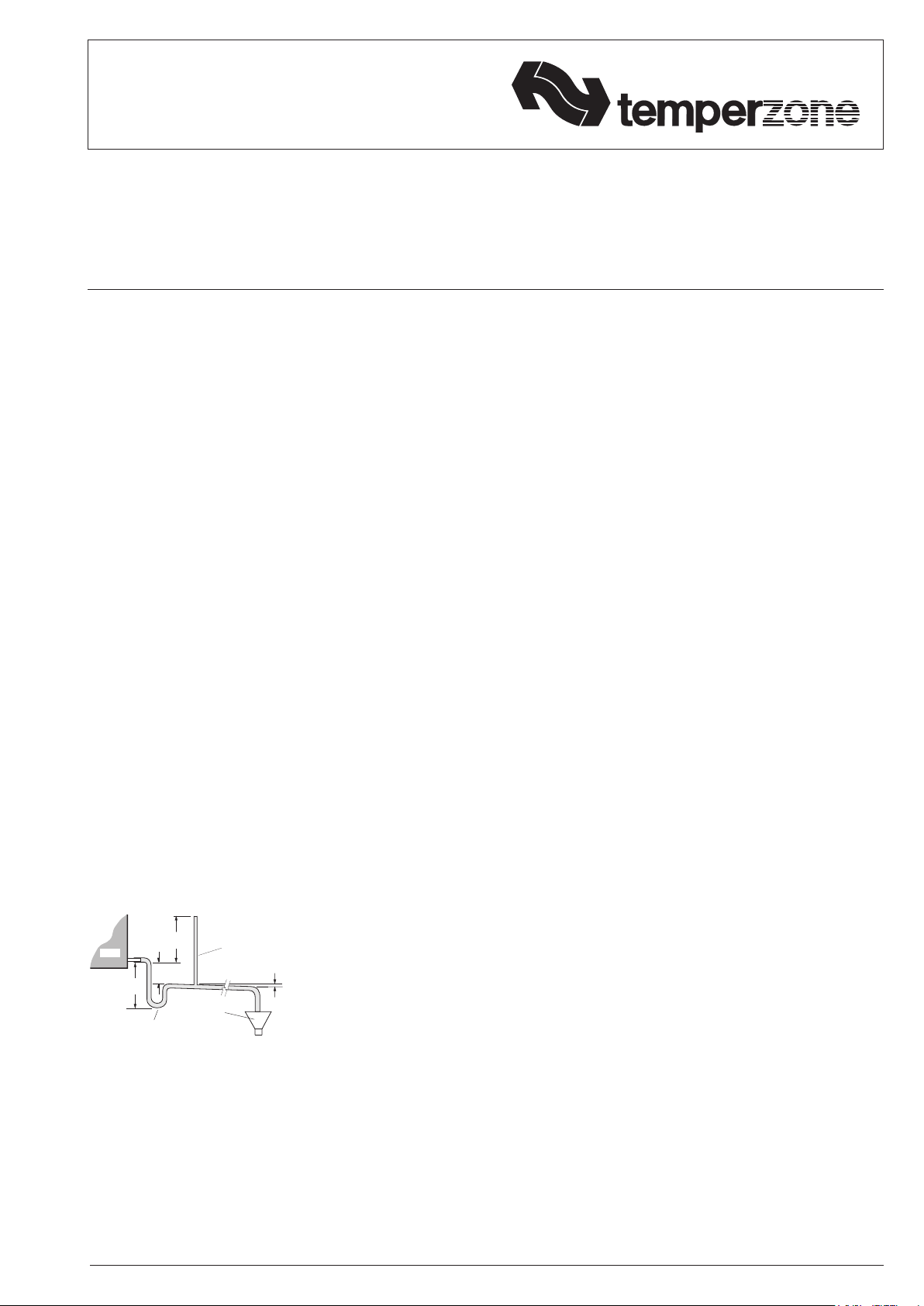
Condensate Drain
The condensate drain should be 'U' trapped
outside the unit. The trap should have a
vertical height of at least 50 mm. The drain
should have a slope of at least 1 in 50 and
must not be piped to a level above the unit
drain pipe.
Forlongcondensatepiperuns,tavent
pipe near the drain trap. The top of the vent
pipe must be at least 100 mm above the
OPA unit's drain tray.
REFRIGERATION SYSTEM
General
The refrigeration system has been charged
with R410A refrigerant; refer wiring
specicationtableforamount.Tapping
points are provided to measure discharge
and suction operating pressures. Beware of
high system pressures; use correct guages.
OPEN
DRAIN
MINIMUM
SLOPE
20 mm PER m
(1 IN 50)
50 mm
MINIMUM
100 mm
APPROX.
'U' TRAP
100 mm
APPROX.
VENT PIPE
FOR LONG
CONDENSATE
DRAIN RUNS
UNIT

Fig.1 Dimensions (mm) OPA 161RKTY
PROJECTION
Not to Scale
POINT LOADS (kg) WEIGHT
W X Y Z (kg)
37 60 60 68 225
5. Fit R410A compatible gauges and
measure the suction and discharge
pressures.
6. In cooling mode, test the operation
of the high pressure safety control by
safely disconnecting the outdoor air fan.
7. Test the operation of the reversing valve
by running the unit in both the heating
and cooling mode.
8. Check that the motors are running
smoothly.
9. Checkthesupplyairowateachoutlet.
10. Touch up any outdoor unit paintwork
damage to prevent corrosion.
UNIT CONTROLLER (UC7)

The Unit Controller provides system
protection functions such as coil frost
protection, de-icing, high head pressure and
low suction pressure cut-out.
It also protects against rapid cycling of the
compressor(s) and loss of refrigerant.
Various methods of head pressure control
(orlimiting)areemployedintemperzone
units. The particular method used varies
from model to model, but is also handled by
the Unit Controller. In combination, these
features deliver optimised performance
across a wide operating temperature range.
AsaresultoftheUC’scontrolofthese
inter-related functions, the outdoor fans may
take some time to start rotating after each
compressor start. They may also run on
when the compressor stops. The fans will
stop during a de-ice cycle. The speed will
vary either smoothly, or in steps, in order to
protect against excessively low or high head
pressure.
Refer to UC7 Controller label on the unit or
www.temperzone.biz for operation & fault
diagnostics information; model search 'UC7'.
MAINTENANCE
Weekly For First Four Weeks
1. Checkindoorairlters(iftted)and
vacuum or wash clean as necessary.
2. Check condensate drain for free
drainage.
3. Check compressor compartment for oil
stains indicating refrigerant leaks.
4. Check tightness of electrical
connections.
Six Monthly
1. Check the tightness of all fan and motor
mountings.
SUPPLY
AIR
RETURN
AIR
1154
MOUNTING CENTRES
1160
OVERALL
1200
OVERALL
OUTDOOR
AIR FLOW
500 MIN. CLEARANCE
1000 MIN. CLEARANCE
X
Y
Z
W
OUTDOOR
AIR FLOW
ELECTRICAL
ACCESS
PANEL 60
342
35 125
ACCESS
PANEL
2000 MIN. CLEARANCE
1070
OVERALL
160
1062
860
725
MOUNTING CENTRES
12 DIA. HOLES
DRAIN
15 BSPF
11
ELECTRICAL
HOLES
25 DIA.
187
225
208
75
500 MIN. CLEARANCE
2. Check tightness of electrical
connections.
3. Check suction and discharge operating
pressures.
4. Replaceindoorunitairlters(iftted).
5. Check condensate drain for free
drainage.
Yearly
1. Checkallrefrigerantpipingforchang
and vibration.
2. Check the operation of electric heaters,
iftted.
3. Check air supply at all diffusers.
4. Check for excessive noise and vibration
and correct as necessary.
5. Check for insulation and duct damage
and repair as necessary.
6. Remove lint and dust accumulation
fromoutdoorcoilns.
7. Touch up any outdoor unit paintwork
damage to prevent corrosion.
NOTE
Specicationsaresubjecttochangewithout
notice due to the manufacturer's ongoing
research and development programme.
Fig. 2 Connecting Alternative Thermostats
This wiring diagram shows how to connect a thermostat or other controller using 12V DC control signals to the UC7.
This pamphlet replaces the previous
issue no. 3877 dated 09/17.
Wiring revision F..
©temperzonelimited201804/18 Pamphlet No. 3877
Client wiring Visit: www.temperzone.biz
for client wiring diagrams
Revision
Drawn
Title
Aprvd
Drawing No.
2014
temperzone ltd
C
J.S.L.
30-07-14
291-000-758
Temperature Sensor
Sensor Color
DL Discharge Red
IC I/D Coil Yellow
AMB Ambient Black
DEI Deice Blue
OC O/D Coil Yellow
UC7 Dip switch settings
DIP switch On/Off
1, 4 & 6 On
2,3,5,7,8,9,
10,11,12,13,14,15 & 16
Off
TFC SW2 (DIP
S/W) settings
DIP On/Off
1,2,3 &
4
Off
date
Drawn
OPA 161RKTYH
Cooling -
Electrical Input
Electrical
Supply required 3Ph 380-415V ~ 50Hz
Indoor fan motor (1Ph)
Outdoor fan motor (1Ph) Full load amps
Running amps (Total)
Heating - Reverse Cycle
Compressor (3Ph) run amps rated conditions
Cooling -
Heating - Reverse Cycle
Indoor fan motor (1Ph) Full load amps
Capacities - Net to AS/NZS 3823
E.E.R. (Cooling)
Compressor type : Scroll
CM
A.E.E.R. (Cooling)
Oil type : Polyolester (P.O.E.)
IFM
Control circuit breaker
CCB
Max running amps (Total)
Base charge unit
Unit Weight - Nett
OFM
kW
kW
A
kW
MFD
kW
kW
A
0.9
5
10
kW/kW
kW/kW
A
A/Ph
15.55
14.39
4.8
3.95
3.24
3.23
A/Ph 7.2
A15
11/7.2/7.2
Kg 225
OPA161RKTYH
Kg 4.65
Outdoor motor capacitor
CM Compressor Motor
RV Reversing Valve
CMC
Compressor Contactor
CAP Capacitor
PRC
Phase Rotation Control
PRR
Phase Rotation Relay
CCH CrankCase Heater
HP
High Pressure Control
CCB
Control Circuit Breaker
OFM Outdoor Fan Motor
FRB TFC
UC7
LP
Low Pressure Control
Fault Relay Board
Unit Controller 7
Triac Fan Controller
8
1.7 x 1
F
c/w UC7 WIRING SCHEMATIC
Updated earth symbols
N
L3
L2
L1
ACTIVE
N2
CMC
CCB
N3
3 ~
PRR
PRC
N1
CM
PRR
TB1
TB2
TB3
TB4
TB5
TB6
TB7
IFM
Indoor Fan Motor
CMC
RV
CCH
HP
Modbus slave port for BMS
(monitoring or control)
A
B
SLDL
DEI
ICOC
DIP Switches
AMB
LPT

HPT
N/C
COM
N/O
FRB
Refer to DIP
S/W settings
UC7
0-10V
input
Temp sensors
(Refer to table)
Pressure
sensors
ELECTRIC
FILTER
BK
IFM
R
BK
R
Modbus master port for
optional Temperzone
approved T/stat
(TZT100 SAT 3)
Remote
On/Off
option
24C
A
B
24
If Remote
On/Off option
fitted remove
this link.
Motor Driver
Heatsink
Yellow
Black or Brown
Red
Black
White
M
1~
FAN
BLU
OFM
CAP
U1
U2
N
230V
MAINS
TFC
FAN
output
For SW2 (DIP switch)
settings- Refer table
TB8
C
D
CD
External Quiet
Mode activation
External Dry
Mode activation
See UC7 Manual
for DIP switch
settings
Z1
Z2
BRN
ORG
LP
Ferrite - Coil wires 3 turns
around ferrite core. Separate
these 3 wires from others.
Black or Brown
Yellow
A
B
ACTIVE1
N4
TB9
SW3
Refer I&M for
Alternative
T/Stat or BMS
F
N4074
28-12-17
M.A.K.
E
E
F
N3829
30-08-17
L.O.L.
ECC-1260 Changed To Motor Driver. Changed wire colour to red from white
F