Page8of 16 Edition1.2(0608)
SettingTheClock
TheTZT-701 thermostat isfittedwithareal timeclock.Itisessential thattheclocktimeanddayaresetaccuratelyifyouwant
yourprogrammedeventstostartontime.
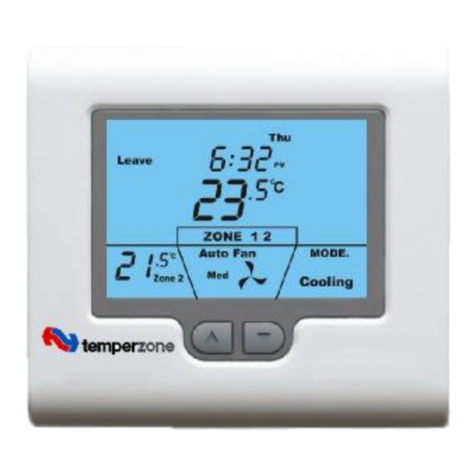
Tosettheclock, taptheclockbutton.TheLCDwillshowtheHoursDigitflashing. Usetheup(p)ordown(q)buttontoadjust
thehourstothecorrecttime(notetheAM /PM symbol)Taptheclockbuttonagainand nowtheminute’sdigitswill flash.
Adjustthisvalueusingtheup (p)ordown(q)buttontoshowthecorrectminute.TaptheClockbuttonagainand nowtheweek
dayflashes, againusetheup (p)ordown(q)buttontosetthisvaluetothecorrectdayof theweek. Taptheclockbuttonagain
toexit theclocksetfunction.Your clockisnowset.
ProgrammingYour4DailyEvents
TheTZT-701 isanindividual7-dayprogrammablethermostat.Foreachdayoftheweekyouareabletohave4timeschedulesor
programmedevents. Forclaritytheseeventsareconvenientlynamed“Wake”, “Leave”, “Return”&“Sleep”.
The“Wake”eventmaybeusedtosetthetemperaturesof your homethatyouwouldliketowakeup to.
The“Leave”eventistypicallyusedtosetthetemperaturesyouwishyourhometomaintainwhilstyouareawayat work.
The“Return”eventisoftenusedtosetthetemperatureyouwishtobegreetedwithuponreturninghomeattheendof theday.
The“Sleep”eventcanbeusedtosetacomfortableandenergyefficienttemperaturewhileyousleep.
Youarepermittedtohaveeveryeventoccurat adifferenttimeofthedayandsetadifferentheatingand coolingsettemperature
foreachof the4events.Youareabletosetaheatingset pointtemperaturebetweenHeatingOFF and38 degreesCelsius.You
areabletosetacooling temperaturebetweenzerodegreesCelsiusand CoolingOFF.
ProgrammingyourTZT-701thermostatorsetting thesedailyeventsisnomorecomplicatedthansettingtheclockasdescribed
previously.Thesamebuttonsareusedinthesamesequence,usingtheClockbuttontoadvance tothenextstep,andtheup (p)
ordown(q)buttonstomakechanges.TheLCDshows onlyrelevantinformationfortheeventbeing adjustedthusreducing
possibleerrorsthatmaybecausedbyhavingconfusinginformationdisplayedontheLCD.
Toentertheprogram mode,press andholdtheClockbuttonfor5seconds.Thedisplaywill changetoshowtheDay“Monday”
flashing.Usingtheup (p)ordown(q)buttonsadjustthedaytothedayyou wishtostartprogramminganeventortotheday
youwishtoeditanexisting event.
Taptheclockbuttontoadvance tothenextstep,TheLCDwill showtheword“Wake”withthehour’sdigitflashes.Using the
up (p)ordown(q)buttonsadjustthehourstothetimeyouwishthe“Wake”eventtocommence forthecurrentlyselectedday.
TaptheClockbuttonagain,nowtheminute’sdigitsflashes.Usingtheup (p)ordown(q)buttonssettheminutetothetime
youwishthe“Wake”eventtocommence.
TaptheClockbuttonagain. IftheTZT-701thermostat hasbeensetbytheinstallertocontroltheoptionalclimatezoning AND if
theoptiontoprogramthezoneshasbeensetbytheinstaller,youwill nowhavetheabilitytosetwhichzonesyourequiretobe
ON during thewakeevent.Usingtheup(p)ordown(q)buttonssetthezonesyouwishtobeON forthe“Wake”event.
IftheinstallerhassettheZoneoption“OFF”, thisstepisskippedbytheTZT-701duringtheprogramming sequence.
TaptheClockbuttonagain, nowtheword“Heat” (ifheating modeisenabledbytheinstaller)andatemperaturevalueisshown
intheLCD,using theup (p)ordown(q)buttonssetthedesiredHeatingtemperatureforthe“Wake”event.TaptheClock
buttonagain,nowtheword“Cool” (ifcooling modeisenabledbytheinstaller)andatemperaturevalueisshownintheLCD,
usingtheup(p)ordown(q)buttonssetthedesiredCooling temperaturefortheWakeevent.
NOTE:theremustbeaminimumof1degCdifferencebetweenheating and cooling set points. Theheating temperaturemustbe
atleast1degClowerthan thecooling settemperature.Ifyou settheheating orcooling set pointcloserthanthisminimum
value,theTZT-701 thermostatwill automatically“push”theothersetpointawaytomaintainthisminimumvalue.
TaptheClockbuttonagainandtheDaypreviouslyselectedwill beshownalongwiththeword“Leave”.TheHourdigit will
flashindicatingthat thisvaluecannowbeadjustedwiththeup (p)ordown(q)buttons.Setthehourtothetimeyouwishthe
“Leave”eventtocommence.
ContinuetotaptheClockbuttontoadvance youthroughthe“Leave”“Minute”,then“Leave”Zone(ifenabled) “Leave”Heating
(ifenabled) and“Leave”cooling(ifenabled) temperatures.Againbycontinuing totaptheClockbuttonyouwill advance to
through the“Return”programandthen“Sleep”programsforthedayyouhavechosentoprogram.
TapingtheClockbuttonagaintheLCDwillnowshowtheword“COPY”.
YounowhaveTWOoptions
Option1 -Continueprogrammingasabove.
SimplycontinuetotaptheClockButtonasyouhavebeentoadvance tothenextday,“Tuesday”inthisexample“Wake”,
“Leave”, “Return”, “Sleep”thenWednesday, Thursdayetc, followingthesamesimplestepspreviouslyexplained,…. OR….