KEEP WARM FUNCTION
CRUST CONTROL
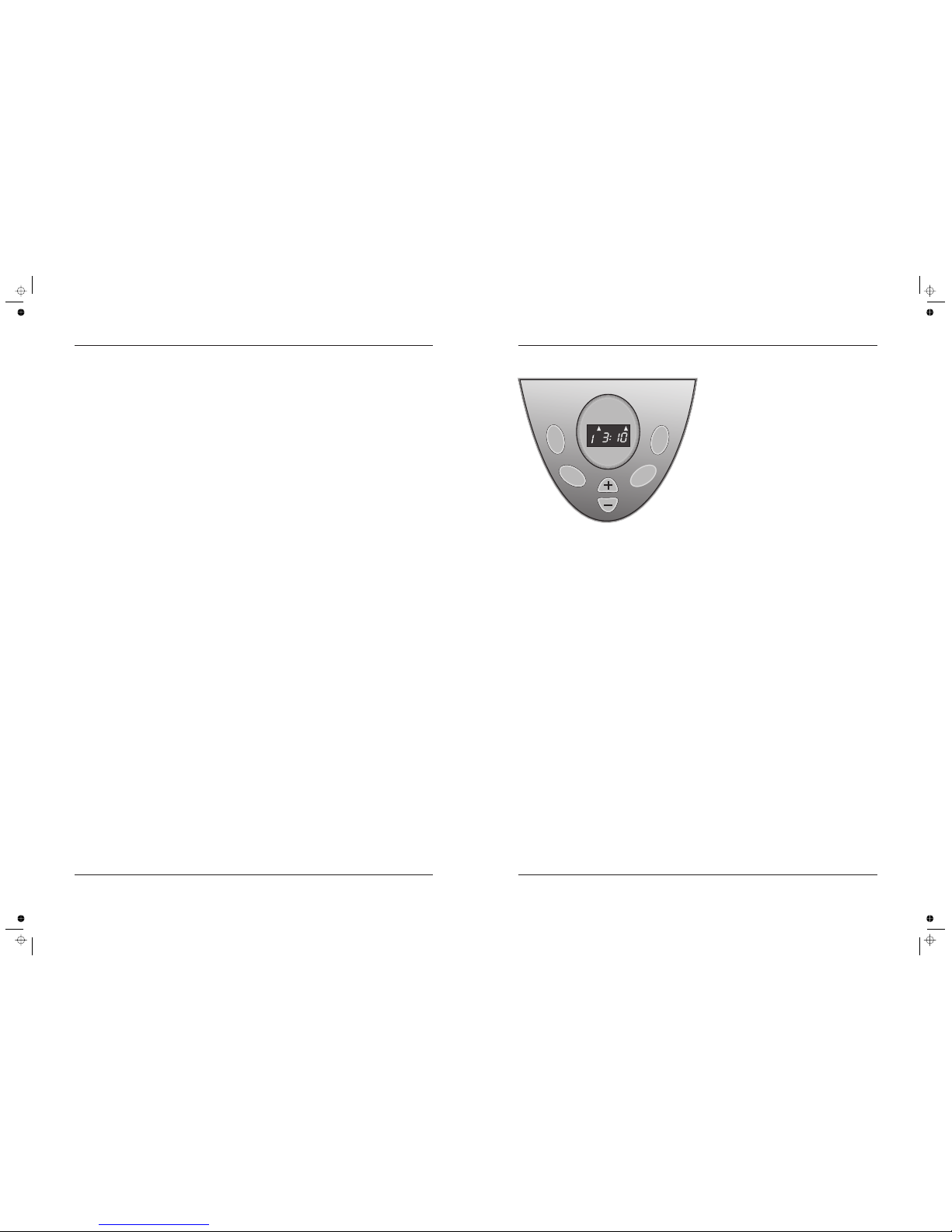
Setting the Delay Timer
+–
Stopping the Breadmaker in an Emergency
Adding Ingredients
Error Displays
,i
When the baking cycle has ended
the Breadmaker keep the bread
warm for one hour he Breadmaker will
All programs excepting 7 (Dough) and 8 (Jam) offer 3
degrees of crust which you can select by repeatedly
pressing the COLOR button. You can choose Medium,
Dark or Light crust.
When the appropriate program and crust has been
selected, press the START/STOP button to start. Do not
switch the Breadmaker off until the cycle is complete.
All programs with the exception of
can be combined with the time
delay function. The time delay function allows you to
delay the start time of baking by up to 13 hours,
depending on the length of the baking cycle.
If the dough contains fresh milk, fruit or onions, do not
select the time delay function, but bake the dough
immediately.
It is 8.00 p.m. and you want to have fresh
bread (using the Basic setting) at 7.00 a.m.
The difference between now (8:00 p.m) and 7:00 a.m.
is 11 hours. Plug the breadmaker in. The preset cycle of
3:10 hours will be displayed.
If you keep the or buttons pressed, they will cycle to
a maximum of 13:00 hours and reset to the preset
program time (in this case 3:00 hours)
The timer display shows in hours and minutes the total
time left until the bread is finished (including the delay
added and the program time) It does not display the 1
hour "keep warm" time after the program is finished
Remember to press the START button to commence the
timer countdown - otherwise nothing will happen. 1f
you set the timer incorrectly after the start button has
been pressed, you are able to switch off and reset the
delay period again only if mixing has not started
The START STOP button serves to start or to stop the
program. Only press this button after you have selected
the Menu Program, Crust Colour (and the Delay Time if
required). As the button is pressed you will hear a beep,
the machine will start and the timer display will count
down. The symbol will flash when the machine is running
or the delay function has been activated.
Keep the START/STOP button depressed for 3 seconds.
Only do this in an emergency, as the machine will reset to
the beginning of its program: You must then begin again,
the ingredients may be ruined and need replacement.
If the bread maker program menu is set at Basic, French,
Whole Wheat, Sweet, beeps are heard during the second
kneading process. These inform you when extra
ingredients may be added. During breadmaking, open
the lid of the Breadmaker only at the times specified. If the
lid is opened at any other time, the quality of the bread
may be adversely affected.
If you the Breadmaker the
temperature in is too high the display shows
leave the lid
open and wait until the Breadmaker has cooled down.
If the display shows after you have pressed START, the
temperature sensor is inoperative. Have the Breadmaker
examined by a competent repair facility.
When the program is completed the display shows
and the appliance beeps 10 times. The pan may now be
removed from the Breadmaker.
Lift the lid. remove the pan
from the Breadmaker following the procedure on Page 4.
Place the bread pan on a heatproof surface and leave it
for 10 minutes.
nvert the bread pan over a
breadboard or other heat resistant surface and tap the
bread pan lightly to release the bread.
The bread should now be allowed to cool on a heatproof
rack before use. If the paddle has got stuck in the loaf,
remove it with the supplied paddle puller tool.
Although the Breadmaker works perfectly well at low
temperatures, if your kitchen is cold the bread may not be
satisfactory. Ideally, bread should be baked in an ambient
temperature around 20ºC (70ºF).
Switching On
Delay Timer
Start, Stop & Safety Cut-out
When The Bread Has Baked
Cold Weather
Example:
Always use a rack. If you leave the bread to cool on
a normal work surface, water vapour in the bread will not
evaporate fully and the bottom of the loaf may be spoiled.
.
try to use when internal
. Switch
the Breadmaker off, remove the pan,
H:HH
0:00
E:EE
Using a pair of oven gloves,
Using a pair of oven gloves
Note:
All programs excepting 7 (Dough) and 8 (Jam) have a
"keep warm" setting.
will beep 10 times and '
. T then revert to
the default setting (Program 1).
"Rapid" "Ultra-fast"
"Jam" "Cake" and "Bake"
Rapid and Ultra-fast programs
also have beeps during which you may add ingredients.
Breadmaker Operating Sequence
Weighing and Measuring Ingredients
IMPORTANT NOTE
I. Open the lid and remove the baking pan by
raising the handle and twisting anticlockwise to the
REMOVE position. Lift the pan out and place it on the
work surface.
2. Ensure that the paddle is attached to the spindle
inside the baking pan (this simply pushes on) Make sure
the paddle is fitted correctly..
3. Measure the ingredients as required and add
them all into the pan. There Is no need to mix the
ingredients before hand, the Breadmaker will do this.
4. When adding the yeast to the baking pan, take
care that the yeast does not come into contact with the
water or any other liquid as It will start to activate
immediately.
All our recipes and those that are available
elsewhere are based on yeast specially intended for
breadmakers, available in sachet form.
5. Do not overfill the baking pan This will affect the
bread and may damage the appliance. Using the pan
handle, place the baking pan in the Breadmaker and
twist clockwise to the LOCK position. Close the lid of the
appliance.
6. Plug the appliance into the power supply (you will
hear one long beep). The appliance will automatically
be set to the BASIC program with the crust setting at
MEDIUM. The display will show
7. Select the required program by pressing the
SETTING button until the light corresponding to the
program becomes Illuminated. Remember to select the
loaf size and the crust colour .
9. When the program is completed and the bread is
baked the “keep warm” function operates for a further
hour. After 1 hour the breadmaker will again beep 10
times and then revert to the default (Program 1). For best
results, stop the breadmaker with the START/STOP
button and remove the baking pan within this period.
10. Take care when removing the bread. The baking
pan is very hot. To remove the baking pan open the Lid
and, using oven gloves because the pan is still hot,
remove the pan, Using the handle, twist the pan anti-
clockwise to the REMOVE position and lift out.
11. Let the pan cool for about 10 minutes out of the
machine in normal orientation. This is particularly
important for the heavier breads.
12. Turn the pan upside down and gently tap or
shake the bread from the pan. Occasionally, the paddle
will stay in the loaf; wait until the loaf is cool and then
remove the paddle with a wooden utensil
to avoid damage to the non-
stick surface. If you need to aid removal of bread from
the pan use only wooden or heatproof plastic utensils.
13. Leave the bread on a rack to cool. Make sure the
paddle has been removed before slicing the bread.
The next few pages contain a series of recipes to help
you get acquainted with the facilities available on your
new Breadmaker. If you are to get the best results it is
vital that your measurements are careful and accurate
as small differences in key ingredients can have a huge
effect on the final result.
Use a clear container for measuring liquids and
measure at eye level. If you measure from above or
below you will not get an accurate
reading. The measuring cup
provided has scales marked in
cups, millilitres (ml) and fluid
ounces (fl.oz.) to help you measure
the ingredients correctly. Always fill
the liquid to the marked line.
If you are measuring dry ingredients by weight, use a
good pair of kitchen scales calibrated in grammes (and
Imperial if you prefer).
Where the abbreviations tsp. (teaspoon) and
tbsp. (tablespoon) appear in the recipes they refer to the
supplied measuring spoon. Use this spoon as other
utensils may not yield the correct amounts. Spoon
measurements must be . Rounded or heaped
measures may not yield the proper results.
Note:
Note:
This applies especially when using the delay timer.
When the Breadmaker is operating only open
the lid at the prescribed places in the baking cycle.
Failure to observe this will affect the quality of the bread,
especially its ability to rise properly.
exactly
level
3:10
14. Always unplug the appliance after use.
NOTE:
The capacity of the Breadmaker is sufficient to bake a 900g
loaf, or to raise the equivalent amount of dough for baking
elsewhere. Do not exceed this amount otherwise the
mechanism may be damaged, or the dough may rise through
the appliance lid.
8. Press the START/STOP button to start the
machine. When the program is completed the display
shows and the appliance will beep 10 times.
or the
supplied paddle puller tool
0:00 The
1hour “Keep Warm” time is not displayed.
Page 6 Page 7
tsp.
(teaspoon)
tbsp.
(tablespoon)
1: Set the display time to 11:00.
(The time difference between now
and when you want the bread)
2a: Press to add time in 10 minute
steps.
2a: Press to deduct time in 10 minute
steps.
3: Press START/STOP to start time
delayed baking
START
STOP
apid Ultra-fast