8
BASIC OPERATION
POWERING UP
Press the ON touch pad.
All display indicators will illuminate momentarily.
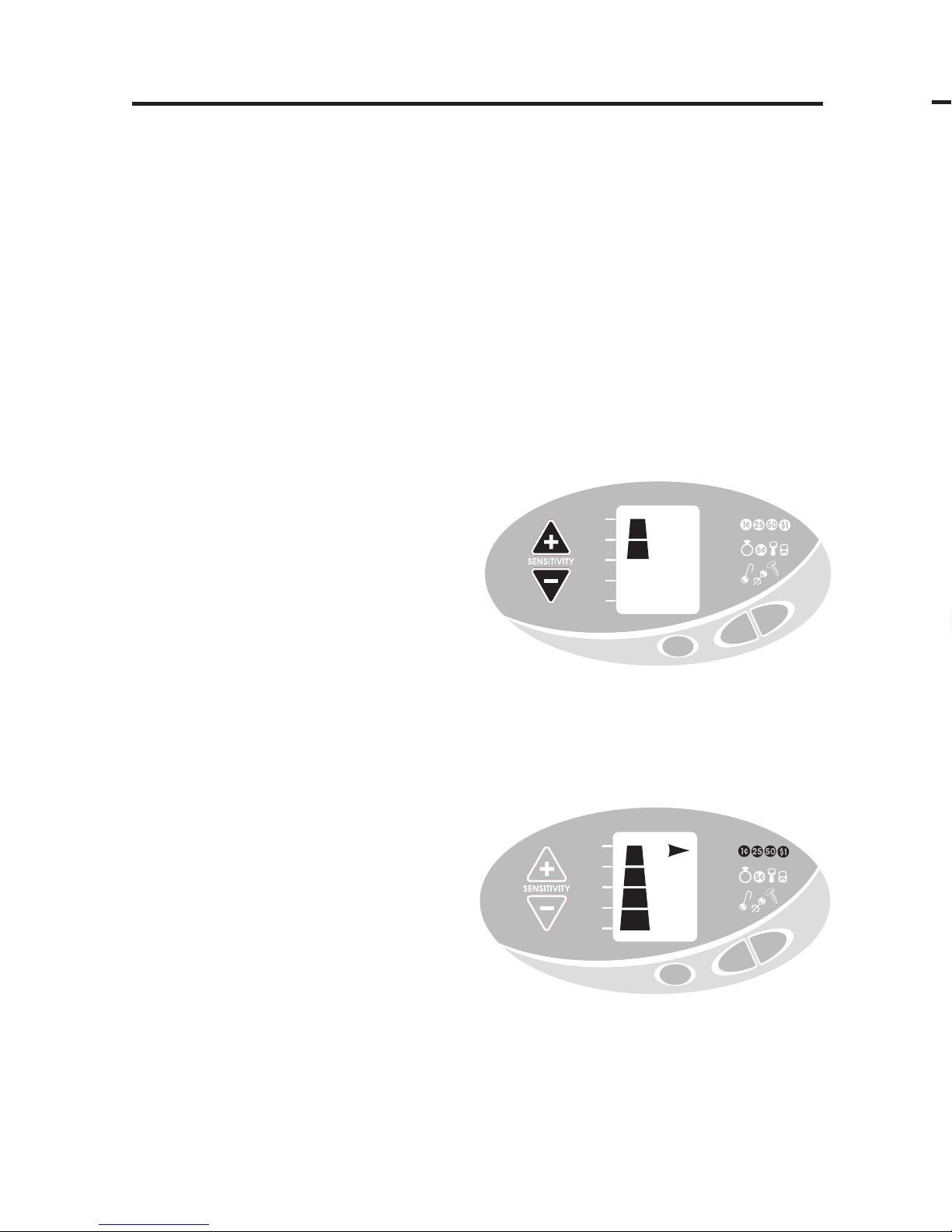
The 4-segment pyramid-shaped Sensitivity Indicator will illuminate on the
left side of the display. The 4-segment pyramid indicates that the
detector is at full sensitivity.
When an object is detected, the object will be identified by a tone, a display
indicator, and a depth indication.
A two-minute “warm-up” is required before the detector reaches full
sensitivity.
UNDERSTANDING THE DISPLAY
The LEFT SIDE of the display has a dual purpose:
●
1SENSITIVITY LEVEL
Upon power-up, and after
pressing either the up- or down-
sensitivity pads, the pyramid-
shaped display indicates the
detector’s sensitivity level.
The sensitivity level can be
changed using the up- and down-
pads.
At maximum sensitivity, the unit can detect a coin-sized metal object buried
about 6" beneath the surface; larger objects can be detected much deeper.
●
2DEPTH INDICATION
After detecting an object, the
pyramid-shaped display indicates
the approximate depth of buried,
coin-sized objects.
Objects at or near the surface
will illuminate the single
segment at the top of the scale.
More deeply buried objects will illuminate more segments, indicating depths
of 2, 4, or 6 inches, as identified to the left of the display.
NOTE: The depth indicator is not accurate for large, or irregularly shaped, objects.
However, the scale will provide relative depth indications for larger objects; a given
object will induce deeper readings the farther it is from the search coil.
TARGET
DEPTH
SILVER/
COINS
GOLD/
COINS/
PULLTABS
SM GOLD/
IRON/
TRASH
TARGET
ID
SURFACE
2”
4”
6”
MODE
OFF
ON
TARGET
DEPTH
SILVER/
COINS
GOLD/
COINS/
PULLTABS
SM GOLD/
IRON/
TRASH
TARGET
ID
SURFACE
2”
4”
6”
MODE
OFF
ON
13
Upon power-up, the detector defaults to 3/4 sensitivity. To increse to full
sensitivity, press the Sensitivity ▲ touch pad.
ELECTROMAGNETIC INTERFERENCE
The principle use for the Sensitivity Control is to eliminate Electromagnetic
Interference (EMI).
A hobby metal detector is an extremely sensitive device; the search coil creates
its own magnetic field and acts like an antenna. If your detector beeps
erratically when the search coil is motionless, the unit is probably detecting
another magnetic field.
Common sources of EMI are electric power lines, both suspended and buried,
motors, and household appliances like computers and microwave ovens.
Some indoor electronic devices, such as dimmer switches used on household
lighting, produce severe EMI and will cause the detector to beep erratically.
Other metal detectors also produce their own electromagnetic fields, so if
detecting with a friend, keep two metal detectors at least 20 feet apart.
If the detector beeps erratically, REDUCE THE SENSITIVITY by pressing the
Down-Sensitivity Arrow ▼ on the left of the control panel.
SEVERE GROUND CONDITIONS
A secondary use for the Sensitivity Control is to reduce false detection signals
caused by severe ground conditions. While your Titan 1000 XD contains
circuitry to eliminate the signals caused by most naturally occurring ground
minerals, 100% of all ground conditions cannot be anticipated. Highly
magnetic soils found in mountainous and gold-prospecting locations can cause
the detector to emit tones when metal objects are not present. High saline
content soils and sands can also cause the detector to false.
If the detector emits false, non-repeatable, signals, REDUCE THE SENSITIVITY.
MULTIPLE TARGETS
If you suspect the presence of
deeper targets beneath a
shallower target, reduce
the sensitivity to eliminate
the detection of the deeper
targets, in order to
properly locate and identify
the shallower target.
SENSITIVITY ADJUSTMENT
TARGET
DEPTH
SILVER/
COINS
GOLD/
COINS/
PULLTABS
SM GOLD/
IRON/
TRASH
TARGET
ID
SURFACE
2”
4”
6”
MODE
OFF
ON