INSTALLATION INSTRUCTIONS
Use the band switch located under the control panel cover to select
the operation mode of the sensor switch. “OFF” mode powers off the
entire sensor. “OCC” mode automatically turns the load on and off
based on occupancy. “VAC” mode requires the load to be manually
turned on and will automatically turn off the load based on occupancy.
VAC mode can also be described as “Manual On Occupancy Mode”.
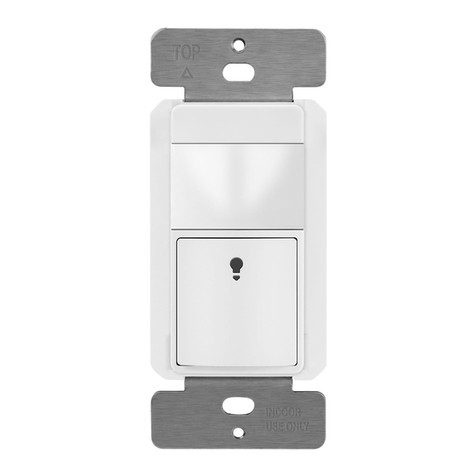
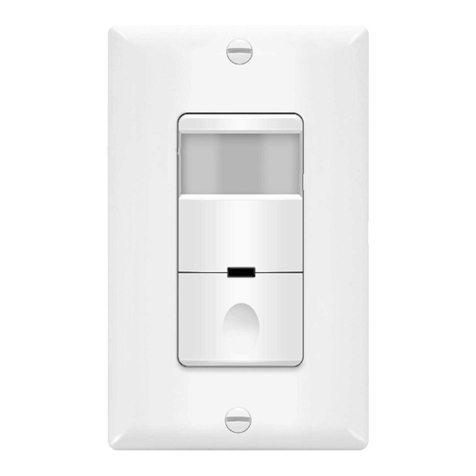
Manual On/Off Button
By Pressing the control panel cover, the Load can be turned On/Off
under OCC or VAC mode. (Illustrated in Figure 5)
Turning On the Load under Occupancy Mode
Load will automatically turn on when occupancy is detected.
Tu rning On the Load under Vacancy Mode
Press switch cover to manually turn on the load.
Automatically Tur n i ng Off the Load
Under either mode, the Sensor will keep the Load on when no motion
is d etected for up to the set time d elay before automatically turning off
the load. Under VAC mode, the lo ad will automatically turn back on if
motion detected within the first 30 se conds.
-04-
Figure 5
1.
It can take up to three minute for initial run to complete.
2.
Check the wiring connections, especially the
Ground Wiring.
The Load does not turn on when motion is detected
1.
There can be up to a 30 minutes time delay after the last motion
detected. To verify proper operation, turn the Time Delay Knob to 15s
(Test Mode), make sure there is no motion (no LED flashing), and
the Load should turn Off in 15 seconds.
2.
Check if there is any significant heat source mounted within six feet (two
meters) that may cause false detection, such as a high wattage light bulb,
portable heater, or HAVC device.
3.
Check the wiring connections, especially the Ground wiring to the
sensor switch.
The Load turns on when there is no motion
1.
Switch from OCC to VAC mode.
2.
Cover the Sensor Switch's lens to eliminate unwanted coverage area.
3.
Turn the Sensitivity Level knob to the left to avoid false alerts in
smaller rooms and if installed near the door way.
If within two(2) years from the date of purchase, this product fails due to
a defect in material or workmanship, we will repair or exchange it, at its
sole option free of charge. This warranty does not apply to: (a) damage to
units caused by accident, dropping or abuse in handling, acts of God or
any negligent use; (b) units which have been subject to un-authorized
repair, opened, taken apart or otherwise modified; (c) unit not used in
accordance with instruction; (d) damages exceeding the cost of the product;
(e) finish on any portion of the product, such as surface and weathering,
as this is considered normal wear and tear; (g) transit damage, initial
installation costs, remov al costs, or rein-installation costs.
This warranty service is available by returning the product with proof of
purchase, purchase date and a description of the problem to the
dealer from whom the unit was purchased.
April,2016
-06-
WARRANTY INFORMATION
To operate properly, the Sensor Switch consumes power from the hot
and
Ground.
Therefore, a
Secured Ground Wiring is required.
Initial run
The Sensor Switch requires an
initial run of three minute.
During the
initial run, the load may turn on and off several times.
Do not adjust any setting until the initial run has completed.
The Load is out of control (frequently flashing)
1.
Check to see if Ambient Light Level is enabled by covering the lens
by hand.
2.
Check the wiring connections, especially Hot and Ground wiring, and
make sure there is no loose wiring.
2. Press and hold the Manual ON/OFF button (Figure 4) for 6 seconds
until the load turns on, release in the next 4 seconds. The Load will
turn off for 10 seconds.
3. The Load will turn on again for 2 seconds and then turn off. This
confirms that the present light level is now the set Ambient Light Level.
4.Set the Band Switch to OCC mode. The Load will now turn on only
when the present light level is below the Ambient Light Level setting
and when motion is detected.
Back to factory default
(daylight).
1. Set the Band Switch to VAC.
2. Press and hold the Manual ON/OFF button (Figure 4) until the Load
turns on, continue holding until the Load turns off. Release button.
3. Set the band Switch to OCC. The switch is now set to the factory
default mode.
The Load does not turn Off
-0
5
-
Manually Turning Off the Load
You can manually turn off the load in OCC or VAC mode by pressing the
switch cover. In OCC mode, the sensor will take about 5 minutes to
reactivate and will not respond to motion during this time.
TROUBLESHOOTING
OPERATION