TriTeq MicroIQ UM User manual

R
O
TM
ELECTRONIC LOCK
Operation Manual
Models:
UM, CM, SM
FOR OFFICE FURNITURE, STORAGE CABINETS, LOCKERS, SAFES, VAULTS, SECURED ENCLOSURES

Micro-IQ Electronic Lock Programming Guide
Table of Contents
Definition of Terms ..............................................................1
Operating the Lock...............................................................1
Lock Components and Features ........................................................2
Programming Instructions...................................................2
Programming a New Master Code
..................................................
3
Adding a Control Key-Fob ...............................................................
Available User IDs .............................................................................
5
Operating the Lock With an Access Code .......................................
6
Unlocking the Unit ...........................................................................
6
Deleting Access Codes ......................................................................
6
Changing Access Codes ....................................................................
7
Battery Replacement ..........................................................
7
Care and Cleaning
8
General Information ..........................................................
Troubleshooting .................................................................
10
..............................................................
10
11
Table of Contents
Programming Access Codes .............................................................
4
Pre-programmed Codes ....................................................................2

Definition of Terms
1
MicroIQ Electronic Lock Programming Guide
Definition of Terms
Term Meaning
Factory Code
1-2-3-4-5
This is the preset Master Code set at
the factory.
Master Code This is the new code you will use
to permanently replace the Factory
Code.
User ID # This is the location or two digit
memory number used to store
each user’s individual Access Code.
(twenty five are available)
Access Code(s) This is the five digit code used by
each individual user to unlock the
unit.
Control Key-Fob Optional: Used to access and
program the lock.
Operating the Lock With an Access Code
1. Enter the 5-digit Access Code. The Factory Access Code is 1-1-1-1-1.
2. Rotate knob clockwise to unlock.
3. Rotate the knob counter-clockwise to lock.
(no code required to lock)
Wait for green light and an an audible beep.

Programming Instructions
2
MicroIQ Electronic Lock Programming Guide
Lock Components and Features:
Programming Instructions
Pre-programmed Codes
Your keypad lock has come preprogrammed with two (2) codes:
Access Code 1-1-1-1-1 to allow access to the unit before you program
your own codes, and Factory Code 1-2-3-4-5 to allow you to program
your own unique Master Code. This Master Code does not give you
access to the unit; it is for programming only.
It is important to write down the new 5-digit Master Code in a
safe place and do not share it with anyone. Please make note of
your new Master Code here before you begin the programming
procedure.
Note: Refer to page 1 where you recorded your Master Code.
Do not give your Master Code to anyone. If the Master Code is
compromised, then the unit’s security is compromised.
Green
Proceed
LED
Red
Error
LED
Yellow
Low battery
LED
Knob
in locked
position
Location to
point the
key-fob
Battery
holder
with cover
Keypad
Program
button
Push thin
front edge
inward
Press
Here
R

3
MicroIQ Electronic Lock Programming Guide
Programming a New Master Code
Warning: Do not set your Master Code to 1-2-3-4-5. Doing so will
erase all existing Access Codes and reset User ID 1-1 to
Access Code 1-1-1-1-1.
If a valid Master Code is entered, the green, red, and yellow
LEDs will ash.
If an invalid Master Code is entered, the red LED will flash 3
times, and the keypad will exit programming.
Once the new Master Code is programmed, the 1-2-3-4-5 Factory
Code becomes invalid.
Note: All Access Codes remain the same when a new Master Code is
programmed.
1. With the lock in either unlocked or locked position, press and
The keypad will enter programming mode, and the green LED
will light up.
2. Enter your 5-digit Master Code
If the code is entered correctly, the green LED will light up.
Proceed to step 3.
If no code is entered within 10 seconds, or if the code is entered
incorrectly, then the red LED will flash 3 times, and the keypad
will exit programming mode.
3. Press and hold the Program Button for 5 seconds.
The keypad will enter programming mode. The red LED will
flash once, and then the green and yellow LEDs will light up.
4. Enter the desired 5-digit Master Code.
MY MASTER CODE: __ - __ - __ - __ - __
Programming Instructions
hold the Program Button
(located below the #3 button) for 5
seconds.

4
MicroIQ Electronic Lock Programming Guide
Programming Instructions
Adding a Control Key-Fob
Note:
The Factory Code should be
changed to a new Master
Code before proceeding
with the programming
a Control Key-Fob.
Now you can use the Control Key-Fob to operate the lock.
1. With the lock in either unlocked or locked position, press and
hold the Program Button
(located below the #3 button) for 5
seconds.
The keypad will enter programming mode, and the green LED
will light up.
2. Enter your 5-digit Master Code
If the code is entered correctly, the green LED will light up.
Proceed to step 3.
If no code is entered within 10 seconds, or if the code is entered
incorrectly, then the red LED will flash 3 times.
To try again, return to step 1.
3. Press and hold the Program Button for 5 seconds.
The red LED will flash once, and then the green and yellow LEDs
will light up.flash once, and then the green and yellow LEDs will
light up.
4.
Point your Control Key-Fob under the Program Button and press
the center button of the fob.
A Control Key-Fob can be used insted of the
keypad to open or program the lock.
A Control Key-Fob can be paired to as many
MicroIQ locks as desired.

If no code is entered within 10 seconds, or if the Master Code is
entered incorrectly, then the red LED will flash 3 times, and the
keypad will exit programming mode.
4.
Enter the 2-digit User ID that you want to program.
If the User ID is entered correctly, the yellow LED will blink 5
times, and then both the yellow and green LED will light up.
Proceed to step 4.
If a User ID is not entered within 10 seconds, the red LED will
blink 3 times, and the keypad will exit programming.
Enter the new 5-digit Access Code.
If a valid code is entered, the green, red, and yellow LEDs will
strobe.
If an invalid code is entered, the red LED will flash 3 times, and
the keypad will exit programming mode.
Repeat Steps to program or change up to twenty-five Access Codes.
P
5
MicroIQ Electronic Lock Programming Guide
Programming Your Access Codes
You may program up to 25 unique Access Codes. Each of these
codes is used to unlock the unit.
To program a 5-digit Access Code:
1.
2.
With the lock in either the locked or unlocked position, press and
hold the Program Button (located below the #3 button) for 5
seconds.
The keypad will enter programming mode, and the green LED
will light up.
3.
Enter the 5-digit Master Code.
If the Master Code is entered correctly, the green LED will light
up. Proceed to step 3.
Programming Instructions

Available User IDs
Use this chart to record Access Codes for each User ID. User ID #11
is factory-set to Access Code 1-1-1-1-1, and should be reprogrammed
first.
11 (1-1-1-1-1) 12 13 14 15
21 22 23 24 25
31 32 33 34 35
41 42 43 44 45
51 52 53 54 55
A total of twenty-five (25) codes can be programmed.
Programming Instructions
6
MicroIQ Electronic Lock Programming Guide
Unlocking the Unit
Warning: Three invalid attempts will cause the lock to block any
other attempts for 3 minutes.
To open the unit:
1. Enter the 5-digit Access Code.
If a valid 5-digit Access Code is entered, the green LED will light
up and the lock will unlock. Proceed to step 2.
If an invalid Access Code is entered, the red LED will flash 3
times.
2. Rotate the knob clockwise to the unlocked position.
The lock will re-engage within 5 seconds if left in the locked
position.
3. To relock, rotate the knob counter-clockwise to the locked
position.

Programming Instructions
7
MicroIQ Electronic Lock Programming Guide
Deleting Access Codes
Warning: This will erase all Access Codes & reset the lock back to the
1-1-1-1-1 Access Code under User ID 1-1 when complete.
It will not change the Master Code.
To delete all Access Codes:
1.
2.
With the lock in either the locked or unlocked position, press
and hold the Program Button (located below the #3 button) for
5 seconds.
3.
Enter the valid 5-digit Master Code.
4.
Press and hold the Program Button for 5 seconds again
Enter 1-2-3-4-5.
Changing Access Codes
Each Access Code is saved under a User ID location. This procedure
will replace an existing Access Code based on the code’s User ID
location, making the original Access Code located under that User ID
permanently obsolete.
To change an Access Code:
1.
2.
With the lock in either the locked or unlocked position, press and
hold the Program Button (located below the #3 button) for 5
seconds.
3.
Enter the valid 5-digit Master Code.
4.
Enter the 2-digit User ID location* you wish to replace/change
(found in the table on page 6).
Enter the new 5-digit Access Code.
Repeat steps 1 - 4 to change additional Access Codes.
*Reference the User ID found in the table on page 6.

P
8
MicroIQ Electronic Lock Programming Guide
Battery Replacement
The keypad requires a 3v lithium CR2032 battery. When the battery
is low, the yellow LED light will flash 5 times after the lock is operated
operated to signify the low battery level. It should be replaced as
soon as possible, to avoid being locked out if the battery is depleated.
Note: Changing the battery will not delete any codes.
Caution: Be careful when removing small screw from battery
holder. If the screw is missing, a M2 x 4mm socket head
cap screw will fit for replacement. The hex tool is 1.5mm.
To replace the battery:
1. Lift the battery cover.
2. Swing the battery cover to parallel position as
lock body.
3. Remove the battery holder screw from lock body
using the hex tool.
4. Remove the battery holder by pulling it away
from the lock body.
5. Remove the battery from the holder using the
hex tool, if necessary.
Battery Replacement

9
MicroIQ Electronic Lock Programming Guide
6. Insert a new battery into the holder.
The “+” surface of the battery should be
inserted into the holder against the surface
marked with the “+” symbol.
7. Insert the battery holder into the lock with the
holder cover in the fully open position, and with
the battery holder screw flush to the bottom of
the holder, until the holder is fully seated.
8. Place the battery cover screw onto the battery
holder.
9. User the hex tool to tighten the battery cover
screw.
10. Swing the battery cover back, and snap the
cover down.
If the knob is unlocked, you should hear the lock mechanism click
after turning the knob to the locked position, and the unit will
lock. If the unit will not lock after inserting the battery, enter
any Access Code, move the knob to the unlocked position, and
move the knob to the locked position.
You should hear the lock mechanism click and the unit will lock.
Battery Replacement

Care and Cleaning
Care and Cleaning
To clean the MicroIQ surface, apply a non-acid based cleaner.
Do not spray cleaner directly on the MicroIQ keypad.
Spray the cleaner onto a clean, cotton cloth, and wipe the keypad.
Wipe down the keypad and housing surface of excess cleaner.
Liability Limits:
This is a limited warranty and in lieu of all other warranties (including the implied warranties
of merchantability and tness of use) and under no circumstances shall TriTeq Lock & Security
or Hudson Lock, LLC be liable for any incidental or consequential damages or losses.
TriTeq Limited Warranty:
TriTeq offers a one year limited warranty all products to be free from manufacturing defects
in materials and workmanship. This limited warranty does not cover battery, lost combinations or
damages caused by improper mounting, improper or unreasonable use.
Operating Temperature: 0 - +50 C
Storage temperature: -10 - +70 C
Operating Moisture: 20% - 80% Rh
(without condensation)
Replacement Battery: 3 volt lithium CR2032
Battery Life: 3 to 5 years typical or 50,000 operations
ATTENTION: Battery life may vary with battery brand and envi-
ronmental conditions.
10

Troubleshooting
Troubleshooting
Condition Suggested Solution(s)
No LEDs light up when I enter my
code, or after holding program
button for 5s
Replace battery
Knob will not turn when valid code
is accepted (green LED remains on)
Wait until the LED turns off. Then
re-enter Access Code, wait for the
green LED and click sound before
turning the lock knob.
Red LED flashes/sounds three times
after entering any code
Reprogram Access Codes
Erase all Access Codes by
reprogramming Master Code to 1-2-
3-4-5, and reprogram Access Codes
Yellow LED flashes/ after entering
any code
Replace battery
Red ERROR LED flashes/sounds three
times after any key is pressed
Wait 3 minutes and enter a valid
keypad code
Knob stuck in either the unlocked
or locked position (even after valid
code & good battery & waiting)
Knob in the unlocked position, but
unit still locked
Forgot codes cab is locked up
No response after changing battery Turn knob to locked position
Check battery orientation
Contact Technical Support at
847-640 7002
Contact Technical Support at
847-640 7002
Contact Technical Support at
847-640 7002
Contact Technical Support at
847-640 7002
Contact Technical Support at
847-640 7002
Contact Technical Support at
847-640 7002
Contact Technical Support at
847-640 7002
TriTeq Lock and Security
701 Gullo Ave
Elk Grove Village, IL
60007
Phone: (847) 640-7002
Toll Free: (888) 603-5625
Email: marketing@triteqlock.com
© Copyright 2014 TriTeq Lock and Security. All rights reserved
042617 - Rev. 1
R
O
Other manuals for MicroIQ UM
1
This manual suits for next models
2
Table of contents
Other TriTeq Lock manuals

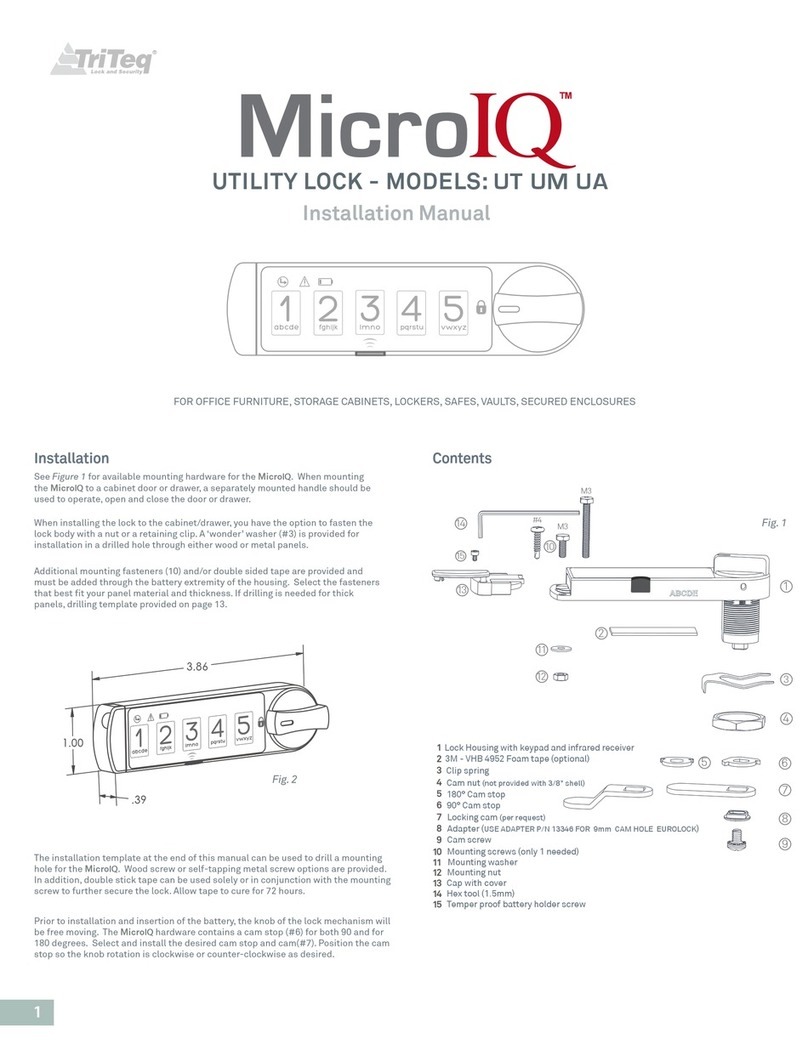
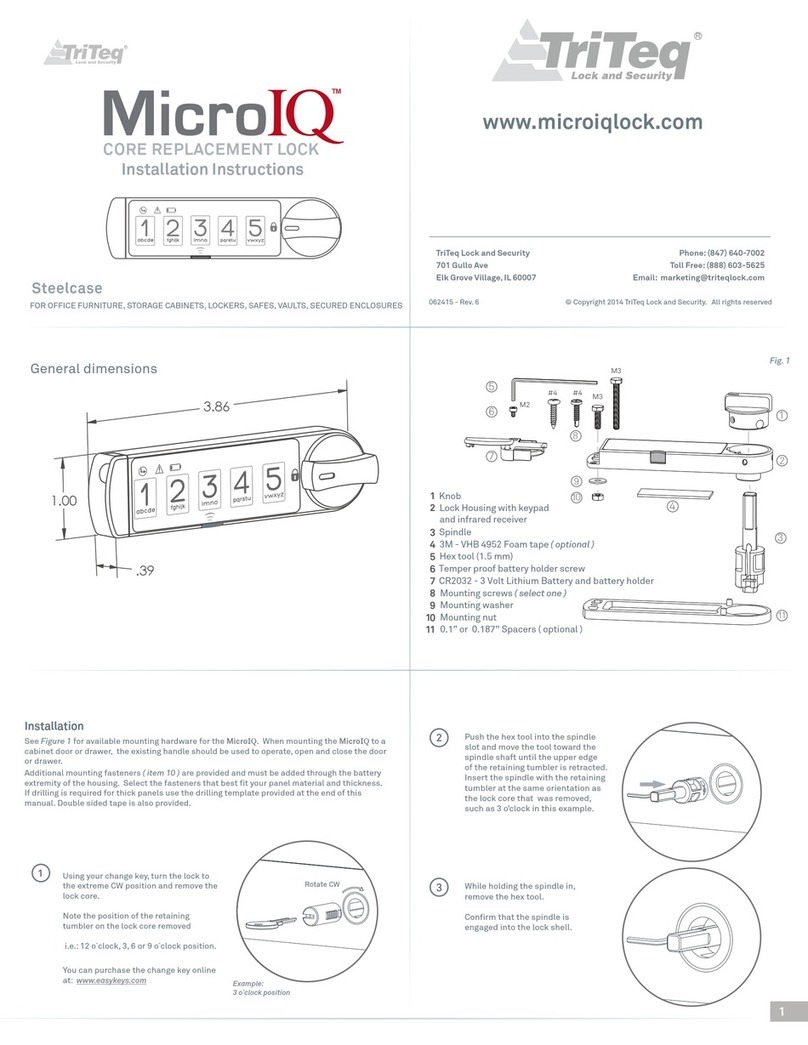

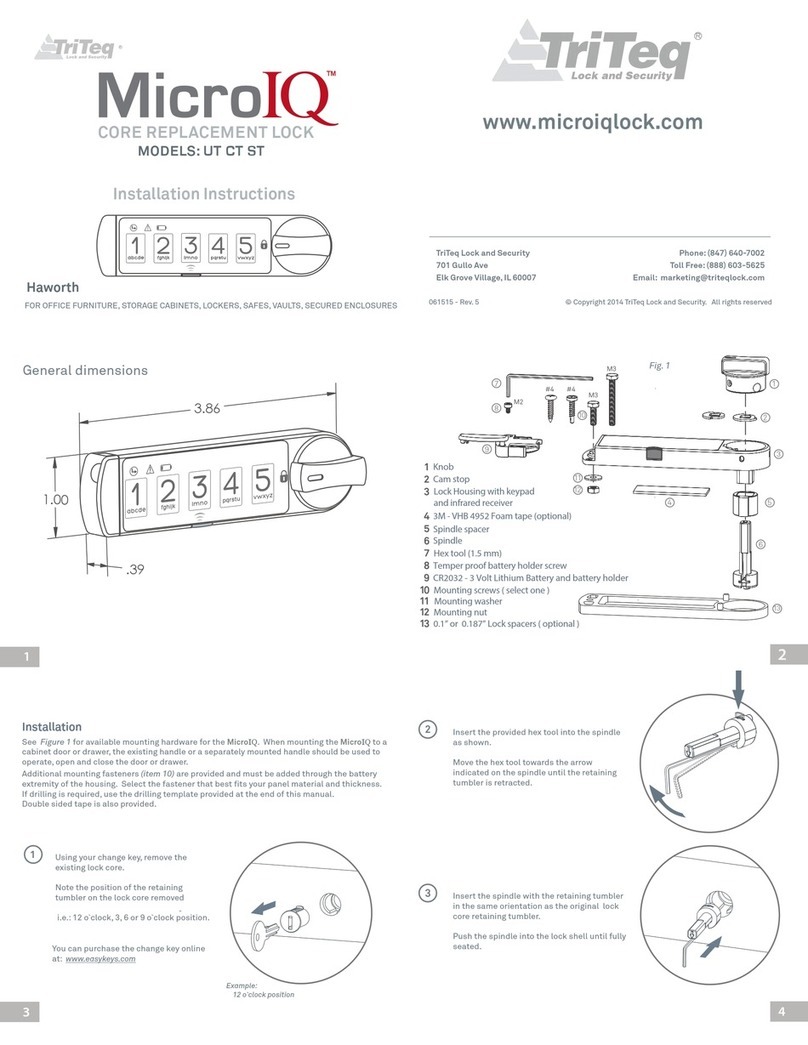
Popular Lock manuals by other brands


ALTRO
ALTRO Altro Smart Lock installation manual
hager
hager 3220 Installation instructions manual
Stock Loks
Stock Loks CB-190 instruction sheet
Allegion
Allegion LOCKNETICS CS450 Series installation instructions
Sandleford
Sandleford PKSS70 operating instructions

BKT Elektronik
BKT Elektronik BKT AL200 user manual