MXC550 User Manual
Contents…………………………………………………………………….1
Introduction
oOverview................................................................................2
oBox Contents............................................................................2
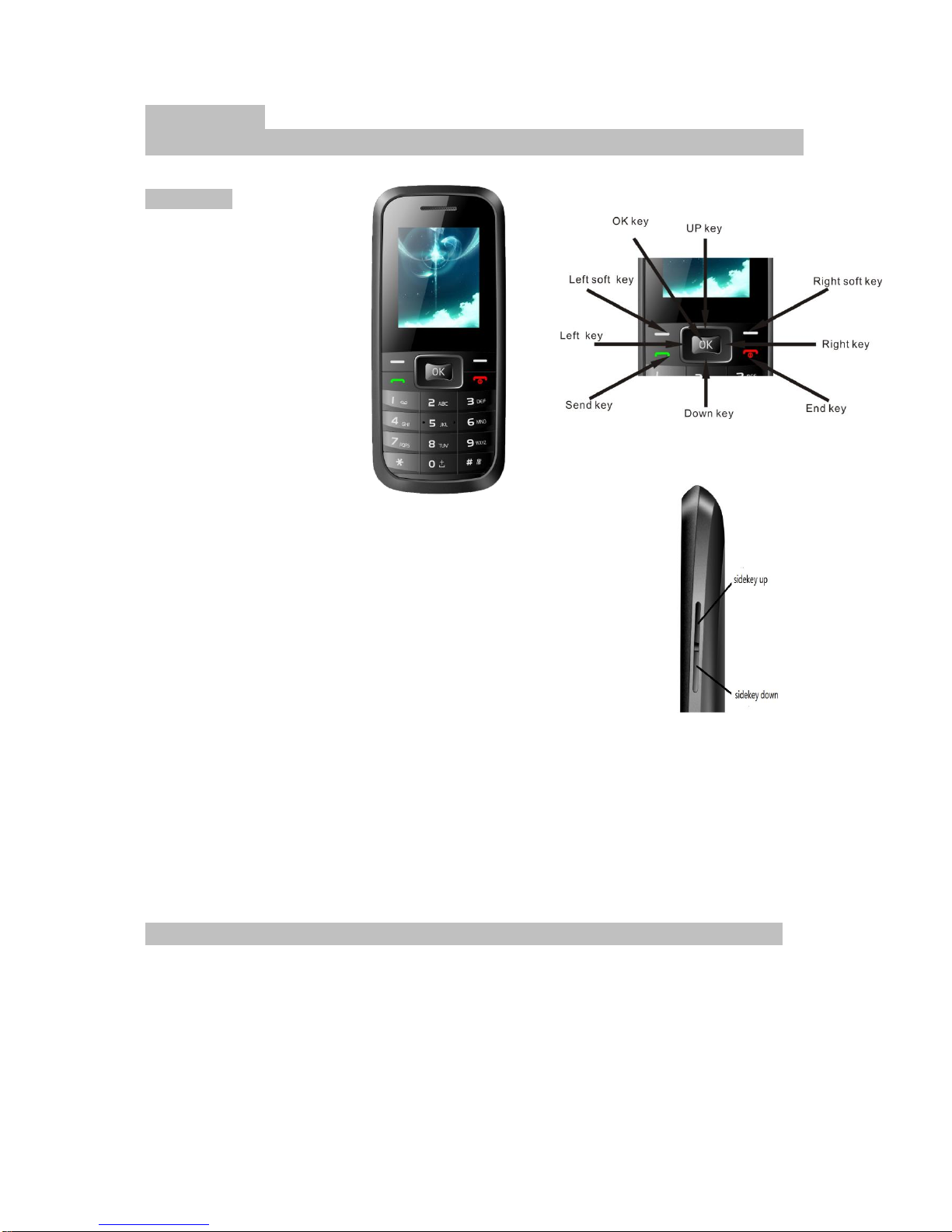
oButtons Functions.......................................................................2
oGetting Started –Installing the battery.....................................................3
oInstalling the Battery......................................................................3
oCharging the Battery......................................................................3
oPowering ON/OFF………………………………………………………………………………………………...4
Making Phone Calls
oMaking a Call using the Keypad............................................................4
oMaking a Call from Contacts...............................................................4
oAnswering a Call..........................................................................4
oAdjusting the Volume......................................................................4
Messages
oSMS Settings..............................................................................4
oMMS Settings..............................................................................4
oComposing a SMS.........................................................................4
oComposing a MMS.........................................................................4
oSave the info as a Draft.....................................................................5
oReading and Replying to a Message.........................................................5
oChanging the notification for a new Text and Multimedia Message....................................................5
oForwarding Messages..............................................................................................................................5
oDeleting Messages………………………………………………………………………………………………5
Phone Settings
oSounds………………………………………………………………………………………………………………6
oPhone Settings……………………………………………………………………………………………………6
oDisplay………………………………………………………………………………………………………………6
oCall Settings…………………………………………………………………………………………………………6
oSecurity………………………………………………………………………………………………………………6
oBluetooth……………………………………………………………………………………………………………..7
Managing Contacts
oCreating a New Contact………………………………………………………………………………………….7
oSearching for a Contact………………………………………………………………………………………8
oDeleting a Contact……………………………………………………………………………………………8
Using Bluetooth
oTurning ON the Bluetooth……………………………………………………………………………………….8
oPairing with a Bluetooth Device………………………………………………………………………………..8
oUn-pairing a Bluetooth Device………………………………………………………………………………….8
oSending and Receiving Files…………………………………………………………………………………….9
Tools
oCalendar……………………………………………………………………………………………………………….9
oGames…………………………………………………………………………………………………………….9
oNotes…………………………………………………………………………………………………………………..9
oCamera………………………………………………………………………………………………………………..9
oRecorder…………………………………………………………………………………………………………….9
oAlarm………………………………………………………………………………………………………………….9
oWorld Clock……………………………………………………………………………………………………….10
oCalculator……………………………………………………………………………………………………………10
oStopwatch…………………………………………………………………………………………………………10
oBluetooth…………………………………………………………………………………………………………..10
File Manager
oGraphics……………………………………………………………………………………………………………10
oMusic………………………………………………………………………………………………………………10
oMy video…………………………………………………………………………………………………………..10
oRecordings…………………………………………………………………………………………………………11
oThemes………………………………………………………………………………………………………………11
oDownloads…………………………………………………………………………………………………………11
oData………………………………………………………………………………………………………………11
Dm…………………………………………………………………………………………………………………………………11
WAP……………………………………………………………………………………………………………………………….11
Legal Information……………………………………………………………………………………………………………..12
Health and Safety……………………………………………………………………………………………………………13