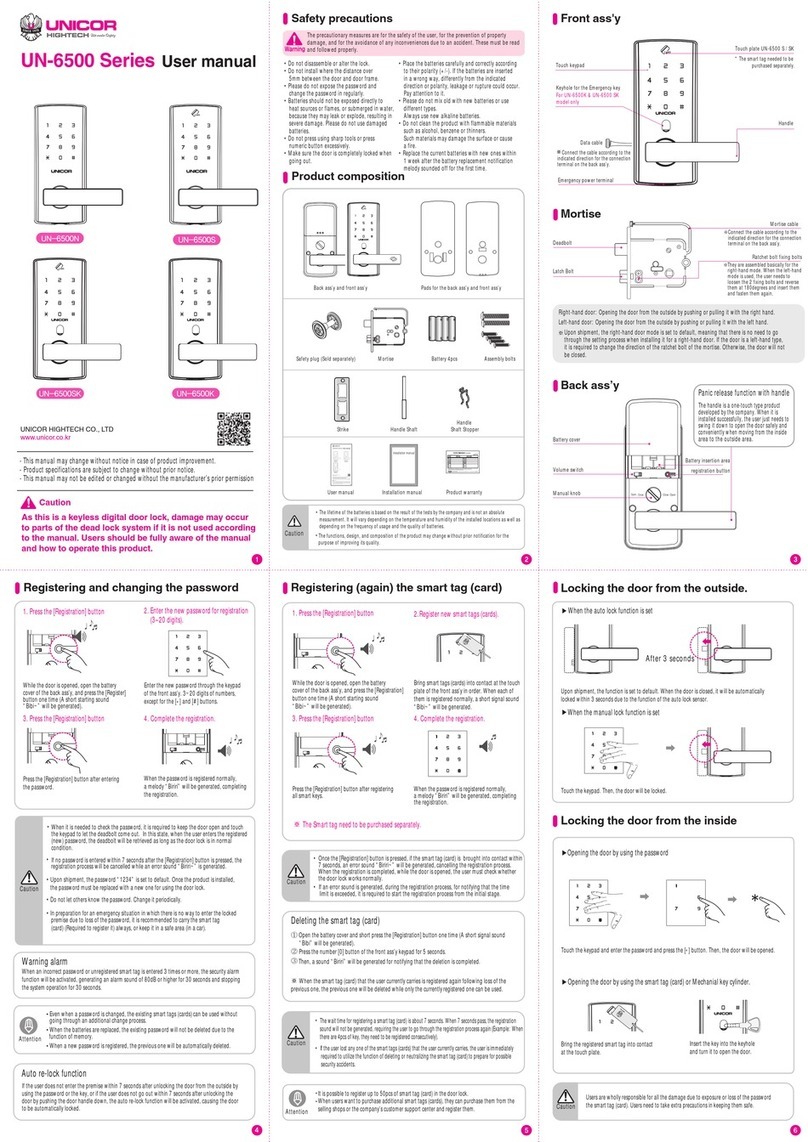
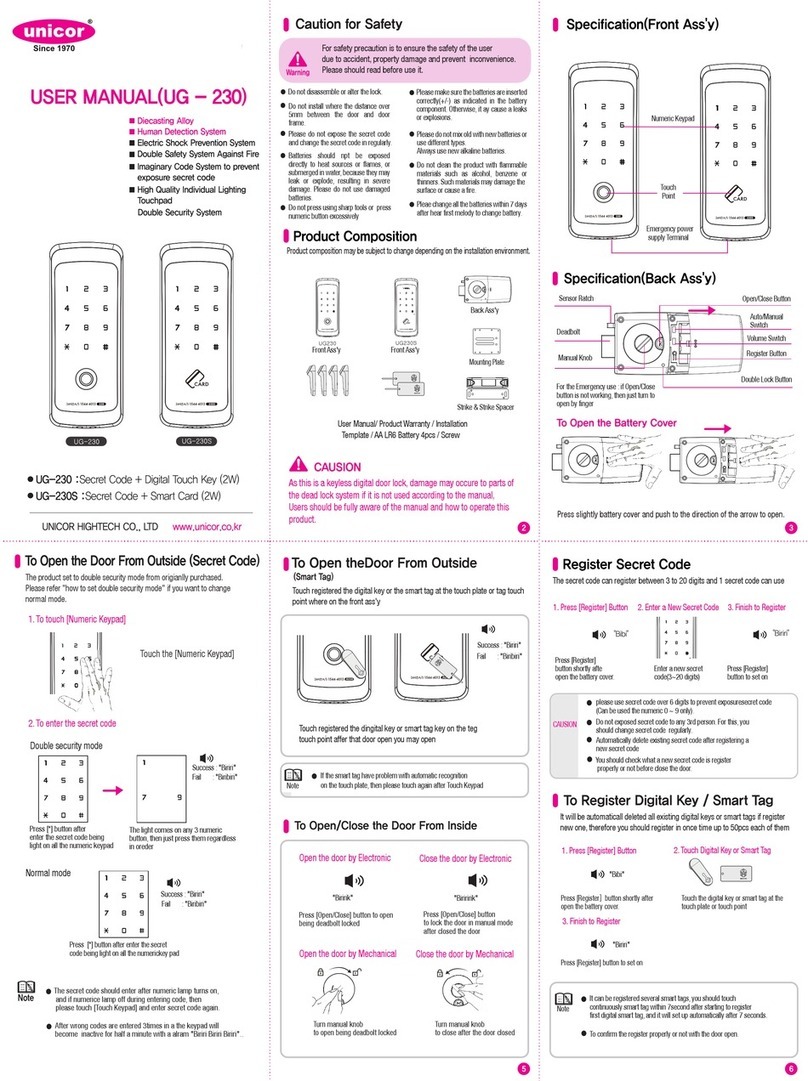
Locking the doorfrom the outside.
When the manuallock function is set.
Setting While the door is locked, press the [Double locking] button of the back ass’y for 3
seconds.Then,a sound for checking will be generated,completing the setting.
For 3 seconds
Opening the door by using the handle.
Releasingthe double lock function
from the outside
This makes it possible to unset the double lock function from the outside in case the
double lock function of the door should be set accidently.
Releasing
1.While the door is locked,Push the [keypad cover] up and enter the registered password.
2. Press the [#] button and press the password and press the[*] button again.
Setting andunsetting the forced lock function
from the outside
Setting
This function makes it possible for an emergency sound to be generated for the purpose of
enhancing security when the door lock is handled from the inside when the user has to be absent
from the premise for a period of time.
This functionwill be automatically disabled when the user opens the door and enters the
premise normally by using the password,digital touch key or the smart tag (card).
After entering
78945 Enter 1234
Unauthorized entry/Damage alarm
While the door is closed,if an abnormal opening of the door
(For example:Someone breaks into the premise by opening
up the gap in the door) is detected,a warning sound of
80dB will be generated.
▶How to disable the warning sound
The warning is disabled.
Enter the password normally or bring the digital touch key or smart tag (card) into contact
normally.Then, the warning sound will be disabled.
The batteries are removed The password is entered The digital touch key or smart tag
(card) is brought into contact
Mischief-preventionwarning and stopping
of operation
When an unregistered password is entered 3 consecutive times or an unregistered digital touch key or
smart tag (card) comes in contact 3 consecutive times, a warning sound will be generated and the system
operation will be stopped for 30 seconds.
Entered 3 consecutive times?
Warning the jam of the deadbolt
While the door is opened or closed,if the deadbolt does not come out or is not
retrieved normally because of the jam of the deadbolt,and a warning sound
“Bibibibi” will be generated.
“Bibibibi”
When the batteries need to be replaced,a melody “Open the east,east, east gate~ Open the
south, south,south gate”will sound off when operating the product.The melody lets the user
know about the need for replacing batteries
If the melody sounds off when operating the system,it is required to immediately open the battery
cover of the back ass’y, and replace all the batteries (4pcs) with new genuine 1.5V LR6AA alkaline
batteries that can be purchased at nearby stationary stores or convenience stores.
Must use general batteries, not rechargeable ones.
Take precautions in placing the batteries in the compartment in order to prevent leakage or rupture that
could occur when they are placed wrongly.
Must replace the old batteries all with new ones, not partially. Do not use new ones with
discharged ones together.
It is designed to operate with the rated voltage 6V. If low voltage (4.2±0.3V) is detected,
a melody will sound off.
After the replacement,if the door lock stops working in a short period of time or the batteries are
discharged, the batteries could be defective. It is required to contact the shop where the user purchased
batteries and get new ones as replacement ones.
Caution
External EmergencyPower Supply
When the batteries of the door lock are completely discharged,making it impossible to open the
door from the outside by using the password digital touch key,or the card key, this function will
help supply the emergency power by using a 9V battery from the outside.
1) Purchase a 9V battery in a rectangular shape from nearby stationary
stores or convenience stores.
2) Bring the battery into contact at the 9V battery input terminal at the
bottom of the front ass’y, and the press the [*] button while maintaining
the contact. If thepower is supplied normally,a sound “Bibi~”will be
generated and the keypad will be turned on.
3) Enter the password and then press the [*] button,or bring the
registered digital touch key or smart tag (card) into contact.Then, the
door will be opened.
(not rechargeable)
It is OK to bring a 9V battery as an emergency power into contact regardless of the + and – polarities.
When it comes to a key type model,it is possible to enter by using an emergency key even in this situation.
That is why it is recommended to carry the emergency key usually or keep it in a safe place (in a car).
The emergency power can be supplied when keeping the 9V battery into contact at the input terminal
Replace all the discharged batteries right after supplying the emergency power.
Information
To be released the internal double locking,
press the [Double locking] button for 3 seconds.
It's not possible to open the door by password, digital key and smart key from outside while
the double locking is set.
Push the [keypad cover] up and press
[0] for 5 seconds.
Entering trick numbers to prevent
exposure password
Even when another person is watching nearby, this fuction makes the user to enter an trick
numbers before entering the real password.
How to use the
function
When the password is 1234 the user
just needs to enter the real password
1234 at the end, after the trick munbers,
78945 is entered.
High-temperature
warning system Even when the digital door lock is locked, if the temperature
sensor detects a high temperature(65℃±10℃), it will
generate a powerful alarm and open the door automatically
at the same time.
warning
If the back ass'y is exposed to direct sunlight a long period of time, it could cause the
temperature sensor to be cativated and a warning sound to be generaged accordingly.
The door's locked stated will be disabled even when the door is in the double-locked
state from the inside.
Releasing the High-temperature
warning system
Open the battery cover and remove the all
batteries and wait for a certain time for the
temperature to go down. Remove all the batteries
Releasing
warning
▶
Volume control function
[Reg.]-[7]-[Reg.]
▶
Nomal
(initial value)
▶
Mute
▶
High tone
[Reg.]-[8]-[Reg.] [Reg.]-[9]-[Reg.]
This function helps the users to adjust the volum level.
Mute
function
This removes the sound temporarily (one time) when it is
needed to use the door lock quietly regardless of the currently
set operating sound.
Setting the auto/manual lock function
For locking the door automatically(or manually)
Setting the auto lock function
Remove the battry cover, and press [Reg.] -[3]-[Reg.] button.
[Reg.] [Reg.]
[Reg.] [Reg.]
After opening the door, the magnet sensor is operating to recognize the auto locking status.
If the door will not be opened within 7 seconds after releasing locking mode at the indoor/outdoor,
it will be locked again.
Setting the manual lock function
Remove the battry cover, and press [Reg.] -[6]-[Reg.] button.
After opening the door, the magnet sensor is operating to recognize the manual locking status.
To lock the door, please keep touch the keypad over 2 seconds.
Touch the keypad, and press [#] button one time.
Then, enter the registered password and [*] button.
* this is a temporary fuction, meaning that the
operating sounds will be generated when the door
lock is used again.
Entering and Delete the Master code / Master key
The administrator only function to manage the collective complex.
(It can be deleted when moving-in.)
Master code
Entering
[
Reg.
]-[
8
]-[
3
]-[
Reg.
]-[
Input of Master code
]-[
Reg.
]
Delete
[
Reg.
]-[
#
]-[
#
]- [
#
] -[
7
] -[
3
] -[
Reg.
]-[ ]-[
Reg.
]
Registered Password
or Input Master code
Master Key
Input
[
Reg.
]-[
8
]-[
6
]-[
Reg.
]-[
Key touch
]-[
Reg.
]
Delete
[
Reg.
]-[
#
]-[
#
]- [
#
] -[
7
] -[
6
] -[
Reg.
]-[ ]-[
Reg.
]
Registered Password
or Input Master code
Product standards
Warranty
UNICOR HIGHTECH CO., LTD
62 EunCheong Street, Namdong-Gu,Incheon,Korea (zip. 21643)
http://www.unicor.co.kr
◎The warranty period for all of the company’s products is 1 year from the date of purchase indicated
on the warranty certificate.
◎Even during the warranty coverage, users need to pay (the cost for trip,technical support and parts)
for some services if they are in the category of chargeable services.
◎User generally submit the warranty certificate or other methods that contains the installation
information when needed to request a service.
◎If the warranty certificate is not available, users need to submit a receipt, a credit card receipt or
a cash receipt instead (Except for a simple receipt)
◎
◎
If it is impossible to show the purchase date, the warranty period will be applied by taking into
consideration the product’s manufactured date + expiration period (6 months)
Types of consumer damage
Not the case of failure
● When needed to break the
product due to the loss of
secret code.
● When the door is sagging, or
installation is defective, requiring
the product to be reinstalled.
● Request for checking the product
for possible problems while
there is no specific symptom of
a failure.
●Problems in operation occur after
the user installs the product
directly.
●A visit for repair is needed as
there are mistakes and mishan
dling by the user such as mistakes
in replacing batteries and unskill
ful use of the product.
●Defective operation due to poorly
inserted batteries and use of
defective batteries.
● Failure and breaking due to the
use of the product for other
purposes.
●Failure and breaking caused by
the user on purpose or from an
external impact.
●Failure and damage due to natu
ral disasters such as fires, floods,
and damage from sea water.
●Penetration by water, condensa
tion and injection of chemicals,
requiring the internal circuits to
be replaced, and causing failures.
Mistakes and mishandling by the user Other reasons
The product
is used in
normal
conditions
Mistakes and
mishandling
by the user
Front ass’y
(Front body)
Back ass’y
(Main body)
Digital touch key
Smart tag (card)
Emergency key
Battery
Door Handing
74W X 295H X25D mm
Rated voltage: DC 6V
Working temperature:-20℃
to 65℃
Sensor working temperature (High
temperature):65℃
74W X 295H X30D mm
4pcs (2way touch model) / Possible to register up to 50pcs.
2pcs (2way tag model) / Possible to register up to 50pcs.
2pcs (2way key / 3way card models)
1.5VAA LR6 alkaline battery x 4
LH / RH / LHR / RHR
Failure occurs within 1 month from date of purchase Product replacement
Free-of-charge repair
Free-of-charge repair Paidrepair
Replacement after depreciation
basedon a fixed rate.
Product replacement
Failure occurs within 1 year from date of purchase
Same failure occurs 4 times or more
The repair parts are not available at the main office
Not the case of failure Paid repair
Mistakes and mishandling by the user
Defective installation, and other reasons
Will run for about 12 months when
used 10 times a day (6–8 months in
case of card models)
*The lifetime of the batteries is based on the result of the tests by the company and is not an absolute measurement.It will vary
depending on the temperature and humidity of the installed locations as well as depending on the frequency of usage and the
quality of batteries.
*The functions, design,andcomposition of the productmay change without priornotification for the purpose of improving its quality.
* Details of mistakes and mishandling by the user
Content of compensation
Within the warranty period After the warranty period
Remarks
For products pruchased outside of Korea, please consult your local distiriboutor or reseller as warranty
policies vary from country to country.
▶When the auto lock function is set.
After 3 seconds.
When the door is closed,it will be automatically locked 3 seconds later.
Forced lock function
Internal doublelock function
This ability not be able to open the door by password, digital key and smart key or remote
control from outside.
UnsettingBring the handle down from the inside and open the door.
▶Releasing
Information
The total entering number of digits combining the trick munber and real password
should be 3~20 digits.
If the warning sound continues or the deadbolt does not work normally, it is required
to adjust the position of the door lock,requiring the user to contact a shop that can
handle the installation or an expert in the door locks
Caution
Push the [keypad cover] up and down to close the door.
For 5 seconds
Resetting Function
This function is to reset the system if temporarily unstable, such as condensation or
temporary system down
setting Push [Keypad cover] up, press [#] button for 10 secons for reactivation
For 10 seconds