Datasheet & Quick Reference for UCBT232/EXA v2.3 www.usconverters.com
www.usconverters.com Page 5
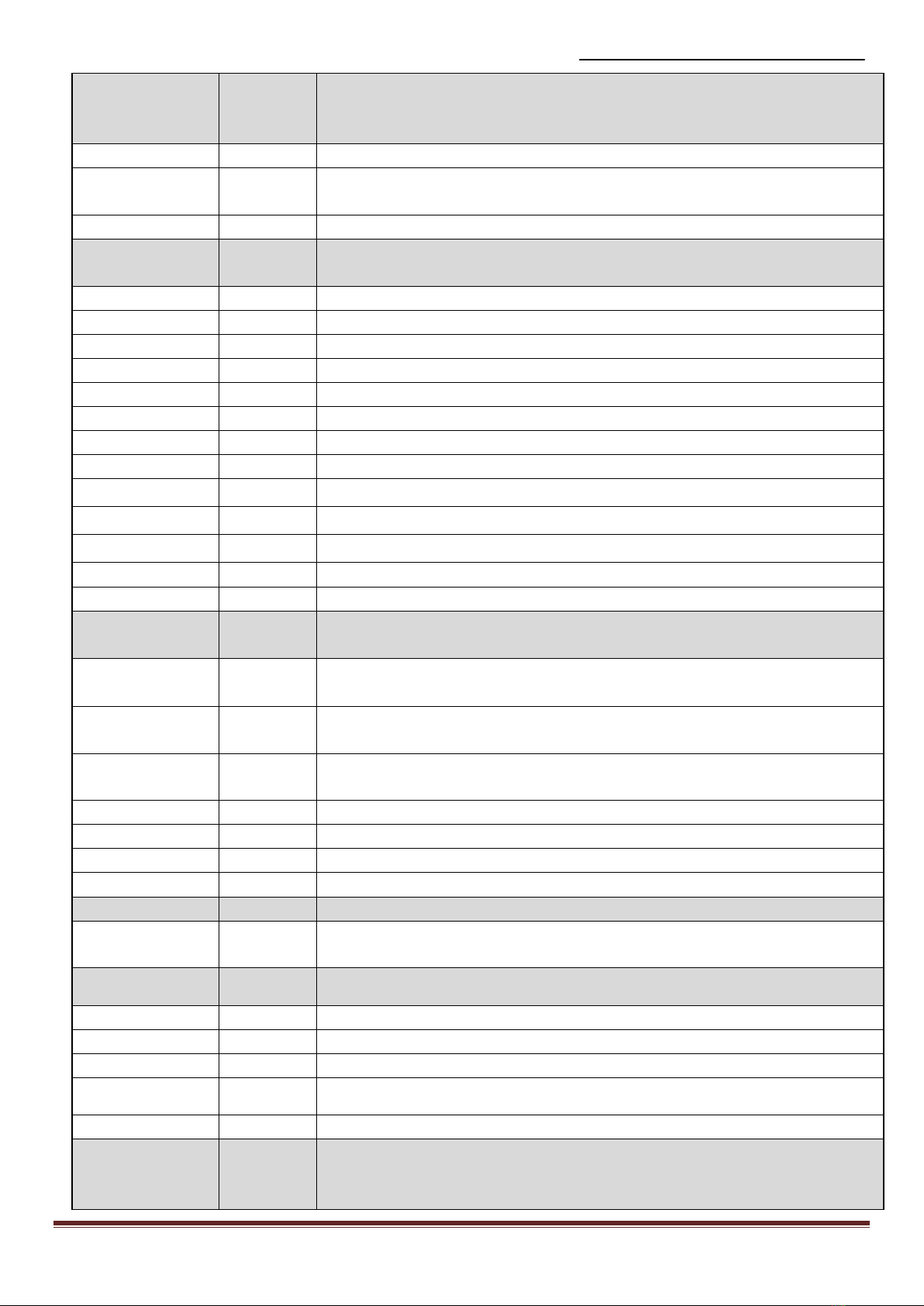
slave address. If the adapter is in the Slave mode, this command is a filter
condition to accept the inquiry of the Master device.
xxxxxxxxxxx
x
“xxxxxxxxxxxx” is a string of 12 hexadecimal digits.
R Restore the status in which the adapter can connect with any remote address.
? Inquiry the designated address that can be paired and connected.
DFU= Device Firmware Upgrade
Y
DIP= Enable / disable the DIP switch.
? Inquire the setting status of the DIP switch function.
Y Enables the DIP switch. The “ROLE” and “AUTO” commands are not available
to set the “Master” or “Slave”.
(Default) N Disable the DIP switch. The “ROLE” and “AUTO” commands are available when
the DIP=N.
DISCOVER= This command is used to specify whether the adapter can be discovered or
connected by remote devices.
This command is available only when the adapter is in Slave mode.
N The adapter enters the discoverable mode. If a pair has been made, the original
connection can be resumed. But other remote master device cannot discover this
adapter.
(Default) Y The adapter enters the discoverable mode.
? Inquire the current setting.
ECHO= This command is used to specify whether the adapter echoes characters received
from the UART back to the DTE/DCE.
N Command characters received from the UART are not echoed back to the
DTE/DCE.
(Default) Y Command characters received from the UART are echoed back to the DTE/DCE.
? Inquire the current setting.
FLOW= This command enable or disable flow control signals (CTS/RTS) of the UART
port. Note, the setting is not affected by DEFAULT.
The command will need 1 second delay.
(Default) N Disable flow control.
Y Enable flow control.
? Inquire the current setting
NAME= This command is used to specify a name for the adapter.
You can specify a friendly name using 0 to 9, A to Z, a to z, space and –, which
are all valid characters. Note that “first space or -, last space or – isn’t
permitted”. The default name is “Serial Adapter”.
(Default) Serial
Adapter
Default device name
xx….xx “xx….xx” is a character string with the length from 2 to 30.
R Restore the default settings name=“Serial Adapter”.
? Inquire the name of the local adapter.
PARITY= This command is used to specify parity bit setting of COM port.
The command will need 200 ms delay.
(Default) N None parity bit
O Odd parity
E Even parity
? Inquire the current setting.