WELDMAX - 7 - MIG S (3-phase) + SWF 2
The mach ne s controlled by an electronic unit wh ch prov des the
feed ng motor's DC voltage, sw tches the contactor and gas valve on/off
and controls the weld ng process.
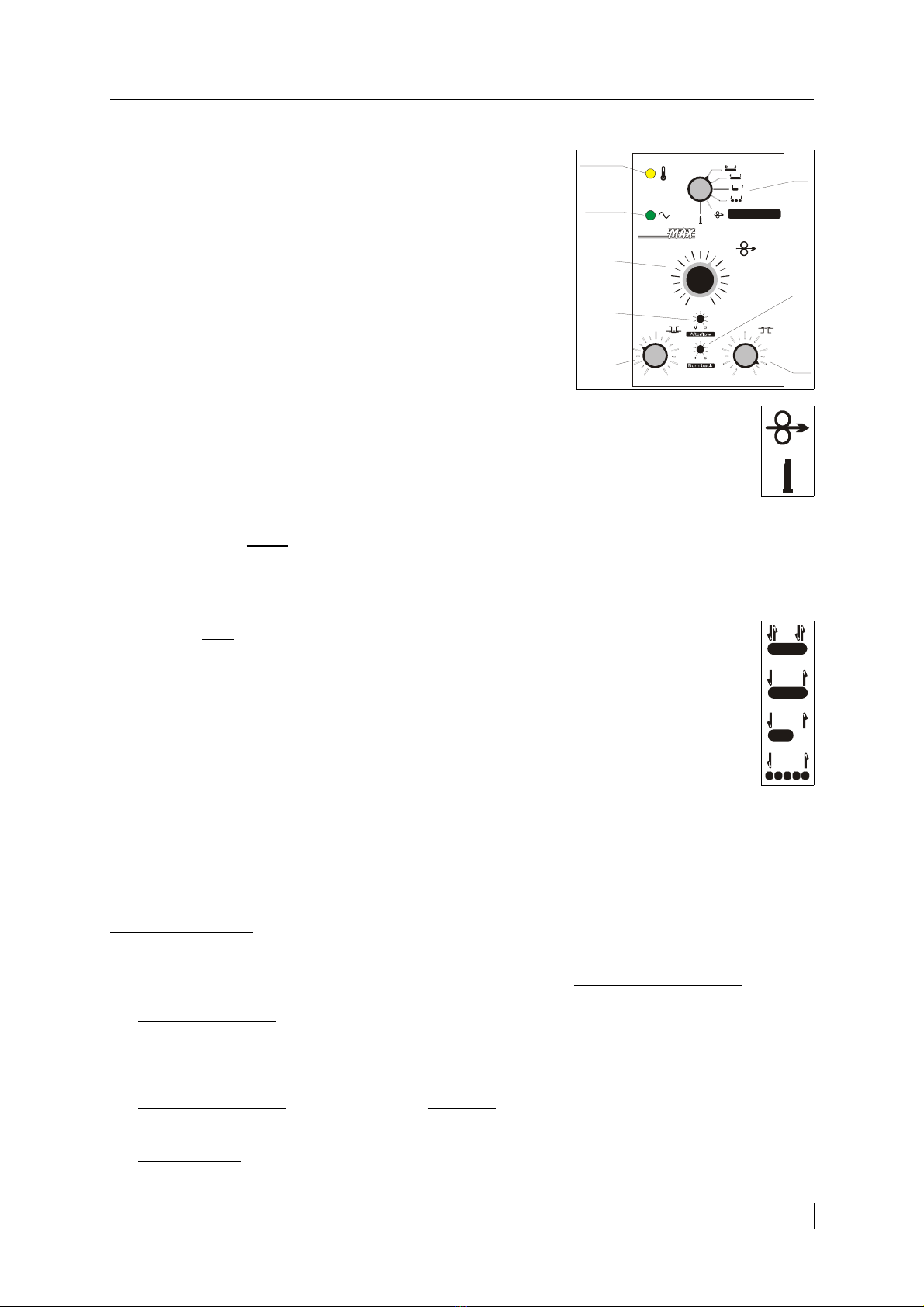
•Green LED: s gnals the mach ne's on.
•Yellow LED: s gnals the overheat ng of the power source.
•K: Funct on selector sw tch.
•P4: W re feed speed potent ometer.
•P7: Weld ng on t me potent ometer.
•P8: Weld ng off t me potent ometer.
•P1: W re burn back (m n ) potent ometer.
•P2: Gas post-flow t me (m n ) potent ometer.
Two operat on modes wh ch can be chosen by the sw tch K are:
Wire threading: Wh le pushing the torch button, the feeder s feeding
the w re w th speed approx. 10 m/m n. nto the torch cable (any other funct ons are proh b ted). For
smooth w re feed, keep torch cable as straight as poss ble dur ng th s operat on. In case of slippage
of the w re, ncrease dr ve roll pressure by the set screw.
Gas test: Wh le pushing the torch button, the gas valve s open (any other funct ons are
proh b ted). Dur ng th s t me the quant ty and the pressure of gas can be checked and set. Set gas
flow between approx. 16-20 l/m n (depending on the weld ng current).
The weld ng can be started by push ng the button on the weld ng torch:
•F rst there s only gas pre-flow ( ts durat on can be 0-0.5 sec., sett ng by P3 potent ometer on the PCB);
•Afterwards the wire feeding beg ns, w th soft start ( ts durat on s set to 0.2 sec. by P9 on PCB), and also the
welding current starts.
The weld ng work s accord ng to the operat on modes set by the funct on selector sw tch (K):
4-stroke mode: Releas ng the button the weld ng continues and t stops only f the button s pushed
aga n.
2-stroke mode: After releas ng the button, the weld ng stops.
Spot welding: After the set t me s f n shed (or releas ng the button), the weld ng stops. The
durat on of the spot weld ng can be set by P7 potent ometer (0.5-2.5 sec).
Interval welding: The weld ng stops f the button s released n the pause t me. The durat on of the
feeding can be set by P7, wh le the pause t me can be set by P8.
When the weld ng s f n shed:
•F rst the wire feeding stops ( f t works);
•Elaps ng the w re burn back t me (P1), the welding current ceases;
•Elaps ng the gas post-flow t me (P2), the gas flow stops, too.
The P6 potent ometer on the PCB sets the m n mal w re speed, wh le the P5 sets the max mal one.
6. Trouble shooting
All repa r works are needed to be carr ed out by a technician, on disconnected mach ne!
If the fault of the equ pment rema ns or s caused by an unknown reason, contact the serv ce d v s on!
•The green LED s off: Faulty sw tch (Q1), ma ns cable or transformer(s); ⇒ replace t or contact the serv ce.
Bad electr c connect ons to the power source; ⇒ check these cables.
•Blown fuse: ⇒ F nd the cause of trouble (short c rcu t may be ns de!), replace fuse and check ts rat ng.
•The yellow LED s on: The power source s overheated; ⇒ wait unt l the fan cools t down and the LED
ext ngu shes.
•No weld ng arc: Faulty torch or ts cable or button; ⇒ replace t. Loose connect on at weld ng cables; ⇒
fasten t. Faulty control un t; ⇒ contact serv ce.
M I G / M A G P o w e r S o u r c e w t h s e p a r a t e W r e F e e d e r
Green
LED
Yellow
LED K
P7
P1
P2
P8
P4
1
2
3
4
5 6
7
9
8
10
PROGRAMME
S
S
0,5
1,5
2,5 sec. 0,5
1,5
2,5 sec.
WELD