CDP2100
www.winkleraudio.cz side 9 from 20
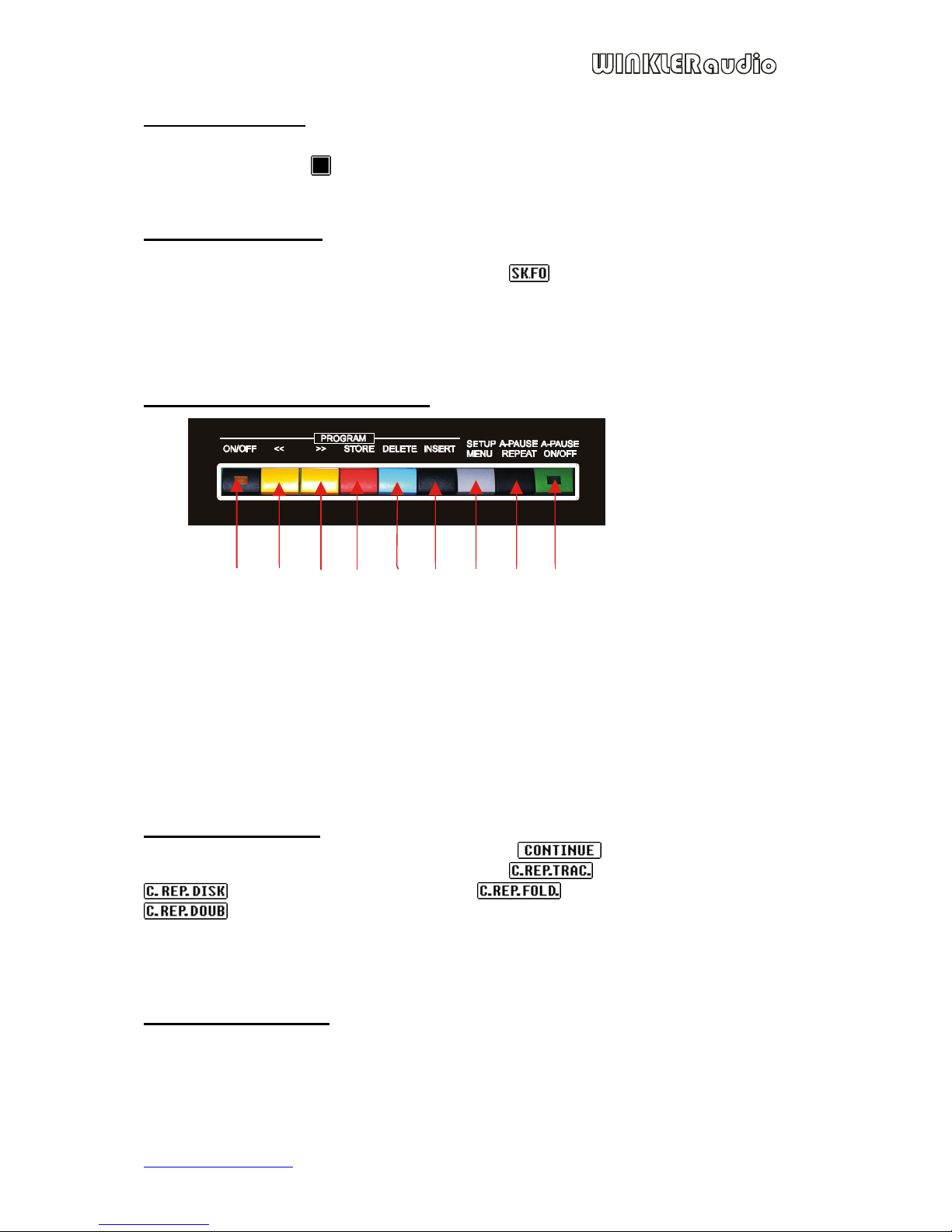
Using button (8) you switch between courses of function A-pause:
by pressing PLAY/PAUSE during playing it holds up playing and by
follow-up pressing PLAY/PAUSE the playing will continue to the end of track.
by pressing PLAY/PAUSE during playing it stops playing and CD
player will set to next track.
by pressing PLAY/PAUSE during playing it stops playing and CD
player will set to the start of playing track, if the track plays to the end, the player
will stop when next track.
It is possible to switch from CONTINUE function to A-PAUSE function, and conversely.
If you skip between functions during playing, take into account small delay due to
changing the playing mode.
Programming:
Programming is instrumental to store the sequence of playing tracks of particular CD. CD
player enables saving as much as 100 CDs into memory. The algorithm used for CD
identification eliminates allocation of the program to wrong CD (in case of two identical
CDs, algorithm recognizes them as one CD disc and assigns them the same program).
Program memory of CD-A and CD-B is merged, it means that your CD program made in
drive CD-A is possible to play in CD-B with right program. It is possible to pre-set as
much as 99 program steps for one CD (according to CD Audio standards, where max. 99
tracks are permitted).
Storing your own tracks sequence to program:
1. Press button PLAY/PAUSE, icon Pause appears on display
2. By buttons previous, next track or by wheel SKIP choose the track, e.g. track n.2
and press button STORE (4), the track will be saved into program and on display
appears T02-01/01 (T02= your chosen track, 01/01number of program/total
number of program steps used). Repeating procedure 2. you store other tracks.
3. To delete wrong record press button DELETE (5).
4. If you forget about some track and need to put it in the program, use button (2)
and (3) to choose the position in program, where you want to insert the track and
press button INSERT (6), your chosen track will be inserted in front of selected
position in program.
Program editing:
If you need to adjust already existing program, process is followed:
1. Turn off the program by pressing button ON/OFF, yellow control lamp is not on.
2. Choose place in program by buttons (2) and (3).
3. Use buttons DELETE (5) and INSERT (6) to adjust the program.
Cancellation of all programs:
You can cancel all of the programs from the memory pursuant to instructions in chapter
“Basic settings” article 3.
Program activation
Press button STOP, the icon “ ” appears. Activate the program by button Program
ON/OFF, the yellow control lamp lights up. Press PLAY/PAUSE and start up CD
playback according to program. If you have the automatic playback turned on in basic