manuals.online logo
Brands
  1. Home
  2. •
  3. Brands
  4. •
  5. WisyCom
  6. •
  7. Batteries Charger
  8. •
  9. WisyCom LBC61 Instruction manual

WisyCom LBC61 Instruction manual

Other WisyCom Batteries Charger manuals

WisyCom LBC61 Instruction manual

WisyCom

WisyCom LBC61 Instruction manual

WisyCom ACM50 User manual

WisyCom

WisyCom ACM50 User manual

Popular Batteries Charger manuals by other brands

EVBox BusinessLine manual

EVBox

EVBox BusinessLine manual

Goobay 71808 user manual

Goobay

Goobay 71808 user manual

Kogan KACRDQIS4XA user manual

Kogan

Kogan KACRDQIS4XA user manual

Sealey WCB3 quick start guide

Sealey

Sealey WCB3 quick start guide

Vanner SP00143/181 owner's manual

Vanner

Vanner SP00143/181 owner's manual

KeyOuest KO037515 quick start guide

KeyOuest

KeyOuest KO037515 quick start guide

Enplus Silk Series user manual

Enplus

Enplus Silk Series user manual

Intermec SF51 user guide

Intermec

Intermec SF51 user guide

Colorovo PowerBox 6800 user guide

Colorovo

Colorovo PowerBox 6800 user guide

Smartech WBC-250 Operator's manual

Smartech

Smartech WBC-250 Operator's manual

PIXO C-USB instruction manual

PIXO

PIXO C-USB instruction manual

Gunson G4104 quick start guide

Gunson

Gunson G4104 quick start guide

Dometic NDS SCE320 Short Operating Manual

Dometic

Dometic NDS SCE320 Short Operating Manual

ABB HT572708 Operation manual

ABB

ABB HT572708 Operation manual

EVOline Square80 manual

EVOline

EVOline Square80 manual

Redarc SBC24025 Operating instructions and owner's manual

Redarc

Redarc SBC24025 Operating instructions and owner's manual

Absaar HV04 manual

Absaar

Absaar HV04 manual

DazeTechnology Cover Dazebox Home installation manual

DazeTechnology

DazeTechnology Cover Dazebox Home installation manual

manuals.online logo
manuals.online logoBrands
  • About & Mission
  • Contact us
  • Privacy Policy
  • Terms and Conditions

Copyright 2025 Manuals.Online. All Rights Reserved.

QUICK USER GUIDEQUICK USER GUIDE
POWER
8÷17Vdc
LTCSYNC
LINK/ACT 10/100
USB 2.0 HS POWER
8÷17Vdc
LTCSYNC
LINK/ACT 10/100
USB 2.0 HS
Main Accesories (nd more information at Wisycom.com )
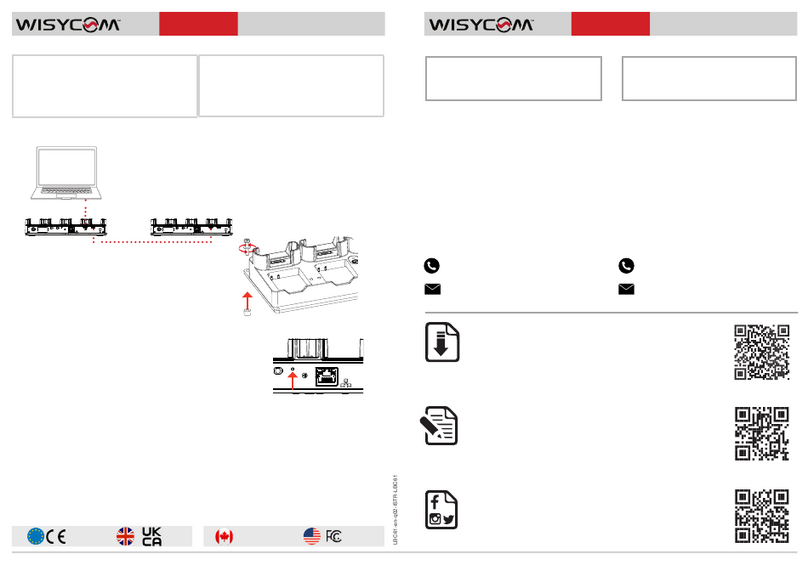
Cascade via USB
LBP61: rechargeable Lithium-ion battery
Model CS-BCE10, Part No. CGA-S008E
3.7V, 1050 mAh, 3.9Wh, Cameron Sino
PSP15V4A0: Power supply 9-17Vdc,
DC Connector, screw Type 5.5x2.1mm.
Included with LBC61.
LBC61LBC61
This guide is intended to assist you with initial quick setup and
operation of your Wisycom product.
You can refer to Wisycom Autorized Distributors for technical
Support and information about service and repairs available in your
area or contact us directly by email.
Serial Number: Purchase Date:
Download Documentation and Firmware
Get declarations, user manual, specica-
tions and softwares on the download page:
wisycom.com/products/d/LBC61
Keep up with Wisycom online
Follow us on Facebook and Instagram. You
can also subscribe on Youtube for more.
wisycom.com/social
Product Registration and Warranty
Register your product to extend your warranty
and receive update on latest rmware:
wisycom.com/registration
WISYCOM S.r.l.
Via Tiepolo 7/E
35019 Tombolo (PD) - ITALY
WISYCOM INC.
14301 Sullyeld Circle, Suite C
Chantilly, VA 20151- USA
+1 703-574-7505
[email protected]
[email protected]
[email protected]
[email protected]
+39 0424 382605
EU DECLARATION OF CONFORMITY
This product meets the Essential Requirements of all relevant European directives and is
eligible for CE marking.
The CE Declaration of Conformity can be obtained from:
wisycom.com/products/d/LBC61
USA and CANADA
This device complies with part 15 of the FCC Rules.
Operation is subject to the following two conditions:
1 - This device may not cause harmful interference, and
2 - This device must accept any interference received, including interference that may
cause undesired operation.
Le présent appareil est conforme aux CNR d’Industrie Canada applicables aux appareils
radio exempts de licence.
L’exploitation est autorisée aux deux conditions suivantes:
(1) l’appareil ne doit pas produire de brouillage, et
(2) l’utilisateur de l’appareil doit accepter tout brouillage radioélectrique subi, même si le
brouillage est susceptible d’en compromettre le fonctionnement.
LBC61-en-q01#ISTR-LBC61
IC
Cascade multiple LBC61 using the USB ports to
update the rmware and download the recorded
les on multiple MTP61 simultaneously.
Note: if you connect more than two LBC61 in cascade you
might experience a downloading speed reduction

POWER
8÷17 Vdc
LTC SYNC
LINK / ACT 10 /100
USB 2.0 HS
GREEN: unit ON
GREEN: connected to Wisycom Manager
RED: over temperature
(*) LBC61 status LED
PINK: no battery inside (MTP61 only)
RED: battery failure
GREEN BLINKING: in charge (<70%)
GREEN: in charge (>70%)
BLUE: fully charged (100%)
(**) MTP61/LBC61 battery status LED
When placed into a recharging slot
a unit enters a standby mode. It will
automatically begin charging. When
removed, the unti returns to the state it
was in prior to charging.
LBC61 BODYPACK SLOTS
1 2 34
A full battery recharge should
take less than 2 hours.
LBC61 BATTERIES SLOTS
A
ABattery packs
LBP61
MTP61 battery
status led (**)
LBC61 batteries
status led (**)
LBC61
status led (*)
COMMAND BUTTON
Quick press for bodypacks
general info. Press and hold to
start bulk timecode jamming
1234
POWER
8÷17 Vdc
LTC SYNC
LINK / ACT 10
/
100
USB 2.0 HS
Power Supply
PSP15V4A0
Timecode I/O
Minijack 3.5mm
Ethernet
(to PC)
Kensingthon
Security Slot
USB Type C
USB Cascade to next LBC61
REAR VIEW
CC
USB 2.0/3.0
Type C to Type A to PC
C A
B
B
C
C
D
D