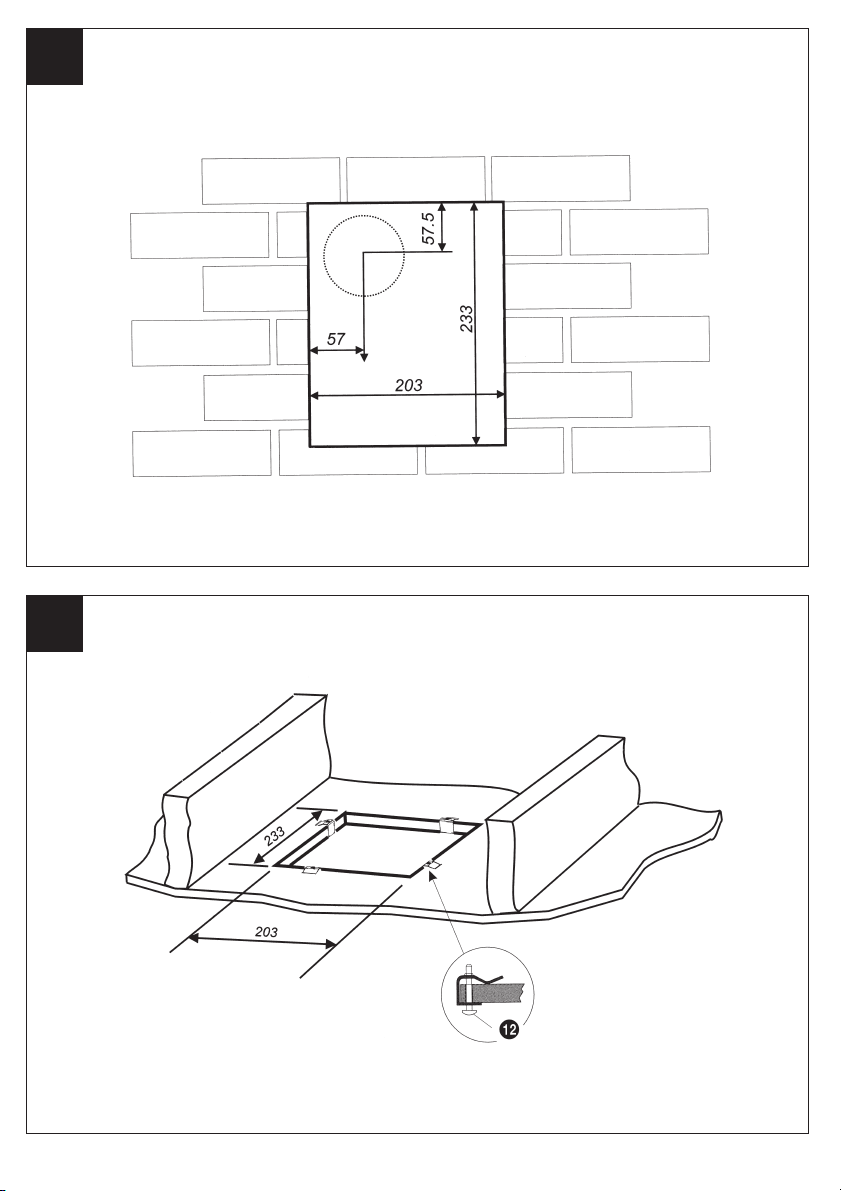
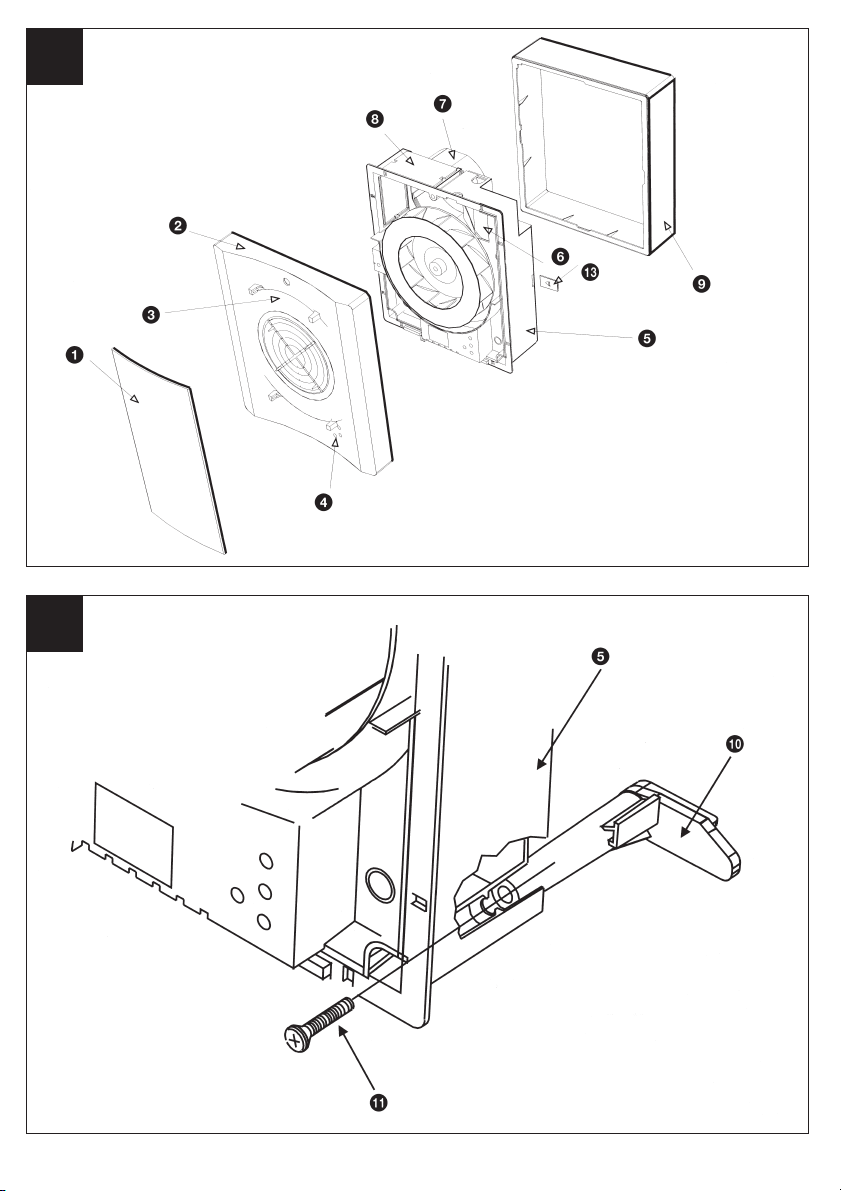
1 The surround 9is not required for this
installation.
2 Insert the fan box 5into the hole and
mark four positions using the slots in the
flange B.
3 Remove fan box 5from ceiling and fit
the four ceiling clips (supplied) over the
edge of the hole, so that the clips align
with the marks on the ceiling B.
4 Make a pilot hole 3.5mm diameter
through the hole of each clip. Ensure not
to damage the clip.
5 Fit the ducting to the circular spigot 7.
6 Offer the fan box 5up to the ceiling.
7 Pass the electrical cable into the fan box
5through the front cable inlet hole.
8 Using the screws !™, fix the fan box
flange to the ceiling clips.
1 Make good the outer hole if required.
Allow the mortar to set before continuing
the fan installation.
2 Fit the outer grille to the outer wall or for
ceiling mounting the appropriate
terminations.
♦If installing with a controller please refer
to Controller's Installation instructions.
♦Make sure the mains supply is isolated.
♦Before making electrical connections
pierce grommet with No. 2 pozi-drive
screwdriver.
DO NOT REMOVE GROMMET.
1 Remove the retaining screw of the
terminal cover 6and let the cover swing
out.
2 If wiring via cable clamp, remove the
cable clamp.
3a Wire the fan as shown in C. Check fan
model to diagram.
3b For dual speed operation, you will need a
COS (Change Over Speed Switch),
available from Xpelair.
3c For single speed operation at high speed,
connect the live supply to the LH
terminal.
3d For single speed operation at low speed,
connect the live supply to the LL
terminal.
4 If wiring via cable clamp, replace the
cable clamp and two screws. Ensure the
cable is firmly retained by the clamp.
5 Replace the terminal cover 6and fasten
the retaining screw.
6 Switch off the mains electrical supply
and remove fuses.
2 Mark on the wall or ceiling the positions
of the three fixing holes Din the fan box
5.
3 If wall mounting, drill three holes 5.5mm
diameter for wall plugs (supplied). If
ceiling mounting, use appropriate
fasteners.
4 Snap the surround support plates !£ to
the fan box 5.
5 Cut out the cable inlet hole in the
surround 9, if required. Slide the
surround 9over the fan box 5.
6 Pass the electrical cables into the fan box
5through the rear cable inlet hole.
7 Offer the fan box 5up to the wall or
ceiling making sure the circular spigot 7
enters the ducting.
8 Fix the fan box 5to the wall using
screws !¡ or to the ceiling using
appropriate fasteners (not supplied).
The surround 9is not required for this
installation. Fit the ducting to the circular
spigot 7.
If the hole size is as recommended:
1 Assemble the three fan body clamps !º
to the fan box 5using screws !¡.
2 Pass the electrical cables into the fan box
5through the front cable inlet hole.
3 Offer the fan box 5up to the wall
making sure the ducting enters the outer
wall. Ensure that the ducting slopes down
away from the fan to allow drainage of
any incoming water to the outside.
4 Tighten up the three screws !¡ until the
fan is clamped to the inner wall. The fan
body clamps !º will rotate to an
automatic stop position. Do not
overtighten.
If the hole size is larger than
recommended i.e. larger than the flange
on the fan box 5.
1 The fan body clamps are not suitable.
2 Construct a wooden frame of internal
dimensions 203 x 233mm. Depth should
be at least 50mm.
3 Fit the wooden frame in the internal wall
and make good the hole.
4 Offer the fan box 5up to the wall
making sure the ducting enters the outer
wall. Ensure that the ducting slopes down
away from the fan to allow drainage of
any incoming water to the outside.
5 Allow the mortar to set before continuing
the fan installation.
6 Screw the fan box 5to the wooden
frame using the slots in the flange
(screws not supplied).
8
If installing in a wall
(flush mounting) Terminating the ducting
Wire the electrical connections
7 Connect the cable from the isolating
switch to the electrical supply wiring.
♦For fixed wiring circuits the protective
fuse for the appliance must not exceed
5A.
1 Refit front cover 2by placing the lower
lugs into the apertures on the fan box
flange and pivoting upwards over the
fan box 5. Fix with screw.
2 Fit spindle plugs 4onto the front cover
2.
3 Fit baffle plate 1onto the front cover 2
by locating the clips and carefully
snapping into position.
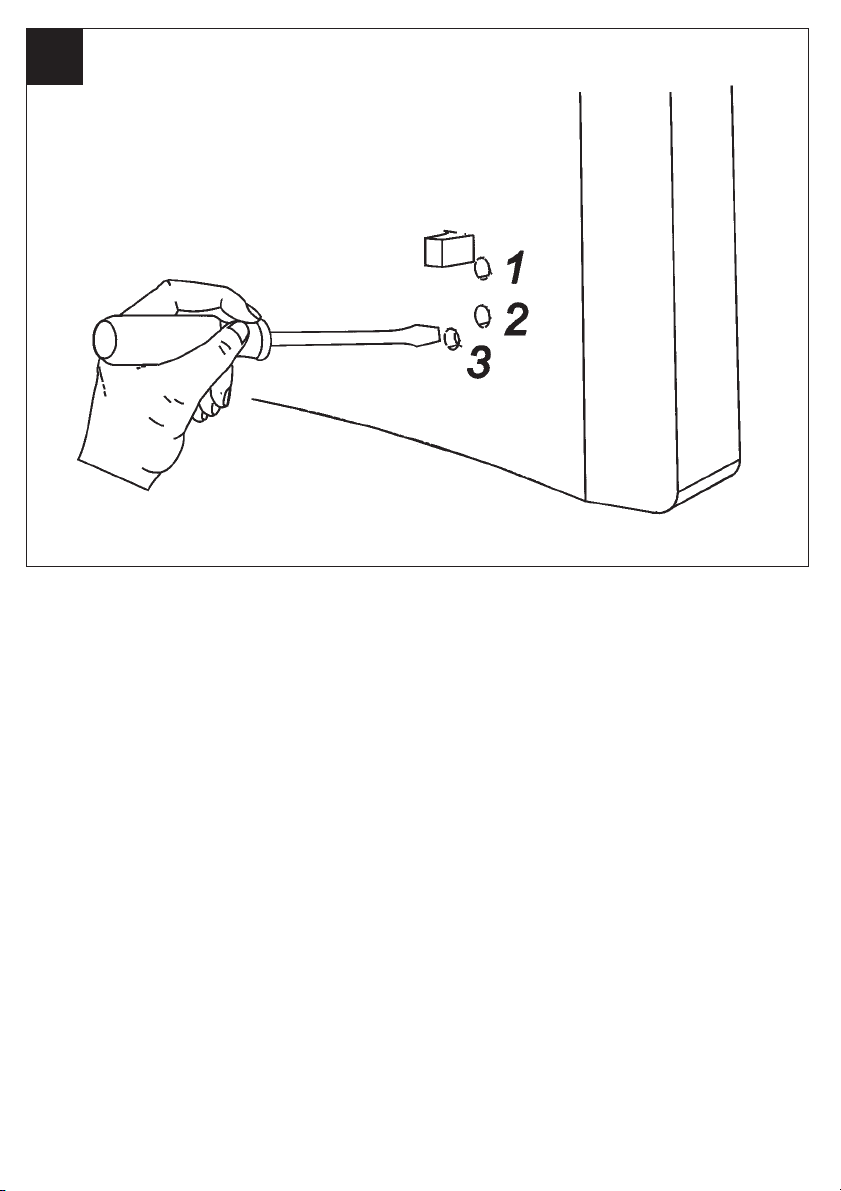
1 Before making any adjustments, isolate
the fan completely from the mains
supply.
2 Remove the baffle plate 1by unclipping
it using a sideways action.
3 Lever out the spindle plugs 4with an
electricians screwdriver.
4 Using an electrician's screwdriver, turn
clockwise to increase setting or anti-
clockwise to decrease setting.
DX200T
Timer over-run is approximately 2 minutes
minimum to 20 minutes maximum. Use
position 1G.
♦For single speed operation, the fan will
operate at the speed selected during
installation.
♦For dual speed operation, the fan will
operate at the speed selected on the COS
switch.
♦Operate the fan using the isolating
switch. Repeat to switch off.
(Light indicates when fan is switched on).
♦For single speed operation, the fan will
operate at the speed selected during
installation.
♦For dual speed operation, the fan will
operate at the speed selected on the COS
switch.
♦Operate the fan using the on/off switch.
When the switch is turned off, the fan
continues to operate for the adjustable
timer over-run period. (Light indicates
when fan is operating in manual mode).
Re-fitting fan covers
User adjustments
Using the fan
DX200
DX200T
If installing in a ceiling
(flush mounting)