manuals.online logo
Brands
  1. Home
  2. •
  3. Brands
  4. •
  5. Zidoo
  6. •
  7. Media Player
  8. •
  9. Zidoo X8 Specification sheet

Zidoo X8 Specification sheet

Other Zidoo Media Player manuals

Zidoo X9 Service manual

Zidoo

Zidoo X9 Service manual

Zidoo NEO S User manual

Zidoo

Zidoo NEO S User manual

Zidoo NEO X User manual

Zidoo

Zidoo NEO X User manual

Popular Media Player manuals by other brands

VidaBox LUX installation guide

VidaBox

VidaBox LUX installation guide

CasaTunes CT-3S quick start guide

CasaTunes

CasaTunes CT-3S quick start guide

Yamaha TSX-112 owner's manual

Yamaha

Yamaha TSX-112 owner's manual

Fantec MM-FHDL user manual

Fantec

Fantec MM-FHDL user manual

Visual Land Impulse quick start guide

Visual Land

Visual Land Impulse quick start guide

Philips GoGear Muse SA2MUS08 quick start guide

Philips

Philips GoGear Muse SA2MUS08 quick start guide

Fantec MM-HDRL user manual

Fantec

Fantec MM-HDRL user manual

Kvarta DVB Streamer quick start

Kvarta

Kvarta DVB Streamer quick start

Dune HD Duo 4K user manual

Dune HD

Dune HD Duo 4K user manual

Camos MMS-1000 manual

Camos

Camos MMS-1000 manual

Energy 75 Series user manual

Energy

Energy 75 Series user manual

Z3 Technology DME-03 user guide

Z3 Technology

Z3 Technology DME-03 user guide

Sony SVR-2000 Dimensions

Sony

Sony SVR-2000 Dimensions

Meicheng HD-1080K12 user manual

Meicheng

Meicheng HD-1080K12 user manual

DENAFRIPS ARCE owner's manual

DENAFRIPS

DENAFRIPS ARCE owner's manual

Topaz CMS Media Player Hardware user manual

Topaz

Topaz CMS Media Player Hardware user manual

InFocus LightCast user guide

InFocus

InFocus LightCast user guide

Samsung MP-80S Owner's instructions

Samsung

Samsung MP-80S Owner's instructions

manuals.online logo
manuals.online logoBrands
  • About & Mission
  • Contact us
  • Privacy Policy
  • Terms and Conditions

Copyright 2025 Manuals.Online. All Rights Reserved.

15
1.V FD display
2.I R receiver
3.P ower button (with LED light)
4.U SB 2.0 (Connect USB devices, such as U disk )
5.U SB 2.0 (Connect USB devices, such as U disk )
6.U SB 3.0 ( connect USB devices, delivery faster)
7.D C 12V: 12V
8.T F card reader : Support 1GB/2GB/4GB/8GB/16GB/32GB.
9.R ESTORE.
10.O PTICAL.
11.A V OUT (Composite video and audio port): To connect TV set with AV cable.
12.H DMI2.0 Input: support Picture in Picture (PIP) function.
13.H DMI Output: HDMI2.0a.
14.G IGABIT LAN: RJ-45 Ethernet Jack (10/100/1000Mbps):To connect home network devices (routers/switches, etc. ).
15.E xternal high-gain single Antenna .
13
456
8 9 10 11 12 13
Simple Manual
8
2
714
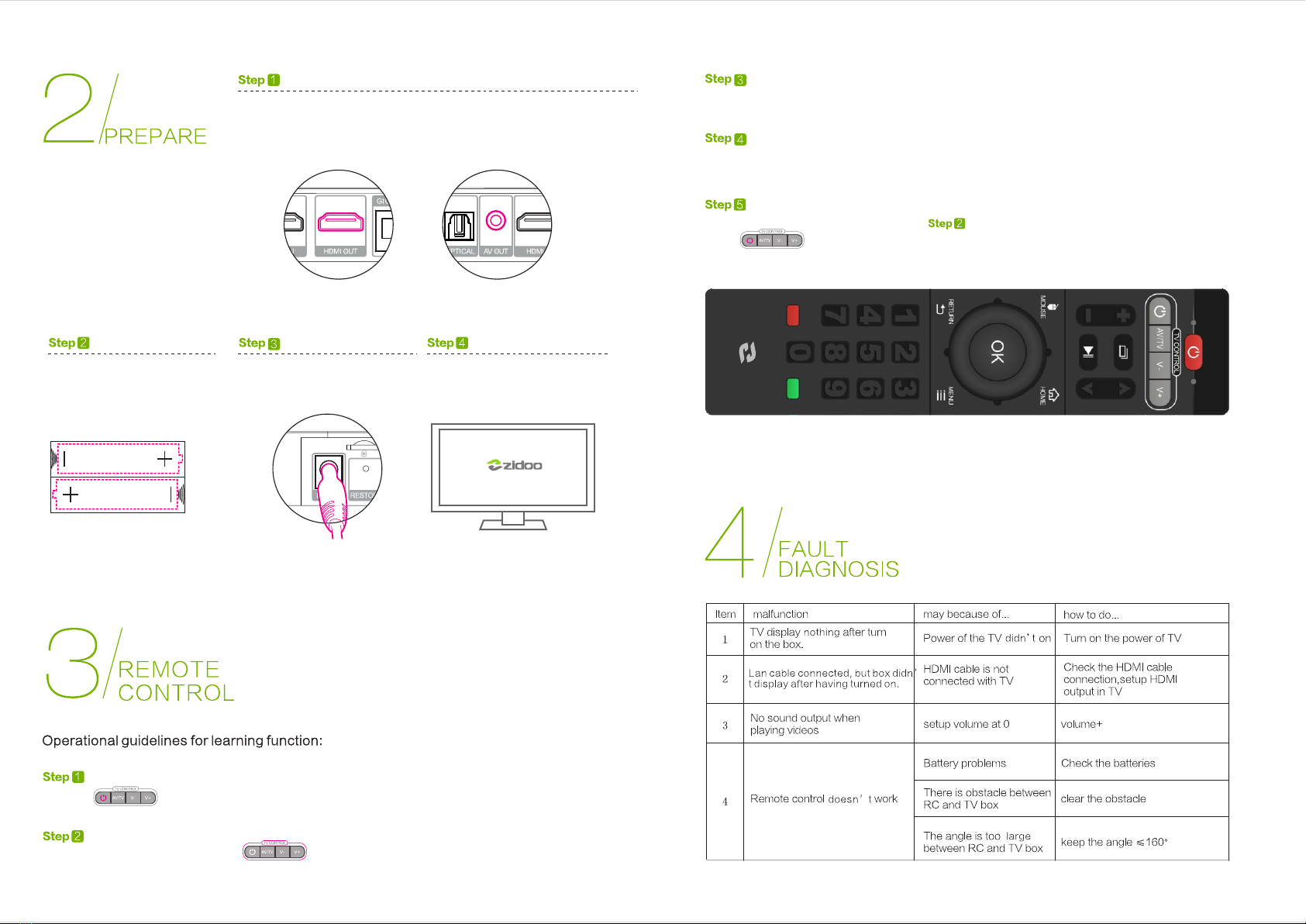
Pressing (around 8-10s), unloosing until the light long on(red).
Single-click one of the learning buttons
on this remote control, the light will flash slowly;
“ ”
Keeping a face-to-face state with the launcher mouth of two remote controls,
distance from 1~3cm.
Pressing the learning button that you need to learn with the TV RC for several seconds,
unloosing until the light long on, when the light off, it means it’s finished its learning.
If you want to learn other buttons, just repeat ; after finishing learning;
press to exit the learning state.
“ ”
“ ”
Use the HDMI cable to connect X8 TV BOX with your TV set or projection device.
If it is an old TV, please use AV cable to connect X8 TV BOX with your TV set.
Connect the power
Remote Controller: please put the
batteries inside the RC. If you will
not use the RC for a long time,
please take out the batteries.
Turn on the TV, turn on X8 TV BOX