
Zipato KNX User manual

KNX expansion module
FOR ZIPABOX
The KNX Expansion module for Zipabox serves as a simple integration solution for KNX devices.
The device supports the BAOS protocol for accessing data points. This allows KNX devices to be fully integrated into
a Zipato network via standard KNX bus.
COMPATIBILITY
This expansion module is designed to work only with Zipabox.
HANDLING
Do not drop, knock or shake the module. Rough handling can break internal circuit boards and connectors.
ENVIRONMENT
Do not expose the module to excessive heat or cold, as it can damage or shorten the life of electronic circuit boards.
If possible, dispose this module at a recycling center. Do not dispose of this module with the household waste.
SPECIFICATION
Electrical safety
• Protection classification (EN 60529): IP 20
• Safety extra low voltage SELV DC 30 V
• Galvanic isolation: 2,5 kV DC
EMC requirements
• Complies with EN 50090-2-2 and EN 50491-5-2 CE
norm
• Complies with the EMC regulations (residential and
functional buildings) and low voltage directive
Certification
• KNX
Environmental requirements
• Ambient temp. operating: - 5 ... + 45 °C
• Ambient temp. Non-op.: - 25 ... + 70 °C
• Rel. humidity (non-condensing): 5 % … 93 %
Mechanical data
• Housing: Plastic
• DIN rail mounted device, width: 18 mm
• Weight: approx. 45 g Indicator
• Signal-LED (green) for KNX-Connection Power
supply
• The device is supplied by KNX bus.
• Current consumption: ca. 10 mA
Connectors
• KNX: KNX connector
• RS-232: SUB-D connector (female, 9 pole), cable
length max. 5 m
Protocol
• UART (19,2 kbit/s, 8 data bits, parity even, 1 stop
bit)
• Frame Format: FT1.2 (IEC 870-5-1 and 870-5-2)
• Protocol telegrams: EMI2
• Protocol Data points: BAOS Binary V1
Up to 250 group objects and 250 parameters
UNPACKING
KNX expansion module consists of:
1x expansion module
1x user manual
CONNECTING TO THE ZIPABOX
1. Disconnect Zipabox from power;
2. Align connector of KNX expansion module to
expansion Slot 2 of Zipabox (or to module
connected into Slot 2);
3. Join module and Zipabox together until gap
between them is completely closed.

2
CONNECTING TO KNX NETWORK
Connect to the KNX network by using standard KNX bus (polarity is protected)
ETS
ETS (Engineering Tool Software) is a manufacturer independent configuration tool software to design and configure
intelligent home and building control installations with the KNX system. It is also necessary for configuring the Zipato
KNX expansion module. ETS runs on computers using the Microsoft Windows System.
It can be downloaded from the KNX download page2. Version 4 suits fine for working which the BAOS Module. A
license is also necessary to run ETS. The demo license allows only 3 devices per project. If more are needed, we
recommend to do the eCampus3 training to get a Lite license which allows up to 20 devices.
Via ETS the following parameters can be set:
Data points:
It’s possible to parameterize up to 250 data points. Every data point can be allocated with a group address to send to
bus. For receiving, more group addresses can be allocated per object.
Type of data points:
For every data point the type can be set.
The following data point types are selectable:
DPT 01 – Binary – 1 bit
DPT 02 – Binary controlled – 2 bits
DPT 03 – Dim up/down – 4 bits
DPT 04 – Character – 1 byte
DPT 05 – Scaling – 1 byte
DPT 06 – Signed value – 1 byte
DPT 07 – Unsigned value – 2 bytes
DPT 08 – Signed value – 2 bytes
DPT 09 – Float value – 2 bytes
DPT 10 – Time – 3 bytes
DPT 11 – Date – 3 bytes
DPT 12 – Unsigned value – 4 bytes
DPT 13 – Signed value – 4 bytes
DPT 14 – Float value – 4 bytes
DPT 15 – Access data – 4 bytes
DPT 17 – Scene – 1 byte
DPT 18 – Scene controlled – 1 byte
DPT – Unknown – 1 bit
DPT – Unknown – 2 bits
DPT – Unknown – 4 bits
DPT – Unknown – 6 bits
DPT – Unknown – 1 byte
DPT – Unknown – 2 bytes
DPT – Unknown – 3 bytes
DPT – Unknown – 4 bytes
Additional types for data points 1 to 32:
DPT 16 – Character string – 14 bytes
DPT – Unknown – 6 bytes
DPT – Unknown – 8 bytes
DPT – Unknown – 10 bytes
DPT – Unknown – 14 bytes KNX Serial BAOS 870
(REG)
Parameter:
KNX Serial BAOS 870 has 250 free programmable bytes,
which can be read via UART-Interface. The interpretation is
performed by the client.
Parameter byte:
For each one of the 250 bytes a value between 0 and 255 is
possible.
Description of parameter byte:
For each parameter byte there is a label, which is not downloaded in the device.
Import product database by using the link: 1. Select the KNX BAOS module 820/870 in the

3
http://www.weinzierl.de/download/development/82x/
KNX_BAOS_870.zip and add KNX BAOS module
820/870 from the list of devices to your network.
“topology list”, to see all the associated objects.
Select “Parameters” tab to manage Datapoints. For
each datapoint choose Type and add some
description which will be helpful for the later
maintenance.
2. a. Select GROUP address which you would like to
associate to the Zipato network and add
appropriate BAOS 820 DATAPOINT to it (in this
case we are adding ON/OFF datapoint)
3. 4. a. Select GROUP address which you would like
to associate to the Zipato network and add
appropriate ZIPATO BAOS 820 DATAPOINT to it
(in this case we are adding ON/OFF STATUS
datapoint)
4. Export your project into a file which you can use to
import associated Endpoints to the Zipato KNX
importer tool.
ZIPATO KNX IMPORTER TOOL
Light application that extracts group addresses and names associated to the BAOS 820 datapoints. You can
download this tool on the www.zipato.com/
1. Select FILE/OPEN, and chose KNX project file from
which you would like extract ZIPATO BAOS 820
datapoints.
2. Select EDIT/COPY to copy data to the clipboard,
as you will PASTE it to the Zipato dashboard to
finish the proces of the integration.
ZIPATO DASHBOARD
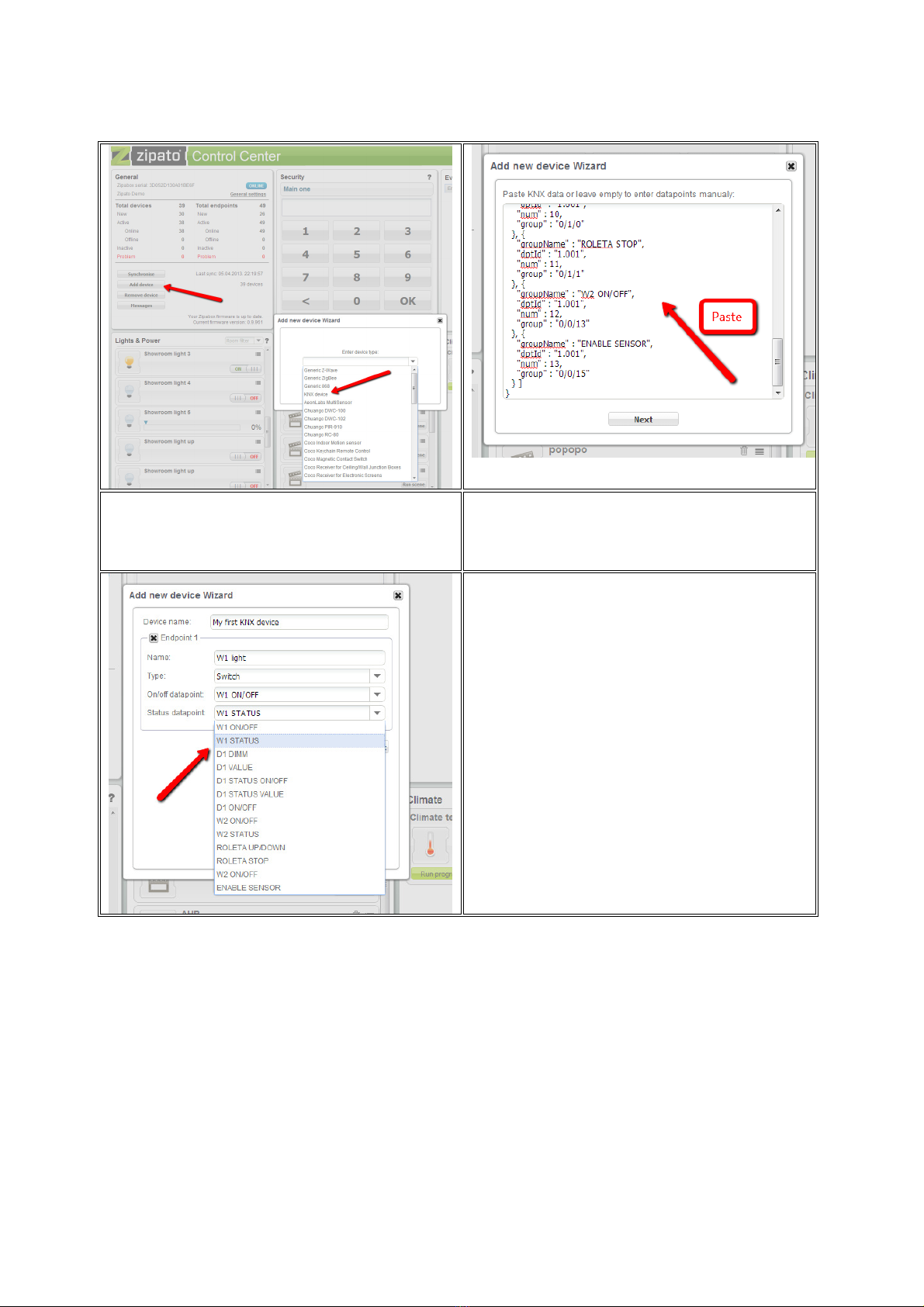
Zipato dashboard is the main configuration tool for the Zipato network. Go to my.zipato.com and login to your
account by using your username and password.
4
1. Open “ADD DEVICE” wizard and select KNX Device
from the list.
2. In the text field PASTE the date from the clipboard.
If you lost the datapoints from the clipboard, repeat
the proces with the KNX IMPORTER TOOL.
3. Create Zipato endpoints by using appropriate
datapoints. For each Zipato ENDPOINT you need
to select right BAOS endpoint. This way, the newly
createt Endpoint will communicate with the KNX
group addresses which are associated with those
Enpoints.
After you finish adding the enpoints, press SAVE
button and all your new endpoints will be available
within the Zipato network.
REPARING
Do not attempt to repair this product. There are no user-serviceable parts inside.
WATER-RESISTANCE
This product is not water-resistant. Keep it dry. Moisture will corrode the inner electronics.
CLEANING
Use a dry cloth to clean this product. Do not use harsh chemicals, cleaning solvents or strong detergents.
COPYRIGT
The contents of this manual is subject to copyright protection. Copying and reproducing is prohibited without prior
written permission. Information in this document is subject to change without prior notice. Check www.zipato.com for
updates.
Other Zipato Control Unit manuals
Popular Control Unit manuals by other brands

Festo
Festo Compact Performance CP-FB6-E Brief description

Elo TouchSystems
Elo TouchSystems DMS-SA19P-EXTME Quick installation guide

JS Automation
JS Automation MPC3034A user manual

JAUDT
JAUDT SW GII 6406 Series Translation of the original operating instructions

Spektrum
Spektrum Air Module System manual

BOC Edwards
BOC Edwards Q Series instruction manual

KHADAS
KHADAS BT Magic quick start

Etherma
Etherma eNEXHO-IL Assembly and operating instructions

PMFoundations
PMFoundations Attenuverter Assembly guide

GEA
GEA VARIVENT Operating instruction

Walther Systemtechnik
Walther Systemtechnik VMS-05 Assembly instructions

Altronix
Altronix LINQ8PD Installation and programming manual





