manuals.online logo
Brands
  1. Home
  2. •
  3. Brands
  4. •
  5. Abitana
  6. •
  7. Control Unit
  8. •
  9. Abitana ABI-ET2003 User manual

Abitana ABI-ET2003 User manual

Popular Control Unit manuals by other brands

Seitz 14A80 user manual

Seitz

Seitz 14A80 user manual

Wilo RS485 Installation and operating instructions

Wilo

Wilo RS485 Installation and operating instructions

Becker CentralControl CC41 Commissioning Instruction

Becker

Becker CentralControl CC41 Commissioning Instruction

SICK CDB650 operating instructions

SICK

SICK CDB650 operating instructions

Panduit NetKey NKP5E88M Series installation instructions

Panduit

Panduit NetKey NKP5E88M Series installation instructions

MX Options Concentric Petite Fitting instructions

MX

MX Options Concentric Petite Fitting instructions

Clean Water Systems Fleck 2510 Installation & start?up guide

Clean Water Systems

Clean Water Systems Fleck 2510 Installation & start?up guide

Fairchild FSB44104A user guide

Fairchild

Fairchild FSB44104A user guide

LEGRAND Wattstopper LMIN-104 installation instructions

LEGRAND

LEGRAND Wattstopper LMIN-104 installation instructions

PMK ATT10BNCS instruction manual

PMK

PMK ATT10BNCS instruction manual

Tektronix TDS3FFT user manual

Tektronix

Tektronix TDS3FFT user manual

Woodward easYgen Technical manual

Woodward

Woodward easYgen Technical manual

Balluff BNI EIP-502-105-R015 user guide

Balluff

Balluff BNI EIP-502-105-R015 user guide

NXP Semiconductors TWR-LS1021A Getting started

NXP Semiconductors

NXP Semiconductors TWR-LS1021A Getting started

Advantech PCM-3117 Startup manual

Advantech

Advantech PCM-3117 Startup manual

Danfoss MCO 101 manual

Danfoss

Danfoss MCO 101 manual

Moons' Lin Engineering R701P user manual

Moons'

Moons' Lin Engineering R701P user manual

Aventics RV1 operating instructions

Aventics

Aventics RV1 operating instructions

manuals.online logo
manuals.online logoBrands
  • About & Mission
  • Contact us
  • Privacy Policy
  • Terms and Conditions

Copyright 2025 Manuals.Online. All Rights Reserved.

090810_ABI-ET2003_QSG_ML
English Page9 N.V. abitana S.A.
ENGLISH
ABI-ET2003
Modem,Faxand Telephone
Distribution Module
withintegrated ADSLfilter
Quick StartGuide
1 PackageContents
• TelephoneConnection Module4lines
• QuickStart Guide
2 Introduction
TheABI-ET2003isapassivetelephonedistribution modulesuitablefor
standard(PSTN)withorwithoutADSL.
Thisunitprovideseasyconnection forTelephone,FAXand ADSL
modem/router.Theinternal ADSLfiltereliminatestheneedforan
external ADSLfilter.
TheABI-ET2003doesnothaveaprivacyprotection device
incorporated.
3 HardwareIntroduction
P1
P2
P3
L1
L1
L1
P4
Position
A<->B
Figure1
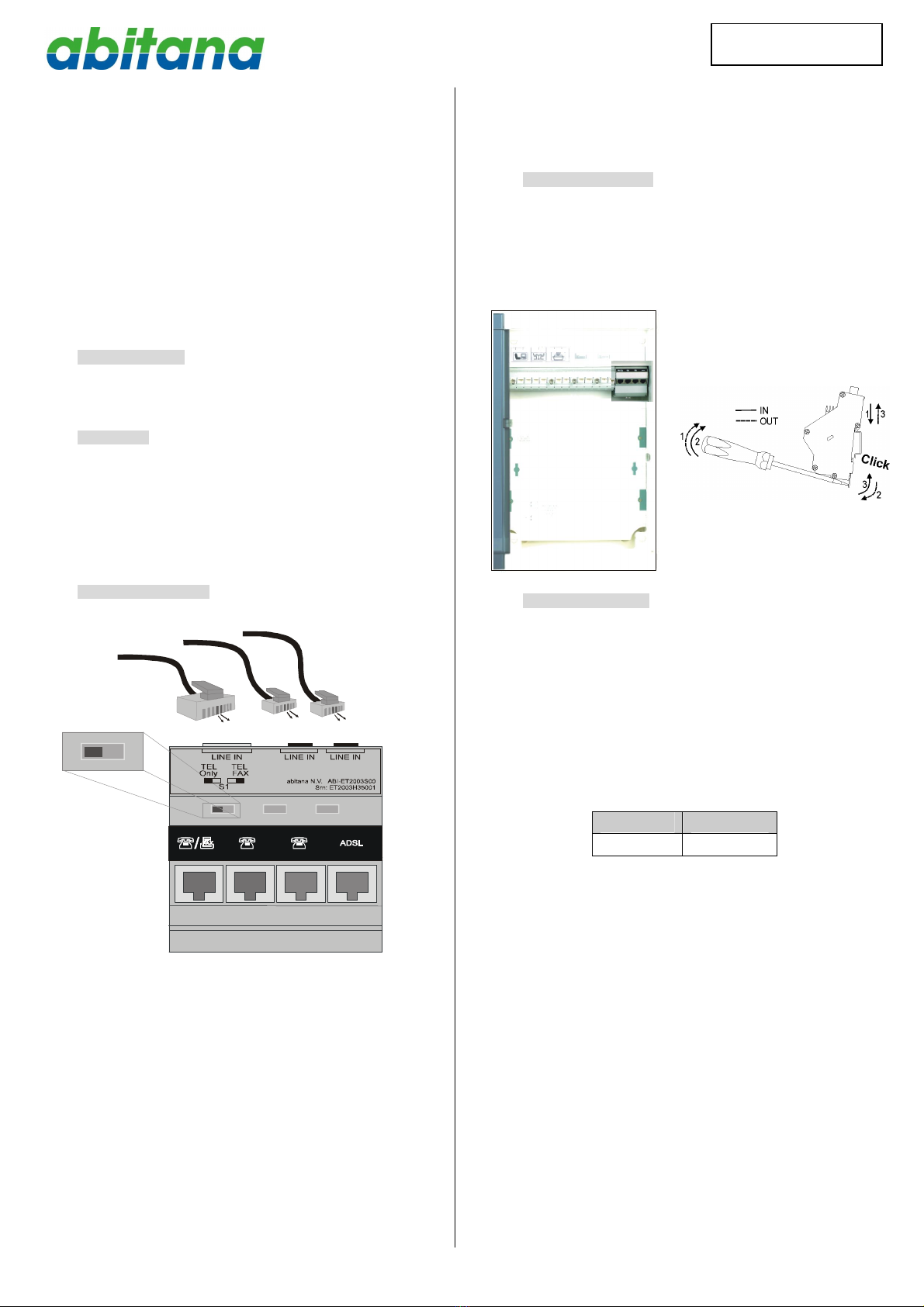
TheDIN-Rail mountableABI-ET2003 isequippedwith4RJ45 jackson
thefront oftheunit. (P1~P4)
Aswitchon thefrontoftheunitisused toconfiguretheunitaccording
totheneedsofyourinstallation.Differentconfiguration scenariosare
explained laterinthismanual.
Onthetop oftheunityou’llfindtheconnectionsforthe‘incoming’
phoneline.
Theswitchandtheincoming phonelineconnectionsareonly
accessiblewhenthefrontof the‘Comm CenterCabinet’isremoved.
Theunitwillprobablybeconfigured duringinstallation.Makesureto
takenoteoftheconfiguration(Connectionstotherearportsandswitch
setting). Attheendofthismanual,youwillfindatablewhereyou can
writedowntheconfiguration.
4 Installation andpower
Nopowerneeded.
Load ratioforthismodule=0.
Maximumallowedloadratio(sumof theloadratiosforallmodules)for
powersupplyABI-PS1001S00=4.
Clickthemoduleon theDIN-Railasshowninthepicturesbelow:
5 Installation scenarios
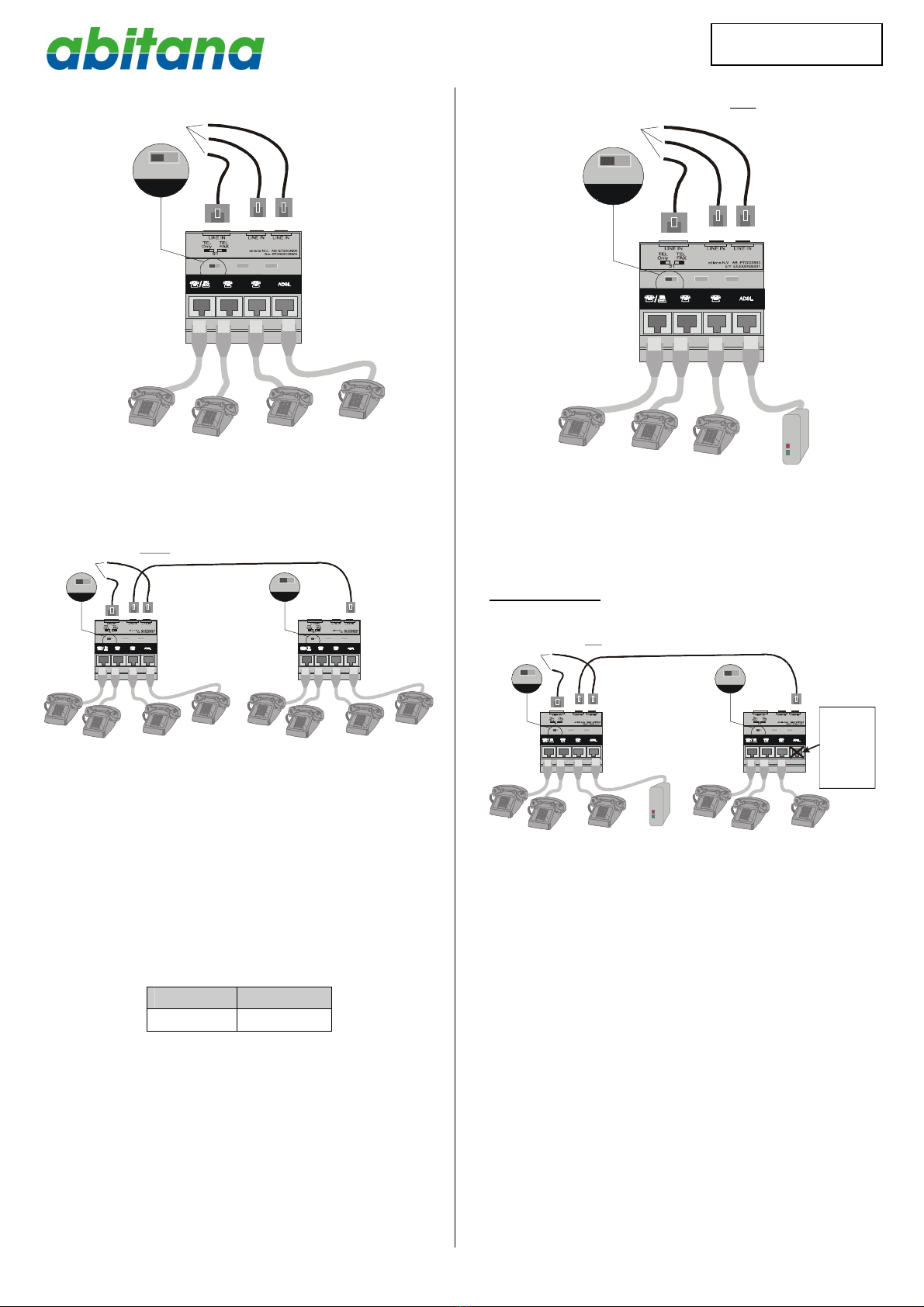
5.1 Oneanalog(PSTN)phonelinewithoutADSL
Whenyouhaveoneincoming telephoneline(standardPSTN),you
can distributethesignal to4locationsinparallel.
Whenacall arrives,allphoneswillringatthesametime.You can pick
up anyof thefourphonestoanswerthecall.
Ifduring acall asecond phoneisunhooked,thisphonewill jointhe
ongoingconversation.
Nointernal callsbetweenthelocationsarepossible(NOPABX
function).
SwitchNr. Position
S1 A
Forthisconfiguration,theswitchmustbeinthepositionsindicated in
theprecedingtable.
090810_ABI-ET2003_QSG_ML
English Page10 N.V. abitana S.A.
ENGLISH
P1
P2
P3
L1
L1
L1
P4
L1PUBLICanalog(PSTN)linewithoutADSL
L1
L1
L1
A
Connectiontoone
ofthe3connectors
L1
Inthisconfiguration,itispossibletoextendthenumberofphones
connected tothephonelinebyconnectingoneofthefree RJ45or
RJ11connectorsofthefirst ABI-ET2003tooneofthe3connectorsof
thesecond one.
P1 P2 P3
L1 L1L1
P4
L1 PUBLICanalog(PSTN) lineADSL(extention to8telephoneunits)
WITHOUT
L1
L1
L1
A
Connection toone
ofthe2connectors
L1
P1
P2
P3
L1
L1
L1
P4
L1
L1
L1
A
L1
5.2 Oneanalog(PSTN)phonelinewith ADSL
Whenyouhaveoneincoming telephoneline(standardPSTN),you
can distributethesignal to3locationsinparallel.TheADSLmodemis
connected tothe4th port(P4).
Whenacall arrives,allphoneswillringatthesametime.You can pick
up anyof the3phonestoanswerthecall.
Ifduring acall asecond phoneisunhooked,thisphonewill jointhe
ongoingconversation.
Nointernal callsbetweenthelocationsarepossible(NOPABX
function).
SwitchNr. Position
S1 A
Forthisconfiguration,theswitchmustbeinthepositionsindicated in
theprecedingtable.
P1
P2
P3
L1
L1
L1
P4
L1PUBLICanalog(PSTN)line ADSL
with
L1 L1 L1 ADSL
MODEM
A
Connection toone
ofthe3connectors
Inthisconfiguration,itisalsopossibletoextendthenumberof phones
connected tothephonelinebyconnectingoneofthefree RJ45or
RJ11connectorsofthefirst ABI-ET2003tooneofthe3connectorsof
thesecond one.
ImportantRemark: OnlyoneADSLmodemshouldbeconnected to
thesystem.
P1 P2 P3
L1
L1L1
P4
L1 PUBLICanalog(PSTN) lineADSL (Extension to6telephoneunits)
WITH
L1 L1 L1
A
Connection toone
ofthe2connectors
P1
P2
P3
L1
L1
L1
P4
L1
L1
L1
A
ADSL
MODEM
Onlyoneofthe
portsP4should
beinuse and
haveanADSL
modem
connectedto
it.
5.3 Onephoneline(PSTN)connected toapriorityFAX
The FAXdeviceisconnected toP1.You can usethefeed-through
featureofthatequipmenttodisconnecttherestofthephoneswhena
FAXcommunicationisinprogress.Thispreventsdisruption ofthe
communication when someonepicks-up aphonewhilethelineisin
usebythosedevices.Thefeed-through linebecomesL1’in the
drawing.
Whenacall arrives,allphoneswillring (including FAX).
Depending ontheconfiguration oftheFAX,itwillanswerthecallafter
aspecified numberofrings.Anytimebetweenthefirstring andthat
specificnumberofrings,you can answerthecallbypickingup anyof
thephonesconnected toP2~P3.
Whenthecallhasbeenanswered bytheFAX,phonesconnected to
P2~P3(L1’)willbedisconnected.

090810_ABI-ET2003_QSG_ML
English Page11 N.V. abitana S.A.
ENGLISH
P1
P2
P3
L1
L1
L1
P4
L1PUBLICanalog (PSTN)linewith ADSL
L1
L1’
L1’
B
ADSL
MODEM
Connection toone
ofthe 3connectors
SwitchNr. Position
S1 B
Forthisconfiguration,theswitchmustbeintheposition,indicated in
theprecedingtable.
ImportantRemark:
Thisconfiguration isonlyvalidincasetheFAXconnectedtoP1
returnsL1’on pins2and 5oftheRJ11connector(or3and 6of
theRJ45connector).
ChecktheFAXdocumentation beforeusing thisfeature.
P1 P2 P3
P4
L1
L1’
L1’
L1
L1’
RJ11/RJ12
ADSL
MODEM
2345
WhenevertheFAXisdisconnected,all thephonesconnectedto
P2~P3aredisconnectedalso.
IftheFAXisdisconnected(repair,maintenance,…) the
configuration mustbechanged(Selectsetting A).
Theuseofthisfeaturehasno influenceon theADSLport.
6 Troubleshooting
-Thetelephonesystemworksfine,buttheADSLmodem
connected toP4isnotworking.
Check iftheADSLlineisactivatedbytheprovider.
CheckiftheABI-ET2003unitisdirectlyconnected tothe
provideroutlet(thereshouldbenoexternal ADSLfilter
installed).
-Thetelephoneconnected toport1worksfine,butthose
connected toports2and3arenotworking.
IncasenoFAXisconnected andthefeed-throughfeature
isnot used, verifythattheswitchisin positionA.
IncaseaFAXisconnected,checkiftheFAXdevice
supportsthefeed-through featureandreturnsthephone
signal topins2and 5oftheRJ11connector(topins3and
6oftheRJ45connector).
- Excessivenoiseduringaphoneconversation:
MakesurethetelephonesareonlyconnectedtoportsP1to
P3ofthemodule.
Incasethescenariofrom§5.1isused,makesurethat
thereisnoADSLsignal presenton theincomingphone
line.
090810_ABI-ET2003_QSG_ML
English Page12 N.V. abitana S.A.
ENGLISH
7 Yourconfiguration
Port Nr Connected to
Telephone
line
cADSLcNOADSL
1 cL1cL1 FAX
Tel #:
2 cL1cL1’
Tel #:
3 cL1cL1’
Tel #:
4 cADSLMODEM cL1TEL
Tel #:
RJ45 (Top) cL1cNoConnection.
Tel #:
RJ11-1
(Top)
cL1cNoConnection
Tel #:
RJ11-2
(Top)
cL1cNoConnection
Tel #:
cConnection tosecondABI-ET2003
Positionoftheswitch
AS1 B
cc