manuals.online logo
Brands
  1. Home
  2. •
  3. Brands
  4. •
  5. Agilent Technologies
  6. •
  7. Power Supply
  8. •
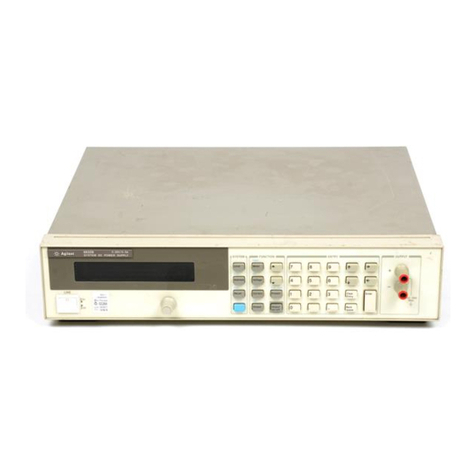
  9. Agilent Technologies 66 A Series User manual

Agilent Technologies 66 A Series User manual

This manual suits for next models

6

Other Agilent Technologies Power Supply manuals

Agilent Technologies E3631-90002 User manual

Agilent Technologies

Agilent Technologies E3631-90002 User manual

Agilent Technologies E3620A Service manual

Agilent Technologies

Agilent Technologies E3620A Service manual

Agilent Technologies 6641A User manual

Agilent Technologies

Agilent Technologies 6641A User manual

Agilent Technologies 6631B User manual

Agilent Technologies

Agilent Technologies 6631B User manual

Agilent Technologies 6541A User manual

Agilent Technologies

Agilent Technologies 6541A User manual

Agilent Technologies N2775A User manual

Agilent Technologies

Agilent Technologies N2775A User manual

Agilent Technologies 6680A Quick start guide

Agilent Technologies

Agilent Technologies 6680A Quick start guide

Agilent Technologies 66312A User manual

Agilent Technologies

Agilent Technologies 66312A User manual

Agilent Technologies 6106A User manual

Agilent Technologies

Agilent Technologies 6106A User manual

Agilent Technologies E3631A User manual

Agilent Technologies

Agilent Technologies E3631A User manual

Agilent Technologies E364XA Series User manual

Agilent Technologies

Agilent Technologies E364XA Series User manual

Agilent Technologies E3633A User manual

Agilent Technologies

Agilent Technologies E3633A User manual

Agilent Technologies 6201B User manual

Agilent Technologies

Agilent Technologies 6201B User manual

Agilent Technologies 6443B Service manual

Agilent Technologies

Agilent Technologies 6443B Service manual

Agilent Technologies E3632A User manual

Agilent Technologies

Agilent Technologies E3632A User manual

Agilent Technologies 6625A User manual

Agilent Technologies

Agilent Technologies 6625A User manual

Agilent Technologies 66332A User manual

Agilent Technologies

Agilent Technologies 66332A User manual

Agilent Technologies 6112A User manual

Agilent Technologies

Agilent Technologies 6112A User manual

Agilent Technologies 66111A User manual

Agilent Technologies

Agilent Technologies 66111A User manual

Agilent Technologies E3632A User manual

Agilent Technologies

Agilent Technologies E3632A User manual

Agilent Technologies E3646A/47A User manual

Agilent Technologies

Agilent Technologies E3646A/47A User manual

Agilent Technologies 6214A User manual

Agilent Technologies

Agilent Technologies 6214A User manual

Agilent Technologies E3610A Service manual

Agilent Technologies

Agilent Technologies E3610A Service manual

Agilent Technologies N6751A User manual

Agilent Technologies

Agilent Technologies N6751A User manual

Popular Power Supply manuals by other brands

Videx 520MR Installation instruction

Videx

Videx 520MR Installation instruction

Poppstar 1008821 Instructions for use

Poppstar

Poppstar 1008821 Instructions for use

TDK-Lambda LZS-A1000-3 Installation, operation and maintenance manual

TDK-Lambda

TDK-Lambda LZS-A1000-3 Installation, operation and maintenance manual

TDK-Lambda 500A instruction manual

TDK-Lambda

TDK-Lambda 500A instruction manual

Calira EVS 17/07-DS/IU operating instructions

Calira

Calira EVS 17/07-DS/IU operating instructions

Monacor PS-12CCD instruction manual

Monacor

Monacor PS-12CCD instruction manual

VOLTIMA MagicBox 15 Installation and operating instructions

VOLTIMA

VOLTIMA MagicBox 15 Installation and operating instructions

Miller Auto Deltaweld 452 owner's manual

Miller

Miller Auto Deltaweld 452 owner's manual

BCP PUOUBK How to install

BCP

BCP PUOUBK How to install

HC 2210 manual

HC

HC 2210 manual

Radial Engineering SB-48UB user guide

Radial Engineering

Radial Engineering SB-48UB user guide

Puls CT5.241 installation manual

Puls

Puls CT5.241 installation manual

OCZ ZX1250W Technical specifications

OCZ

OCZ ZX1250W Technical specifications

iseg ECH 238 manual

iseg

iseg ECH 238 manual

Power XXL A Series instruction manual

Power

Power XXL A Series instruction manual

HP 6200B Operating and service manual

HP

HP 6200B Operating and service manual

Epson Stylus Scan 2500 Product information sheet

Epson

Epson Stylus Scan 2500 Product information sheet

Pulsar GREEN POWER CCTV PoE POE044816 manual

Pulsar

Pulsar GREEN POWER CCTV PoE POE044816 manual

manuals.online logo
manuals.online logoBrands
  • About & Mission
  • Contact us
  • Privacy Policy
  • Terms and Conditions

Copyright 2025 Manuals.Online. All Rights Reserved.

(217) 352-9330 | [email protected] | artisantg.com
-~
ARTISAN
®
~I
TECHNOLOGY
GROUP
Your definitive source
for
quality
pre-owned
equipment.
Artisan Technology
Group
Full-service,
independent
repair
center
with
experienced
engineers
and
technicians
on staff.
We
buy
your
excess,
underutilized,
and
idle
equipment
along
with
credit
for
buybacks
and
trade-ins
.
Custom
engineering
so
your
equipment
works
exactly as
you
specify.
•
Critical
and
expedited
services
•
Leasing
/
Rentals/
Demos
• In
stock/
Ready-to-ship
•
!TAR-certified
secure
asset
solutions
Expert
team
ITrust
guarantee
I
100%
satisfaction
All
tr
ademarks,
br
a
nd
names, a
nd
br
a
nd
s a
pp
earing here
in
are
th
e property of
th
e
ir
r
es
pecti
ve
ow
ner
s.
Find the Keysight / Agilent 5063-9221 at our website: Click HERE
OPERATING MANUAL
MULTIPLE OUTPUT LINEAR SYSTEM
DC POWER SUPPLY
AGILENT MODELS 6625A, 6626A,
6628A, and 6629A
Agilent Part No 06626-90001
Microfiche Part No. 06626-90002 Printed in Malaysia
September,2004
Artisan Technology Group - Quality Instrumentation ... Guaranteed | (888) 88-SOURCE | www.artisantg.com

2
CERTIFICATION
Agilent Technologies certifies that this product met its published specifications at time of shipment from the factory. Agilent
Technologies further certifies that its calibration measurements are traceable to the United States National Bureau of
Standards, to the extent allowed by the Bureau's calibration facility, and to the calibration facilities of other International
Standards Organization members.
WARRANTY
This Agilent Technologies hardware product is warranted against defects in material and workmanship for a period of one
year from date of delivery. Agilent software and firmware products, which are designated by Agilent for use with a
hardware product and when properly installed on that hardware product, are warranted not to fail to execute their
programming instructions due to defects in material and workmanship for a period of 90 days from date of delivery. During
the warranty period Agilent Technologies will, at its option, either repair or replace products which prove to be defective.
Agilent does not warrant that the operation of the software, firmware, or hardware shall be uninterrupted or error free.
For warranty service, with the exception of warranty options, this product must be returned to a service facility designated
by Agilent. Customer shall prepay shipping charges by (and shall pay all duty and taxes) for products returned to Agilent
for warranty service. Except for products returned to Customer from another country, Agilent shall pay for return of
products to Customer.
Warranty services outside the country of initial purchase are included in Agilent's product price, only if Customer pays
Agilent international prices (defined as destination local currency price, or U.S. or Geneva Export price).
If Agilent is unable, within a reasonable time to repair or replace any product to condition as warranted, the Customer shall
be entitled to a refund of the purchase price upon return of the product to Agilent.
LIMITATION OF WARRANTY
The foregoing warranty shall not apply to defects resulting from improper or inadequate maintenance by the Customer,
Customer-supplied software or interfacing, unauthorized modification or misuse, operation outside of the environmental
specifications for the product, or improper site preparation and maintenance. NO OTHER WARRANTY IS EXPRESSED
OR IMPLIED. Agilent SPECIFICALLY DISCLAIMS THE IMPLIED WARRANTIES OF MERCHANTABILITY AND
FITNESS FOR A PARTICULAR PURPOSE.
EXCLUSIVE REMEDIES
THE REMEDIES PROVIDED HEREIN ARE THE CUSTOMER'S SOLE AND EXCLUSIVE REMEDIES. Agilent
SHALL NOT BE LIABLE FOR ANY DIRECT, INDIRECT, SPECIAL, INCIDENTAL, OR CONSEQUENTIAL
DAMAGES, WHETHER BASED ON CONTRACT, TORT, OR ANY OTHER LEGAL THEORY.
ASSISTANCE
The above statements apply only to the standard product warranty. Warranty options, extended support contracts, product
maintenance agreements and customer assistance agreements are also available. Contact your nearest Agilent
Technologies Sales and Service office for further information on Agilent's full line of Support Programs.
Copyright 2000, 2004 Agilent Technologies Edition 1___January, 1993
Update 1___February, 2000
Update 2___September, 2004
Artisan Technology Group - Quality Instrumentation ... Guaranteed | (888) 88-SOURCE | www.artisantg.com
3
SAFETY SUMMARY
The following general safety precautions must be observed during all phases of operation, service, and repair of this
instrument. Failure to comply with these precautions or with specific warnings elsewhere in this manual violates safety
standards of design, manufacture, and intended use of the instrument. Agilent Technologies assumes no liability for the
customer’s failure to comply with these requirements.
BEFORE APPLYING POWER.
Verify that the product is set to match the available line voltage and the correct fuse is installed.
GROUND THE INSTRUMENT.
This product is a Safety Class 1 instrument (provided with a protective earth terminal). To minimize shock hazard, the instrument chassis
and cabinet must be connected to an electrical ground. The instrument must be connected to the ac power supply mains through a three-
conductor power cable, with the third wire firmly connected to an electrical ground (safety ground) at the power outlet. For instruments
designed to be hard-wired to the ac power lines (supply mains), connect the protective earth terminal to a protective conductor before any
other connection is made. Any interruption of the protective (grounding) conductor or disconnection of the protective earth terminal will
cause a potential shock hazard that could result in personal injury. If the instrument is to be energized via an external autotransformer for
voltage reduction, be certain that the autotransformer common terminal is connected to the neutral (earthed pole) of the ac power lines
(supply mains).
FUSES.
Only fuses with the required rated current, voltage, and specified type (normal blow, time delay, etc.) should be used. Do not use repaired
fuses or short circuited fuseholders. To do so could cause a shock or fire hazard.
DO NOT OPERATE IN AN EXPLOSIVE ATMOSPHERE.
Do not operate the instrument in the presence of flammable gases or fumes.
KEEP AWAY FROM LIVE CIRCUITS.
Operating personnel must not remove instrument covers. Component replacement and internal adjustments must be made by qualified
service personnel. Do not replace components with power cable connected. Under certain conditions, dangerous voltages may exist even
with the power cable removed. To avoid injuries, always disconnect power, discharge circuits and remove external voltage sources before
touching components.
DO NOT SERVICE OR ADJUST ALONE.
Do not attempt internal service or adjustment unless another person, capable of rendering first aid and resuscitation, is present.
DO NOT EXCEED INPUT RATINGS.
This instrument may be equipped with a line filter to reduce electromagnetic interference and must be connected to a properly grounded
receptacle to minimize electric shock hazard. Operation at line voltages or frequencies in excess of those stated on the data plate may
cause leakage currents in excess of 5.0 mA peak.
SAFETY SYMBOLS.
Instruction manual symbol: the product will be marked with this symbol when it is necessary for the user to refer to the
instruction manual (refer to Table of Contents) .
Indicates hazardous voltages.
Indicate earth (ground) terminal.
The WARNING sign denotes a hazard. It calls attention to a procedure, practice, or the like, which, if not correctly
performed or adhered to, could result in personal injury. Do not proceed beyond a WARNING sign until the
indicated conditions are fully understood and met.
The CAUTION sign denotes a hazard. It calls attention to an operating procedure, or the like, which, if not correctly
performed or adhered to, could result in damage to or destruction of part or all of the product. Do not proceed
beyond a CAUTION sign until the indicated conditions are fully understood and met.
DO NOT SUBSTITUTE PARTS OR MODIFY INSTRUMENT.
Because of the danger of introducing additional hazards, do not install substitute parts or perform any unauthorized modification to the
instrument. Return the instrument to an Agilent Technologies Sales and Service Office for service and repair to ensure that safety features
are maintained.
Instruments which appear damaged or defective should be made inoperative and secured against unintended operation until they can be
repaired by qualified service personnel
Artisan Technology Group - Quality Instrumentation ... Guaranteed | (888) 88-SOURCE | www.artisantg.com

4
SAFETY SUMMARY (continued)
GENERAL
Any LEDs used in this product are Class 1 LEDs as per IEC 825-1.
ENVIRONMENTAL CONDITIONS
This instrument is intended for indoor use in an installation category II, pollution degree 2 environment. It is designed to
operate at a maximum relative humidity of 95% and at altitudes of up to 2000 meters. Refer to the specifications tables for the
ac mains voltage requirements and ambient operating temperature range.
SAFETY SYMBOL DEFINITIONS
Symbol Description Symbol Description
Direct current Terminal for Line conductor on permanently
installed equipment
Alternating current Caution, risk of electric shock
Both direct and alternating current Caution, hot surface
Three-phase alternating current Caution (refer to accompanying documents)
Earth (ground) terminal In position of a bi-stable push control
Protective earth (ground) terminal Out position of a bi-stable push control
Frame or chassis terminal On (supply)
Terminal for Neutral conductor on
permanently installed equipment Off (supply)
Terminal is at earth potential
(Used for measurement and control
circuits designed to be operated with
one terminal at earth potential.)
Standby (supply)
Units with this symbol are not completely
disconnected from ac mains when this switch is
off. To completely disconnect the unit from ac
mains, either disconnect the power cord or have
a qualified electrician install an external switch.
Herstellerbescheinigung
Diese Information steht im Zusammenhang mit den Anforderungen der
Maschinenläminformationsverordnung vom 18 Januar 1991.
* Schalldruckpegel Lp <70 dB(A) * Am Arbeitsplatz * Normaler Betrieb
* Nach EN 27779 (Typprüfung).
Manufacturer’s Declaration
This statement is provided to comply with the requirements of the German Sound Emission Directive,
from 18 January 1991.
* Sound Pressure Lp <70 dB(A) * At Operator Position * Normal Operation
* According to EN 27779 (Type Test).
This ISM device complies with Canadian ICES-001. Cet appareil ISM est conforme à la norme NMB-001 du Canada.
Artisan Technology Group - Quality Instrumentation ... Guaranteed | (888) 88-SOURCE | www.artisantg.com
5
DECLARATION OF CONFORMITY
According to ISO/IEC Guide 22 and CEN/CENELEC EN 45014
Revision: B.00.00 Issue Date: Created on 11/24/2003 3:33
PM Document No. 662xA.11.24.doc
Manufacturer’s Name and Address
Responsible Party Alternate Manufacturing Site
Agilent Technologies, Inc. Agilent Technologies (Malaysia) Sdn. Bhd
550 Clark Drive, Suite 101
Budd Lake, New Jersey 07828
USA
Malaysia Manufacturing
Bayan Lepas Free Industrial Zone, PH III
11900 Penang,
Malaysia
Declares under sole responsibility that the product as originally delivered
Product Names a) Multiple Output 40 W and 80 W system dc Power Supplies
b) Multiple Output 25 W and 50 W precision system dc Power Supplies
Model Numbers a) 6621A, 6622A, 6623A; 6624A, 6627A
b) 6625A; 6626A; 6628A; 6629A
(and other customized products based upon the above)
Product Options This declaration covers all options and customized products based on the above
products.
Complies with the essential requirements of the Low Voltage Directive 73/23/EEC and the EMC
Directive 89/336/EEC (including 93/68/EEC) and carries the CE Marking accordingly.
EMC Information ISM Group 1 Class A Emissions
As detailed in Electromagnetic Compatibility (EMC), Certificate of Conformance Number
CC/TCF/00/076 based on Technical Construction File (TCF) HPNJ3, dated
Oct. 29, 1997
Assessed by: Celestica Ltd, Appointed Competent Body
Westfields House, West Avenue
Kidsgrove, Stoke-on-Trent
Straffordshire, ST7 1TL
United Kingdom
Safety Information and Conforms to the following safety standards.
IEC 61010-1:2001 / EN 61010-1:2001
UL 1244
CSA C22.2 No. 1010.1:1992
This DoC applies to the above-listed products placed on the EU market after:
January 1, 2004
Date Bill Darcy/ Regulations Manager
For further information, please contact your local Agilent Technologies sales office, agent or distributor.
Authorized EU-representative: Agilent Technologies Deutschland GmbH, Herrenberger Straβe 130, D
71034 Böblingen, Germany
Artisan Technology Group - Quality Instrumentation ... Guaranteed | (888) 88-SOURCE | www.artisantg.com
6
WHAT THIS MANUAL CONTAINS
It contains information relating to the installation, operation, and programming of these supplies as outlined below.
Maintenance and troubleshooting instructions are given in a separate Service Manual (Agilent Part No. 06626-90003).
Chapter 1.--General Information
Chapter 1 contains a general description of the power supplies as well as instrument specifications and information
concerning options and accessories.
Chapter 2.--Installation Procedures
Chapter 2 contains information to prepare the supply for use. Included in this chapter are power requirements, line voltage
conversion, and GP-IB interface connections.
Chapter 3.--Getting Started
Chapter 3 contains a brief description of the supply’s front panel controls and indicators and describes how to turn on the
supply and to check it’s operation. An introduction to remote operation over the GP-IB is also given to help a first time user
get started quickly.
Chapter 4.--Output Connections and Operating Information
Chapter 4 contains information about making connections to the supply’s output terminals. General operating information is
also provided.
Chapter 5.--Remote Operation
Chapter 5 contains all of the information required to operate the supply remotely via a GP-IB computer. All of the
commands that can be used to program the supplies are described.
Chapter 6.--Local Operation
Chapter 6 contains instructions on using all of the front panel controls and indicators.
Appendix A--Calibration Procedure
Appendix A contains programming steps and procedures that are required to calibrate your power supply. It is
recommended that the power supply be calibrated yearly.
Appendix B--Programming with Series 200/300 Computer
Appendix B contains Series 200/300 Computer programming examples (in Agilent extended BASIC language) for your
Power Supply’s most frequently used functions.
Appendix C--Command Summary
Appendix C contains an alphabetical listing of all commands that can be sent to a supply.
Appendix D--Error Messages
Appendix D contains a listing and brief explanation of all error codes and messages for all programming and hardware
errors.
Appendix E - Manual Backdating
Appendix E contains backdating information for units with Serial numbers lower than those listed on the title page.
Artisan Technology Group - Quality Instrumentation ... Guaranteed | (888) 88-SOURCE | www.artisantg.com
7
Table Of Contents
1 General Information
Introduction...................................................................................................................................................11
Safety Considerations....................................................................................................................................11
Instrument and Manual Identification...........................................................................................................11
Options................................. .........................................................................................................................11
Accessories....................................................................................................................................................12
Description ............................ .......................................................................................................................12
Basic Operation.............................................................................................................................................14
GP-IB Board..............................................................................................................................................14
Output Boards............................................................................................................................................15
Specifications......................... .......................................................................................................................15
Qualifying Conditions...............................................................................................................................15
Definitions.................................................................................................................................................15
2 Installation
Introduction...................................................................................................................................................25
Initial Inspection............................................................................................................................................25
Location and Cooling....................................................................................................................................25
Input Power Requirements............................................................................................................................26
Line Fuse.......................................................................................................................................................27
Power Cord....................................................................................................................................................28
Line Voltage Conversion...............................................................................................................................29
GP-IB Interface Connection..........................................................................................................................29
3 Getting Started
Introduction ..................................................................................................................................................31
Front Panel Controls and Indicators..............................................................................................................31
Turning On Your Supply...............................................................................................................................36
Normal Self Test Indications.....................................................................................................................36
Self Test Errors..........................................................................................................................................37
Checking Out Your Supply Using Local Control..........................................................................................37
Voltage Test............................ ..................................................................................................................38
Overvoltage Test......................... ..............................................................................................................38
Current Test...............................................................................................................................................38
Changing Resolution Range......................................................................................................................39
Introduction To Remote Operation....... ........................................................................................................39
Enter/Output Statements............................................................................................................................40
Reading the GP-IB Address......................................................................................................................40
Changing the GP-IB Address....................................................................................................................40
Sending a Remote Command....................................................................................................................41
Getting Data from the Supply....................................................................................................................41
Often Used Commands..............................................................................................................................41
Returning the Supply to Local Mode..... ...................................................................................................43
4 Output Connections and Operating Information
Introduction ..................................................................................................................................................45
Output Ranges...............................................................................................................................................45
Operating Quadrants..................................................................................................................................46
Operating Range........................................................................................................................................47
Protection Features........................................................................................................................................48
Connecting The Load....................................................................................................................................49
Wire Size Selection......................... ..........................................................................................................49
Multiple Loads.............................. ............................................................................................................50
Artisan Technology Group - Quality Instrumentation ... Guaranteed | (888) 88-SOURCE | www.artisantg.com
8
Table Of Contents (continued)
Positive and Negative Voltages.................................................................................................................51
Remote Voltage Sensing..................... ..........................................................................................................51
Remote Sense Connections................... ....................................................................................................52
Output Noise Considerations.....................................................................................................................53
Programming Response Time with an Output Capacitor..........................................................................53
Open Sense Leads......................................................................................................................................54
Overvoltage Trigger Connections............ .....................................................................................................54
External Trigger Circuit................... .........................................................................................................54
Power Supply Protection Considerations .......................... ...........................................................................55
Battery Charging........................... ............................................................................................................55
Capacitive Load Limitation.......................................................................................................................56
Parallel Operation..........................................................................................................................................56
CV Operation............................... .............................................................................................................57
CC Operation.............................................................................................................................................58
Remote Sensing.........................................................................................................................................58
Specifications for Parallel Operation.........................................................................................................58
Series Operation............................................................................................................................................59
CV Operation............................... .............................................................................................................59
CC Operation.............................................................................................................................................60
Remote Sensing.........................................................................................................................................60
Specifications for Series Operation...........................................................................................................60
Bi-Polar Operation ....................................................................................................................................61
5 Remote Operation
Introduction ..................................................................................................................................................63
GP-IB Operation............................................................................................................................................63
Interface Functions....................................................................................................................................63
GP-IB Address Selection...........................................................................................................................64
Power-On Service Request (PON)............................................................................................................65
Programming Syntax.....................................................................................................................................65
Numeric Data............................... .............................................................................................................67
Order of Execution....................................................................................................................................70
Terminators................................ ...............................................................................................................70
Initial Conditions...........................................................................................................................................71
Power Supply Commands.............................................................................................................................71
Voltage Programming........................ .......................................................................................................71
Current Programming................................................................................................................................73
Range Programming..................................................................................................................................73
Output On/Off.................................... .......................................................................................................74
Overvoltage Protection..............................................................................................................................74
Overcurrent Protection........................... ...................................................................................................75
Multiple Output Storage and Recall..........................................................................................................75
The Clear Command..................................................................................................................................76
Status Reporting................................. .......................................................................................................76
Service Request Generation....................... ...............................................................................................79
Reprogramming Delay............................. .................................................................................................80
Display On/Off..........................................................................................................................................81
Other Queries.............................................................................................................................................82
6 Local Operation
Introduction ..................................................................................................................................................85
Local Mode....................................................................................................................................................85
Artisan Technology Group - Quality Instrumentation ... Guaranteed | (888) 88-SOURCE | www.artisantg.com

9
Table Of Contents (continued)
Local Control Of Output Functions...............................................................................................................85
General........................................... ...........................................................................................................85
Setting Voltage and Voltage Range...........................................................................................................86
Setting Current and Current Range............................................................................................................87
Enabling/Disabling an Output...................................................................................................................87
Setting Overvoltage Protection..................................................................................................................88
Resetting Overvoltage Protection..............................................................................................................88
Enabling/Disabling Overcurrent Protection........ ......................................................................................88
Resetting Overcurrent Protection................. .............................................................................................88
Local Control Of System Functions..............................................................................................................88

Setting the Supply’s GP-IB Address..........................................................................................................88
Displaying Error Messages........................................................................................................................89
Storing and Recalling Voltage and Current. Settings for all Outputs........................................................89
A Alignment Procedures
Introduction...................................... .............................................................................................................91
Test Equipment and Setup Required.............................................................................................................91
Calibration Program.............................. ........................................................................................................91
Alignment Program.......................................................................................................................................95
B Programming With a Series 200/300 Computer
Introduction ................................................................................................................................................103
I/O Path Names...................... .....................................................................................................................103
Voltage and Current Programming..... ........................................................................................................103
Voltage and Current Programming With Variables... .................................................................................104
Voltage and Current Readback....................................................................................................................104
Programming Power Supply Registers........................................................................................................105
Present Status...................... ....................................................................................................................105
Service Request and Serial Poll...............................................................................................................106
Error Detection .......................................................................................................................................107
Stored Operating States...........................................................................................................................108
C Command Summary
Introduction.................................................................................................................................................109
D Error Messages
Introduction.................................................................................................................................................117
Power-On Self Test Messages.....................................................................................................................117
Error Responses...........................................................................................................................................117
Test Responses............................................................................................................................................117
E Manual Backdating
Introduction ................................................................................................................................................121
Make Changes.................…………………………………………………………………………………...121
Agilent Sales and Support Office
Contacts ......................................................................................................................................................122
Artisan Technology Group - Quality Instrumentation ... Guaranteed | (888) 88-SOURCE | www.artisantg.com