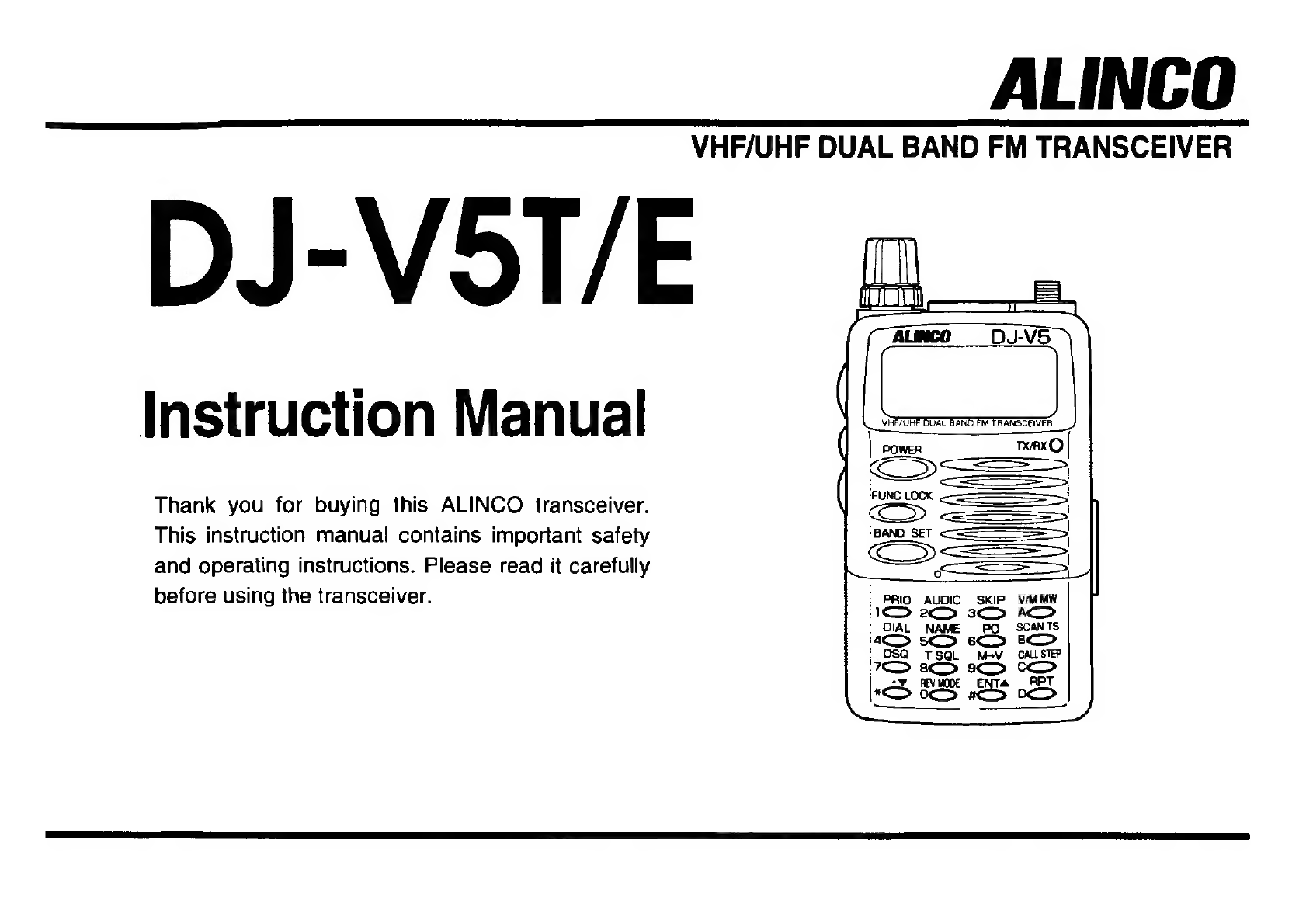
Alinco DJ-V5T/E User manual

Instruction
Manual
Thank
you
for
buying
this
ALINCO
transceiver.
This
instruction
manual
contains
important
safety
and
operating
instructions.
Please
read
it
carefully
before
using
the
transceiver.
—————
FUNCLOK
<<
SL
——————
CS
PRIO
AUDIO
SKIP
2
3S
—
DIAL
NAME
PQ
SCAN
4S
6
am]
OSQ
TSQL
MeV
CALSTEP
‘S
3
ALINCO
VHF/UHF
DUAL
BAND
FM
TRANSCEIVER
DJ-VST/E
VM
MW
A
9
cS
E
22S
0
pees
eee

NOTICE
Precautions
This
equipment
has
been
(ested
and
found
to
comply
with
the
limits
/\
CAUTION
for
a
Class
B
digital
device,
pursuant
to
part
15
of
the
FCC
Rules.
These
limits
are
designed
to
provide
reasonable
protection
against
harmful
interference
in
a
residential
installation.
This
equipment
Do
not
open
the
transceiver
case
Do
not
yank
the
power
cord
from
or
touch
non-user-serviceable
its
outlets.
Also,
do
not
rewire
the
generates,
uses,
and
can
radiate
radio
frequency
energy
and.
if
not
installed
and
used
in
accordance
with
the
instruction
manual,
may
cause
harmful
interference
to
radio
communications.
However,
there
is
no
guarantee
that
interference
will
not
occur
in
a
particular
installation.
If
this
equipment
does
cause
harmful
interference
to
;
:
radio
or
television
reception,
which
can
be
determined
by
turning
the
components.
power
cord
with
other
extension
equipment
off
and
on,
the
user
is
encouraged
to
try
to
correct
the
cords.
Such
handling
may
damage
interference
by
one
or
more
of
the
following
measures:
or
short-circuit
the
cord.
-
Reorient
or
relocate
the
receiving
antenna.
-
Increase
the
separation
berween
the
equipment
and
receiver.
-
Connect
the
equipment
into
an
outlet
on
a
circuit
different
from
Matto
which
the
receiver
is
connected.
©
AN
1
eat
Sy
cae
Ter
ee
ae
Do
not
expose
the
product
to
Use
a
13.8
V
DC
regulated
power
-
Consult
the
dealer
or
an
experienced
radia
technician
for
help.
direct
sunlight
or
heat
sources.
supply
to
operate
this
product.
Also,
avoid
using
the
product
in
The
transceiver
must
be
Tested
to
Comply
an
extremely
dusty
or
humid
grounded.
Cc
With
FCC
Standards
environment.
FOR
HOME
OR
OFFICE
USE
Information
in
this
document
are
subject
to
change
without
notice
or
)
A
obligation.
All
brand
names
and
trademarks
are
the
property
of
their
respective
owners.
Alinco
cannot
be
liable
for
pictorial
or
typographical
Do
not
place anything,
which
Beware
of
moisture
condensation.
inaccuracies.
Some
parts.
options
and/or
accessories
are
unavailable
in
4
.
n
might
spill
on
top
of
or
overthe
—
Moisture
in
the
air
will
condense
certain
areas.
Changes
or
modifications
not
expressly
approved
by
the
:
2
‘
y
:
product.
on
the
product
when
you
move
it
party
responsible
for
compliance
could
void
the
user's
authority
to
fi
ld
ol
operate
(he
equipment.
roma
cold
place
to'a
warm
place.
Condensation
will
cause
Copyright©
1998
Ali
rights
reserved.
No
part
of
this
document
may
be
the
unit
to
malfunction.
If
reproduced,
copied,
translated
or
transcribed
in
any
form
or
by
any
means
without
the
prior
written
permission
of
Alinco,
Inc.,
Osaka,
Japan.
English
Edition
Printed
in
Japan.
condensation
forms
on
the
unit,
wipe
or
let
dry.

Contents
Contents
2
Hl
Before
operating
the
transceiver
u4
@
Attention.
4
4
4
5
@
Points
to
Note
Before
Transmitting....
@
Points
to
Note
for
Using
an
External
Power
Supply
Wi
Accessories
..
4
@o0pen
the
bees
and
1
Check
“That
ihe
Following
tems:
Have
‘deen
Included
@
Connecting
and
Disconnecting
the
Antenna.
@
Attaching
the
Hand
Strap
@
Attaching
and
Detaching
the
Belt
Clip
“S
@
Attaching
and
Detaching
the
Ni-Cd
Battery
Pack
and
Battery
Case......5
@
Loading
Batteries
6
@
Exchanging
the
Batteries
6
@
Battery
Recharger
(EDC-93.
EDC-94)
6
@
6.0V-700mAh
Ni-Cd
Battery
Pack
(EBP-45N)..
sake
@
Prevent
Short
Circuiting
the
Ni-Cd
Battery
Pack...
7
1
Names
and
Functions
of
Parts..
8
1-1
External
View
...
8
Wi
Front...........
8
WTop...
8
MSide.
9
Rear...
9
1-2.
Keyboard.
W
Upper
Part...
Wi
Lower
Part.
1-3
Display
2
BASIC
OPSrAtiOn
vivssniseiceiccvststeasedeveetargenoaspssspacendueidetbersguretanvacess
13
2-1
Basic
Operation...
chek
W@W
Turning
the
Power
On.
@
Voltage
Indication............
B
Adjusting
the
Audio
Volume
WW
Squelch
@
Adjusting
the
Squelch....
W@
Monitor
Function
and
Squelch
Level.
@
Switching
MONI-1
and
MONI-2
2-2
Operating
Modes.
I
VFO
Mode
Mi
Memory
Mode
Wi
Call
Mode...
@
Switching
Between
Modes...
2-3
Setting
the
Frequency
in
the
VFO
Mode...
Wi
Switching
the
Band
@
Adjusting
the
Frequency
in
Tuning
Steps
@
Setting
the
Tuning
Step...
@
Adjusting
in
|
MHz
Steps
W@
Entry
From
the
Keyboard...
Wi
First
Entry
Digit
for
Different
Tuning
Steps
2-4
Receiving
...
setts
staid
aes
ecides
WSeting
the:
Receiving
Mode
2-5
Transmitting
.
W
Setting
Transmission
Output
Level
.........ccscsecssseesseececcseeseecsesensee
3
Memory
Channel
and
Calt
Channel
.
3-!
|
Memory
(MR)
Channel
Wi
Selecting
a
Memory
Channel
Number
.
@
Programming
a
Memory
Channel
.
@
Memory
Channel
Programming
@
Programmed-Scan
Channel
Programming...
@
Call-Channel
Programming
Wi
Calling
up
a
Programmed
Memory
Channel
Number...
Clearing
a
Memory
Channel
..
WB
Setting
the
Memory
Channel
Skip
@
Memory
Shift..
3-2
Call
Channel...
Selecting
a
Call
Channel
.....
@
Programming
a
Call
Channel
.
4
Functions.
4-1
Scan
Mode:
:
Band
Scan
and
Progtanumed
‘Scan.
@
Memory
Scan
and
Skip
Scan......

4-2
43
44
4.5
5
Communicating
5-1
5-2
W
Common
Function
of
All
Scams
........cccceececceeseeeeseeneeeeetsees
essences
Wi
Setting
Scan
Resume
Conditions
ee
@
Scan
Operation
When
Setting
Tone
Squelch
and
DTMF
Squelch.
Priority
Watch
W@W
Turning
Priority
Watch
On
WW
Simultaneous
Operation
of
Priority
Watch
and
Scans
@
Stopping
Scanning
Only
@
Stopping
Priority
Watch
Only.
Repeater
Operation
..
Wi
Repeater
Shift...
W
Reverse
......
W
Tone
Burst.
Mode
Settings
...
Beep
Function.
Weel!
B®
Auto
Power
Off
(APO)..
W
Battery
Save
(BS)
W
Setting
the
DTMF
Transmission
Delay
Time
.
Other
Functions...
BW
Display
Choices
@
Frequency
Display..
@
Channel
Display
.
é
@
Switching
Between
the
Frequency
Display
and
Channel
Di
Naming
Memory
Channels
.....
@
Setting
the
Audio
Modulation
.
WKeylock..
BLamp......
isplay
...
Tone
Squelch
Frequency
(CTCSS)..
Wi
Setting
Tone
Encoder
Frequency
W
Setting
Tone
Squelch
Frequency...
WTransmiting
and
Receiving
with
a
Tone
Frequency
.
DTMF
Squelch
(DSQ)
BB
Setting
DSQ
Code
6
Maintenance
and
Reference
W
Communicating
Using
DSQ
Code
..........ceeccccccccsssteccssstcsseesessensceeee
38
@
Attention
When
Using
DSQ
Auto
Dialet........
eeseeecesees
W@
Programing
Dial
Codes
...
W@W
Clearing
the
Dial
Code.
W
Sending
the
Auto
Dialer
Code
~
Wi
Outputting
DIMF
Codes
Manually
oo...
escssseecssseessesesteeesseee4
W@W
Troubleshooting............
W
Resetting
W@
Factory
Settings.
W
Options
Es
@
Reference
of
EMS-8
(Remote
control
speaker
microphone).....-
@A
Key
Function
Allocation
.........cccccscsseccsseceseeseeesseseesarenecnneenee!
W
Packet
Operation
00...
@
Packet
Operation
Connections
..
WiCloning
@
Transmission
System
.
WB
Specifications
...ccccecceesscsssseesseseesssseesennsonscessssesseesecsessesnneessansesssene

Wi
Before
operating
the
transceiver
@
Points
to
Note
Before
Transmitting
Many
wireless
stations
use
frequencies
adjacent
to
the
ham
bands
for
@
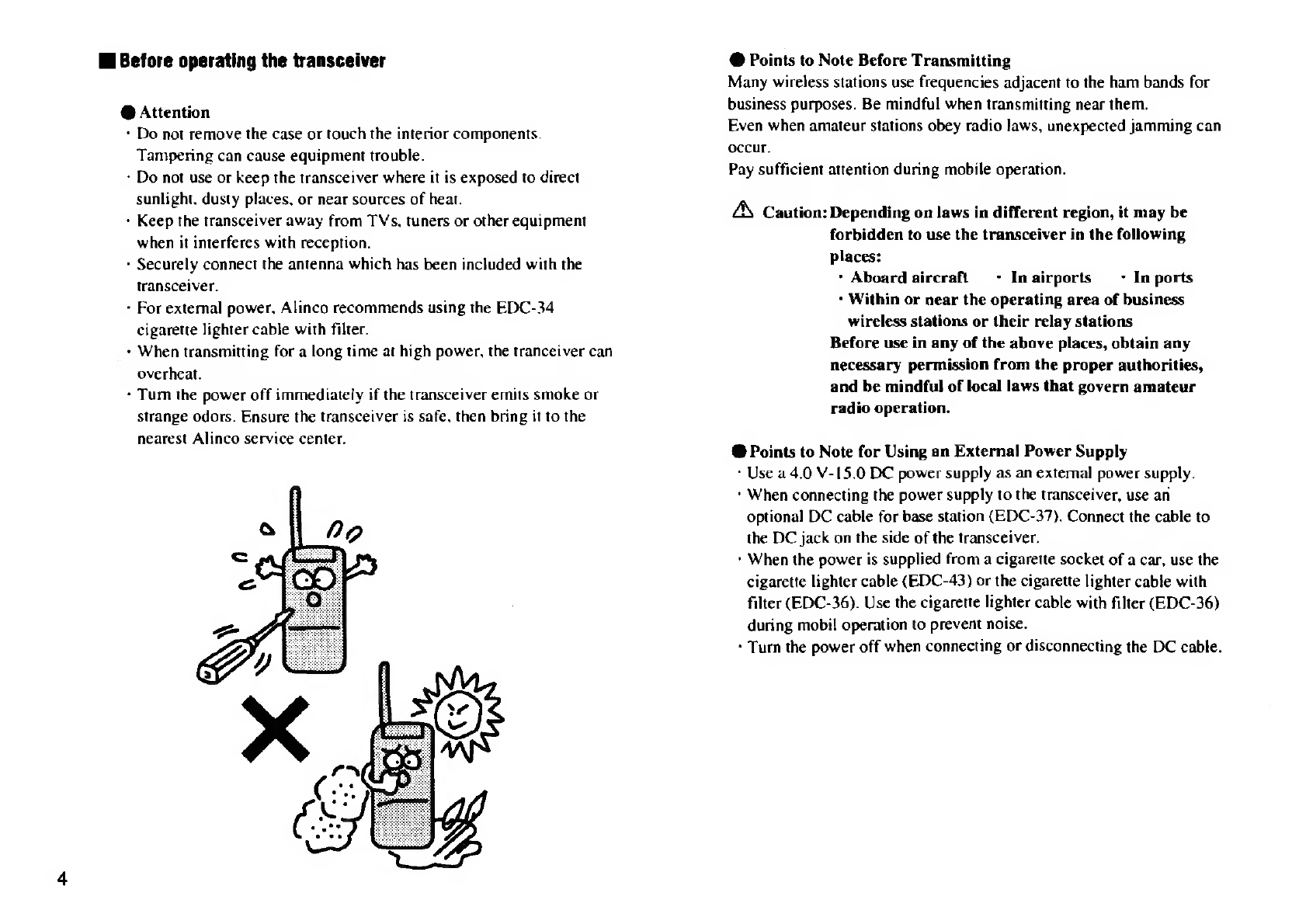
Attention
business
purposes.
Be
mindful
when
transmitting
near
them.
+
Do
not
remove
the
case
or
touch
the
interior
components.
Even
when
amateur
stations
obey
radio
laws,
unexpected
jamming
can
occur.
Tampering
can
cause
equipment
trouble.
: ; .
:
:
Pay
sufficient
attention
during
mobile
operation.
-
Do
not
use
or
keep
the
transceiver
where
it
is
exposed
to
direct
sunlight.
dusty
places,
or
near
sources
of
heat.
+
Keep
the
transceiver
away
from
TVs,
tuners
or
other
equipment
4
Caution:
Depending
on
laws
in
different
region,
it
may
be
when
it
interferes
with
reception
forbidden
to
use
the
transceiver
in
the
following
*
Securely
connect
the
antenna
which
has
been
included
with
the
places:
.
:
transceiver.
*
Aboard
aircraft
-
Inairports
-
In
ports
-
For
external
power,
Alinco
recommends
using
the
EDC-34
5
hin
Sr
nege
the
operating
area
of
business
cigarette
lighter
cable
with
filter
wireless
stations
or
their
relay
stations
+
When
transmitting
for
a
long
time
at
high
power,
the
tranceiver
can
Before
use
in
any
of
the
above
places,
obtain
any
overheat
necessary
permission
from
the
proper
authorities,
+
Tum
the
power
off
immediately
if
the
transceiver
emits
smoke
or
and
be
mindful
of
local
laws
that
govern
amateur
strange
odors.
Ensure
the
transceiver
is
safe.
then
bring
it
to
the
radio
operation.
nearest
Alinco
service
center.
.
‘
.
@
Points
to
Note
for
Using
an
External
Power
Supply
*
Use
a
4.0
V-15.0
BC
power
supply
as
an
external
power
supply.
*
When
connecting
the
power
supply
to
the
transceiver,
use
an
optional
DC
cable
for
base
station
(EDC-37).
Connect
the
cable
to
the
DC
jack
on
the
side
of
the
transceiver.
*
When
the
power
is
supplied
from
a
cigarette
socket
of
a
car,
use
the
cigarette
lighter
cable
(EDC-43)
or
the
cigarette
lighter
cable
with
filter
(EDC-36).
Use
the
cigarette
lighter
cable
with
filter
(EDC-36)
during
mobil
operation
to
prevent
noise.
+
Turn
the
power
off
when
connecting
or
disconnecting
the
DC
cable.

MB
Accessories
@
Open
the
Box
and
Check
That
the
Following
Items
Have
Been
Included:
*
Antenna
-
Belt
clips
>
Hand
Strap
-
Battery
Recharger
(EDC-93(120V),
EDC-94(230V))
*
~
Ni-Cd
battery
pack
6.0V
—
700mAh
(EBP-45N)
*
-
Instruction
manual
-
Warranty
*
-
Cautions
about
PL
*Standerd
Accessories
May
Differ
Depending
On
The
Version
@
Connecting
and
Disconnecting
the
Antenna
4.
Hold
the
antenna
by
its
base.
2.
Align
the
grooves
at
the
base
of
the
antenna
with
the
protrusions
on
the
antenna
connector.
3.
Slide
the
antenna
down
and
turn
it
clockwise
until
it
stops.
4.
Confirm
that
the
antenna
is
securely
connected.
*
Turn
the
antenna
counter-clockwise
to
disconnect
the
antenna.
@
Attaching
the
Hand
Strap
;
{
Atiach
the
hand
strap
as
shown
in
the
illustration
on
the
left.
.
Attaching
and
Detaching
the
Belt
Clip
*
Attaching
the
Belt
Clip
Attach
the
belt
clip
to
the
back
of
the
transceiver
until
it
clicks.
Detaching
the
Belt
Clip
Push
up
the
catches
of
the
belt
clip,
and
pull
it.
Attaching
Detaching
@
Attaching
and
Detaching
the
Ni-Cd
Battery
Pack
and
Battery
Case
Attaching
the
Ni-Cd
battery
pack
or
battery
case:
Align
with
the
grooves
on
the
tranceiver,
and
slide
in
the
direction
of
the
arrow
until
it
clicks.
Catches
Attaching
Detaching
Detaching
the
Ni-Cd
battery
pack
or
battery
case:
Push
up
the
catches,
and
pull
the
battery
pack
or
case
free
of
the
transceiver.

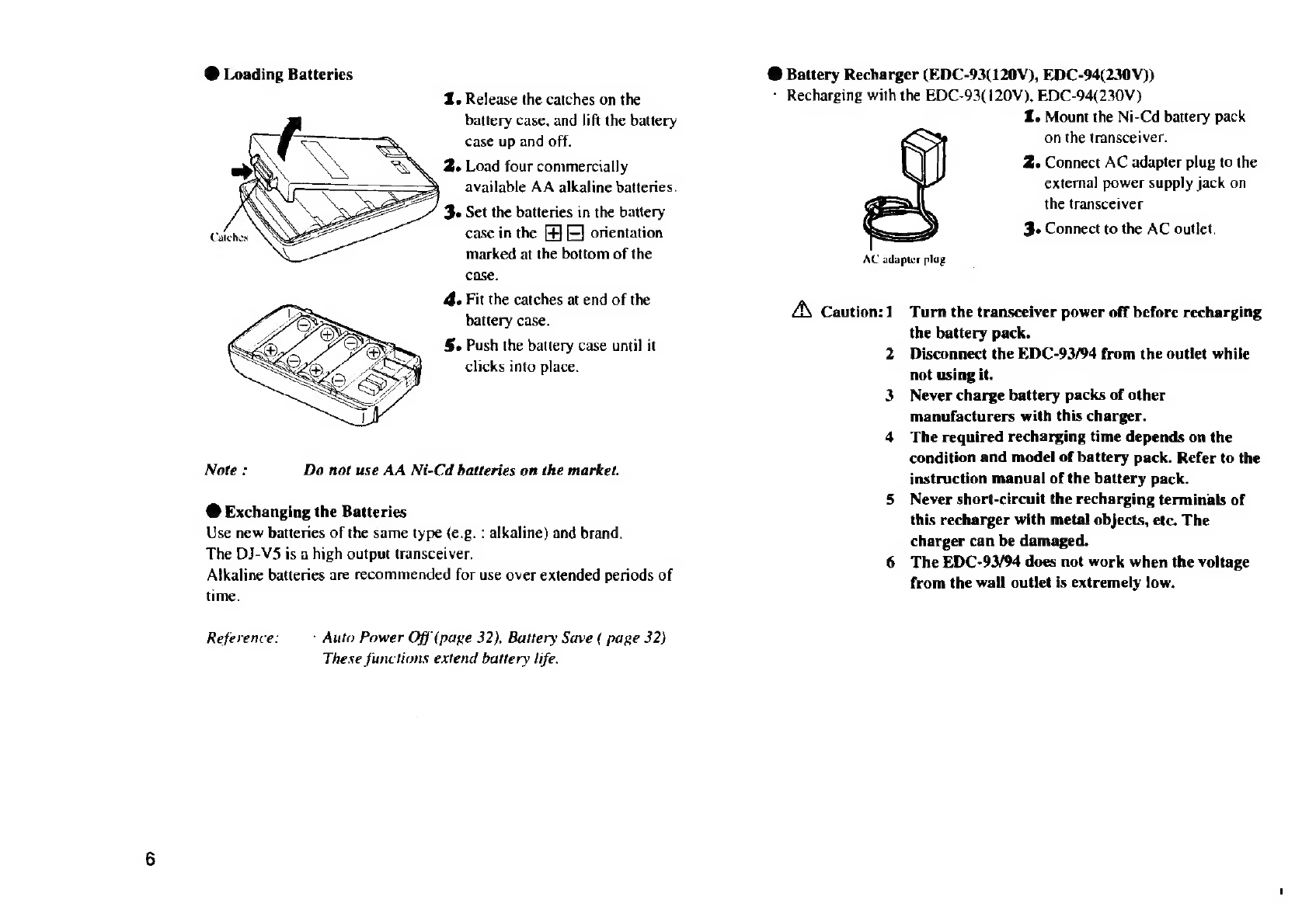
@
Loading
Batteries
1.
Release
the
catches
on
the
battery
case,
and
lift
the
battery
case
up
and
off.
2.
Load
four
commercially
available
AA
alkaline

batteries.
3
Set
the

batteries
in
the
battery
case
in
the
[4]
[E]
orientation
marked
at
the
bottom
of
the
case.
4.
Fit
the
catches
at
end
of
the
battery
case.
§.
Push
the
battery
case
until
it
clicks
into
place.
Note:
Do
not
use
AA
Ni-Cd
batteries
on
the
market.
@
Exchanging
the
Batteries
Use
new
batteries
of
the
same
type
(e.g.
:
alkaline)
and
brand.
The
DJ-V5
is
a
high
output
transceiver.
Alkaline
batteries
are
recommended
for
use
over
extended
periods
of
time.
Reference:
+
Auto
Power
Off
(page
32),
Battery
Save
(
page
32)
These
functions
extend
battery
life.
@
Battery
Recharger
(EDC-93(120V),
EDC-94(230V))
+
Recharging
with
the
EDC-93(120V),
EDC-94(230V)
1.
Mount
the
Ni-Cd
battery
pack
on
the
transceiver.
2.
Connect
AC
adapter
plug
to
the
external
power
supply
jack
on
the
transceiver
3.
Connect
to
the
AC
outlet.
AC
adapter
plug
A
Caution:1
2
3
Turn
the
transceiver
power
off
before
recharging
the
battery
pack.
Disconnect
the
EDC-93/94
from
the
outlet
while
not
using
it.
Never
charge
battery
packs
of
other
manufacturers
with
this
charger.
The
required
recharging
time
depends
on
the
condition
and
model
of
battery
pack.
Refer
to
the
instruction
manual
of
the
battery
pack.
Never
short-circuit
the
recharging
terminals
of
this
recharger
with
metal
objects,
etc.
The
charger
can
be
damaged.
The
EDC-93/94
does
not
work
when
the
voltage
from
the
wall
outlet
is
extremely
low.

@
6.0V-700mAh
Ni-Cd
Battery
Pack
(EBP-45N)
@
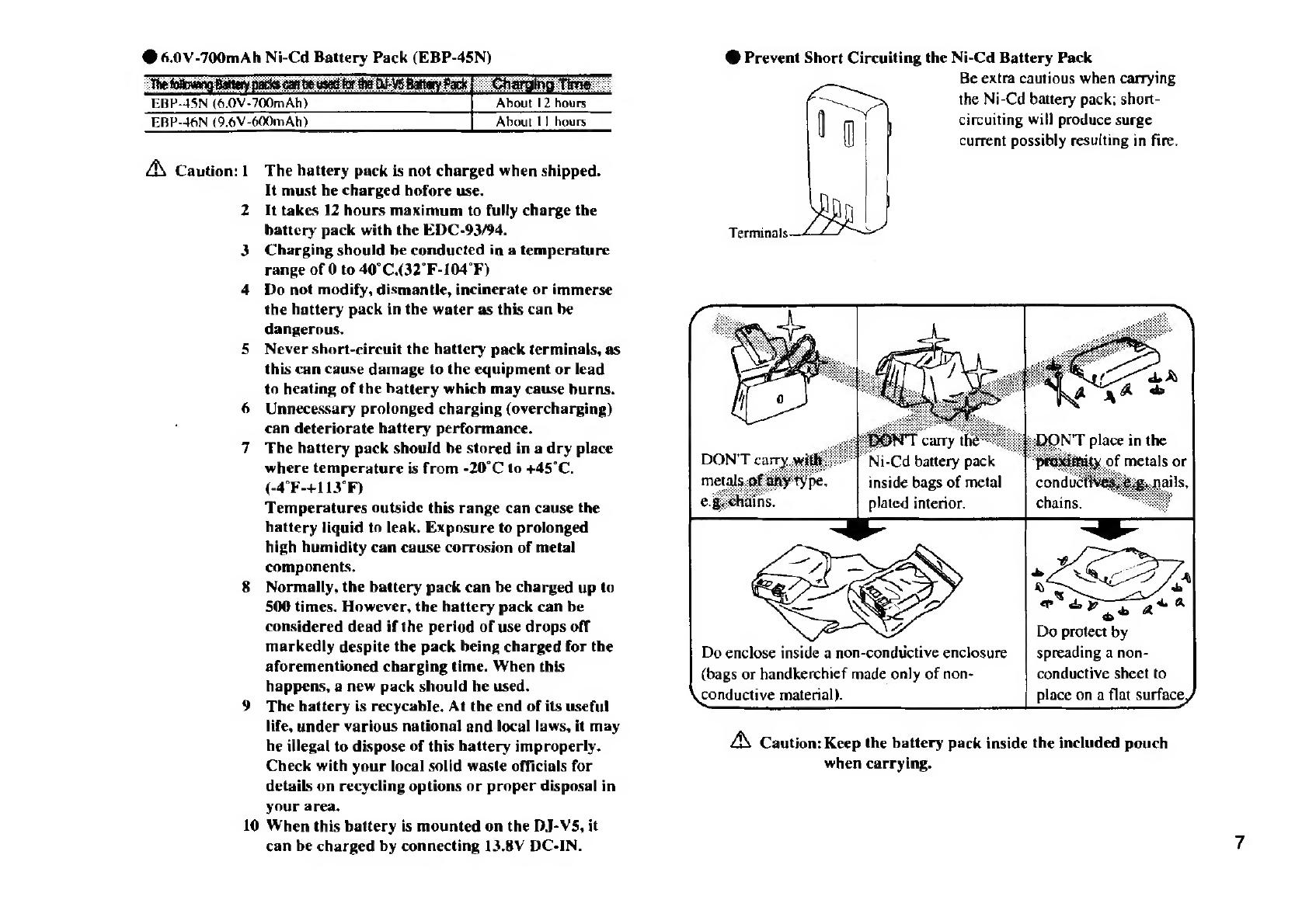
Prevent
Short
Circuiting
the
Ni-Cd
Battery
Pack
"The
follnwang
Battery
packs
cai
be
5
Pack
ar
Be
extra
cautious
when
carrying
EBP-45N
(6.0V-700mAh)
|
About
12
hours
ae
the
Ni-Cd
battery
pack;
short-
EBP-46N
(9.6¥-600mAh)
About
1]
hours
{
circuiting
will
produce
surge
(}
current
possibly
resulting
in
fire.
AX
Caution:
1
The
hattery
pack
is
not
charged
when
shipped.
It
must
he
charged
hofore
use.
2
It
takes
12
hours
maximum
to
fully
charge
the
battery
pack
with
the
EDC-93/94.
Terminals
‘
3
Charging
should
be
conducted
in
a
temperature
range
of
0
to
40°C.(32°F-104°F)
4
Do
not
modify,
dismantle,
incinerate
or
immerse
the
hattery
pack
in
the
water
as
this
can
be
dangerous.
5
Never
short-circuit
the
hattery
pack
terminals,
as
this
can
cause
damage
to
the
equipment
or
lead
to
heating
of
the
battery
which
may
cause
burns.
6
Unnecessary
prolonged
charging
(overcharging)
can
deteriorate
hattery
performance.
7
The
hattery
pack
should
be
stored
in
a
dry
place
ee
where
temperature
is
from
-20°C
to
+45°C.
Ni-Cd
battery
pack
(-4°F-+113°F)
: : f
.
inside
bags
of
metal
Temperatures
outside
this
range
can
cause
the
‘6
.
plated
interior.
hattery
liquid
to
leak.
Exposure
to
prolonged
high
humidity
can
cause
corrosion
of
metal
components.
8
Normally,
the
battery
pack
can
be
charged
up
to
500
times.
However,
the
hattery
pack
can
be
considered
dead
if
the
period
of
use
drops
off
markedly
despite
the
pack
being
charged
for
the
aforementioned
charging
time.
When
this
happens,
a
new
pack
should
he
used.
9
The
hattery
is
recycable.
At
the
end
of
its
useful
life,
under
various
national
and
local
laws,
it
may
Do
protect
by
Do
enclose
inside
a
non-conductive
enclosure
|
spreading
a
non-
(bags
or
handkerchief
made
only
of
non-
conductive
sheet
to
conductive
material).
place
on
a
flat
surface,
he
illegal
to
dispose
of
this
hattery
improperly.
A
Caution:
Keep
the
battery
pack
inside
the
included
pouch
Check
with
your
local
solid
waste
officials
for
when
carrying.
details
on
recycling
options
or
proper
disposal
in
your
area,
10
When
this
battery
is
mounted
on
the
DJ-V5,
it
can
be
charged
by
connecting
13.8V
DC-IN.

1
Names
and
Functions
of
Parts
1-1
External
View
i
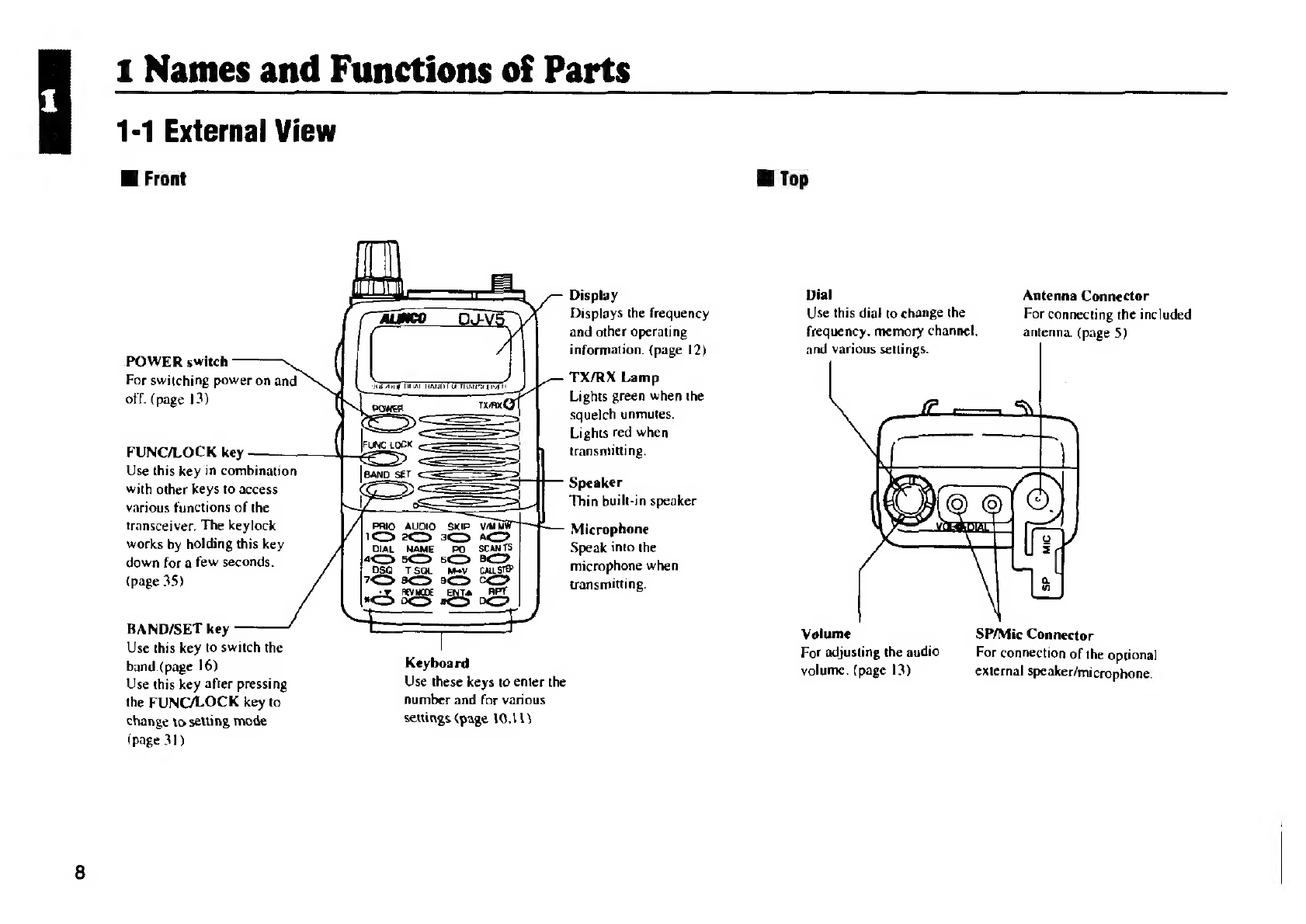
Front
Display
Displays
the
frequency
and
other
operating
:
information.
(page
12)
POWER
switch
TX/RX
Lamp
Lights
green
when
the
squelch
unmutes.
Lights
red
when
transmitting.
For
switching
power
on
and
off.
(page
13)
FUNC/LOCK
key
Use
this
key
in
combination
with
other
keys
to
access
various
functions
of
the
transceiver,
The
keylock
works
by
holding
this
key
down
for
a
few
seconds.
(page
35)
Speaker
Thin
built-in
speaker
PRIO
AUDIO
SKIP
1S
2D
3
A
DIAL
NAME
PO
scANTS
aD
5S sc
8
DSQ
TSQL
Mev
cALSI
7S
a
2
Microphone
Speak
into
the
microphone
when
transmitting.
BAND/SET
key
Use
this
key
to
switch
the
band
(page
16)
Keyboard
Use
this
key
after
pressing
Use
these
keys
to
enter
the
the
FUNC/LOCK
key
to
fumber
and
for
various
change
to
setting
mode
settings
(page
16,11)
(page
31)
i
Top
Dial
Antenna
Connector
Use
this
dial
to
change
the
For
connecting
the
included
frequency.
memory
channel,
antenna.
(page
5)
and
various
settings.
Volume
SP/Mic
Connector
For
adjusting
the
audio
For
connection
of
the
optional
volume.
(page
13)
external
speaker/microphone.

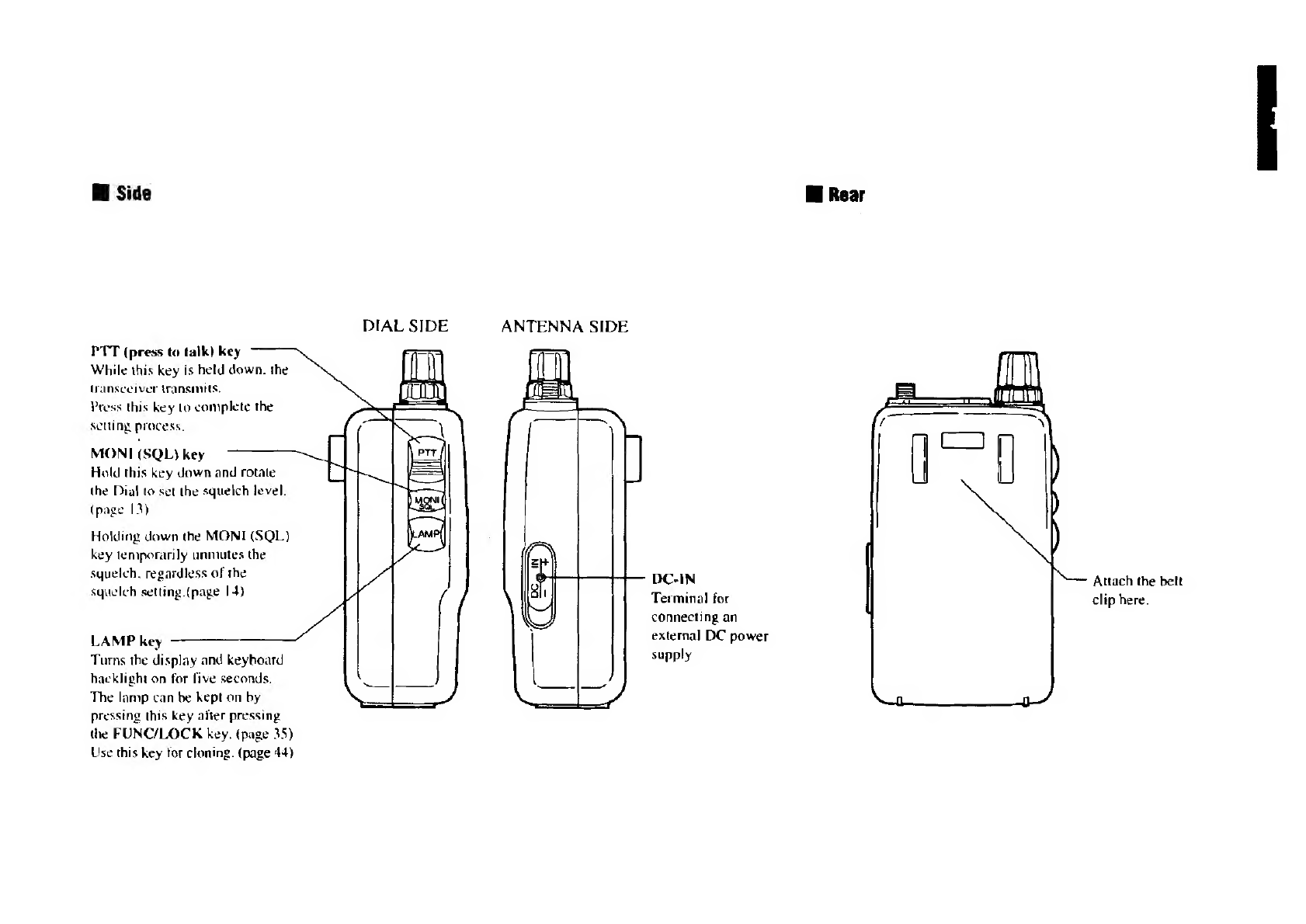
WH
Side
PTT
(press
to
talk)
key
While
this
key
is
hetd
down.
the
sceiver
transmits,
s
this
key
Lo
complete
the
SCLIN
process.
MONI
(SQL)
key
Hold
this
key
down
and
rotate
the
Dial
to
set
the
squelch
level.
(page
13)
Holding
down
the
MONI
(SQL)
key
temporarily
unmutes
the
squelch,
regardless
of
the
squelch
setting
(page
14)
LAMP
key
Turns
the
display
and
keyboard
hacklight
on
for
five
seconds.
The
lamp
can
be
kept
on
by
pressing
this
key
after
pressing
the
FUNC/LOCK
key.
(page
35)
Use
this
key
for
cloning.
(page
44)
ANTENNA
SIDE
DC-IN
Terminal
for
connecting
an
external
DC
power
supply
Attach
the
belt
clip
here.

1-2
Keyboard
Wi
Upper
Part
1
(PRIO)
2
(AUDIO)
3
(SKIP)
Priority
watch
start
and
Audio
setting
Channel
skip
setting
stop
(page
35)
(page
23)
(page
28)
PRIO
AUDIO
SKIP
V/MMW
1S)
2
3G
AC
DIAL
NAME
PO_
SCANTS
4M
5sCD
6c
8
4
(DIAL)
5
(NAME)
6
(PO)
Dial
code
setup
Memory
name
entry
Transmission
output
(page
39)
(page
34)
switching
(page
20)
10
A
(V/M/MW)
Switch
operation
mode
(page
15)
Memory
Write
(page
21)
B
(SCAN/TS)
Scan
setup
and
operation
(page
25)
Switch
between
Umer
scan
and
busy
scan
(page
27)

Wl
Lower
Part
7
(DSQ)
8
(T-SQL)
9
(MV)
C
(CALL/STEP)
DSQ
mode
and
DSQ
code
Tone
and
Tone
squelch
Memory
shift
Call
mode
setup
frequency
setup
(page
23)
(page
15)
(page
38)
(page
36)
Channel
step
frequency
setup
(page
17)
DSQ
TSQL
M=V_
CALLSTEP
7D
8&D
9D
CO
*V
REVMODE
ENTA
RPT
*D
0GD
#CD
0S
*(°¥)
®
(REV/MODE)
#
(ENT4)
D
(RPT)
Frequency
and
item
Switch
receiving
mode
Frequency
and
item
Repeater
Shift
setting
adjustment.
selection
etc.
(page
!9)
adjustment
and
selection.
(page
30)
Reverse
on/off
(page
30)

12
1-3
Display
WFM
+0&9)
DSQ
0
On
ta
A
ee
Me
Pag
LAN
WAN
TANT
IAN
ET
LTTE
Appears
when
the
FUNC/LOCK
key
is
pressed.
Indicates
transmission
output
status.
Appears
when
Temperature
Protection
is
on.
Flashes
while
squelch
is
being
set.
Appears
while
monitor
function
is
on.
Appears
when
a
memory
channel
is
selected.
Indicates
memory
channel
number.
Indicates
the
frequency
and
various
setting
status.
Appears
when
the
squelch
is
unmuted.
PPOPOP
\odicates
the
receiving
level
and
transmission
output.
TS
Appears
during
Timer
Scan
setting.
APO
Appears
when
Auto
Power
Off
function
is
activated.
BS
Appears
when
Battery
Save
is
on.
PRIO
Appears
when
Priority
Watch
is
on.
O=-n
Appears
when
keys
are
locked.
>
Appears
when
the
Bell
Function
is
on.
Flashes
when
a
signal
is
received.
DSQ
Appears
when
the
DSQ
is
on.
Flashes
when
the
DSQ
code
matches.
wee
Appears
when
setting
the
tone
and
the
tone
squelch.
-
(—)
Indicates
the
shift
(+/—
direction.
WFEM
Indicates
the
wide
FM
mode
is
active.

2,
Basic
Operation
2-1
Basic
Operation
Mi
Squelch
.
The
squelch
silences
the
transceiver
except
for
signals
above
a
certain
Mi
Turning
the
Power
On
ievel
Setcleh
eliminates
the
noise
when
te
aa
receives
less
Hold
the
POWER
switch
down
than
a
certain
level.
for
a
second.
The
power
will
come
“To
unmute
the
squelch”
means
that
the
transceiver
receives
the
signal
on
and
the
power
supply
voltage
and
reproduces
the
sound.
will
appear
on
the
display.
The
frequency
will
be
indicated
on
the
@
Adjusting
the
Squelch
display.
Use
the
MONI
(SQL)
key
to
unmute
the
squelch
according
to
the
frequency.
To
turn
the
power
off,
hold
the
-
There
are
6
squelch
levels
(00-05).
POWER
switch
down
until
the
A
higher
squelch
level
requires
a
stronger
signal
to
unmute
the
indication
disappears.
receiver.
The
default
setting
is
Level
|.
@
Voltage
Indication
The
power
supply
voltage
is
indicated
on
the
display.
1.
Press
the
MONI
(SQL)
key.
"SQL"
will
appear
on
the
display.
It
is
possible
to
adjust
the
squelch
level
when
SQL
is
indicated
on
the
display.
AX
Caution:
"OVER-V"
flashes
on
the
display,
and
the
transceiver
makes
a
beep
when
the
power
supply
voltage
is
over
16.0V.
None
of
the
functions
work
in
this
state
because
of
the
overvoltage.
Wi
Adjusting
the
Audio
Volume
Rotate
the
Volume
dial
clockwise
to
increase
the
audio
volume,
and
counter-clockwise
to
decrease
it.
"SQL"
appears
Z.
Rotate
the
Dial
while
MONI
(SQL)
key
is
pressed
down
to
set
the
squeich
level.
13

14
3.
Select
the
squelch
level
from
00-05
while
MONI
(SQL)
key
is
being
pressed.
Release
the
MONI
(SQL)
key
to
complete
the
setting
and
return
to
the
previous
status.
“SQL"
flashes
Hi
Monitor
Function
and
Squelch
Level
+
The
monitor
function
unmutes
the
squelch.
This
is
useful
when
the
signal
is
weak
or
intermittent.
Pressing
the
MONI
(SQL)
key
will
unmute
the
squelch.
SQL
and
BUSY
will
appear
on
the
display.
There
are
two
Monitor
functions
:
MONI-1
and
MONI-2
When
MONI-|
is
selected,
squelch
unmutes
while
MONE
(SQL)
key
is
being
pressed.
When
MONI-2
is
selected,
squelch
unmutes
until
MONE
(SQL)
key
is
pressed
again.
The
default
setting
is
MONI-1.
@
Switching
MONI-1
and
MONI-2
4.
Press
the
FUNC/LOCK
key.
"F"
appears
on
the
display.
“E"
appears
2.
Press
the
MONI
(SQL)
key
Monitor
type
switches
between
MONI-I
and
MONL-2
every
time
the
MONI
(SQL)
key
is
pressed.
Alternatively,
you
can
switch
the
Monitor
function
by
rotating
the
Dial
while
the
MONI
(SQL)
key
is
being
pressed.
3.
Release
the
MONI
(SQL)
key
to
complete
the
setting
and
return
to
the
previous
state.

2-2
Operating
Modes
The
DJ-V5
has
three
operating
modes
:
VFO
mode,
Memory
mode,
and
Cal!
mode.
Hi
VFO
Mode
The
factory
setting
for
the
DJ-V5
is
the
VFO
mode.
The
VFO
mode
allows
you
to
change
the
frequency,
audio,
and
other
settings,
There
is
no
specific
indication
on
the
display
during
the
VFO
mode.
i
Memory
Mode
In
memory
mode,
you
call
up
and
operate
on
a
previously
programmed
frequency.
CAAPATA
ss
Jw
HI
145
Memory
channel
number
“M"
appears
M“
and
the
memory
channel
number
appear
at
lower
left
on
the
display.
i
Call
Mode
The
Call
mode
is
used
when
you
are
waiting
to
receive
or
transmit
on
the
Call
channel.
"C"
appears
“C”
appears
on
the
display
instead
of
the
memory
channel!
number.
@
Switching
Between
Modes
The
three
operating
modes
rotate
as
shown
in
the
diagram
below.
Ccan'mode
_)
mode
fet
STEP
CALL
STEP
CALL STEP
cc
Ccc>
gust
step
um
on
pes
Mw
pote
uw
Wome
“=>
Ga)
VFO
(vFOmode
aT
ea
af
uw
AS
[Memory
mode
_]
mode
15

16
2-3
Setting
the
Frequency
in
the
VFO
Mode
The
VFO
made
has
one
channel]
each
for
FM
radio,
VHF,
and
UHF.
The
VFO
mode
allows
the
frequency
to
be
set
easily
by
using
the
Dial
or
the
&/W
keys.
Allowed
frequency
ranges:
FM
radio
DJ-V5T:76.000-
107.995
MHz
DJ-V5E:87.500-107.995
MHz
VHF
band
DJ-V5T:144.000-
147.995
MHz
DJ-V5E:
144.000-
145.995
MHz
UHF
band
DJ-V5T:420.000-449.995
MHz
DJ-V5E:430.000-439.995
MHz
W@
Switching
the
Band
Press
the
BAND/SET
key
to
switch
the
band.
Each
press
of
the
key
changes
tbe
band
as
shown
below.
VHF
band
—
UHF
band
—
FM
radio
—
VHF
band
-*---
Wi
Adjusting
the
Frequency
in
Tuning
Steps
Rotate
the
Dial
clockwise
one
click
to
increase
the
frequency
by
one
tuning
step.
Rotate
the
Dial
counter-clockwise
for
one
click
to
decrease
it
by
one
tuning
step.
When
using
the
keyboard,
press
the
#(ENT/44)
key
to
increase
the
frequency
one
tuning
step.
Press
*
(
:
/W)
to
decrease
it
one
tuning
step.
Note:
When
the
frequency
exceeds
the
upper
(or
lower)
limit
of
the
currently
selected
band,
the
ee
jumps
to
the
lower
(or
upper)
limit.
References:
Holding
the
A/'W
keys
down
for
0.8
seconds
scrolls
through
the
frequency
band.

@
Sctting
the
Tuning
Step
Hi
Adjusting
in
1
MHz
Steps
The
tuning
step
default
setting
is
SkHz
(DJ-V5T),
12.SkHz
(DJ-VSE).
Press
the
FUNC/LOCK
key,
then
the
&/W
keys
to
adjust
the
It
can
be
selected
from
the
following
:
frequieniey,
wel
Mz
ihoremenss:
$,10,12.5,15.20,25.50.
100
kHz.
The
default
setting
is
!1OOkHz(FM).
Adjust
the
frequency
in
|
MHz
increments
1.
Press
the
BAND/SET
key
to
select
the
band
on
witch
you
wish
to
change
the
tuning
step.
2.
Press
the
FUNC/LOCK
key,
then
the
C(CALL/STEP)
key
to
change
the
tuning
step
setting.
HI
Cc
fa
/
Note:
When
the
frequency
exceeds
the
upper
(or
lower)
limit
}
for
the
frequency
range
of
the
currently
selected
band,
the
frequency
jumps
to
the
lower
(or
upper)
limit.
3.
Rotate
the
Dial
or
press
the
4&/W
keys
to
select
the
tuning
step.
4.
Press
the
PTT
key
to
complete
the
setting.
The
display
returns
to
the
frequency
display.
17

18
i
Entry
From
the
Keyboard
Enter
the
frequency
from
the
100
MHz
digit
when
VHF/UHF
is
selected.
Enter
the
frequency
from
the
10
MHz
digit
when
FM
is
selected.
How
the
final
digit
is
entered
depends
on
the
set
tuning
step.
Example
:
When
entering
88.10MHz
on
the
FM
band..
8+
8—
-
—
I(Tuning
step:
10kHz)
When
entering
145.00MHz
on
the
VHF/UHF
band.
1+4—>5-+0-0-0
or
|
+
4-~+5-+#(ENT/@)
(Tuning
step:5kHz)
Note:
#
(ENT/@)
key
changes
all
numbers
after
the
decimal
to
0.
Reference:
—
If
you
want
to
cancel
the
setting,
press
the
PTT
key
or
BANDISET
key
at
any
time
while
entering
the
number.
The
previous
frequency
will
appear
on
the
display
again.
W@
First
Entry
Digit
for
Different
Tuning
Steps
Depending
on
the
tuning
step,
entry
may
be
required
to
the
|
kHz
digit
or
the
10
kHz
digit.
When
you
input
the
10
kHz
digit.
the
|
digit
set
as
follows:
12.5kHz.
{oO}
:
00.0
fi]
212.5
{2}
225.0
|
237.5
{4}:
invalid
{5}:
50.0
{6}:
62.5
{7}:
75.0
{8}:
87.5
{9}:
invalid
25.0kHz
10kHz
When
you
input
the
10
kHz
digit,
the
1
kHz
digit
set
as
follows:
(other
entries
are
invalid)
fo}:
00.0
{21
:
25.0
{s}
2
$0.0
{7}:
75.0
50.0kHz
10kHz
When
you
input
the
10
kHz
digit,
the
|
kHz
digit
set
as
follows:
(other
entries
are
invalid)
fol:
00.0
is}
_:
50.0
100.0kHz
100kHz
When
you
input
the
100
kHz
digit.
the
10
kHz
digit
set
as
follows:
{ol
‘000.0
{Ih
:
100.0
2k
:
200.0
(31:
300.0
{4}:
400.0
{5}:
500.0
{el
:
6000
{7}
:
700.0
+
800.0
{9|
:
900.0
for
the
|
kHz
digit
to
enter
5
kHz.
Any
other
entry
sets
the
1
kHz
digit
to
0.
Other
IkHz

2-4
Receiving
Basic
Operation
|
Adjust
the
volume.
(page
13)
2
Adjust
the
squelch.
(page
13)
3
Set
the
frequency.
(page
16)
4
Receive
the
signal.
When
the
DJ-V5
receives
a
signal,
"BUSY"
appears
on
the
display,
and
you
will
hear
the
sound
of
the
received
signal.
"145080
»
wwe
anseD2
iia
Strength
of
the
signal
“BUSY"
appears
According
to
the
strength
of
the
received
signal,
the
meter
displays
up
to
6
levels.
@
Setting
the
Receiving
Made
The
receiving
mode
can
be
switched
between
FM
and
WFM
(radio
broadcasting
band).
1.
Press
the
FUNC/LOCK
key,
then
the
(?0GREV/MODE)
key.
2.
Rotate
the
Dial
or
press
the
/W
keys
or
the
O(REV/MOFE)
keys
to
select
FM
or
WFM.
3.
Press
the
PTT
key
to
complete
the
setting.
an
Other manuals for DJ-V5T/E
1
Table of contents
Other Alinco Transceiver manuals

Alinco
Alinco DR-138HT User manual

Alinco
Alinco DJ-G7 User manual

Alinco
Alinco DX-SR9 User manual

Alinco
Alinco DR-610T User manual

Alinco
Alinco DR-620 User manual

Alinco
Alinco DR-510T User manual

Alinco
Alinco DX-SR8 User manual

Alinco
Alinco DJ-500T User manual

Alinco
Alinco DR-610T User manual

Alinco
Alinco DJ-200T User manual

Alinco
Alinco DR-590T/E User manual

Alinco
Alinco DX-701 User manual

Alinco
Alinco DJ-140 User manual

Alinco
Alinco DJ-120T User manual

Alinco
Alinco DJ-G5T/E User manual

Alinco
Alinco DJ-V5 User manual

Alinco
Alinco DJ-G29T User manual

Alinco
Alinco DR-61 OT/E User manual

Alinco
Alinco DJ-190T User manual

Alinco
Alinco DR-135T MkII User manual