4
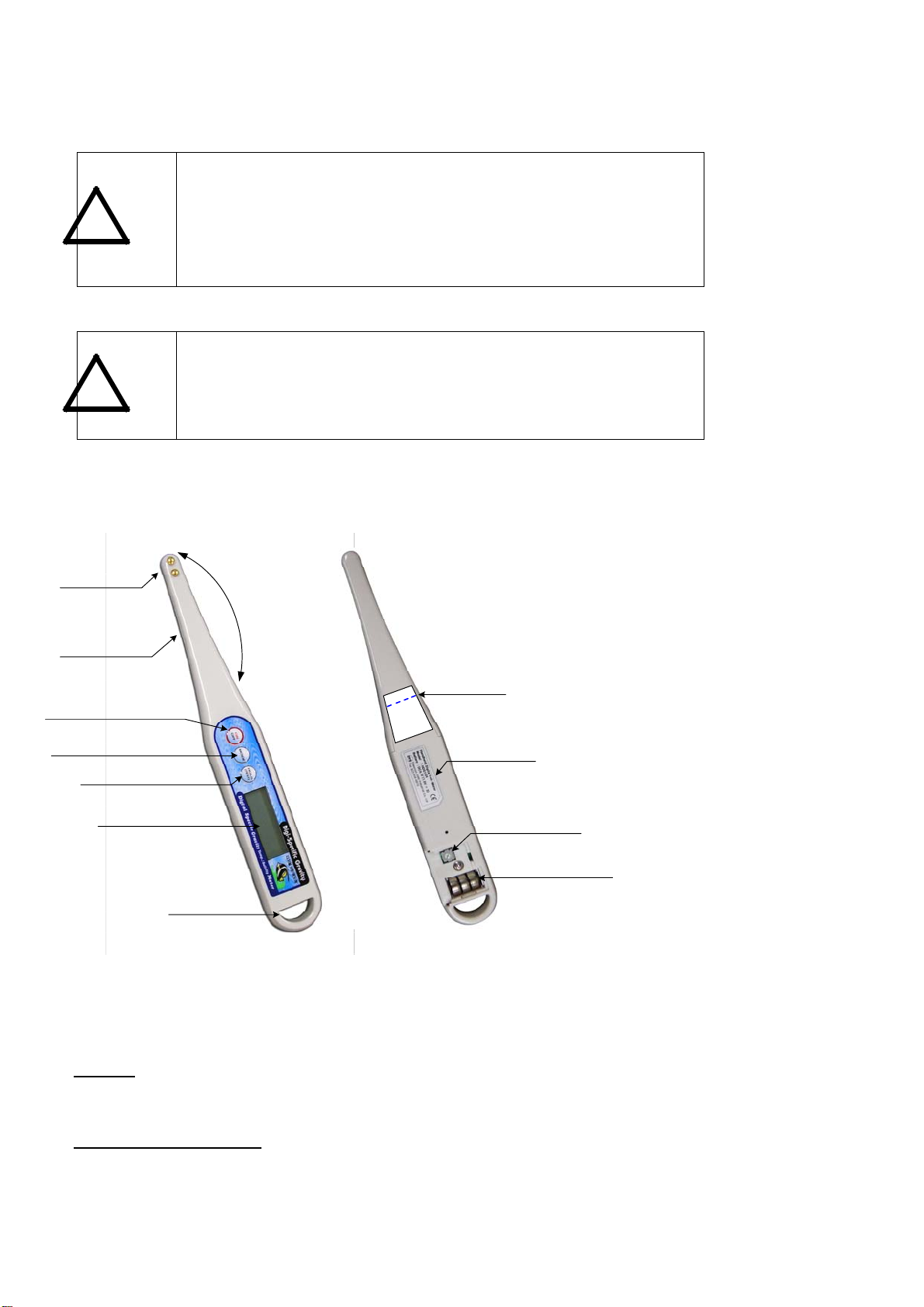
Measurement Selection (MODE) button
When the power is turned on, the default mode is the Temperature measurement.
Press to cycle to Salinity measurement (ppt), press again to cycle to Specific Gravity measurement.
Hold (TEST) button
It is used to “lock” the measurement value during a test. After viewing measurement, press again to clear LCD screen
and start another test.
Calibration Screw (Salinity)
When the Salinity is abnormal, you can calibrate your digital handheld tester by opening the cover on the back of the
main body and adjust the screw with a Phillips screwdriver so that the LCD display window coincides exactly with the
value of the standard solution (35 ppt Salinity). Please refer to section (5) for detailed instructions.
Note: All Marine Control Digital have been factory tested and calibrated for accuracy.
3. Product Specification
Name Marine Control Digital
Measurement target Aqueous solution (Seawater and / or Synthetic seawater)
Measurement method Electric conductivity measurement system
Salinity measurement Measurement range: 5ppt-40ppt
Measurement accuracy : ±2ppt
Measurement temperature range : 0°C-70°C
Temperature measurement Measurement range : 0°C-100°C
Measurement accuracy : ±1°C (temperature range: 0°C-70°C)
of reading
Specific Gravity Measurement range:1.000-1.032
Measurement accuracy: ±0.002 S.G
Measurement Temperature range: 0°C-40°C
Resolution Salinity: 0.1ppt (5-9ppt), 1ppt (10-40ppt)
Temperature: 0.1°C
Specific Gravity: 0.001
Power Supply LR44 Button Battery x 3 pcs
Battery life About 3 months based on 3 times use per day
Size 16.4 (D) × 32 (H) × 255 (W) mm
Weight About 57g (including button battery)
Accessories Button battery 6 pcs, Sensor protection cap 1 ea, Instruction manual
1 vol., 35ppt Salinity Standard Solution (40g) 1 Btl
4. Measurement of Salinity, Temperature and Specific Gravity
4.1 Principle of salinity measurement
The salinity measurement principle of this product is based on the electric conductivity measurement method. Salt
exists as sodium ion and chloride ion within aqueous solution. As the quantity of sodium ion and chloride ion
increases, the solution conductivity also increases proportionately to the increased salt concentration. Using this
principle, salinity is determined by calculating the conductivity of a given sample.
4.2 Testing Temperature, Salinity and Specific Gravity
1. Wipe the sensor gently with a wet cloth or tissue each time prior to use: sensors may be contaminated with
invisible foreign materials that may give false readings.
2. Press (“ON/OFF”) button, the present Temperature is displayed in the LCD display window.
3. Insert the probe into the aquarium, be careful not to submerge beyond the “Water Line” mark that is labeled on
the back of the tester. Please be sure that sensors are completely submerged to gain an accurate readings.
4. It will take approximately 10 seconds for the temperature to be stabilized. Wait until the temperature stabilizes.
After confirming the temperature, push the (“MODE”) button to switch to Salinity measurement.
5. Wait 10 seconds and confirm the Salinity (ppt) measurement. Press (“MODE”) once again to cycle to Specific
Gravity measurement.