Behringer CT100 User manual

CABLE TESTER CT100
Version 1.0 April 2001
Users Manual
ENGLISH
www.behringer.com

CABLE TESTER CT100
2
1. INTRODUCTION
Congratulations! With the CT100, you have purchased an indispen-
sable tool that enables you to easily chec the most common cables
used by musicians and sound engineers. Faulty cables are a
common cause of failure in live and studio situations. This micro-
processor-controlled device was designed to ensure fast, reliable
problem location. Various test modes and the included belt clip add to
its flexibility.
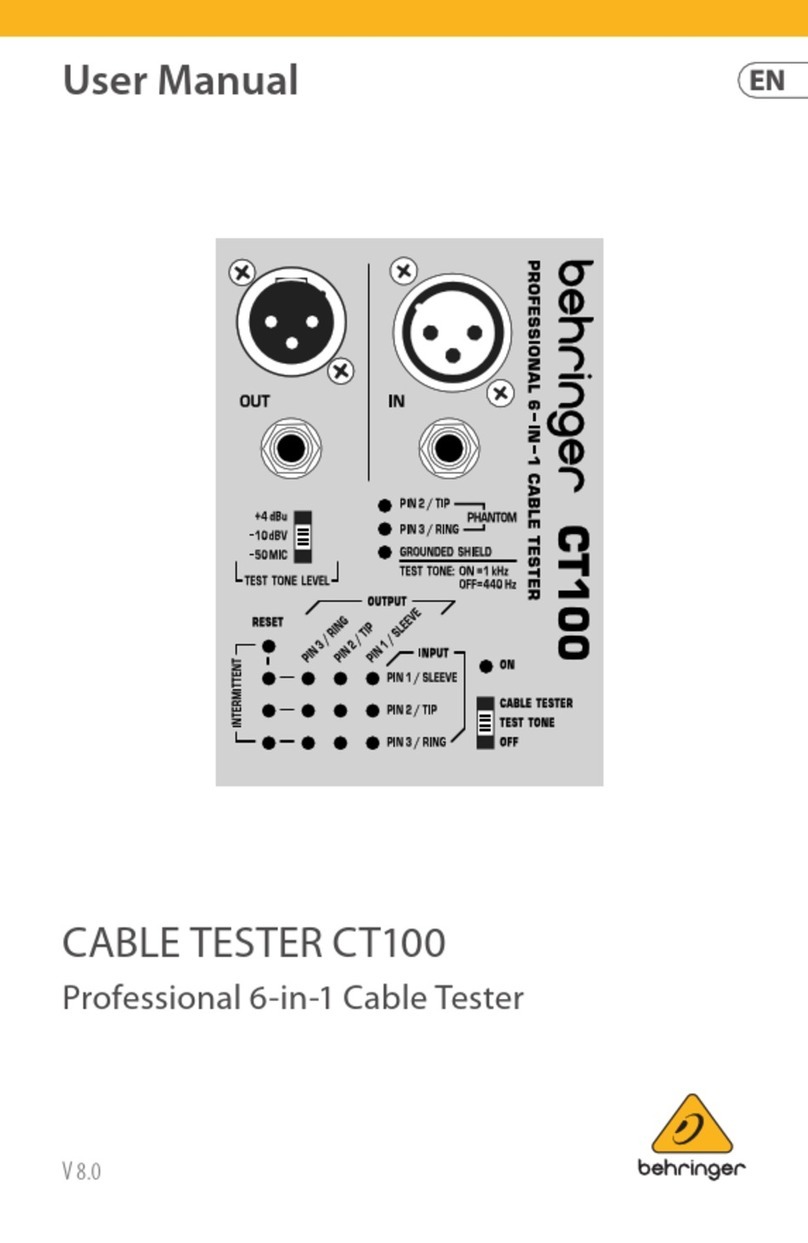
2. CABLE TESTER MODE
+Move the ON switch to the CABLE TESTER position.
Insert one end of your cable into any OUT jac of the CT100. Connect
the other end of the cable to any IN jac . The LEDs will indicate which
input pins are connected to each output pin. Additionally, the
GROUNDED SHIELD LED indicates whether a XLR OUT jac s shield
is connected to the pin 1/sleeve signal.
2.1 How to test intermittent connections
The following method allows you to detect intermittent connections
caused by wire brea s or faulty solder points. While in CABLE TESTER
MODE, press RESET to store the current cable-wiring display and to
clear the INTERMITTENT LEDs. Move the cable vigorously in all
directions and watch the LEDs. Any change in wiring or brea in the
signal flow will cause the LED of the corresponding input pin to light
up. The LED will stay lit until RESET is pressed again, assuring
detection of even the shortest brea s in the signal flow. It is a good
idea to repeat the test after resetting the LEDs to double-chec the
initial results.

CABLE TESTER CT100
3
3. INSTALLED CABLE TESTER MODE
This mode enables you to test cables in fixed installations or
situations that dont allow you to connect both ends of the cable to
the CT100.
+Hold down the RESET button while moving the ON
switch to the CABLE TESTER position. The ON LE will
blink to indicate that the CT100 is in INSTALLE
CABLE TESTER MO E.
To test a cable for short circuits, connect one end of the cable to the
appropriate OUT jac of the CT100. The display wor s as in CABLE
TESTER MODE (see chapter 2). However, it now indicates
connections between out pins. If no LEDs light, the cable is free of
short circuits.
3.1 Continuity check in INSTALLED CABLE TESTE MODE
For a continuity chec , connect a shorting jac (a jac in which pins
are short-circuited to one another) to the other end of the cable. If
there are no brea s in the signal flow, the display will show the
corresponding pins as being shorted to each other. If the display
indicates no short circuit, there is a brea in the signal flow.
+The testing of intermittent connections works
exactly as in CABLE TESTER MO E (see chapter 2.1).
+INSTALLE CABLE TESTER MO E will not indicate
connections between out and in pins. This is done in
CABLE TESTER MO E (see chapter 2).
4. TEST TONE MODE
+Move the ON switch to the position TEST TONE.
+o not use the TEST TONE MO E for MI I cables!
CABLE TESTER CT100
4
TEST TONE MODE may be used to chec signal flow and to facilitate
level adjustments. It routes a test tone to the + pin (pin 2/tip) of all
OUT jac s. Use the TEST TONE LEVEL switch to choose between
+4 dBu, -10 dBV, or -50 dBV mic level. Please note that this mode is
not intended to wor as a voltage standard and that battery voltage
will affect the test tone output level.
4.1 Selection between 1 kHz and 440 Hz
While in TEST TONE MODE, pressing RESET toggles between 1 Hz
and 440 Hz. The TEST TONE LED indicates the selected frequency:
On = 1 Hz, Off = 440 Hz.
5. PHANTOM POWER DETECT
In TEST TONE MODE, pins 2 and 3 are monitored for external DC
voltage (commonly supplied for condenser microphones). The
PHANTOM LEDs will light if DC voltage above approx. 9 V is detected.
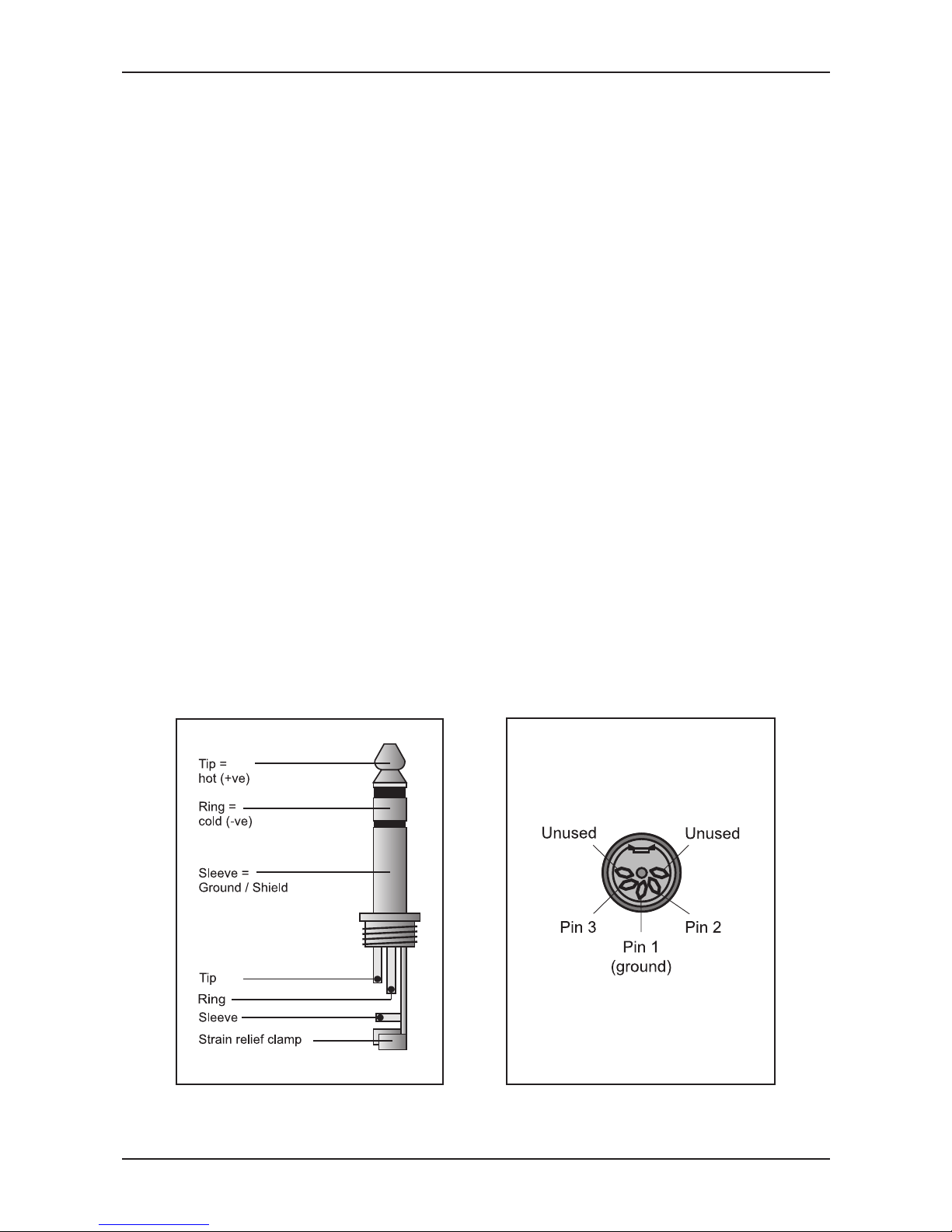
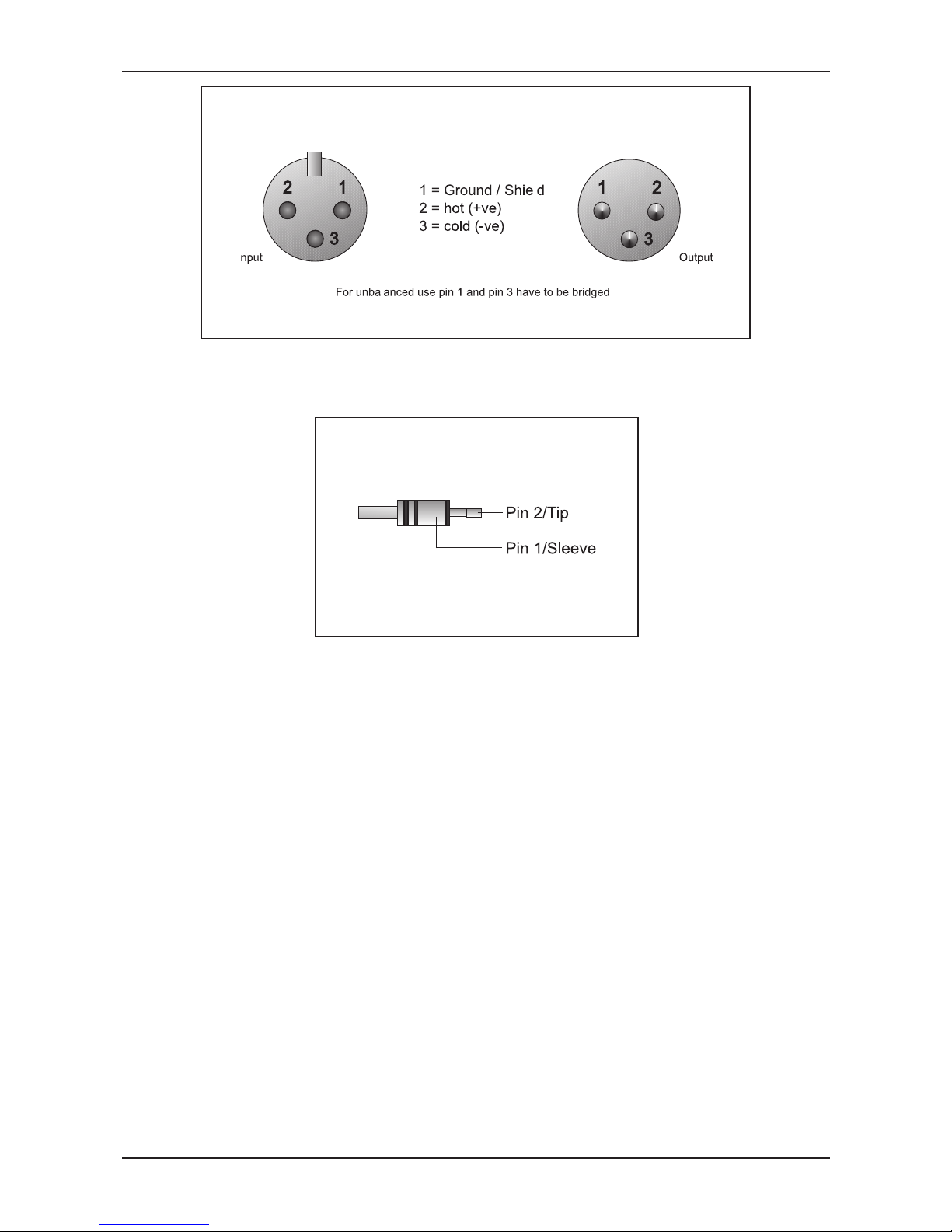
6. WIRING
1/4", TT, 1/8" TRS connectors
(mono or TS connectors also work)
MIDI connector
(2 pins unuse )
CABLE TESTER CT100
5
XLR connectors (pin numbers visible on connectors)
RCA connector
7. WARRANTY
For our current warranty terms, please refer to our website at
http://www.behringer.com, or send us a request via e-mail at
+49 2154 920 666.
8. MULTILINGUAL DOCUMENTATION
+The following versions of this users manual can
be downloaded free of charge at
http://www.behringer.com: German, French, Spanish,
Italian, utch, Finnish, Swedish, anish, Portuguese
and Greek.

CABLE TESTER CT100
6
The information contained in this manual is subject to change without notice.
No part of this manual may be reproduced or transmitted in any form or by any means,
electronic or mechanical, including photocopying and recording of any kind, for any purpose,
without the express written permission of BEH INGE Spezielle Studiotechnik GmbH.
BEH INGE is a registered trademark. ALL IGHTS ESE VED.
© 2001 BEH INGE Spezielle Studiotechnik GmbH.
BEH INGE Spezielle Studiotechnik GmbH, Hanns-Martin-Schleyer-Str. 36-38,
47877 Willich-Münchheide II, Germany
Tel. +49 (0) 21 54 / 92 06-0, Fax +49 (0) 21 54 / 92 06-30
Other manuals for CT100
3
Table of contents
Other Behringer Cable Tester manuals