manuals.online logo
Brands
  1. Home
  2. •
  3. Brands
  4. •
  5. Belkin
  6. •
  7. Docking Station
  8. •
  9. Belkin F8J088 User manual

Belkin F8J088 User manual

Other Belkin Docking Station manuals

Belkin F8Z082-BLK - TuneTalk - Digital Player Voice Recording... User manual

Belkin

Belkin F8Z082-BLK - TuneTalk - Digital Player Voice Recording... User manual

Belkin F5U273ea User manual

Belkin

Belkin F5U273ea User manual

Belkin F5U273au User manual

Belkin

Belkin F5U273au User manual

Belkin F5U273 User manual

Belkin

Belkin F5U273 User manual

Belkin Thunderbolt 3 Dock Plus Instruction Manual

Belkin

Belkin Thunderbolt 3 Dock Plus Instruction Manual

Belkin F5X016 - Home Kit For Xpress User manual

Belkin

Belkin F5X016 - Home Kit For Xpress User manual

Belkin F4U093 User manual

Belkin

Belkin F4U093 User manual

Belkin Valet F8J183 User manual

Belkin

Belkin Valet F8J183 User manual

Belkin Thunderbolt 3 Dock Pro Instruction Manual

Belkin

Belkin Thunderbolt 3 Dock Pro Instruction Manual

Belkin F8Z901 User manual

Belkin

Belkin F8Z901 User manual

Belkin TUNEBASE FM FOR IPOD User manual

Belkin

Belkin TUNEBASE FM FOR IPOD User manual

Belkin TuneSync F5U255ea User manual

Belkin

Belkin TuneSync F5U255ea User manual

Belkin Dual Video Docking Stand User manual

Belkin

Belkin Dual Video Docking Stand User manual

Belkin TuneDok User manual

Belkin

Belkin TuneDok User manual

Belkin F8Z065 User manual

Belkin

Belkin F8Z065 User manual

Belkin B2B043eaC00 User manual

Belkin

Belkin B2B043eaC00 User manual

Belkin F8E461 User manual

Belkin

Belkin F8E461 User manual

Belkin Valet F8J183 Instruction Manual

Belkin

Belkin Valet F8J183 Instruction Manual

Belkin F5U216 User manual

Belkin

Belkin F5U216 User manual

Belkin F5U120-PC User manual

Belkin

Belkin F5U120-PC User manual

Belkin F4U095 Assembly instructions

Belkin

Belkin F4U095 Assembly instructions

Belkin F8E461 User manual

Belkin

Belkin F8E461 User manual

Belkin F8E467 User manual

Belkin

Belkin F8E467 User manual
Popular Docking Station manuals by other brands

Durr Dental VISTACAM2 Installation and operating instructions

Durr Dental

Durr Dental VISTACAM2 Installation and operating instructions

DLO TransDock Direct user manual

DLO

DLO TransDock Direct user manual

Lenovo USB-C Mini Dock user manual

Lenovo

Lenovo USB-C Mini Dock user manual

Sony Dream Machine XDR-DS12iP user manual

Sony

Sony Dream Machine XDR-DS12iP user manual

ATEN UC-2000 user manual

ATEN

ATEN UC-2000 user manual

Xcellon HDD-202 user manual

Xcellon

Xcellon HDD-202 user manual

Dok CR09 user guide

Dok

Dok CR09 user guide

Philips BTM630/12 quick start guide

Philips

Philips BTM630/12 quick start guide

IOGear Travel Pro GUD3C09 quick start guide

IOGear

IOGear Travel Pro GUD3C09 quick start guide

iHome iP15 instruction manual

iHome

iHome iP15 instruction manual

VITURE ONE MOBILE DOCK quick start guide

VITURE ONE

VITURE ONE MOBILE DOCK quick start guide

CipherLab 8001 quick guide

CipherLab

CipherLab 8001 quick guide

Pyle PIPDSP2 owner's manual

Pyle

Pyle PIPDSP2 owner's manual

Targus DOCK315EUZ user guide

Targus

Targus DOCK315EUZ user guide

Philips DC190/79 user manual

Philips

Philips DC190/79 user manual

Akasa DuoDockX3 AK-DK08U3-BK user manual

Akasa

Akasa DuoDockX3 AK-DK08U3-BK user manual

Sirius Satellite Radio SUBX2082808a Installation and user guide

Sirius Satellite Radio

Sirius Satellite Radio SUBX2082808a Installation and user guide

OWC Thunderbolt Dock user guide

OWC

OWC Thunderbolt Dock user guide

manuals.online logo
manuals.online logoBrands
  • About & Mission
  • Contact us
  • Privacy Policy
  • Terms and Conditions

Copyright 2025 Manuals.Online. All Rights Reserved.

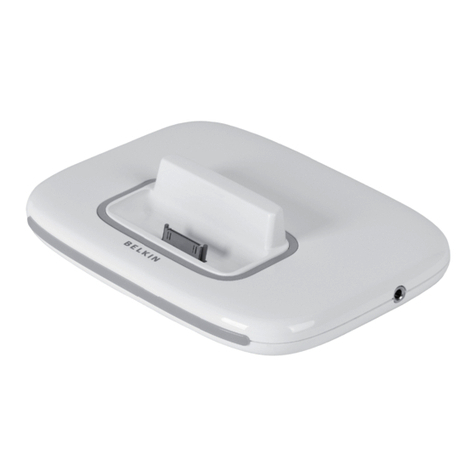
The Belkin Express Dock for iPad, F8J088 is a device that allows you to sync and charge your iPad. This can be
connected to a computer or an AC outlet for charging your iPhone® 5, iPod touch® (5th generation), iPad® 4th Gen
and iPad® mini.
Follow the steps below to help you connect your Belkin Express Dock for iPad to an AC outlet:
Step 1:
Connect the USB power adapter to the Express Dock.
NOTE: You can connect the Express Dock to an AC outlet with your Apple® power supply or another
USB power adapter. For a list of Belkin USB Power Adapters, click here.
Step 2:
Plug the power adapter into an AC outlet.
Step 3:
Connect your iPhone, iPod, iPad or iPad mini to the dock.
Step 4:
Scroll the dial from left to right to adjust the height of the lightning connector so that the device is properly
leveled and resting against the back rest.
NOTE: The Express Dock is made to fit most open bottom cases. Otherwise, it is best to remove the phone
or tablet's case to fit the dock.
Step 5:
Make sure that the device is properly leveled and resting against the back rest of the Express Dock.
Your device can now charge with the AC outlet.