Bluetti EP800 User manual

EP800
Energy Storage System
BLUETTI App User Manual

Notice
BLUETTI's products, services, and features are subject to the agreed-upon terms and conditions
during purchase. Please note that some products, services, or features described in this manual
may not be available under your purchase contract. Unless otherwise specified in the contract,
BLUETTI makes no representations or warranties of any kind, express or implied, with respect to
the contents of this manual.
The contents of this manual are subject to change without notice. Please get the latest version
from: https://www.bluettipower.com/pages/user-guides
If you have any questions or concerns about this manual, please contact BLUETTI support for
further assistance.
Copyright © 2023 ShenzhenPowerOakNewenerCo., Ltd. All rights reserved.
No part of this document may be reproduced or transmitted in any form or by any means without
the prior written consent of ShenzhenPowerOakNewenerCo., Ltd.

Contents
01
01
03
01
02
02
03
03
05
06
07
07
07
08
09
10
09
10
1. Introduction
2. Real-time Monitoring
2.1 Operation Status
2.2 Energy Flow Status
2.3 Inverter Status
2.4 Energy Statistics
3. Device Management
3.1 Basic Settings
3.2 Working Modes
3.3 Advanced Settings
4. Practices
4.1 Charge via Grid
4.2 Time of Use
4.3 Self-consumption (Prioritize PV)
4.4 Backup Power
4.6 Device Control in Offline Mode
4.7 Device Sharing
4.5 Charging Using Generator
01
The App provides you with important details like the current battery level, energy flow status, and
other key metrics, allowing you to monitor and track the performance of your EP800 ESS
effectively. Additionally, in case of any malfunctions or alarms, you can view real-time alerts so
that you can take immediate action to deal with any issues in a timely manner.
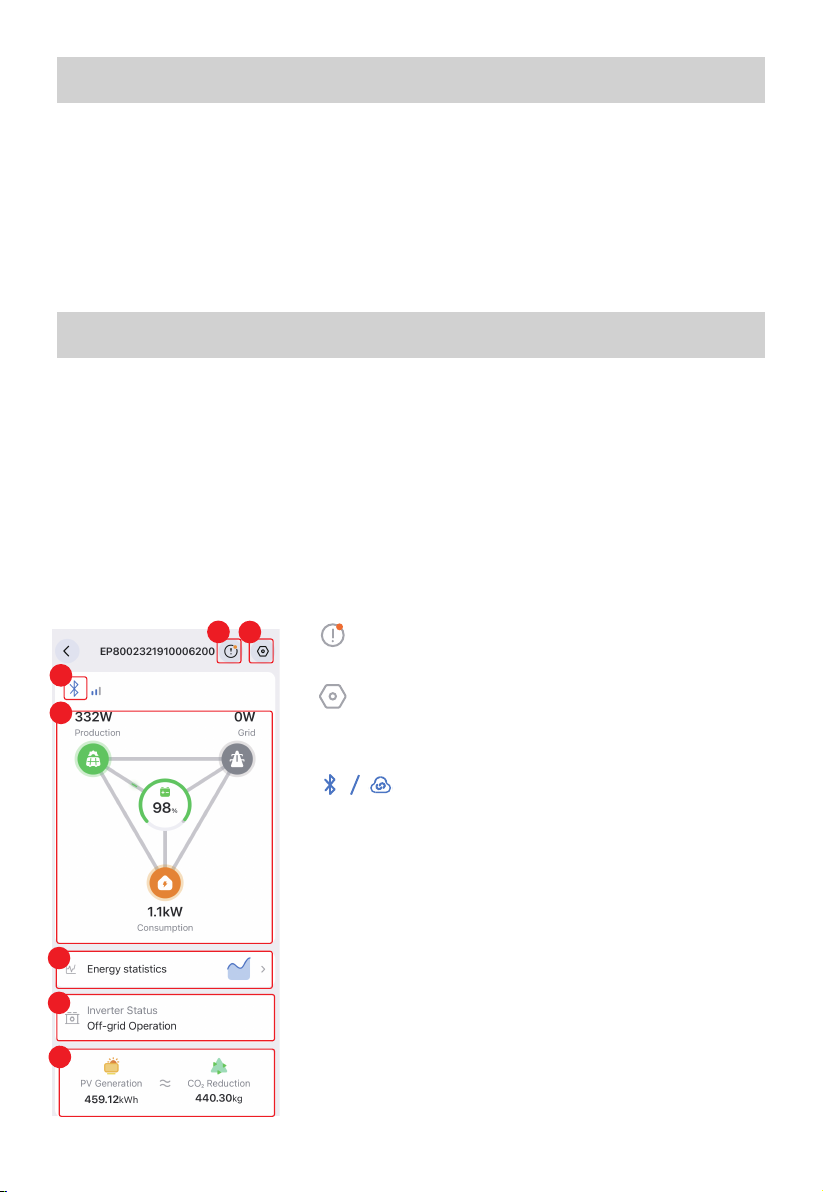
Connect the App to your EP800 ESS via Bluetooth or WiFi, and you'll be directed to the operation
status page.
2.1 Operation Status
1. Introduction
To effectively keep track of and control your EP800 Energy Storage System, begin by
downloading and installing the user-friendly BLUETTI App. Once installed, connect the App to
your device. For step-by-step instructions on how to register, log in, configure your network, and
connect your device, simply refer to the . This manual is designed to
help you easily monitor, manage, and perform various operations for your EP800 ESS.
2. Real-time Monitoring
①
Tap to check the current alarm(s) and alarm history.
②
Tap to check and change system settings, like System Switch,
Working Mode, Device Sharing, Advanced Settings, etc.
③
Bluetooth / WiFi connection successful.
④Energy Flow Status
Please refer to Energy Flow Status for details.
⑤Energy Statistics
Taptoviewtheenergydatabyday,month,year,oruptothecurrentdate.
PleaserefertoEnergy Statisticsfordetails.
⑥Inverter Status
Please refer to Inverter Status for details.
⑦ PV Generation & CO2Reduction
Check out the total solar energy generated and carbon
emissions saved by the EP800 ESS over time.
1
3
4
5
6
7
2
BLUETTI App User Manual

02
The animation gives you a simple way to understand how energy is flowing.
2.2 Energy Flow Status
It shows how the EP800 inverter is operating.
•Off: The system switch is turned off or forced off due to a serious failure.
• Off-grid Operation: The System Switch is turned on and the system operates independently
without relying on the electrical grid. The inverter converts the DC power from the battery and
solar system into AC power for home use.
Grid-connected Operation: The System Switch is turned on and the system is connected to the
grid. In this case, the system and loads can draw power from the grid and the solar system.
However, the system can't export any excess generated power back to the grid.
2.3 Inverter Status
SoC (State of Charge). It indicates the remaining battery level.
PV generation. It shows how much power the EP800 ESS is drawing from your rooftop solar
or solar panel(s). Tap to view more details.
Grid charging. It shows how much power the EP800 ESS is drawing from the grid. Tap to view
more details.
Load consumption. It shows how much power is supplying to your household appliance.
Tap to learn more about where the power is going.
100%

03
It allows you to view the PV Generation, Grid Consumption, and Load Consumption by day, month,
year, or up to now.
2.4 Energy Statistics
3. Device Management
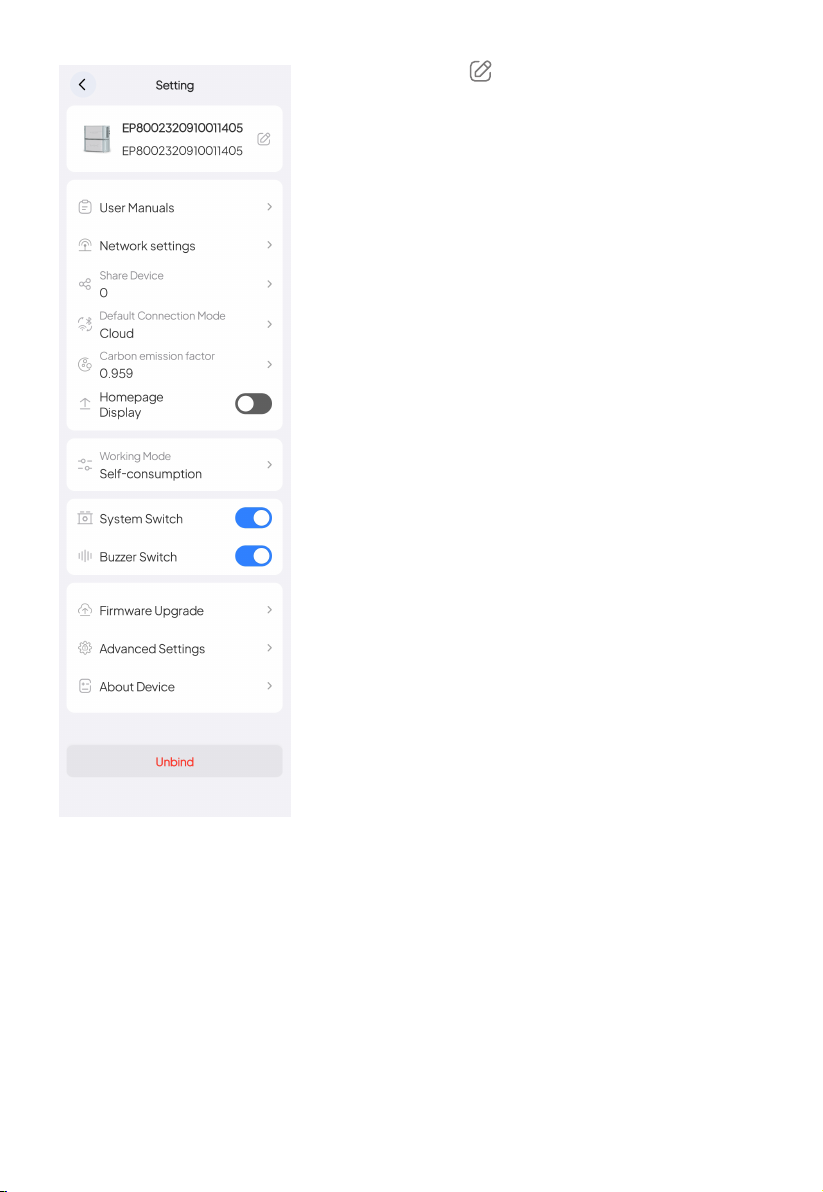
On the operation status page, tap to access the Setting page. You can optimize your
power usage by customizing various settings, including the Charge/Discharge schedule, State of
Charge (SoC) limits, and other relevant configurations.
3.1 Basic Settings
① Tap to view data by Day, Month, Year, and To date.
② Tap or to go back or forth between time periods. If
you want to view data for a specific time, click and select
your desired date.
③ Check the boxes to display relevant data, uncheck to hide.
④ Tap to zoom in on the chart to view it full screen.
⑤ Tap on the chart to view detailed data for a specific time.
⑥ Swipe left or right on the chart to view the data for a specific
timestamp.
1
44
2
3
5
6
04
•Device Name: Tap to modify.
•User Manuals: Tap to get EP800 User Manuals
•Network settings: To configure the WiFi network. Please refer
to the "Cloud Connection" chapter in the
for details.
Note: This feature is only available when you connect to the
EP800 ESS via Bluetooth.
•Share Device: Tap to share your EP800 ESS.
•Default Connection Mode: To modify the device's default
connection mode. Once saved, whenever you tap on the device
image on My Device page, it'll automatically connect using the
chosen mode.
Note: The App is programmed to use the Cloud as the default
connection mode.
•Carbon emission factor: To calculate your reduced carbon
emission.
Note: Reduced carbon emission (kg) = Solar power generation
(kWh) × Carbon emission factor
•Homepage Display: Once enabled, the device will show up on
the App's Home page. Tap the device image to connect
seamlessly and quickly.
•Working Mode: Tap to set the working modes.
•System Switch: The main switch of the EP800 ESS. Keep it on if
you want the EP800 ESS to charge and discharge. If it's off, the
system has no input or output and will automatically shut down.
Note: If you're connecting cables or not using the system, turn the System Switch off.
•Buzzer Switch: To sound an alarm when the device encounters hardware faults.
• Firmware Upgrade: Go to the Firmware Upgrade page and tap Start to upgrade. Once the
upgrade is completed, it'll prompt that You're up to date.
Note: This feature is only available when you connect to the EP800 ESS via Bluetooth.
•Advanced Settings: To check and change more settings.
•About Device: The information about EP800 ESS and other related devices.
•Unbind: Tap to unbind your BLUETTI account with the EP800 ESS.
BLUETTI App User Manual
05
3.2 Working Modes
The EP800 ESS offers three operating modes to accommodate various energy plans. You can
choose the one that best suits your home power supply configuration.
Backup
In this mode, the EP800 ESS acts as a reliable home backup power source that only kicks in
when the grid fails. It prioritizes charging its batteries from solar energy over the grid, making it an
eco-friendly and sustainable choice for your home energy needs. With ample energy reserves, it
provides a seamless power supply, perfect for areas with unreliable grids.
Self-consumption
In this mode, the EP800 ESS prioritizes the direct consumption of solar energy to meet
immediate household energy needs. Any surplus solar energy generated during the day is
intelligently stored in the battery for usage during peak hours or in the event of a power outage.
With such a strategy, the EP800 ESS ensures an efficient and reliable power supply, reducing
reliance on the grid and promoting energy independence.
You can set State of Charge (SoC) limits and specific charging and discharging schedules to
optimize cost savings.
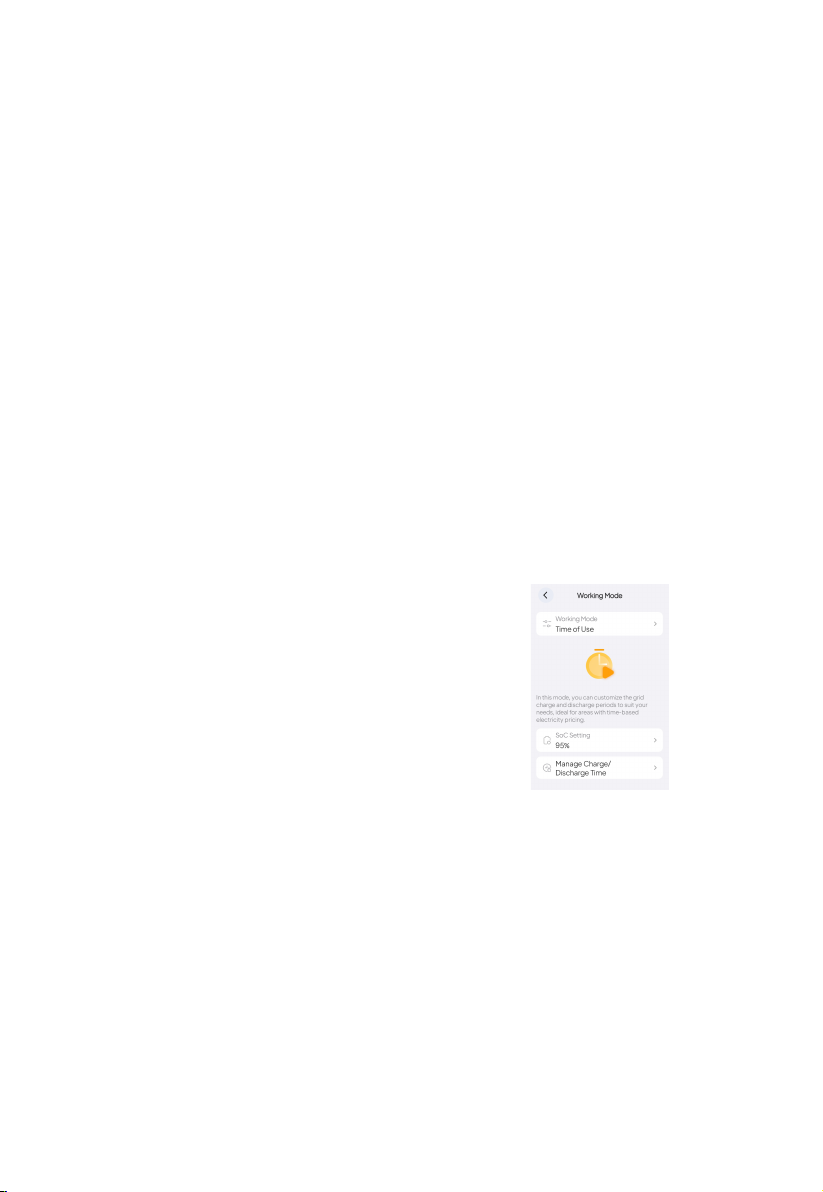
1. SoC Setting
The EP800 ESS will stop charging from the grid when the battery level reaches the configured
SoC and seamlessly switch to solar charging for the remaining capacity.
Time of Use
This mode is suitable for areas with fluctuating electricity
prices based on time-of-use.
During peak electricity pricing, the EP800 ESS provides
power to household appliances, while during off-peak times
when electricity rates are lowest, it draws power from the
grid to charge the battery.

06
The BLUETTI App doesn't allow users to set up a Custom Mode. Please contact BLUETTI customer
service for assistance. You can switch from your current Custom Mode to other modes, but you
can't switch back.
Custom
Grid Consumption Settings
•Charge From Grid: To enable the EP800 ESS to charge from
the grid.
Note: It's enabled by default.
•Single-phase Grid Max. Input Power: The maximum power
that each phase of the EP800 ESS can draw from the grid.
•Single-phase Grid Max. Input Current: The maximum current
that each phase of the EP800 ESS can draw from the grid.
Others
•System Switch Recovery: To save the system switch status
and restore it on restart.
Note: This switch is disabled by default.
•Grid Self-adaption: To provide a stable and continuous grid
charging.
Note: This switch is disabled by default.
3.3 Advanced Settings
2. Manage Charge/Discharge Time
Off-Peak: Schedule the EP800 ESS to charge during off-peak hours when electricity costs are
lower.
Peak: Schedule the EP800 ESS to supply your appliances during peak hours when electricity
costs are higher.

0707
4. Practices
Go to the Advanced Settings page and turn on Charge From Grid.
Note: If you need to set the charging schedule, please follow the steps below:
a. On the Setting page, tap Working Mode.
b. Select Time of Use, and tap OK.
c. Tap Manage Charge/Discharge Time.
d. Select OK in the Attention pop-up.
e. Specify a period, and set it as an Off-Peak period.
f. On the Setting page, after turning on the System Switch, it takes 10 seconds to take effect.
4.1 Charge via Grid
The EP800 ESS features peak-load shifting technology to help you avoid high electricity prices - it stores
massive energy during the day or off-peak hours, and supplies it to your house during peak hours.
Before setting the working mode, please turn off the System Switch.
1. Go to the Advanced Settings page and turn on the Charge From Grid.
4.2 Time of Use
a
cd
e
b
Other manuals for EP800
1
Table of contents
Other Bluetti Power Supply manuals
Bluetti
Bluetti AC2A User manual

Bluetti
Bluetti AC180P User manual
Bluetti
Bluetti EB70S User manual

Bluetti
Bluetti EB70S User manual
Bluetti
Bluetti AC200MAX User manual

Bluetti
Bluetti B300 User manual
Bluetti
Bluetti EP500 User manual

Bluetti
Bluetti AC200MAX User manual

Bluetti
Bluetti AC200MAX User manual

Bluetti
Bluetti EB55 User manual

Bluetti
Bluetti AC300 User manual

Bluetti
Bluetti EB70 716Wh User manual
Bluetti
Bluetti AC200L User manual

Bluetti
Bluetti B300 User manual
Bluetti
Bluetti AC60 User manual

Bluetti
Bluetti AC2A User manual
Bluetti
Bluetti AC2P User manual

Bluetti
Bluetti AC300 User manual

Bluetti
Bluetti EP500Pro User manual
Bluetti
Bluetti AC180 User manual