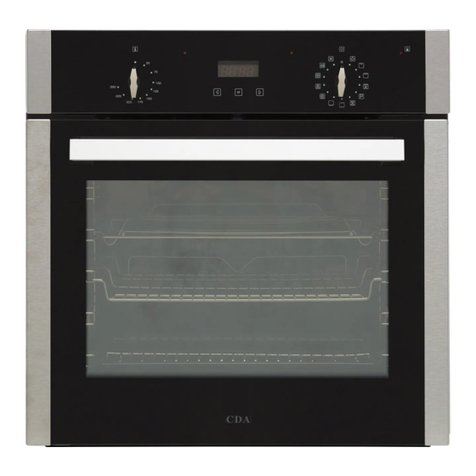
CDA SL570BL User guide

SL570BL
Thirteen function pyrolitic oven
Use and maintenance

IMPORTANT: Please read the user instructions carefully before
using the appliance for the first time and before installing it.
Failure to install the oven, or to have it installed, as per the
instruction manual could invalidate the warranty. Any service
calls relating to misue or incorrect installation could incur a
service charge.
2| Instruction Manual
3
5
5
6
8
8
9
9
10
11
12
12
13
14
15
16
Important information
First use of the oven
Standby mode
Control panel
Function indicator symbols
Setting the time
Minute minder
Child lock
Semi automatic cooking
Automatic cooking
Using the grill
ECO heating
Operations
Preset programmes
Practical tips
Temperature probe
(SL570 only)
Contents
18
18
18
19
19
20
22
29
30
32
34
35
36
37
38
Rapid preheating
Oven preheat
Temperature
Cooling fan and residual heat
Lighting
Pyrolitic cleaning
Cleaning and maintenance
Changing the oven light bulbs
Installation
Mains electrical connection
Technical assistance
Error codes
Specifications
Product fiche
Product information

Instruction Manual | 3
Important information
This appliance must only be used for the purpose for which it is
intended, i.e. domestic cooking. Any other use could be dangerous
and may lead to premature failure of the appliance.
The CDA Group Ltd. cannot be held responsible for injuries or losses
caused by incorrect use or installation of this product. Please note
that CDA reserves the right to invalidate the guarantee supplied with
this product following incorrect installation or misuse of the appliance.
Under no circumstances should any external covers be removed for
servicing or maintenance except by suitably qualified personnel.
User information
• The appliance and its accessible parts become hot during use.
Care should be taken to avoid touching heating elements
• The appliance can be used by children aged from 8 years
and above. Persons with reduced physical, sensory or mental
capabilities must be given instruction or supervision
concerning safe operation of the appliance and understand the
hazards involved
• Do not allow anyone unfamiliar with the contents of this instruction
manual to operate the oven
• Do not use harsh cleaning agents or sharp metal objects to clean
the door as they can scratch the surface potentially resulting in
cracking or shattering of the glass
• Take care when opening the oven door during or after a cooking
cycle as hot steam may escape
• Do not use the oven in the event of a technical fault. Any faults
must be fixed by an appropriately qualified and authorised person
• In the event of an incident due to a technical fault, disconnect the
power and report the fault to CDA Customer Care
• The appliance has been designed only for cooking, any other use
may invalidate your warranty and cause danger
• Do not place anything weighing over 15kg on the opened oven
door
18 Rapid preheating
18 Oven preheat
18 Temperature
19
19
20
Cooling fan and residual heat
Lighting
Pyrolitic cleaning
22 Cleaning and maintenance
29 Changing the oven light bulbs
30 Installation
32 Mains electrical connection
34
35
Technical assistance
Error codes
36 Specifications
37 Product fiche
38 Product information

Appliance information
Please enter the details on the appliance rating plate below for
reference, to assist CDA Customer Care in the event of a fault with
your appliance and to register your appliance for guarantee purposes.
Appliance Model
Serial Number
IMPORTANT INFORMATION FOR CORRECT DISPOSAL OF THE
PRODUCT IN ACCORDANCE WITH EC DIRECTIVE 2012/19/EU.
At the end of its working life, the product must be taken to a special
local authority waste collection centre or to a dealer providing
appliance recycling services.
Disposing of a household appliance separately avoids possible
negative consequences for the environment and health. It also
enables the constituent materials to be recovered, saving both energy
and resources. As a reminder of the need to dispose of household
appliances separately, the product is marked with a crossed-out
wheeled dustbin .
4| Instruction Manual

Instruction Manual | 5
First use of the oven
In order to remove oil residues accumulated during the manufacturing
process and dust accumulated during storage and transport, we
recommend a preliminary cleaning before first use. This is to protect
your health and provide optimum quality in cooking.
IMPORTANT!
Remove the protective foil from the telescopic runners before using
the oven.
Preliminary heating
1. Remove any packaging elements from the oven cavity
2. Turn on ventilation or extractor fan in the room or open a window
3. Set the oven to 250°C using the rapid preheating function
4. Allow to heat for approximately 30 minutes
5. Turn oven o and allow to cool
6. To clean the oven use a well wrung-out cloth with warm water and
a small amount of washing up liquid
7. Dry with a clean cloth
A slightly unpleasant smell may be emitted during this process due to
the vaporising of oil residue used to protect the oven during storage.
Standby mode
Switching the appliance to standby mode resets all functions settings,
times, temperature and automatic programmes. All heating elements
are deactivated and the display is dimmed except for the timer.
To enter standby mode, press the sensor for 3 seconds at any time
(this is applicable even if the oven is locked). A beep will be heard
indicating the mode is active. To exit standby mode simply press the
sensor for 3 seconds, a dierent beep will be heard to indicate the
oven is now ready for operation.

6| Instruction Manual
Control panel
The control panel is equipped with an LED display and backlit touch
sensors.
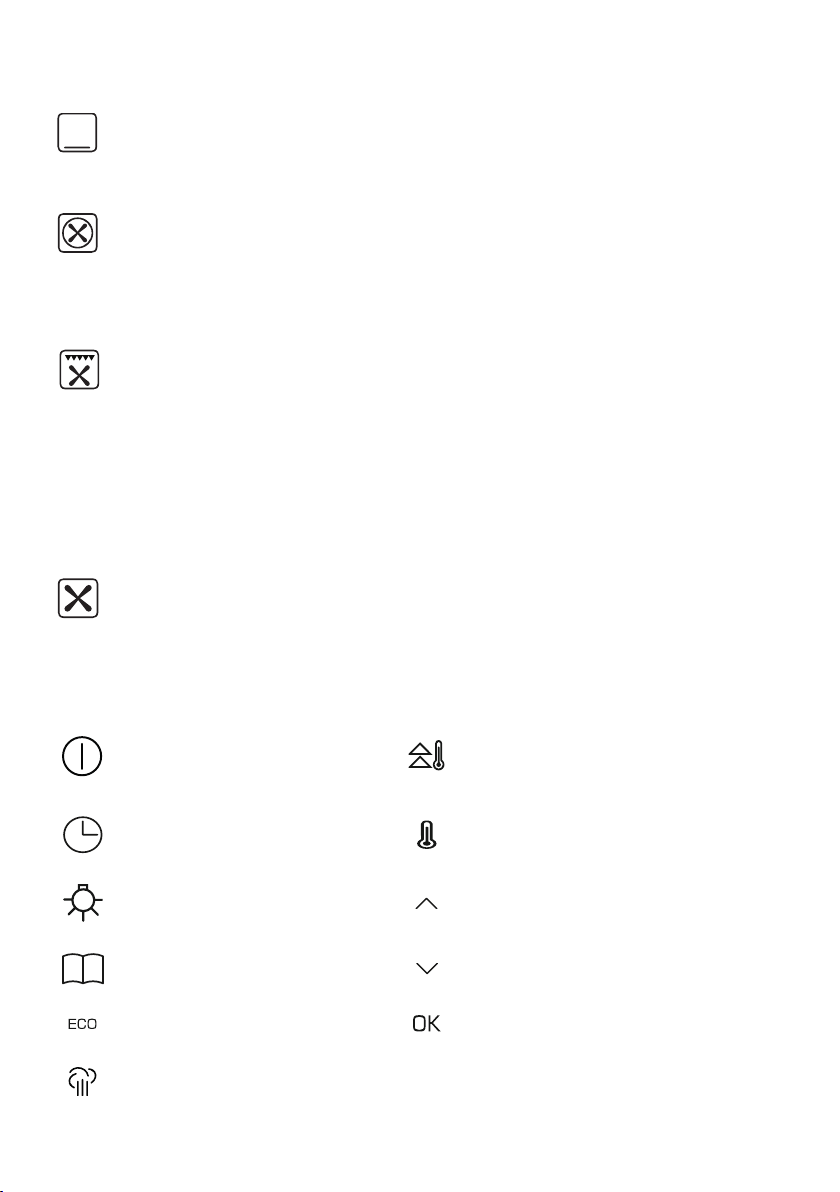
Fan cooking with lower heat
With this setting the convection fan and bottom heater are on,
which increases the temperature at the bottom of the cooked
dish. Intense heat from the bottom is ideal for moist cakes and
pizza.
Fan assisted oven
This setting is most suitable for baking cakes.
Conventional oven
The thermostat enables the user to set the temperature within
a range of 30°C to 280°C. This setting is ideal for baking cakes,
meat, fish, bread. For best results preheat the oven and use a
baking tray on one level.
Half grill
This function radiates heat from the grill element. This fully
temperature variable grill can be set between 30°C and 280°C
maximum.
Full grill
In this setting both the grill and top element are engaged. This
increases the temperature in the top part of the oven chamber
making it suitable for browning and grilling larger portions of
food. It can be set between 30°C and 280°C maximum.
Instruction Manual | 7
Warming oven
This function radiates heat from the bottom element, baking
cakes from underneath until done.
Defrost
This function uses the fan to circulate air at ambient temperature
within the oven which helps to accelerate the defrosting
process.
Fanned full grill
This function radiates heat from the grill element and the top
element but also uses the fan to circulate hot air. The hot air is
distributed over and under the food that you are grilling. This
fully temperature variable grill is ideal for grilling fish or other
items where the appearance could be spoiled by a normal grill
function. It can be set between 30°C and 280°C maximum.
Fan oven
This function uses the circular heating element with a
temperature between 30°C and 280°C. The fan then circulates
the hot air which helps to achieve uniform heat distribution.
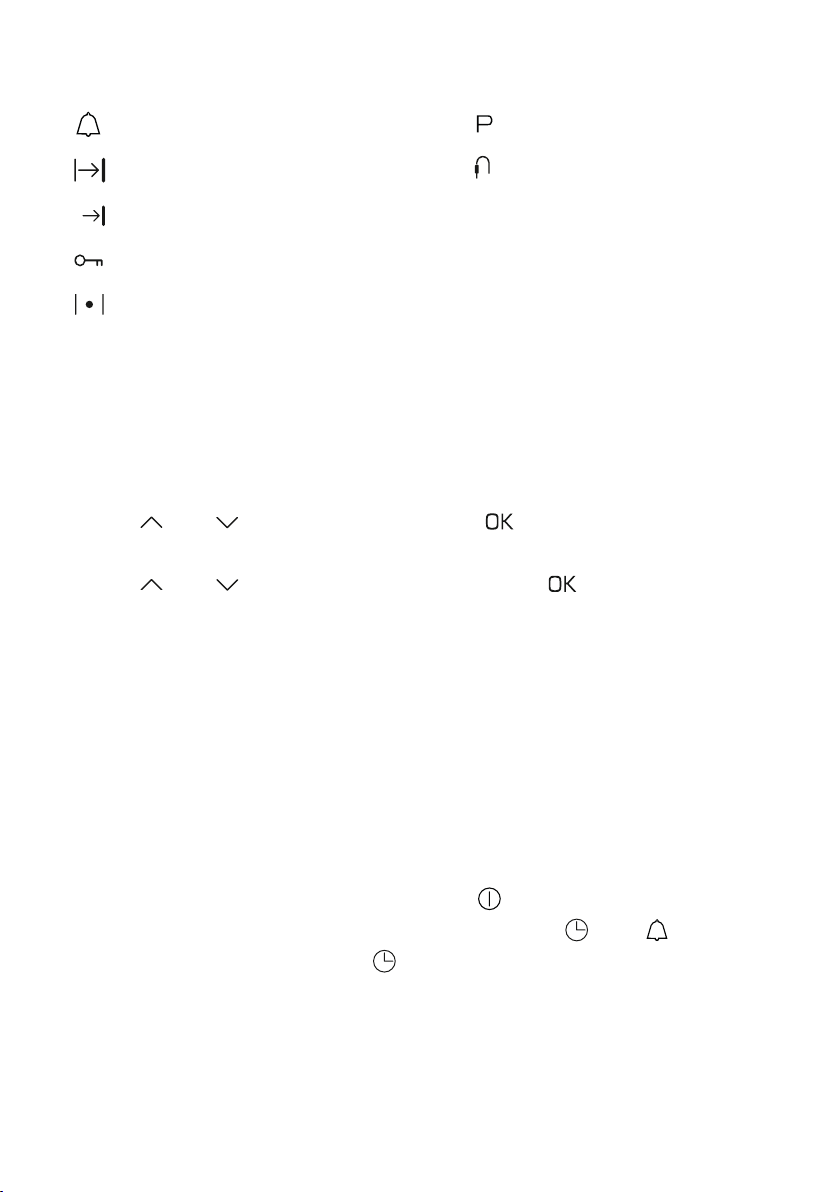
On/o switch
(standby) Rapid preheating
Clock / Minute minder Set Temperature
Light Plus sensor
Pre-set programmes Minus Sensor
Eco programme Confirm sensor
Steam cleaning
8| Instruction Manual
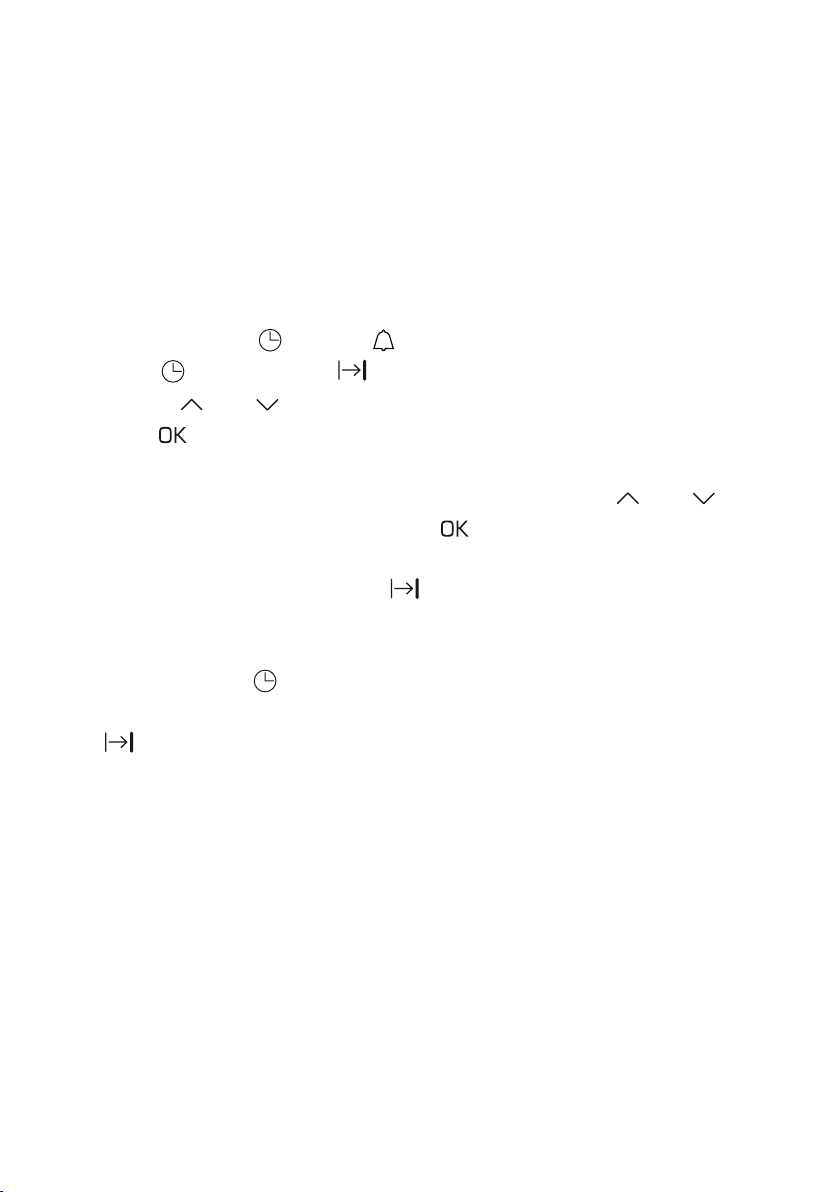
Function indicator symbols
Minute minder active
Duration
End time
Child lock active
Heating active
Setting the time
When the appliance is connected to power, the display will show the
hour digits flashing, the minute digits will be illuminated.
•Use and to set the hours. Touch to confirm the setting, the
hour digits will now be illuminated and the minutes will be flashing
•Use and to set the minutes. Touch the sensor to confirm
the setting. The appliance enters sleep mode and the time set will
be shown
Note: The time can only be set in 24 hour format
Changing the time
The time display can only be changed when no other functions are
being used.
If in sleep mode, press the on/o sensor to wake the appliance up.
Once the display has illuminated, touch and hold . The symbol
will flash on the display. Touch again and the digits will start to flash.
You can now proceed to set the time following the steps in the
'Setting the time' section above.
Pyrolitic cleaning
Temperature probe
connected

Instruction Manual | 9
Child lock
Child lock is intended to prevent changes to the oven settings and
the oven being turned on. When the appliance is on simultaneously
touch and hold and for 3 seconds to activate the child lock.
The symbol will be illuminated. When the child lock is activaed
in standby mode it prevents the oven from being turned on. When
the child lock is activated when the appliance is in use, it prevents
the settings from being changed but the oven can still be turned
o. To turn the child lock o simply touch and hold 3 seconds and
the and sensors and the symbol will go out.
Minute minder
During a cooking function, only the minute minder can be set or
adjusted. The clock or delayed cooking time can not be set or
adjusted during the function.
• Touch and hold and the display will show the symbol
• Touch the and sensors to adjust the the setting and touch
to confirm. Touch and hold the and sensors to clear the
setting. The symbol will be illuminated on the display, indicating
the time is set
• Once the time has elapsed you will hear a beeping and the
symbol will be flashing. Touch the sensor to silence the beep-
ing and end the function
The minute minder can be set for a maximum of 2 hours.
10 | Instruction Manual
Semi automatic cooking
This function allows for a cooking time to be set. When the set time
elapses the oven will switch the set function o and an acoustic signal
will sound to alert the user. The cooking time available ranges from
between 1 minute and 10 hours.
To switch on semi automatic cooking
• First select a heating function and temperature
• Touch and hold and the symbol will flash on the display
• Touch again and the symbol will appear on the display
• Use the and sensors to adjust the duration as needed and
touch to confirm the setting or alternatively wait 5 seconds and
the duration will automatically set
• To clear the duration setting, simultaneously touch and and
the display will show 0:00. Touch to confirm
During the cooking process the symbol will be illuminated.
Once the duration time has elapsed you will hear beeping. Touch
any sensor except to mute the beeping. The function settings and
temperature will clear and the lighting will turn on for 30 seconds.
The symbol will go out and the appliance will turn o after 60
seconds.
Table of contents
Other CDA Oven manuals

CDA
CDA DV1180 Series Reference manual
CDA
CDA SC210 Series Reference manual
CDA
CDA SVA 100 PP Reference manual
CDA
CDA RV921 Reference manual
CDA
CDA 11Z6 for Reference manual
CDA
CDA CD 900 Operation instructions
CDA
CDA DC730 Series Reference manual
CDA
CDA DV 710 Guide
CDA
CDA sg120 Series Reference manual
CDA
CDA SV310SS Reference manual
CDA
CDA VM452 Specification sheet
CDA
CDA SC220L Series Reference manual

CDA
CDA SK420 Installation and operating instructions
CDA
CDA SC223 Quick start guide
CDA
CDA SK651 Quick start guide
CDA
CDA SC211 Reference manual
CDA
CDA SA117 Reference manual
CDA
CDA VK702 Installation and operating instructions
CDA
CDA sk400 Safety guide
CDA
CDA SC360SS User guide