Compaq iPAQ PA-2 User manual

Notice
© 2001 Compaq Computer Corporation
COMPAQ and the Compaq logo registered in U.S. Patent and Trademark Office.
iPAQ is a trademark of Compaq Information Technologies Group, L.P.
Microsoft and Windows are trademarks of Microsoft Corporation.
All other product names mentioned herein may be trademarks or registered trademarks of
their respective companies.
Compaq shall not be liable for technical or editorial errors or omissions contained herein.
The information in this document is subject to change without notice.
The information in this publication is subject to change without notice and is provided “AS
IS” WITHOUT WARRANTY OF ANY KIND. THE ENTIRE RISK ARISING OUT OF
THE USE OF THIS INFORMATION REMAINS WITH RECIPIENT. IN NO EVENT
SHALL COMPAQ BE LIABLE FOR ANY DIRECT, CONSEQUENTIAL,
INCIDENTAL, SPECIAL, PUNITIVE, OR OTHER DAMAGES WHATSOEVER
(INCLUDING WITHOUT LIMITATION, DAMAGES FOR LOSS OF BUSINESS
PROFITS, BUSINESS INTERRUPTION, OR LOSS OF BUSINESS INFORMATION),
EVEN IF COMPAQ HAS BEEN ADVISED OF THE POSSIBILITY OF SUCH
DAMAGES. THE FOREGOING SHALL APPLY REGARDLESS OF THE
NEGLIGENCE OR OTHER FAULT OF EITHER PARTY AND REGARDLESS OF
WHETHER SUCH LIABILITY SOUNDS IN CONTRACT, NEGLIGENCE, TORT, OR
ANY OTHER THEORY OF LEGAL LIABILITY, AND NOTWITHSTANDING ANY
FAILURE OF ESSENTIAL PURPOSE OF ANY LIMITED REMEDY.
The limited warranties for Compaq products are exclusively set forth in the documentation
accompanying such products. Nothing herein should be construed as constituting a further
or additional warranty.
Compaq
iPAQ Personal Audio Player PA-2
First Edition (March 2001)
Part Number 240060-001
MP3 book file.book Page 1 Tuesday, April 3, 2001 10:30 AM


Important First Step
The enclosed CD contains complete user instructions and
required software. Insert the CD in your PC CD-ROM or DVD
drive now to install.
El CD incluido contiene instrucciones completas para el
usuario y el software necesario. Inserte el CD en la unidad de
CD-ROM o DVD de su PC ahora para realizar la instalación.
El CD adjunto contiene todas las instrucciones del usuario y el
software necesario. Introduzca el CD en la unidad de CD-ROM
o DVD de su PC para realizar la instalación.
Le CD ci-inclus contient toutes les instructions et les logiciels
nécessaires. Insérez le CD dans le lecteur de CD-ROM ou de
DVD de votre PC pour démarrer l'installation.
Die mitgelieferte CD enthalt die vollstandige
Benutzeranleitung und die notwendige Software. Legen Sie
jetzt die CD in das CD-ROM- oder DVD-Laufwerk Ihres PCs
ein, um die Software zu installieren.
Il CD allegato contiene tutte le istruzioni per l'uso e il software
necessari. Per l'installazione, inserire il CD nell'unitàCD-ROM
o DVD del PC.
MP3 book file.book Page 2 Tuesday, April 3, 2001 10:30 AM

COMPAQ IPAQ PA-2 1
Setting Up Your Player
Thanks for buying a Compaq iPAQ Personal Audio Player
PA-2, and welcome to the world of digital audio.
What is Digital Audio?
Digital audio is a way of compressing recorded sound so
that it takes up much less storage space. A song is reduced
to about 1/10 its size, enabling fast downloads from the
Internet to your Player. There are many types of digital
audio formats, but MP3 and WMA are two of the most
popular.
Why Digital Audio?
Digital audio players provide many benefits:
>Solid state (no skipping)
>CD quality sound
>Portability (small and lightweight)
>Compatibility with the Internet
>The ability to take your favorite music with you
anywhere!
MP3 book file.book Page 1 Tuesday, April 3, 2001 10:30 AM

2 COMPAQ IPAQ PA-2
Is Your PC Ready or Digital Audio?
If you have a multimedia PC with a sound card and
speakers, you are probably ready for digital audio.
However, to get optimal performance, we recommend the
requirements shown here. You may be able to download
audio files with a less sophisticated PC, but you will be
happier if your PC meets or exceeds these requirements:
>233 MHz processor
>Microsoft Windows 98, Windows ME,
or Windows 2000
>100 MB free hard drive space
>1 available USB port
>24x CD-ROM drive (32x preferred)
>64 MB RAM
MP3 book file.book Page 2 Tuesday, April 3, 2001 10:30 AM
COMPAQ IPAQ PA-2 3
How to Get Help
If you have any trouble setting up your Player or would just
like more information, visit Compaq’s Web site:
http://www.compaq.com/products/iPAQ
Register Your PA-2
Please register your Player to receive a more personalized
support experience. You may register at Compaq’s Web
site:
http://www.compaq.com/go/register
Warranty
Your Player has a One-Year Limited Warranty. Please see
the enclosed Warranty Card for further details.
MP3 book file.book Page 3 Tuesday, April 3, 2001 10:30 AM

4 COMPAQ IPAQ PA-2
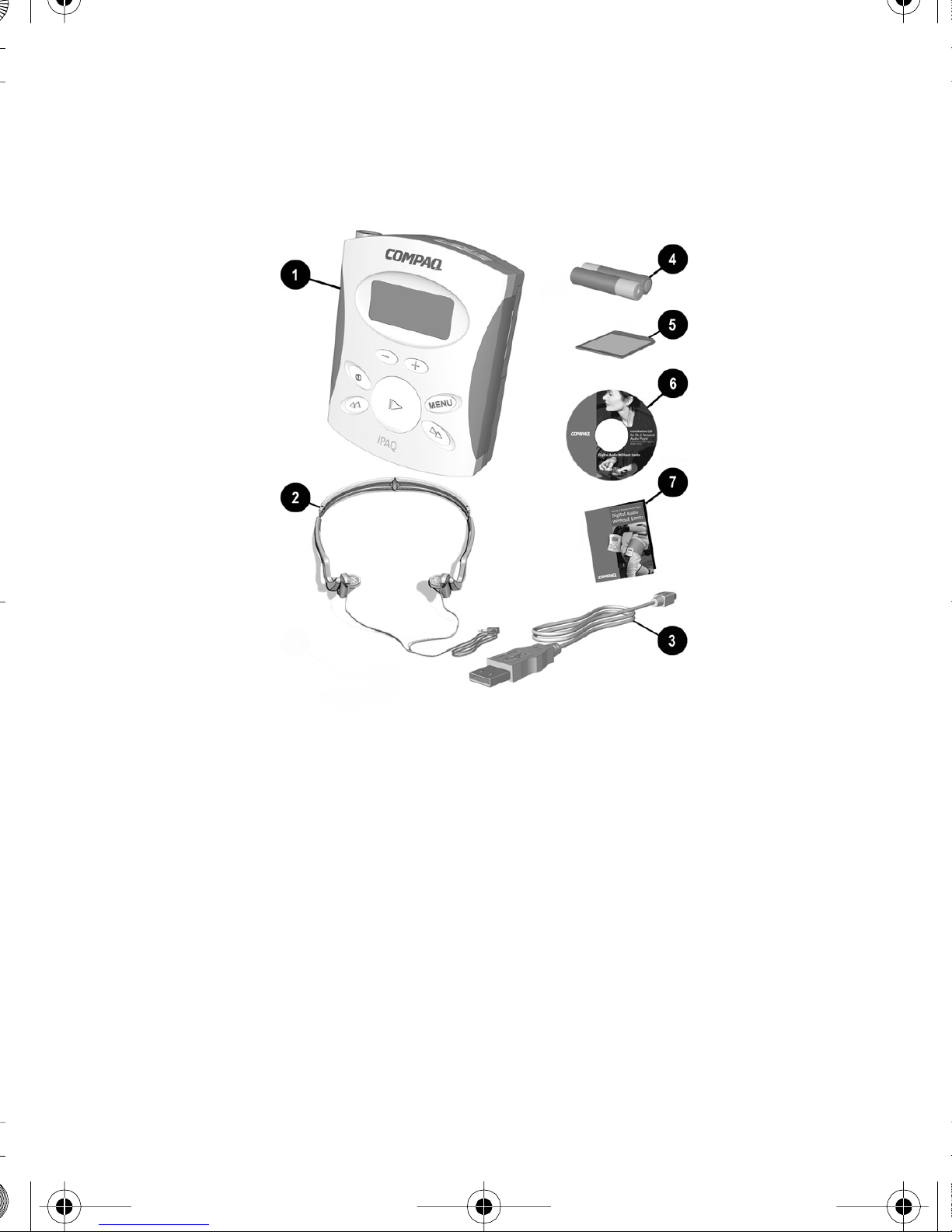
What’s in the Box?
1Personal Audio Player 4Two AAA batteries
2Earphones 564 MB of MMC flash
memory
3USB data cable 6CD
7This guide
MP3 book file.book Page 4 Tuesday, April 3, 2001 10:30 AM
COMPAQ IPAQ PA-2 5
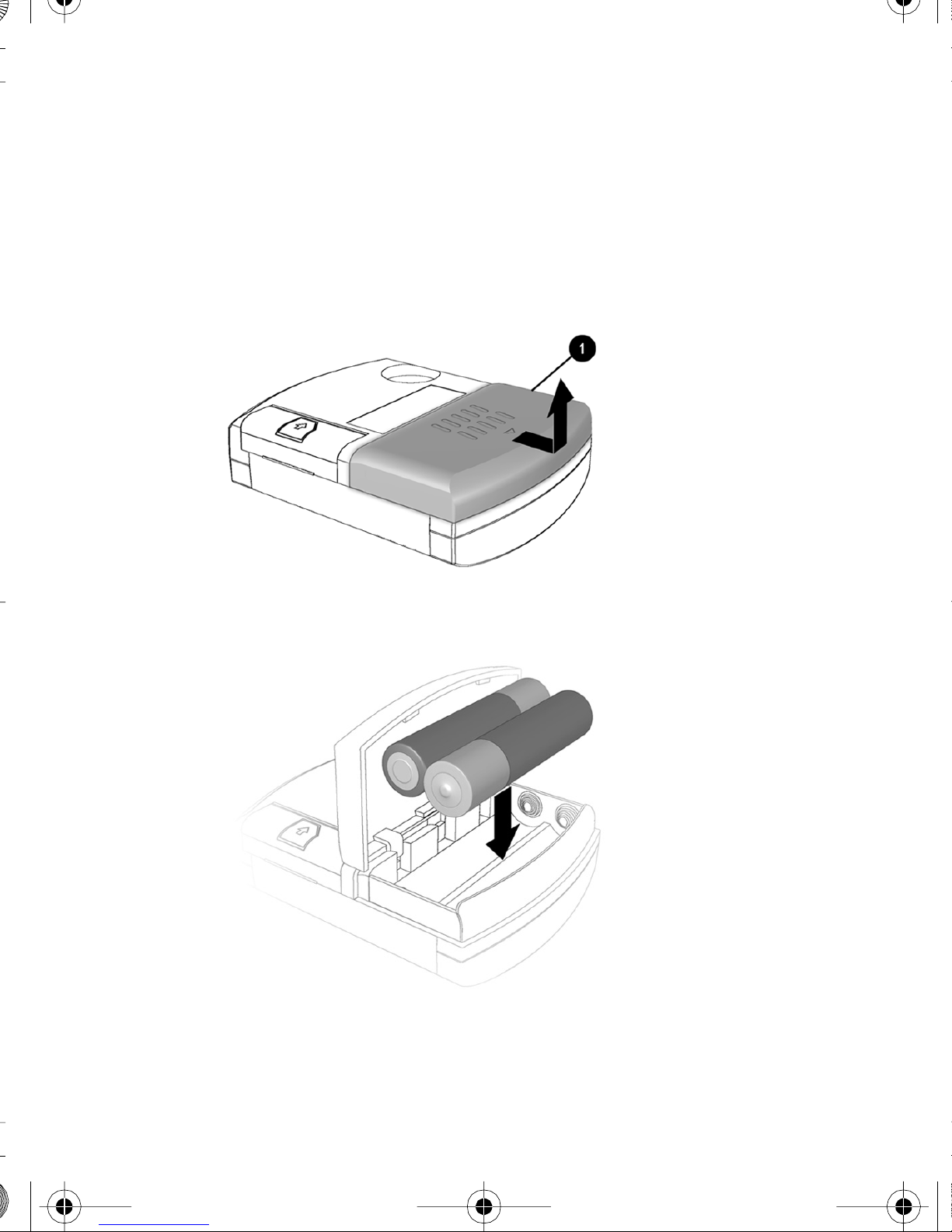
Installing the Batteries
You will soon be listening to your favorite music on your
Player. Just follow these simple steps:
1. Pull out and lift the battery door 1.
2. Place the batteries that came with your Player into the
battery compartment as shown.
MP3 book file.book Page 5 Tuesday, April 3, 2001 10:30 AM
6 COMPAQ IPAQ PA-2
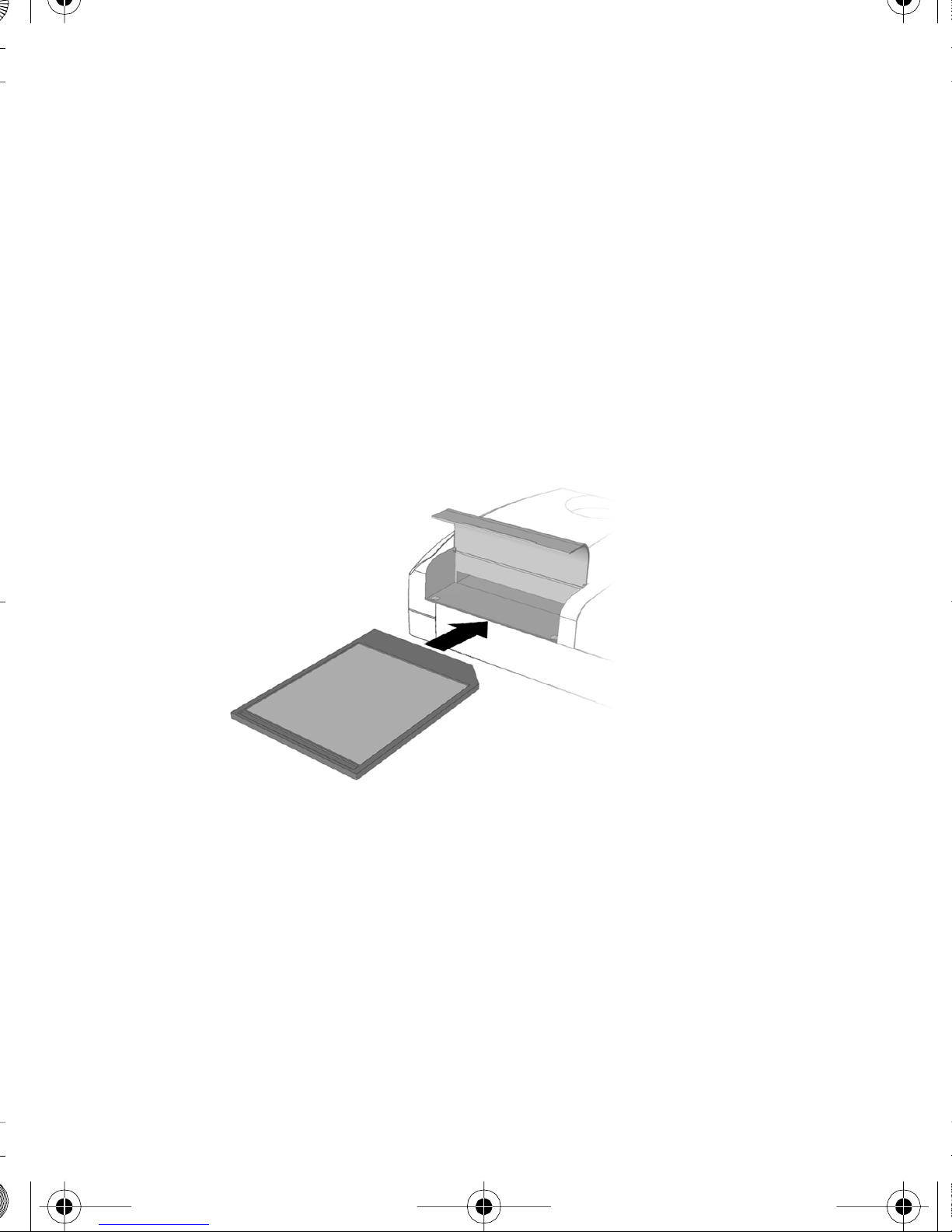
Installing the Memory
Tip: Format your MMC cards before using them for the
first time.
1. Lift the flash memory door located on the left side of
the back of your Player.
2. Insert the flash memory card that came with your
Player into the bottom slot (Slot 1). See the figure
below for orientation.
Tip: The second slot can be used for an additional flash
memory card (purchased separately).
MP3 book file.book Page 6 Tuesday, April 3, 2001 10:30 AM
COMPAQ IPAQ PA-2 7
Connecting the USB Cable
The following steps and associated diagrams show you
how to connect the USB cable and earphones.
1. Connect the USB cable to your computer. The location
of USB ports varies on different computers. See your
computer’s feature guide if you are unable to locate
your computer’s USB port.
2. Press the Power button to turn on the Player.
3. Remove the rubber plug from the USB port on the
Player.
4. Connect the small square USB cable end to your
Player. The USB symbol wdisplays on the LCD.
MP3 book file.book Page 7 Tuesday, April 3, 2001 10:30 AM
8COMPAQ IPAQ PA-2
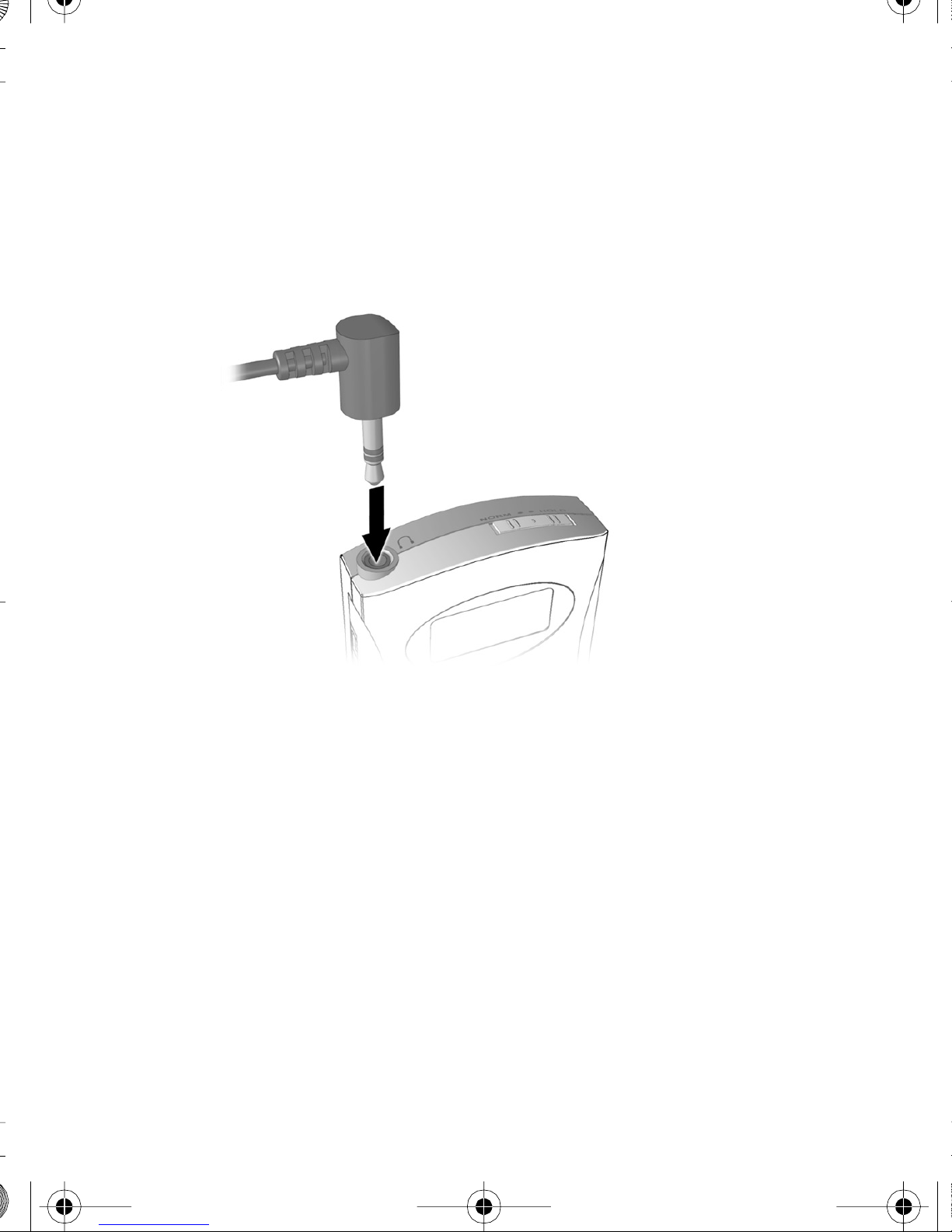
Connecting the Ear Phones
Connect the plug on the end of the earphones to the
earphone jack on top of the Player.
WARNING: Permanent hearing loss may occur if
earphones or headphones are used at high volume.
MP3 book file.book Page 8 Tuesday, April 3, 2001 10:30 AM
Other manuals for iPAQ PA-2
3
Table of contents
Other Compaq MP3 Player manuals