EN - 7
3. Clean and disinfect all parts of the cabinet inside and outside and the power cord with a suitable disinfecting agent, e.g., Microbac Forte or Terralin®.
4. Check the cord, the plug on the back of the device, the power switch, the fuse holder and the indicator light for possible damage.
5. Replace all damaged or worn components.
6. Replace the cabinet air lter on the back of the device.
7. Check the oxygen concentration. If the device is within specications, the extended life intake bacteria lter does not need to be replaced between patients. If the
concentration is not within specications, the provider should refer to the service manual section on Troubleshooting.
RETURN AND DISPOSAL
This device may not be disposed of with household waste. After use of the device, please return the device to the provider for disposal. This device contains electrical and/or
electronic components that must be recycled per EU Directive 2012/19/EU-Waste Electrical and Electronic Equipment (WEEE). Non-infectious used accessories (e.g. nasal
cannula) can be disposed of as residential waste. The disposal of infectious accessories (e.g. nasal cannula from an infected user) must be made via an approved waste
disposal company. Names and addresses can be obtained from the local municipality.
TROUBLESHOOTING
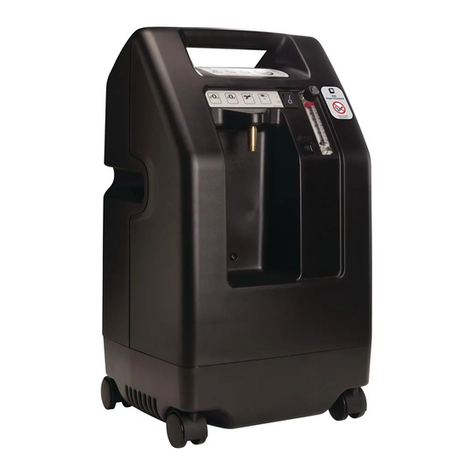
The following troubleshooting chart will help you analyze and correct minor oxygen concentrator malfunctions. If the suggested procedures do not help, switch to your reserve
oxygen system and call your DeVilbiss homecare provider. Do not attempt any other maintenance.
WARNING
To avoid electric shock hazard, do not remove the cabinet. The cabinet should only be removed by a qualied DeVilbiss homecare technician.
Minor Troubleshooting Chart
SYMPTOM POSSIBLE CAUSE REMEDY
A. Unit does not operate. Power light is off when the
power switch is “On.” Audible alert is pulsing and
Service Required light is ashing.
1. Power cord not properly inserted
into wall outlet.
1. Check power cord connection at the wall outlet. On 230 volt units, also
check the mains connection on the back of the unit.
2. No power at wall outlet. 2. Check your home circuit breaker and reset if necessary. Use a different
wall outlet if the situation occurs again.
3. Oxygen concentrator circuit breaker
activated.
3. Press the concentrator circuit breaker reset button located below the
power switch. Use a different wall outlet if the situation occurs again.
If the above remedies do not work, contact your DeVilbiss provider.
B. Unit operates, the Power light is on when the
power switch is “On.” Red Service Required light
is illuminated. Audible alert may be sounding.
1. Air lter is blocked. 1. Check the air lter. If the lter is dirty, wash it following the cleaning
instructions on page 6.
2. Exhaust is blocked. 2. Check the exhaust area; make sure there is nothing restricting the unit
exhaust.
3. Blocked or defective cannula, face
mask, or oxygen tubing.
3. Detach cannula or face mask. If proper ow is restored, clean or replace
if necessary. Disconnect the oxygen tubing at the oxygen outlet. If proper
ow is restored, check oxygen tubing for obstructions or kinks. Replace if
necessary.
4. Blocked or defective humidier
bottle.
4. Detach the humidier from the oxygen outlet. If proper ow is obtained,
clean or replace humidier.
5. Flow meter set too low. 5. Set ow meter to prescribed ow rate.
If the above remedies do not work, contact your DeVilbiss provider.
C. Unit operates, the power light is on when power
switch is “on,” audible low-frequency vibration
sound is detected.
1. Turn your unit “Off.” Switch to your reserve oxygen system, and contact
your DeVilbiss provider immediately.
D Both the green Normal Oxygen and the yellow
Low Oxygen lights are either on or off.
1. OSD malfunction. 1. Contact your DeVilbiss provider.
E. Yellow Low Oxygen light is on or the yellow Low
Oxygen light is on and the intermittent audible
signal is sounding.
1. Flow meter is not properly set. 1. Ensure the ow meter is properly set to the prescribed number.
2. Air lter is blocked. 2. Check the air lter. If the lter is dirty, wash it following the cleaning
instructions on page 6.
3. Exhaust is blocked. 3. Check the exhaust area; make sure there is nothing restricting the unit
exhaust.
If the above remedies do not work, contact your DeVilbiss provider.
F Red Service Required light is on and an
intermittent audible signal is sounding.
1. Flow meter is not properly set. 1. Ensure the ow meter is properly set to the prescribed number.
2. Air lter is blocked. 2. Check the air lter. If the lter is dirty, wash it following the cleaning
instructions on page 6.
3. Exhaust is blocked. 3. Check the exhaust area; make sure there is nothing restricting the unit
exhaust.
If the above remedies do not work, contact your DeVilbiss provider.
G. If any other problems occur with your oxygen
concentrator.
1. Turn your unit “Off.” Switch to your reserve oxygen system, and contact
your DeVilbiss provider immediately.
CN-525K3