6.7.1. The cartridge lter (8) must be completely dry when used to collect dry dust as a wet or damp lter will clog quickly and be very
dicult to clean.
6.7.2. Check the cartridge lter (8) carefully and regularly for tears or small holes. Even a small hole can cause dust to be exhausted.
Never use a cartridge lter with holes or tears as this may cause damage to the motor and invalidate warranty. Replace it
immediately.
6.1. INSTALLING & CLEANING
6.1.1. Slide cartridge lter (8) down over lter cage on the top section (18).
6.1.2. Apply gentle pressure to the cartridge lter until it is fully located over the lter cage. Place the lid over the end of the cartridge lter,
ensuring that the locking device on the lid locates into the hole in the lter cage. Turn the locking device on the lid clockwise until
the lid and lter are locked on to the lter cage.
6.1.3. To remove cartridge lter for cleaning, turn the locking device on the lid anti-clockwise to unlock the lter. Remove the lid, hold the
base of the lter and gently pull it o the cage.
6.1.4. Clean the lter by tapping it on the inside of a waste bin.
7. DRY VACUUM CLEANING
WARNING! Ensure you read, understand and apply Sections 1 and 2 ‘Safety Instructions’.
Reminder: DO NOT vacuum hazardous substances. Use of an incorrect cartridge lter will invalidate your warranty.
7.1. Ensure the machine is unplugged from the power supply.
7.2. Fit the cartridge lter and lid (8) over the basket and lock in place. Attach a dust collection bag over the hose attachment on the
inside of the main drum (19) if desired.
7.3. Re-position the top section (18) onto the main drum (19), and clip in place.
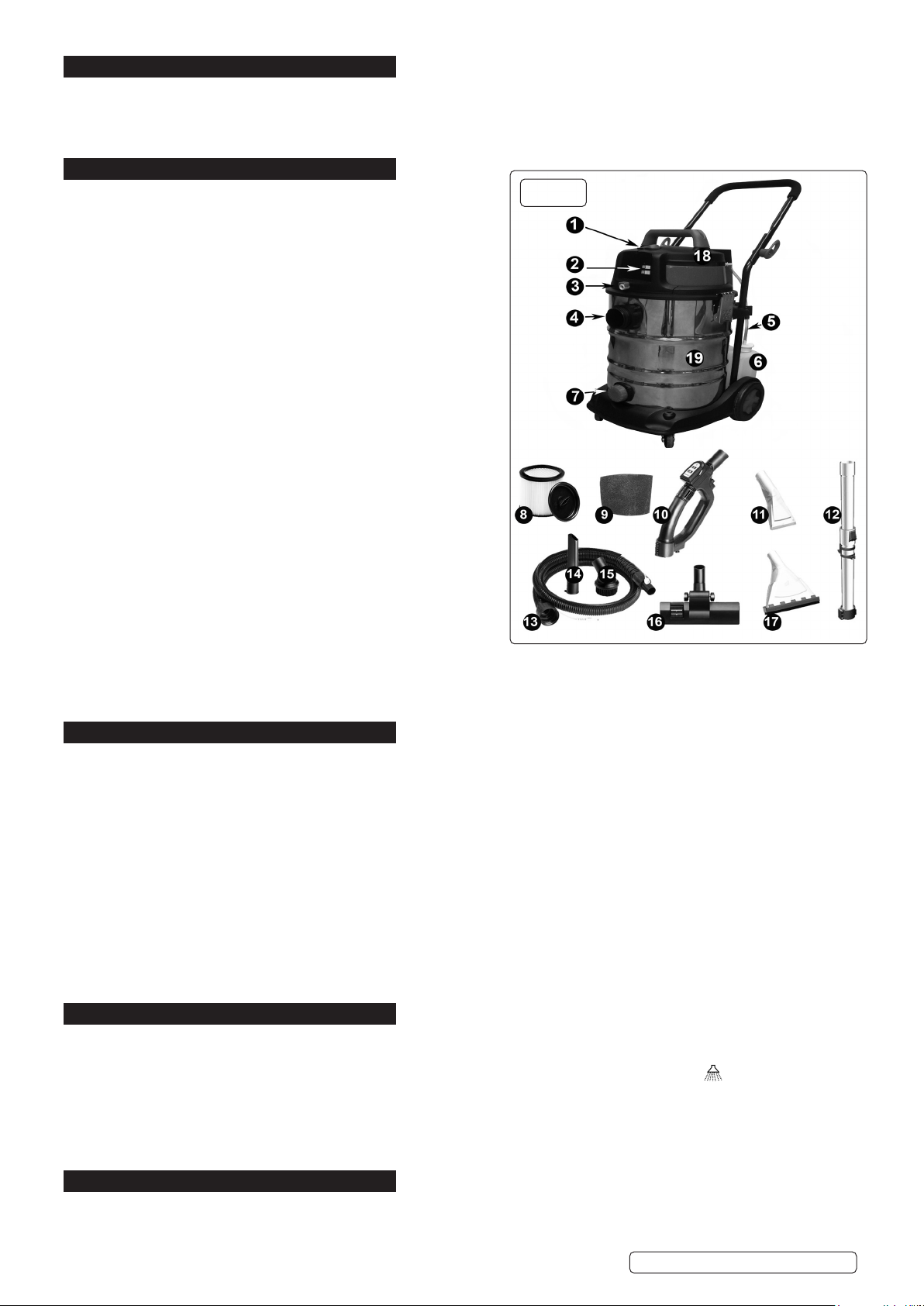
7.4. Insert the larger end of the suction hose (13) into the suction hose inlet (4) on the main drum (19) and screw in place.
7.5. Twist and lock the nozzle (10) onto the free end of the exible hose (13).
7.6. Push the required attachment onto the free end of the nozzle (10).
7.7. Plug into the power supply and set the main switch (1) to the ‘I’ position.
7.8. Switch the motor to vacuum only mode, indicated by the following symbol, using either the button (2) on the top section of the
cleaner or the button on the nozzle (10).
7.9. When you have completed vacuuming, switch o the cleaner by pressing either the vacuum button on the nozzle (10) or the button
on the top section of the cleaner (2).
7.10. Set the main switch (1) to the ‘O’ position and unplug machine from the power supply.
8. WET VACUUM CLEANING
WARNING! Ensure you read, understand and apply Sections 1 and 2 ‘Safety Instructions’. Reminder: Remove plug from
power supply before opening unit. DO NOT vacuum solvents, explosives, inammable and/or hazardous liquids such as petrol, oil,
spirits, paint, thinners, acids etc. Use of an incorrect lter will invalidate your warranty.
8.1. Ensure the machine is unplugged from the power supply. Make sure the main drum (19) is clean and free from dust and dirt.
8.2. For wet vacuum cleaning the foam lter (9) must be used.
8.3. When using the foam lter (9) rst remove any cartridge lter (8) tted. Ensure the foam lter (9) is clean and dry. Place the foam
lter (9) over the lter cage and adjust carefully.
8.4. Fit the required accessories or tubes to the suction hose (13).
8.5. Ensure the main switch (1) is ‘O’ (position ‘O’) before plugging into the power supply.
8.6. Set the main switch (1) to the ‘I’. Press the vacuum selection mode button, indicated by the following symbol, on either the
nozzle (10) or the top section (2) and operate the machine.
8.7. When you have completed vacuuming, switch o the machine using either of the vacuum mode buttons. Set the main switch (1) to
‘O’, and unplug from power supply.
8.8. After use, empty the main drum (19) and dry.
WARNING! The main drum (19) is not designed for liquid storage. Always empty liquids after use. Never store the cleaner with
liquid in the main drum (19).
8.9. To vacuum large quantities of liquid, from a sink or tank etc.,do not immerse the nozzle completely in the liquid; leave a gap at the
top of the nozzle opening to allow an air inow. The machine is tted with a oat valve which blocks the suction action when the
tank has reached its maximum capacity. The user will notice an increase in motor noise. When this happens, turn o the
machine, disconnect from power supply, remove cap from the drainage outlet (7) on the main drum and empty the liquid into a suitable
receptacle or drain. To continue vacuuming, ret the drainage outlet cap (7) and proceed. After wet vacuuming, turn the machine o
and remove plug from power supply. Empty the main drum (19) from the drainage outlet (7) and clean/dry the inside and outside
before storage.
9. CARPET/UPHOLSTERY CLEANING
9.1. SET-UP
9.1.1. Water, mixed with a suitable carpet detergent solution, is pumped deep into the bres of the carpet via the detergent application
nozzle. The dirty liquid is then sucked back into the main drum (19) along with the dirt and grime dislodged by the cleaning solution.
Water can be pumped up to 2 metres above the machine so that stairs may also be cleaned.
9.1.2. WARNING! Ensure you read, understand and apply Sections 1 ‘Safety Instructions’.
9.1.3. Reminder: DO NOT vacuum hazardous substances.
9.1.4. Ensure the machine is unplugged from the power supply.
9.1.5. Fit the foam lter (9).
9.1.6. Reposition the top section (18) onto the main drum (19) and clip in place.
9.1.7. Ensure that the detergent solution has been mixed with the recommended proportion of water and pour it into the detergent tank (6).
9.1.8. Plug the connector on the end of the detergent tank connecting hose (5) into the detergent inlet coupling on the rear of the top
section (18).
9.1.9. Ensure that the transparent detergent delivery tube is tted around the suction hose (13).Screw the large threaded connector on the
end of the suction hose (13) to the suction hose inlet (4).
9.1.10. Push the connector on the end of the detergent delivery tube into the detergent pipe coupling (3) on the front of the top section (18).
Original Language Version
© Jack Sealey Limited VMA915 Issue 6 (1) 23/06/20