manuals.online logo
Brands
  1. Home
  2. •
  3. Brands
  4. •
  5. Durite
  6. •
  7. Test Equipment
  8. •
  9. Durite 0-524-74 Manual

Durite 0-524-74 Manual

Popular Test Equipment manuals by other brands

Ambit P.F. Series instruction manual

Ambit

Ambit P.F. Series instruction manual

Megger BMM500 Series user guide

Megger

Megger BMM500 Series user guide

RJG Lynx Sensor Tester operating instructions

RJG

RJG Lynx Sensor Tester operating instructions

Mark-10 TT02 Series user guide

Mark-10

Mark-10 TT02 Series user guide

Martel 3001 Operator's manual

Martel

Martel 3001 Operator's manual

ElproSys DiagProg4 instruction manual

ElproSys

ElproSys DiagProg4 instruction manual

Redtech TRAILERteck T05 user manual

Redtech

Redtech TRAILERteck T05 user manual

Venmar AVS Constructo 1.0 HRV user guide

Venmar

Venmar AVS Constructo 1.0 HRV user guide

Test Instrument Solutions SafetyPAT operating manual

Test Instrument Solutions

Test Instrument Solutions SafetyPAT operating manual

Hanna Instruments HI 38078 instruction manual

Hanna Instruments

Hanna Instruments HI 38078 instruction manual

Kistler 5495C Series instruction manual

Kistler

Kistler 5495C Series instruction manual

Waygate Technologies DM5E Basic quick start guide

Waygate Technologies

Waygate Technologies DM5E Basic quick start guide

StoneL DeviceNet CK464002A manual

StoneL

StoneL DeviceNet CK464002A manual

Seica RAPID 220 Site preparation guide

Seica

Seica RAPID 220 Site preparation guide

Kingfisher KI7400 Series Training manual

Kingfisher

Kingfisher KI7400 Series Training manual

Kurth Electronic CCTS-03 operating manual

Kurth Electronic

Kurth Electronic CCTS-03 operating manual

SMART KANAAD SBT XTREME 3G Series user manual

SMART

SMART KANAAD SBT XTREME 3G Series user manual

Agilent Technologies BERT Serial Getting started

Agilent Technologies

Agilent Technologies BERT Serial Getting started

manuals.online logo
manuals.online logoBrands
  • About & Mission
  • Contact us
  • Privacy Policy
  • Terms and Conditions

Copyright 2025 Manuals.Online. All Rights Reserved.

Electronic BatteryTester 12/24V with Start / Charge Analyser
Part 0-524-74
0-524-74-LEAF
www.durite.co.uk
WARNINGS
This battery tester is designed to test 12 and 24 volt automotive lead acid batteries includ-
ing maintenance free and sealed for life batteries, it can also help analyse 12 and 24 volt
starter and charging systems. These instructions must be followed for its safe and efcient
use:
• Battery acid is corrosive, any contact with the skin should be immediately rinsed with
copious amounts of water. If in contact with the eyes rinse immediately and seek medical
assistance.
• Batteries can produce explosive gases so always work in a well ventilated area. Do not
work near naked ames, lit cigarettes etc., and avoid any action which may cause sparking.
• If the battery to be tested has a damaged or cracked case do not use the tester; replace
the battery.
• Protect the tester from dampness and never use in a damp or wet environment.
• Only use this product to test lead/acid automotive batteries of the appropriate voltage.
Do not test batteries connected in parallel.
• Make sure the clamps are connected to clean battery posts to ensure a solid connection
and accuracy while analysing the battery.
0-524-74-LEAF
www.durite.co.uk
PRODUCT OPERATION
Introduction of button and clamp
<UP ARROW><DOWN ARROW>: increase, decrease,
scroll up/down the page
<ESC>:cancel, undo, return
<ENTER>: select, enter, test
Red clamp to positive connection and Black clamp to nega-
tive connection.
Before testing, set the voltage according to the type of bat-
tery voltage. Select 12V mode for a 12V battery. Select 24V
mode for a 24V battery.Then choose one of the following
testing procedures: Battery capacity test, Start-up
load test, Maximum load system test, Charging system test.
0-524-74-LEAF
www.durite.co.uk
Battery Capacity Test:
Connect the red clamp to the positive polar , and the black to
the negative. Make sure all connections are well contacted in
order to avoid a false result.
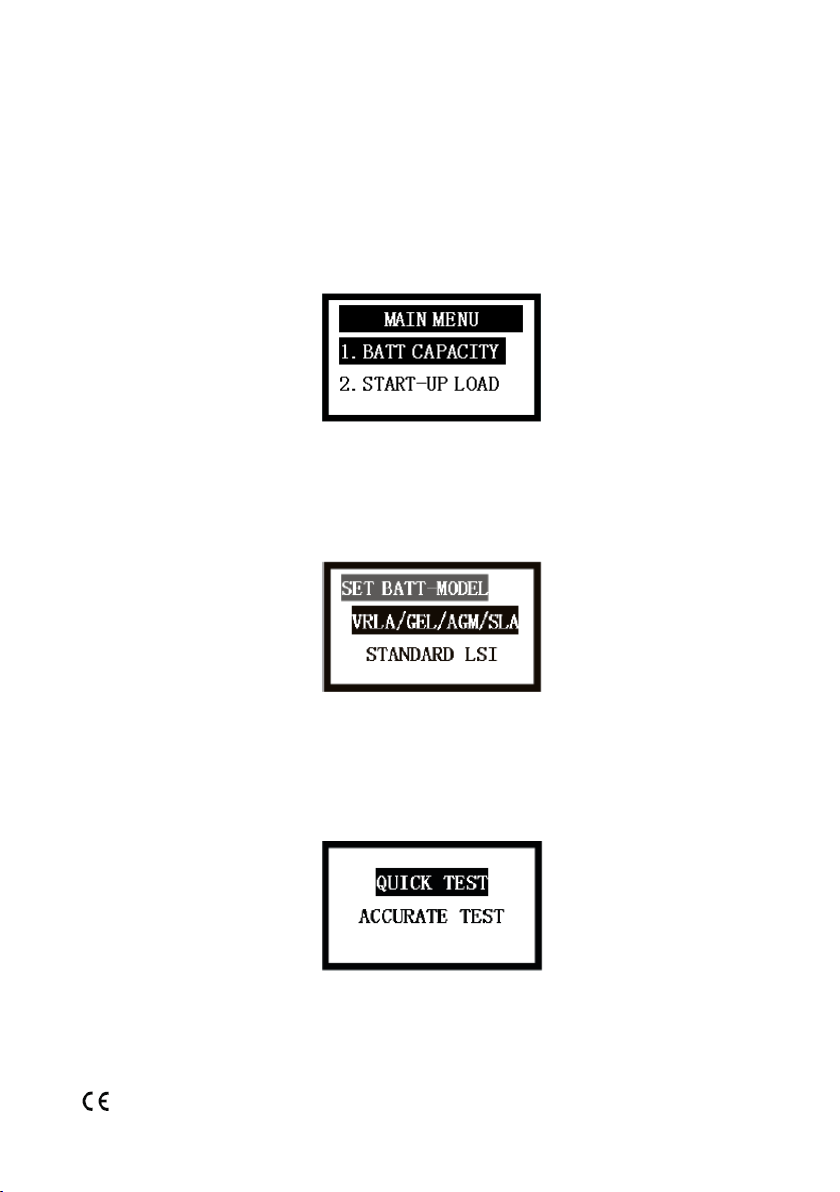
Press <UP ARROW> <DOWN ARROW> button to select test
function, and then press <ENTER>
Press<UP ARROW> <DOWN ARROW> button to select he
type of battery.Then press <ENTER>
Press <UP ARROW> <DOWN ARROW> button to select quick
test or accurate test.
Enter the battery capacity, Press <UP ARROW> <DOWN AR-
ROW> to adjust value.
0-524-74-LEAF
www.durite.co.uk
Press <ENTER> to start the test. When testing is complete
the result will be displayed on the LCD. Press <ESC> to re-
turn to select test function of the battery.
AccurateTest:
Connect the red clamp to the positive terminal and the black
clamp to the negative. Press <UP><DOWN> button to select
test function, and then press <ENTER> See the below pic-
ture:
Press<UP><DOWN>button to select the type of the battery.
Press <ENTER> See the below picture:
According to the label of the battery, press <UP> <DOWN>
button to select quick test or accurate test.The below picture
is the selection of accurate test, press <UP> <DOWN> fur-
ther. See the picture:
Press<UP><DOWN>button to select test standard accord-
ing to the standard of storage battery. If it is JIS standard,
need to check CCA with the comparison table.Then select
CCA(SAE) as the test standard to press <ENTER> further. See
the picture:
According to the label on the battery, press <UP> <DOWN>
button to adjust the CCA rated value. See the picture:
Press <ENTER> to start the test.
When the test is completed, the test results will be displayed
in the LCD screen.
Press <ESC> to return to select other test functions.
0-524-74-LEAFwww.durite.co.uk
Voltage of the battery: 12.85V
Fully charged 100% 12.78V
75% 12.54V
50% 12.30V
25% 12.12V
Totally discharged 11.94V CCA value 588CCA
Check the condition of battery
When selecting 24V test, CCA equals half of the sum of two
groups 12V batteries in series. Internal insulation 4.75mΩ
The higher the CCA value , the lower the internal resistance
normally.
Remark: Different material of the battery produced by var-
ious manufacturers can cause different internal resistance.
So there is no xed standard. But there is little difference
among the internal insulation of the battery with the same
model from the same manufacturer.
When selecting 24V test, internal resistance equals the sum
of two groups 12V batteries in series.
Life: Display the condition of the battery.
Suggest replacing the battery when it shows below 45%.
Instruction of test result:
0-524-74-LEAF
www.durite.co.uk
0-524-74-LEAF
www.durite.co.uk
Suggest replacing
The result indicates the battery is bad and has 32% life. It is
suggested to replace the battery.
Life check OK, and voltage check low.
The result indicates the battery is good and full of 100% of
life. But only 12.11V left. So suggest charging.
Life check OK, and voltage check over low
The result indicates the battery is OK and remains 73% of
life. But only 11.88V left and over low voltage, which can
affect the result. At this time it is better to charge the battery
and retest.
0-524-74-LEAF
www.durite.co.uk
Start up load test
Please swich off the engine before testing. Connect the red
clamp to the positive polar , and the black to the negative.
Make sure all connections are well contacted in order to
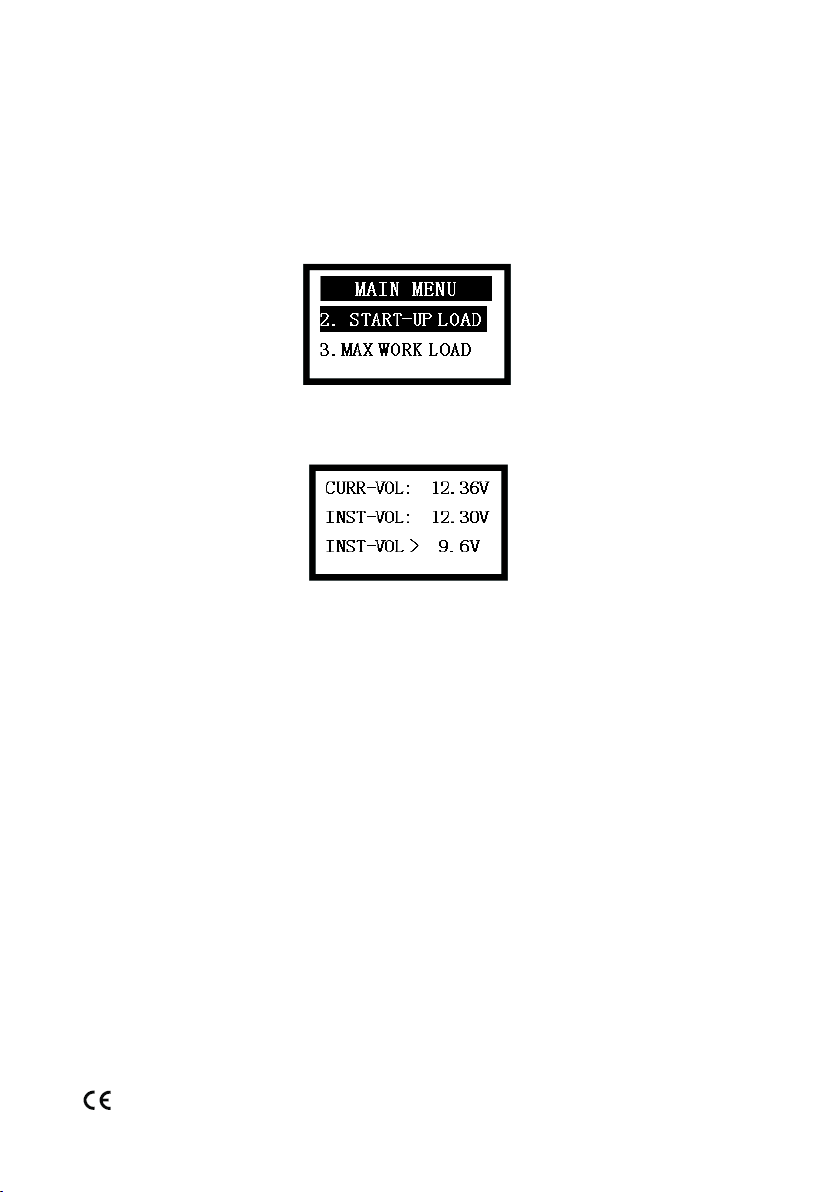
avoid a false result. Press <UP ARROW> <DOWN ARROW>to
select start up load test as the picture below:
After selecting the test item, press <ENTER> to display the
start up load test screen as the picture below:
As can be seen in the picture current test voltage is 12.36V,
standard voltage is 9.6V,(for 24V system, standard voltage is
16V), the lowest voltage is 12.30V.
Start the engine to make the tester automatically record the
lowest voltage in this process. Normally the voltage of bat-
tery will be higher than 9.6V in this process.(for 24V systems,
the voltage should be higher than 16V when starting up the
engine)
Press <ESC> to return.
Instruction of engine start up test
-The lowest voltage higher than 9.6V (for 24V system, the
reading is over 16V) this is good.
-The lowest voltage lower than 9.6V (for 24V system, the
reading is under 16V) means the system must be checked.
Please check the relative connections, wires and engine. Also
the terminals of the battery should be checked to see if oxi-
dised.
0-524-74-LEAF
www.durite.co.uk
Maximum load system test
Firstly, start the engine. Connect the red clamp to the posi-
tive polar, and the black to the negative. Make sure all con-
nections are well contacted in order to avoid a false result.
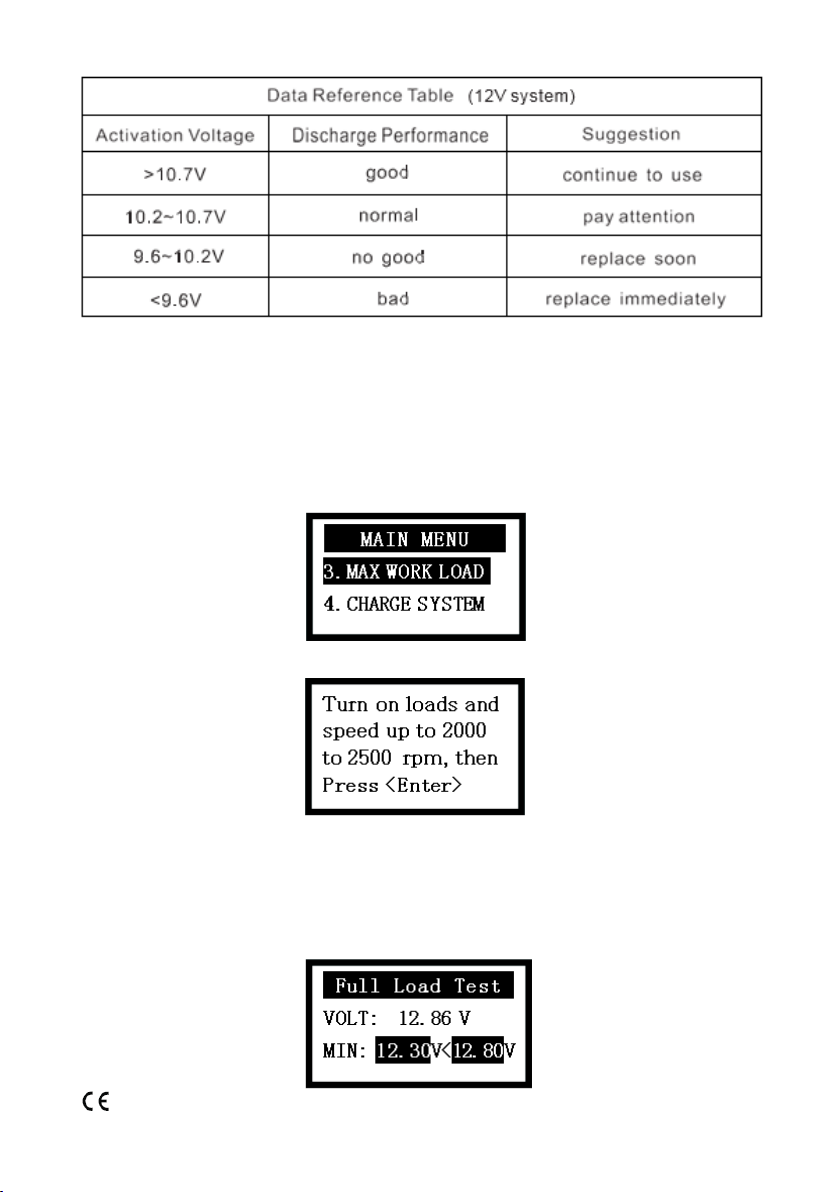
Press <UP ARROW> <DOWN ARROW> to select maximum
load system test as the picture below:
After selecting to get access to the below screen:
After operating, press <ENTER> to display the maximum
load system test screen as the picture below: As can be seen
in the picture current test voltage is 12.86V, standard voltage
is 12.80V,(for 24V system standard voltage is 25.60V), the
lowest voltage is 12.30V
0-524-74-LEAF
www.durite.co.uk
Read the lowest value. If it is higher than 12.80V,(for 24V
system, the voltage is over 25.60V), the system is running
normally. Press <ESC> to return.There are some problems in
the system if the value is lower than 12.80V,(for 24V system,
the voltage is under 25.60V), please check if the engine belt
is damaged and the suporting wires for a short circuit.
Charging system test
Please turn off the engine before testing. Connect the red
clamp to the positive polar , and the black to the negative.
Make sure all connections are well contacted in order to
avoid a false result. Press <UP ARROW> <DOWN ARROW>to
select charging system test as the picture below:
After getting access to the below screen please start engine:
After operating, press <ENTER> to display the maximum
load system test screen as the picture below.The current test
voltage is 13.88V, standard maximum voltage is 15.00V(for
24V system, standard maximum voltage is 30.00V), tested
maximum voltage is 14.10V. The other value indicates the
current test voltage is 13.88V, standard minimum voltage
is 13.30V(for 24V system, standard minimum voltage is
26.60V), tested minimum voltage is 13.58V.