
manuals.online logo
Brands
  1. Home
  2. •
  3. Brands
  4. •
  5. Eastron
  6. •
  7. Measuring Instrument
  8. •
  9. Eastron SDM630-Mbus V2 User manual

Eastron SDM630-Mbus V2 User manual

Other manuals for SDM630-Mbus V2

1

Other Eastron Measuring Instrument manuals
Eastron SDM120-CT-MV User manual

Eastron

Eastron SDM120-CT-MV User manual

Eastron SDM230A User manual

Eastron

Eastron SDM230A User manual
Eastron SDM630MCT-MOD-MID User manual

Eastron

Eastron SDM630MCT-MOD-MID User manual
Eastron SDM230-Modbus User manual

Eastron

Eastron SDM230-Modbus User manual

Eastron SDM630M CT User manual

Eastron

Eastron SDM630M CT User manual

Eastron SDM120C User manual

Eastron

Eastron SDM120C User manual

Eastron SDM630-Modbus V2 User manual

Eastron

Eastron SDM630-Modbus V2 User manual

Eastron SDM230-Modbus User manual

Eastron

Eastron SDM230-Modbus User manual

Eastron SDM630MCT-2L User manual

Eastron

Eastron SDM630MCT-2L User manual

Eastron SDM120 Modbus User manual

Eastron

Eastron SDM120 Modbus User manual

Eastron SDM72DM User manual

Eastron

Eastron SDM72DM User manual
Eastron SDM630MCT-MBUS V2 User manual

Eastron

Eastron SDM630MCT-MBUS V2 User manual

Eastron SDM630MV-2L User manual

Eastron

Eastron SDM630MV-2L User manual

Eastron SDM630MCT Series User manual

Eastron

Eastron SDM630MCT Series User manual
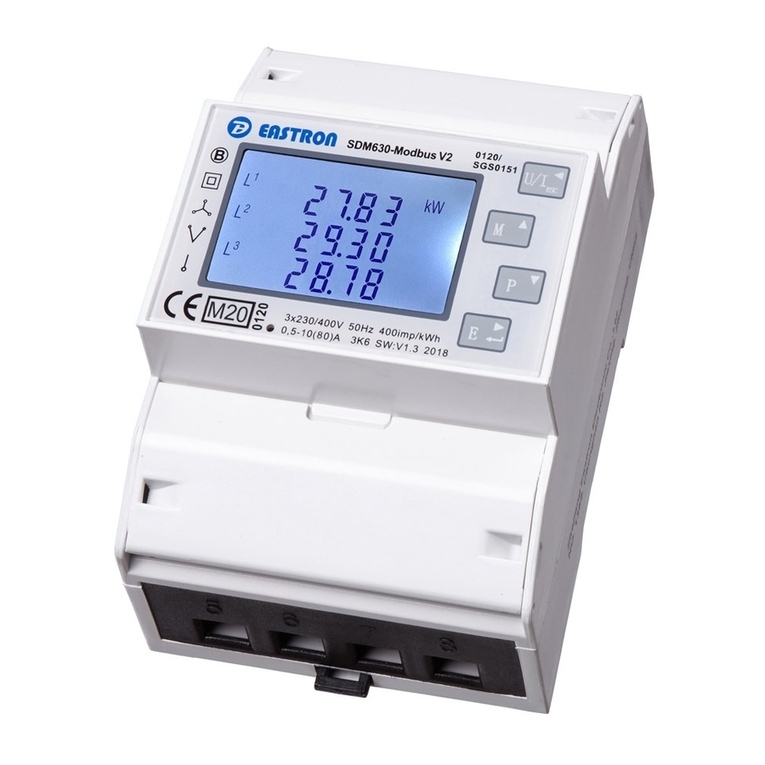
Eastron SDM630-Modbus V2 User manual

Eastron

Eastron SDM630-Modbus V2 User manual

Eastron SDM630MCT-RJV-333mV User manual

Eastron

Eastron SDM630MCT-RJV-333mV User manual

Eastron SDM72CT-M User manual

Eastron

Eastron SDM72CT-M User manual

Eastron SDM72DM User manual

Eastron

Eastron SDM72DM User manual

Eastron SDM120 Series User manual

Eastron

Eastron SDM120 Series User manual

Eastron SDM630Pulse User manual

Eastron

Eastron SDM630Pulse User manual

Eastron SDM72D User manual

Eastron

Eastron SDM72D User manual

Eastron SDM630MCT-LoRaWAN User manual

Eastron

Eastron SDM630MCT-LoRaWAN User manual

Eastron SDM630M CT User manual

Eastron

Eastron SDM630M CT User manual

Eastron SDM220-MBUS User manual

Eastron

Eastron SDM220-MBUS User manual

Popular Measuring Instrument manuals by other brands

Powerfix Profi 278296 Operation and safety notes

Powerfix Profi

Powerfix Profi 278296 Operation and safety notes

Test Equipment Depot GVT-427B user manual

Test Equipment Depot

Test Equipment Depot GVT-427B user manual

Fieldpiece ACH Operator's manual

Fieldpiece

Fieldpiece ACH Operator's manual

FLYSURFER VIRON3 user manual

FLYSURFER

FLYSURFER VIRON3 user manual

GMW TG uni 1 operating manual

GMW

GMW TG uni 1 operating manual

Downeaster Wind & Weather Medallion Series instruction manual

Downeaster

Downeaster Wind & Weather Medallion Series instruction manual

Hanna Instruments HI96725C instruction manual

Hanna Instruments

Hanna Instruments HI96725C instruction manual

Nokeval KMR260 quick guide

Nokeval

Nokeval KMR260 quick guide

HOKUYO AUTOMATIC UBG-05LN instruction manual

HOKUYO AUTOMATIC

HOKUYO AUTOMATIC UBG-05LN instruction manual

Fluke 96000 Series Operator's manual

Fluke

Fluke 96000 Series Operator's manual

Test Products International SP565 user manual

Test Products International

Test Products International SP565 user manual

General Sleep Zmachine Insight+ DT-200 Service manual

General Sleep

General Sleep Zmachine Insight+ DT-200 Service manual

Sensa Core Lacto Spark user manual

Sensa Core

Sensa Core Lacto Spark user manual

VOLTCRAFT UTS-1980 operating instructions

VOLTCRAFT

VOLTCRAFT UTS-1980 operating instructions

EBCHQ 94915 Operation manual

EBCHQ

EBCHQ 94915 Operation manual

Balluff BIP LD2-T017-01-EP-S4 Series user guide

Balluff

Balluff BIP LD2-T017-01-EP-S4 Series user guide

Pulsar IMP Lite Series instruction manual

Pulsar

Pulsar IMP Lite Series instruction manual

ETCR 6800 user manual

ETCR

ETCR 6800 user manual

manuals.online logo
manuals.online logoBrands
  • About & Mission
  • Contact us
  • Privacy Policy
  • Terms and Conditions

Copyright 2025 Manuals.Online. All Rights Reserved.

EASTRON SDM630-Mbus V2 User Manual
Address: No.1369 Chengnan Road, Jiaxing, Zhejiang, 314001, China.
Tel: 0086-573-83698881/83698882 Fax: 0086-573-83698883 Web: www.eastron.com.cn
SDM630-Mbus V2
DIN Rail Smart Meter for Single and Three Phase Electrical Systems
Measures kWh Kvarh, KW, Kvar, KVA, P,
F, PF, Hz, dmd, V, A, etc.
Bi-directional measurement IMP & EXP
Two pulse outputs
Mbus
Din rail mounting 35mm
100A direct connection
Better than Class 1 / B accuracy
USER MANUAL
2016 V1.2
EASTRON SDM630-Mbus V2 User Manual
Address: No.1369 Chengnan Road, Jiaxing, Zhejiang, 314001, China.
Tel: 0086-573-83698881/83698882 Fax: 0086-573-83698883 Web: www.eastron.com.cn
- 1 -
Introduction
The SDM630-Mbus V2 measures and displays the characteristics of single phase two wires (1p2w),
three phase three wires (3p3w,) and three phase four wires(3p4w) supplies, including voltage,
frequency, current, power ,active and reactive energy, imported or exported. Energy is measured
in terms of kWh, kVArh. Maximum demand current can be measured over preset periods of up to
60 minutes. In order to measure energy, the unit requires voltage and current inputs in addition
to the supply required to power the product.
SDM630-Mbus V2 supports max. 100A direct connection, saves the cost and avoid the trouble to
connect external CTs, giving the unit a cost-effective and easy operation. Built-in interfaces
provides pulse and Mbus outputs. Configuration is password protected.
Unit Characteristics
The Unit can measure and display:
Line voltage and THD% (total harmonic distortion) of all phases
Line Frequency
Currents, Current demands and current THD% of all phases
Power, maximum power demand and power factor
Active energy imported and exported
Reactive energy imported and exported
The unit has password-protected set-up screens for:
Changing password
Supply system selection 1p2w, 3p3w,3p4w
Demand Interval Time(DIT)
Reset for demand measurements
Pulse output duration
Two pulse output indicates real-time energy measurement. An RS485 output allows remote
monitoring from another display or a computer.
Mbus
This uses an MBus port with EN13753-3 protocol to provide a means of remotely monitoring and
controlling the Unit.
Set-up screens are provided for setting up the MBus port.
Pulse output
This provides two pulse outputs that clock up measured active and reactive energy. The constant
of pulse output 2 for active energy is 400imp/kWh (unconfigurable), its width is fixed at 100ms.
The default constant of configurable pulse output 1 is 400imp/kWh, default pulse width is
100ms.The configurable pulse output 1 can be set from the set-up menu.
EASTRON SDM630-Mbus V2 User Manual
Address: No.1369 Chengnan Road, Jiaxing, Zhejiang, 314001, China.
Tel: 0086-573-83698881/83698882 Fax: 0086-573-83698883 Web: www.eastron.com.cn
- 2 -
Start-up Screens
1
The first screen lights up all display
segments and can be used as a display
check
2
The second screen indicates the
firmware installed in the unit and its
build number.
3
The interface performs a self-test and
indicates the result if the test passes.
After a short delay, the screen will display active energy measurements.
Measurements
The buttons operate as follows:
1
Selects the Voltage and Current display screens
In Set-up Mode, this is the “Left” or “Back” button.
2
Select the Frequency and Power factor display
screens
In Set-up Mode, this is the “Up” button
3
Select the Power display screens
In Set-up Mode, this is the “Down” button
4
Select the Energy display screens
In Set-up mode, this is the “Enter” or “Right” button
Voltage and Current
Each successive pressing of the button selects a new range:
EASTRON SDM630-Mbus V2 User Manual
Address: No.1369 Chengnan Road, Jiaxing, Zhejiang, 314001, China.
Tel: 0086-573-83698881/83698882 Fax: 0086-573-83698883 Web: www.eastron.com.cn
- 3 -
1-1
Phase to neutral voltages(3p4w)
1-2
Phase to neutral voltages(3p3w)
2
Current on each phase
3-1
Phase to neutral voltage THD%(3p4w)
3-2
Phase to neutral voltage THD%(3p3w)
4
Current THD% for each phase
EASTRON SDM630-Mbus V2 User Manual
Address: No.1369 Chengnan Road, Jiaxing, Zhejiang, 314001, China.
Tel: 0086-573-83698881/83698882 Fax: 0086-573-83698883 Web: www.eastron.com.cn
- 4 -
Frequency and Power factor and Demand
Each successive pressing of the button selects a new range:
1
Frequency and Power Factor (total)
2
Power Factor of each phase
3
Maximum Power Demand
4
Maximum Current Demand
Power
Each successive pressing of the button select a new range:
1
Instantaneous Active Power in kW
EASTRON SDM630-Mbus V2 User Manual
Address: No.1369 Chengnan Road, Jiaxing, Zhejiang, 314001, China.
Tel: 0086-573-83698881/83698882 Fax: 0086-573-83698883 Web: www.eastron.com.cn
- 5 -
2
Instantaneous Reactive Power in kVAr
3
Instantaneous Volt-amps in KVA
4
Total kW, kVArh, kVA
Energy Measurements
Each successive pressing of the button selects a new range:
1-1
Imported active energy in kWh
1-2
Exported active energy in kWh
EASTRON SDM630-Mbus V2 User Manual
Address: No.1369 Chengnan Road, Jiaxing, Zhejiang, 314001, China.
Tel: 0086-573-83698881/83698882 Fax: 0086-573-83698883 Web: www.eastron.com.cn
- 6 -
2-1
Imported reactive energy in kVArh
2-2
Exported reactive energy in kVArh
3-1
Total active energy in kWh
3-2
Total reactive energy in kVArh
Set-up
To enter set-up mode, pressing the button for 3 seconds, until the password screen
appears.
Setting up is password-protected so you must enter the correct password (default ‘1000’) before
processing. If an incorrect password is entered, the display will show: Err
EASTRON SDM630-Mbus V2 User Manual
Address: No.1369 Chengnan Road, Jiaxing, Zhejiang, 314001, China.
Tel: 0086-573-83698881/83698882 Fax: 0086-573-83698883 Web: www.eastron.com.cn
- 7 -
To exit setting-up mode, press repeatedly until the measurement screen is restored.
Set-up Entry Methods
Some menu items, such as password, require a four-digit number entry while others, such as
supply system, require selection from a number of menu options.
Menu Option Selection
1) Use the and buttons to select the required item from the menu. Selection
does not roll over between bottom and top of list
2) Press to confirm your selection
3) If an item flashes, then it can be adjusted by the and buttons. If not, there
maybe a further layer.
4) Having selected an option from the current layer, press to confirm your selection.
The SET indicator will appear.
5) Having completed a parameter setting, press to return to a higher menu level. The
SET indicator will be removed and you will be able to use the and buttons for
further menu selection.
6) On completion of all set-up, press repeatedly until the measurement screen is
restored.
Number Entry Procedure
When setting up the unit, some screens require the entering of a number. In particular, on entry
to the setting up section, a password must be entered. Digits are set individually, from left to
right. The procedure is as follows:
1) The current digit to be set flashes and is set using the and buttons
2) Press to confirm each digit setting. The SET indicator appears after the last digit has
been set.
EASTRON SDM630-Mbus V2 User Manual
Address: No.1369 Chengnan Road, Jiaxing, Zhejiang, 314001, China.
Tel: 0086-573-83698881/83698882 Fax: 0086-573-83698883 Web: www.eastron.com.cn
- 8 -
3) After setting the last digit, press to exit the number setting routine. The SET indicator
will be removed.
Change password
1
Use the and to
choose the change password option
2-1
Press the to enter the change
password routine. The new password
screen will appear with the first digit
flashing
2-2
Use and to set the
first digit and press to confirm
your selection. The next digit will flash.
2-3
Repeat the procedure for the remaining
three digits
2-4
After setting the last digit, SET will show.
EASTRON SDM630-Mbus V2 User Manual
Address: No.1369 Chengnan Road, Jiaxing, Zhejiang, 314001, China.
Tel: 0086-573-83698881/83698882 Fax: 0086-573-83698883 Web: www.eastron.com.cn
- 9 -
Press to exit the number setting routine and return to the Set-up menu. SET will be
removed
DIT Demand Integration Time
This sets the period in minutes over which the current and power readings are integrated for
maximum demand measurement. The options are: 0, 5, 8, 10, 15, 20, 30, 60 minutes
1
From the set-up menu, use and
buttons to select the DIT
option. The screen will show the
currently selected integration time.
2-1
Press to enter the selection
routine.
The current time interval will flash
2-2
Use and buttons to
select the time required.
2-3
Press to confirm the selection.
SET indicator will appear.
Press to exit the DIT selection routine and return to the menu.

